Website Content Checklist: What to Prepare Before Your Web Designer Starts
A new website can be designed and built in a few weeks. Without the copy, photos and pricing, though, the project stalls, no matter how fast your developer is. Website content is the part nobody else can do for you: what exactly you offer, to whom, at what price and why a customer should trust you. This guide shows how to prepare content for a website step by step, from the goal of the site to copy and photos, legal pages, cookies and redirects from your old URLs. A timeline shows when your designer needs each piece, and there’s a checklist at the end.
01Why content matters more than the template
A designer lays out a page for specific content: a headline of a certain length, three services rather than seven, a landscape photo. If the copy doesn’t exist yet, the design gets drawn around placeholder text and has to be reworked once the real content arrives. That’s why a good agency asks for content, or at least an outline of it, at the start of the project, not a week before launch.
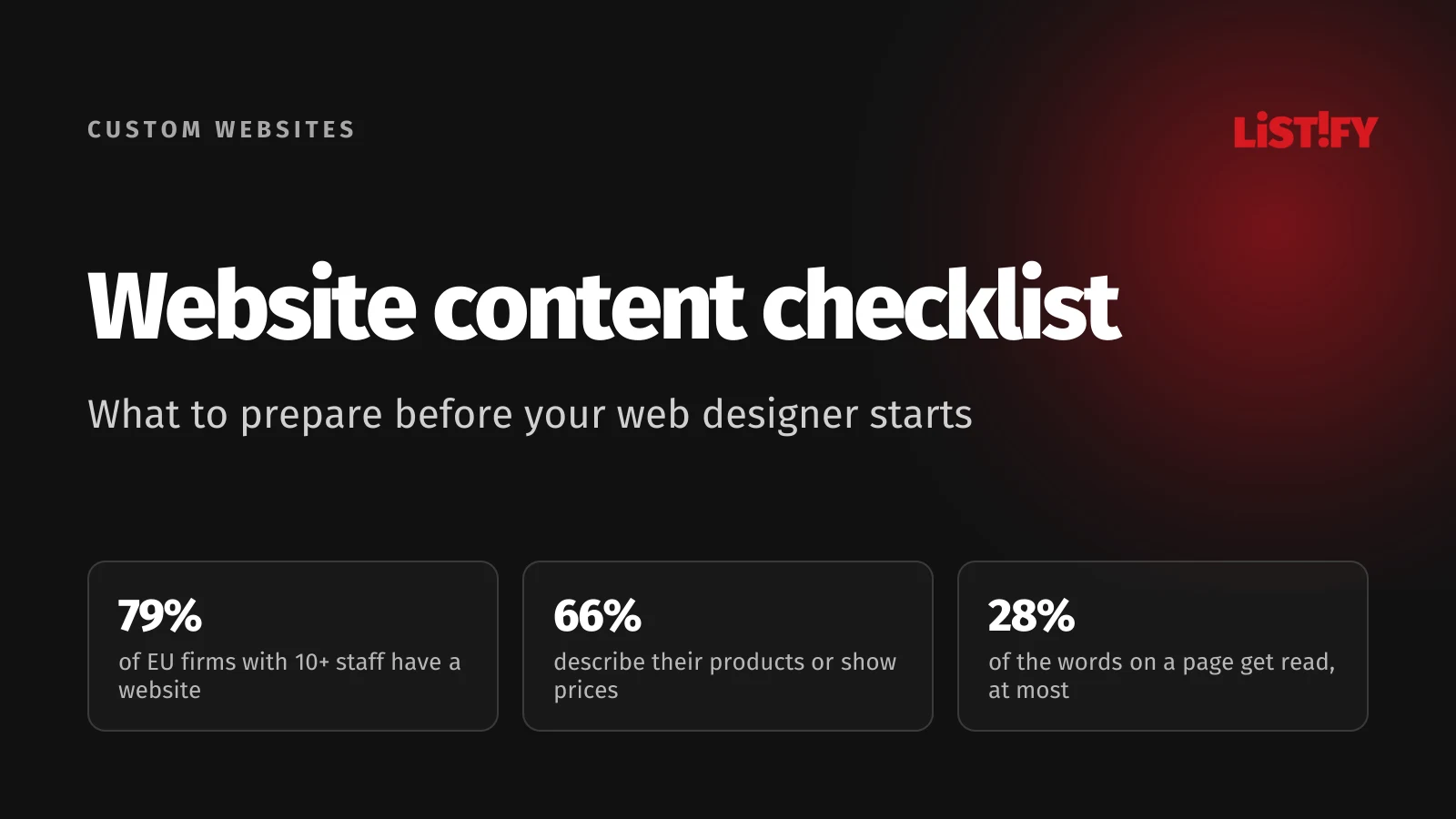
Plenty of businesses have a website that says very little. According to Eurostat, 79% of EU businesses with ten or more employees have a website, yet only 66% of all such businesses, counting those without a website, use one to describe their products or services or show prices. Fewer than a quarter let customers order or book online.
- Business has a website79.0%
- Product or service descriptions, prices66.4%
- Job ads or online applications31.3%
- Content in at least two languages29.5%
- Online ordering or booking22.5%
- Customer support chat9.1%
Share of all EU businesses with 10 or more employees (excluding agriculture, mining and the financial sector), 2025 survey. Source: Eurostat, isoc_ciweb.
In other words, roughly one in six EU businesses with a website doesn’t tell visitors what it sells or what it costs. That’s a content problem, and no amount of code will fix it. For why an off-the-shelf template often isn’t enough for a growing business either, see Why WordPress template websites become a trap.
02Step 1: decide what the website is for and who it’s for
Before you write a single line, answer four questions. Everything else follows from them: the site structure, the copy, the photos and what you’ll measure after launch.
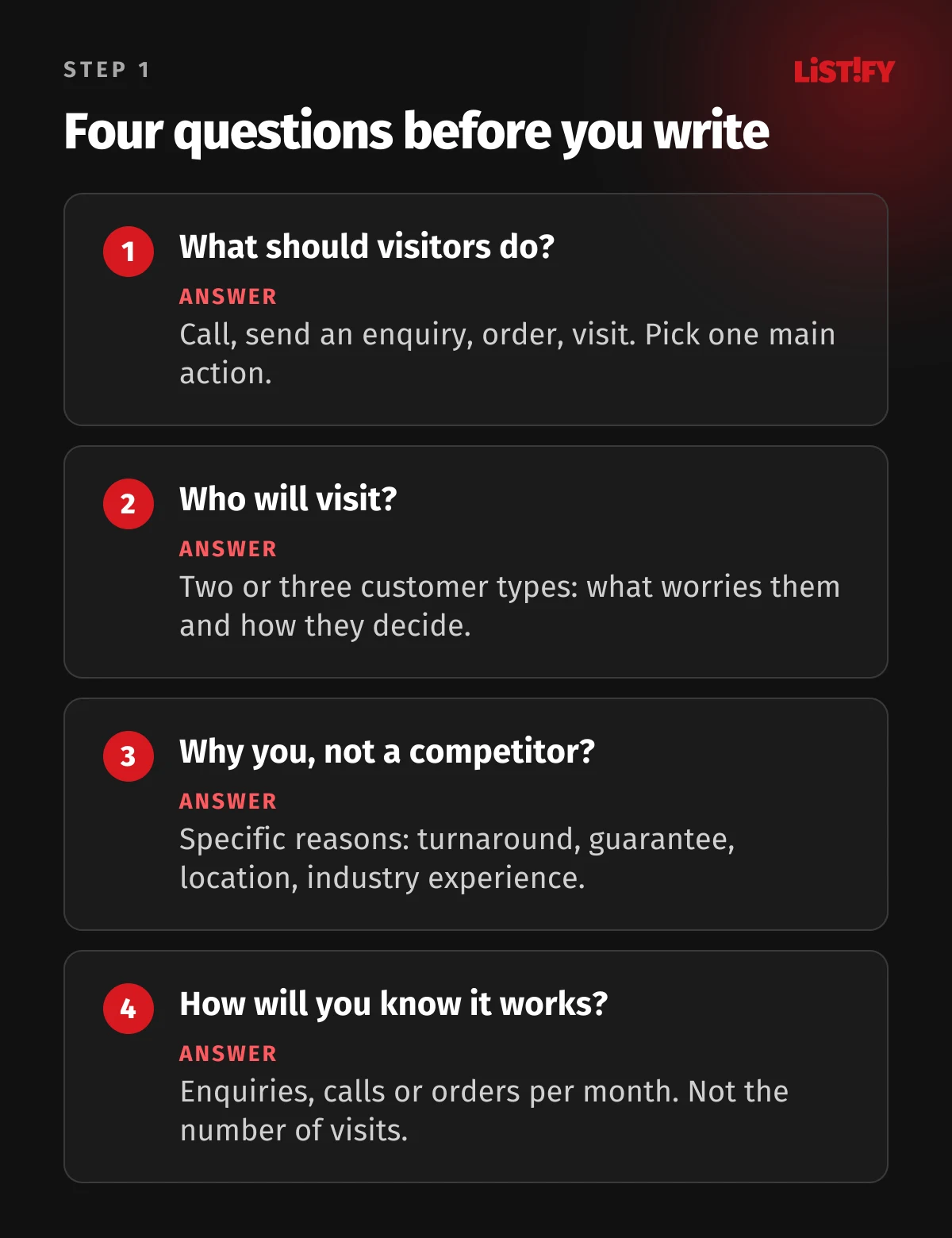
Write the answers on a single page and send them to your web designer as your first piece of content. It shortens the kickoff meeting and tells the designer what needs to stand out. If your team can’t agree on the answers, it’s better to find out now than when you’re signing off the finished design.
03Step 2: map out your pages
A sitemap, in the planning sense, is a list of every page on the site and what goes on each one. For a small service business, this outline usually covers it:
| Page | What it’s for | What your designer needs from you |
|---|---|---|
| Home page | Say in seconds what you do, for whom and where | Main message, 3 to 6 core services, your strongest testimonial, contact details |
| Services (one page each) | Explain the service and win the enquiry | Description, process, price or range, FAQs, project photos |
| Case studies and portfolio | Prove you can do it | List of projects, photos, customer quotes with permission |
| About | Show the people behind the business | Your story in a few paragraphs, team photos, certifications |
| Pricing | Answer the question everyone has | Prices, ranges or starting prices, and what’s included |
| Contact | Make the first step easy | Phone, email, address, map, opening hours, company details |
| Legal pages | Meet your obligations | Privacy notice, cookie information, terms and conditions for online sales |
Every service you want to sell deserves its own page. People search for something specific, like “bathroom renovation Dublin”, not “our services”. A single page listing seven services will struggle to rank for any one of them.
Planning more than one language? Translation is content too. Only 29.5% of EU businesses with ten or more employees have a website in at least two languages. If you want to reach customers abroad, you need translated copy, not just a language switcher.
04Step 3: find out how customers search
You write for people, but search engines need to find the page too. Customers don’t search for “end-to-end solutions”. They search for “accountant for freelancers Cork” or “roof insulation cost per m2”. Before you start writing, pick one main search phrase for each page and a few related ones.
Keyword Planner in Google Ads shows how often phrases are searched. You need to sign in to an Ads account to use it. Your own customers are an even better source: note the exact words they use on the phone and in emails.
Prepare a title and a short description for search results for every page as well. Google asks for a unique, descriptive title and a unique meta description on every page. The description won’t lift your rankings (Google said as much back in 2009), but when Google shows it in results, it can affect whether people click.
And forget the word count myth. Google’s guide to helpful content says plainly that it has no preferred word count. A page should be as long as it takes to answer the customer’s questions.
05Step 4: how to write website content people can scan
Most people don’t read web pages, they scan them. In a Nielsen Norman Group study from 1997, 15 of 19 participants scanned any new page they came across and only three read word by word. A later analysis from 2008 estimates that on an average visit, people read at most 28% of the words on a page, and 20% is more likely.
Also in 1997, NN/g rewrote a travel website in several versions and had 51 people complete tasks on them. Concise copy scored 58% higher in measured usability than the original promotional copy, scannable copy 47% higher and an objective, non-promotional tone 27% higher. All three changes combined improved usability by 124%.
- Objective tone, no hype27%
- Scannable layout47%
- Concise copy (about half the words)58%
- All three combined124%
Nielsen Norman Group, 1997, 51 users, one travel website. Usability here is a combined score of task time, errors, memory, site structure and satisfaction, not sales. Source: NN/g.
What that means for your copy:
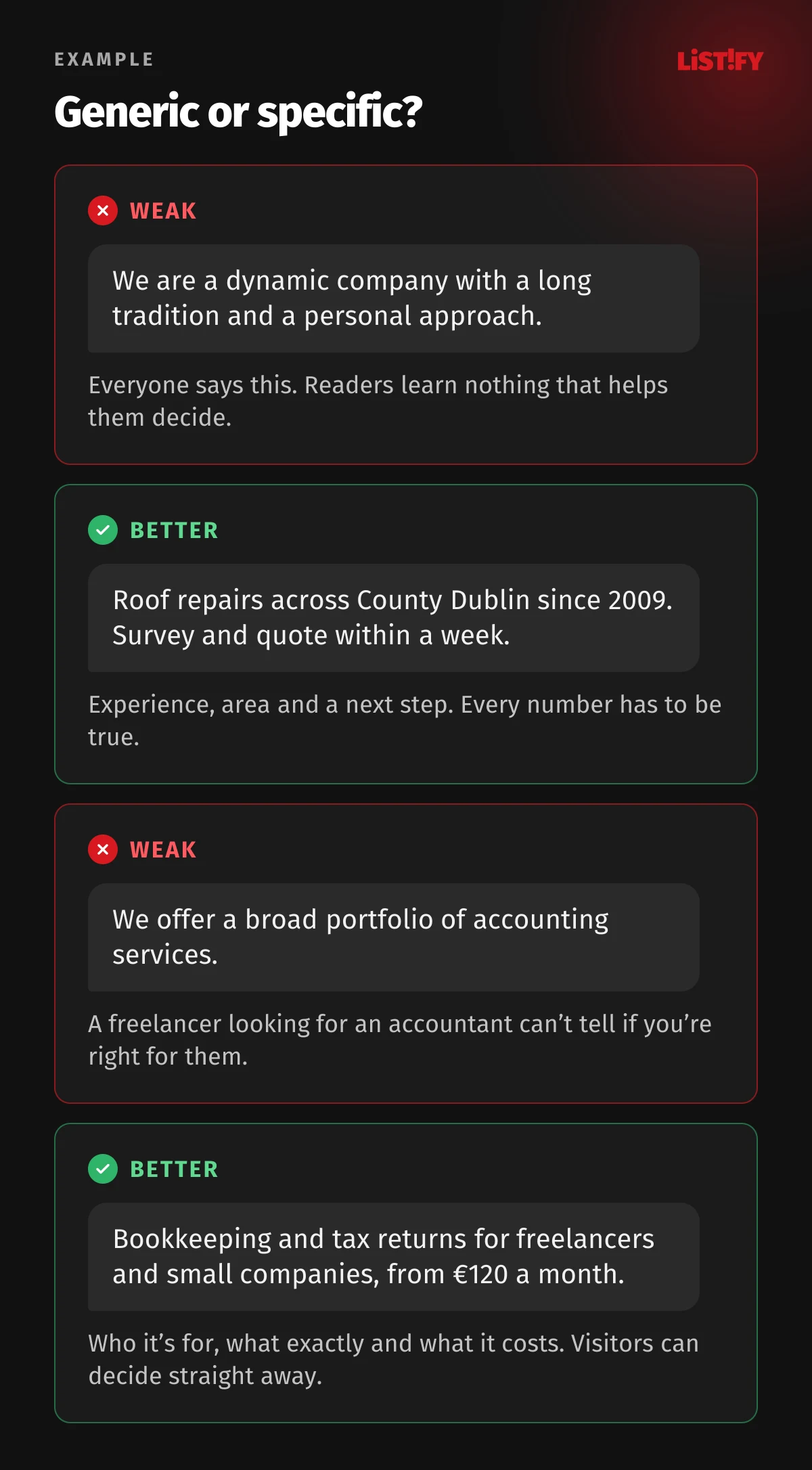
- Headlines say what people get. “Bathroom renovations in Dublin, finished in 4 weeks” beats “Welcome to our website”. Why the first moments matter so much is covered in The 3-Second Rule.
- The most important facts go first. Price, timing, location and who the service is for. Details come after.
- Short paragraphs and subheadings. They’re what readers use to find their way when they skim.
- Numbers, not adjectives. Everyone claims to be “fast and reliable”. “We reply within 24 hours” is a promise people can check, so make sure you keep it.
- Your customers’ words. Use the phrases customers type into search, not your internal product names.
- Every page ends with a next step. A phone number, a form or a link to a related service.
The copy can come from the owner, a salesperson or a copywriter. The best results usually come from a mix: the business supplies the facts, numbers and experience, and a copywriter shapes the wording. For a deeper look at writing pages that need to turn visitors into enquiries, see Landing Page Copywriting That Sells.
06Step 5: use your own photos, not stock
NN/g’s eye-tracking research found that people ignore big decorative images and stock photos of generic people. Photos of products and real people often get close attention (Photos as Web Content). Photos of your team, premises and finished work tell visitors something real about you. In a small business, that includes a photo and a few lines about the owner, as explained in Personal Branding for CEOs and Founders.
Images are also usually the heaviest part of a page. According to the 2025 Web Almanac, an image is the largest element on the first screen, the one Largest Contentful Paint (LCP) measures, on 76% of mobile pages. The median mobile home page loads 911 KB of images, more than it loads in JavaScript. Resizing and converting images to modern formats is your developer’s job, but they need good originals from you.
- Images911
- JavaScript632
- Fonts122
- CSS77
- HTML22
Median mobile home page, HTTP Archive crawl from July 2025 (16 million websites worldwide). Source: Web Almanac 2025, Page Weight.
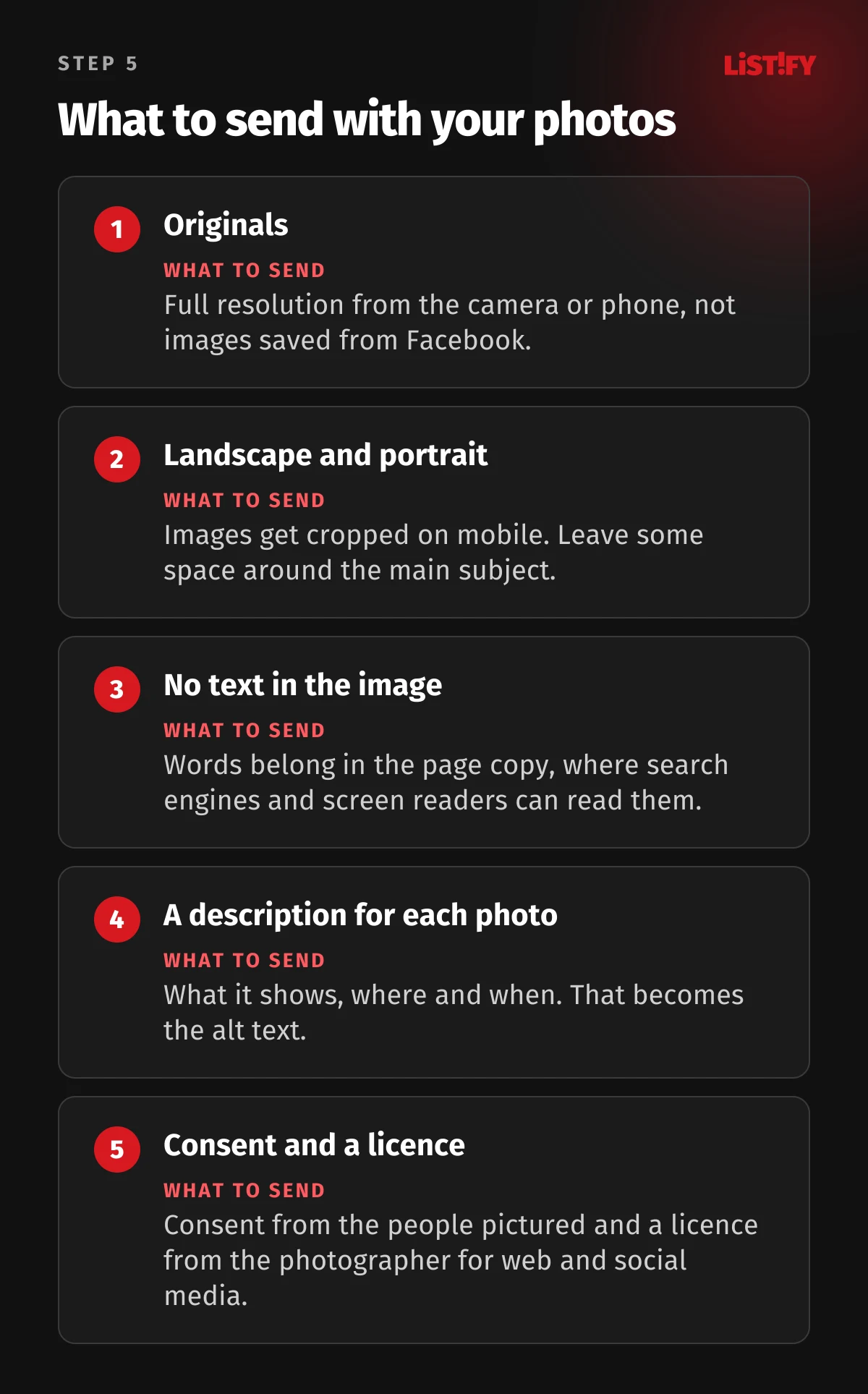
Alt text describes an image to people who can’t see it, and Google’s image documentation calls it the most important attribute for image metadata. Even so, WebAIM found at least one image without alt text on 53% of the top million home pages. The easiest fix is to write a description for each photo when you send it over.
- Low contrast text83.9%
- Missing image alt text53.1%
- Missing form input labels51.0%
- Empty links46.3%
- Empty buttons30.6%
- Missing document language13.5%
Share of the top one million home pages worldwide, February 2026. Source: WebAIM Million.
Images from Google aren’t free to use
Photos and text are protected by copyright, so you need permission or a licence to use them. That applies to images you find through a search engine and to your competitors’ copy. You can take inspiration from how a competitor structures a page, but not their wording.
When you hire a photographer, agree the licence in writing and be specific: website, social media, print, advertising, and for how long. And for people who appear in photos, get their written consent. People can withdraw their consent later, for example when an employee leaves, so plan to update team photos from time to time.
07Step 6: pricing, testimonials and proof people can trust
“How much does it cost?” always comes up. If your website doesn’t answer it, customers go looking elsewhere. You don’t have to publish an exact price list. A starting price, a range or a typical project with its price is enough. Note what’s included and what isn’t.
Collect testimonials with a name, company, photo and written permission. A quote signed “a happy customer” convinces nobody. For each larger project, three sentences work well: what the customer came to you with, what you did and how it turned out, ideally with a number. Certifications, trade association memberships, client logos (with permission) and Google reviews help too.
For how to use pricing, testimonials and other proof on the page itself so the site actually sells, see Why a Pretty Website Isn’t Enough.
08Step 7: logo, colours and fonts in usable formats
A logo photographed off a business card or pasted into a Word file won’t help your designer. Send a vector logo (SVG, PDF or AI), your brand colours as HEX or RGB values, the names of your fonts and licences for any paid ones. If you have brand guidelines, include them.
No logo, or an outdated one? Sort it out before the website, not during it. The design is built on your brand colours and logo, and a new logo halfway through means reworking a finished design. For what makes a logo work, see Logo Design: 7 Rules for a Logo That Lasts for Years.
09Step 8: legal details, privacy and cookies
The legal side is often left until the day before launch, yet it shapes the design: a contact form needs a link to the privacy notice, an online shop needs the right checkout wording and a site with analytics needs a cookie consent banner. The table covers the EU rules. Outside the EU, requirements differ, so check your local law.
| What | When you need it | EU rule |
|---|---|---|
| Business name, address, email, plus register and VAT numbers if you have them | Always, for any business website | E-Commerce Directive, Art. 5 |
| Privacy notice | When the site collects personal data: forms, newsletters, analytics | GDPR, Art. 13 |
| Cookie consent with a real choice | When you use cookies that aren’t strictly necessary, such as analytics or advertising | ePrivacy Directive, Art. 5(3) |
| Accessible website | Online shops and other consumer services listed in the Act, unless you’re a microenterprise | European Accessibility Act |
On cookies, the Court of Justice of the EU ruled in Planet49 (C-673/17, 2019) that a pre-ticked checkbox is not valid consent, and that visitors must be told how long cookies last and whether third parties can access them. If your site only uses strictly necessary cookies, you don’t need a consent banner, but you still need a privacy notice if you collect personal data.
The European Accessibility Act has applied since 28 June 2025, but only to listed consumer products and services, including e-commerce. A brochure site for a business that only sells to other businesses generally falls outside it, and microenterprises providing services (fewer than 10 employees and an annual turnover or balance sheet total of no more than €2 million) are exempt. Image descriptions and video captions are still worth preparing. They help people with visual or hearing impairments and anyone watching with the sound off.
10Step 9: logins, the old website and redirects
The last group of materials isn’t copy but access. Without it the site can’t go live, and tracking it down takes longest when a former agency registered the domain. Prepare:
- Domain: which registrar it’s with, who the registrant is and the account login. The registrant should be your business.
- DNS and email: where your email runs, so it doesn’t stop working when the site switches over.
- Old website: admin access, or at least an export of the text, images and downloadable documents.
- Analytics: Google Search Console and Google Analytics accounts, or other tools, if you already have them.
- Integrations: booking system, e-commerce platform, CRM, newsletter tool, payment gateway. For how to plan those connections, see API integration best practices.
Replacing an old site? Get a list of all its URLs, especially the ones that get links and search traffic. Every old URL needs a permanent (301) redirect to the closest new page. Google recommends keeping redirects for as long as possible, generally at least a year, and from a user’s point of view, indefinitely (Google Search Central). Without them, people coming from search and old links land on an error page.
If your previous developer has gone quiet, this guide explains how to get your domain, logins and code back.
11Who provides what, and when
You don’t need everything ready at once. Your designer needs content in stages, roughly in this order:
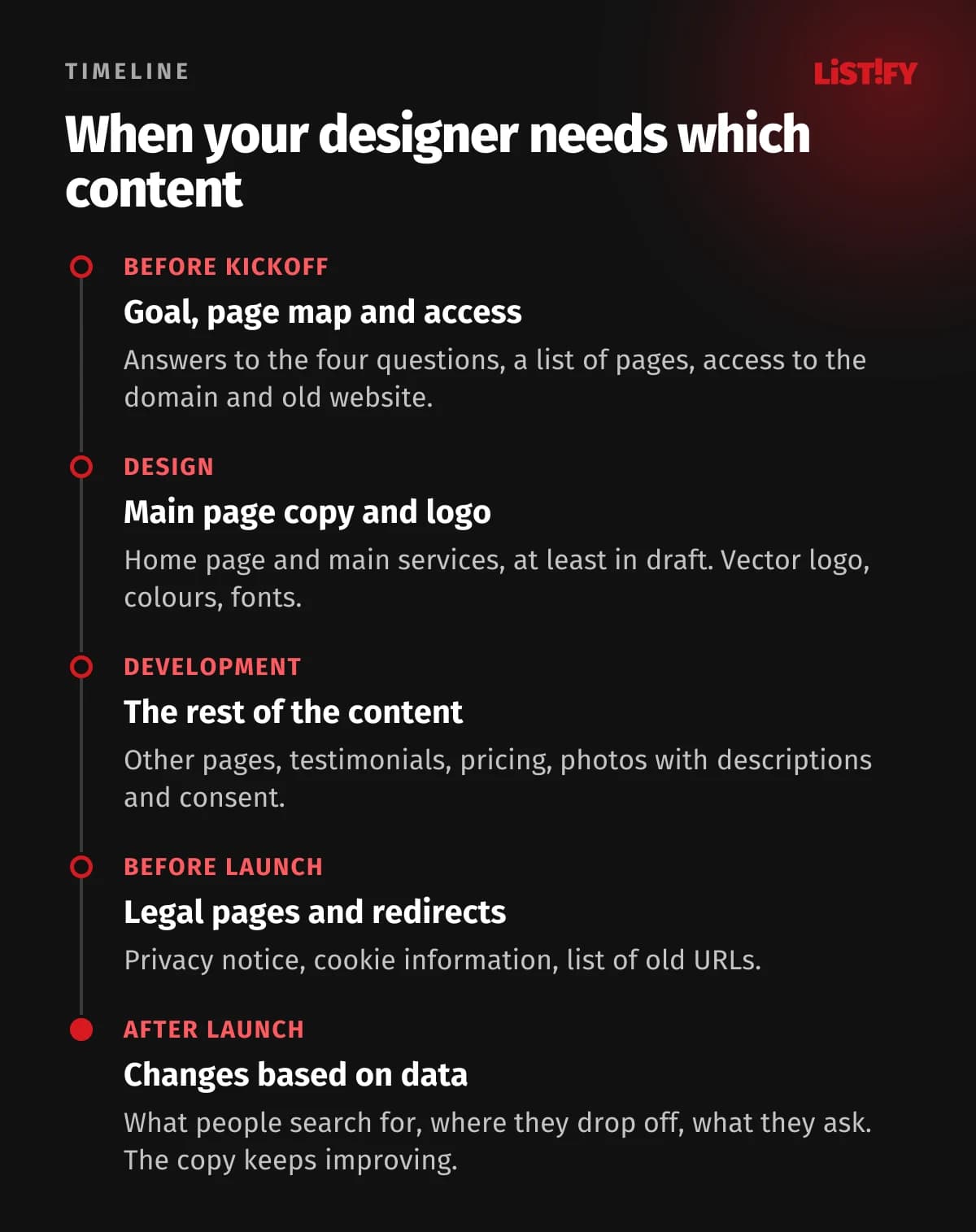
For a step-by-step look at how a custom website project runs, read Custom website development: benefits, costs and a 9-step guide or see how we work.
12Your website content checklist
- The goal of the site and the main action you want visitors to take: an enquiry, a call, an order.
- A short description of two or three customer types and the questions they have.
- A page map with a content list for every page.
- A main search phrase, a title and a meta description for every page.
- Copy: home page, services, about, contact, FAQs.
- Prices, ranges or starting prices, and what’s included.
- Testimonials with names, photos and permission, plus examples of your work.
- Your own photos at full resolution with descriptions, consent from the people in them and a licence from the photographer.
- A vector logo, brand colours, fonts and brand guidelines if you have them.
- Business name, address, register number, VAT number and contact details.
- A privacy notice, cookie information and, for online sales, terms and conditions.
- Access to the domain, DNS, email, old website and analytics, plus a list of old URLs to redirect.
13Frequently asked questions
How much text should a web page have?
Enough to answer the customer’s questions. Google says it has no preferred word count. A service page usually needs a description, the process, a price, FAQs and testimonials. A home page works better with shorter blocks that lead to other pages.
Can I use AI to write my website copy?
As a helper, yes, but the result has to include your facts: prices, processes, experience and testimonials. Google’s guide to helpful content asks whether a page clearly shows first-hand expertise and a depth of knowledge. For your own services, only you can supply that, and generic copy without your details won’t.
What details does a business website legally need in the EU?
Under the E-Commerce Directive, at least your business name, address, an email address and other contact details, your trade register and registration number if you’re entered in one, and your VAT number if you’re registered for VAT. National law may add more, and online shops need extra pre-contract information.
Do I need a cookie banner?
Only if your site uses cookies that aren’t strictly necessary, typically analytics, advertising tags or third-party embeds that set cookies. In that case you need consent before those cookies are set, with no pre-ticked boxes. Even without a banner, you need a privacy notice if you collect personal data.
Can I use images from Google or a competitor’s site?
Not without a licence. Photos are protected by copyright and you need permission or a licence to use them. Use your own photos, photos from a photographer with an agreed licence, or a stock library.
What if I can’t get all the content ready in time?
Agree the order with your designer. Design can start once the home page and main service pages are drafted, and the rest can follow during development. Just don’t launch with placeholder text or empty pages, because search engines will index those too.
14What to do this week
Open a blank document and answer the four questions from step 1. Then go through your current website, or your competitors’ sites, and list the pages you need. Book a photographer before the design starts, and check who the domain is registered to. With that groundwork in place, the rest moves much faster.
What a website costs depends mainly on its scope and features. See our pricing for what’s included, or read more about our custom websites.