App Notifications and Emails That Don’t Annoy: How to Set Them Up So the Important Ones Still Get Through
When an app pings too often or about things that don’t matter, people switch its notifications off and start deleting its emails unread. Then the one message that does matter, like a suspicious sign-in alert, never reaches them. Below: how to pick the right channel and set frequency caps and quiet hours, what Apple, Google, Yahoo and Microsoft actually require, and where a service message ends and marketing begins under EU and US law.
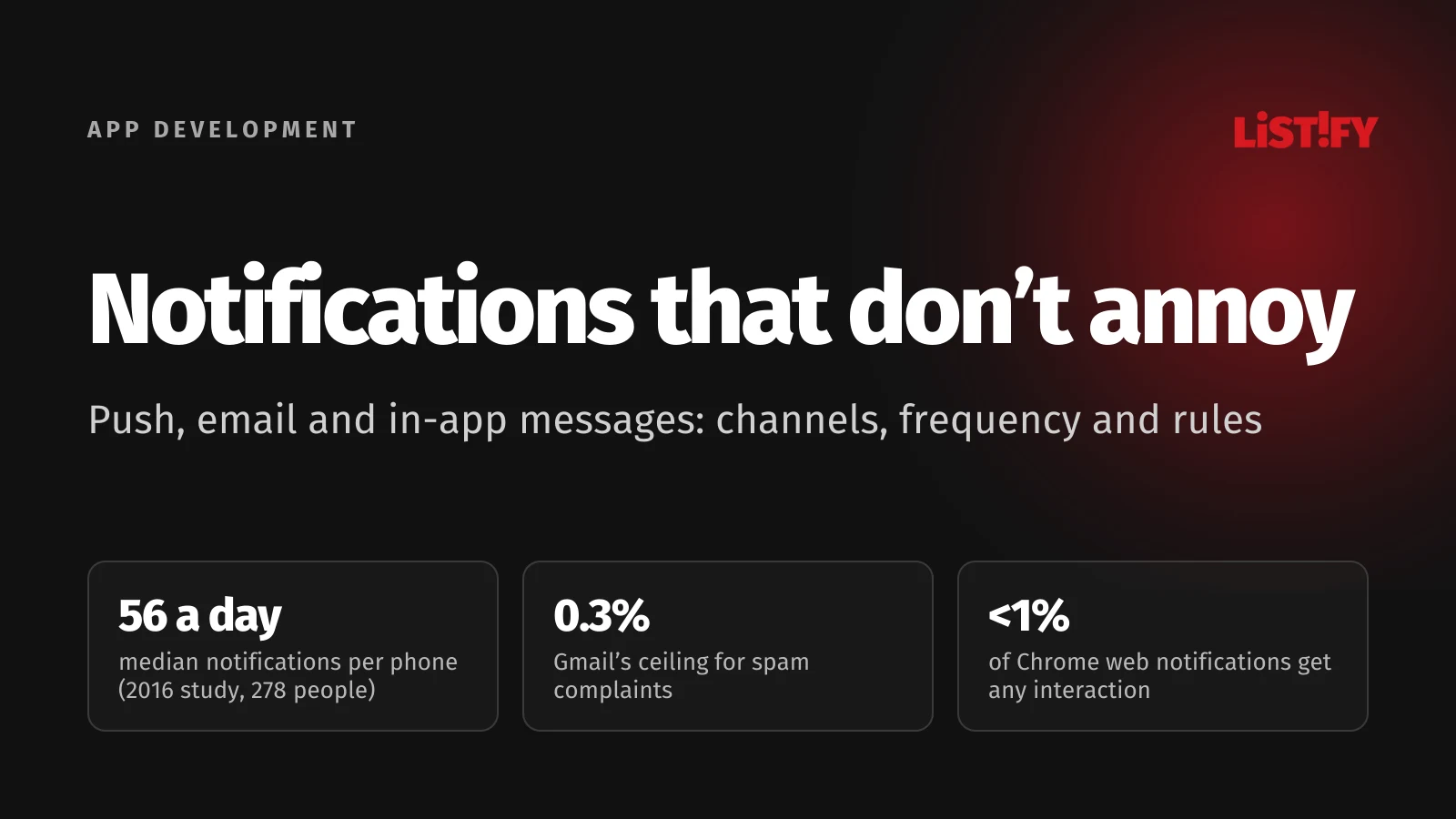
Every notification costs someone a moment of attention, whether they’re driving, working or asleep. An app that spends that attention carelessly gets a simple answer: off. One tap, no matter how much you invested in building it.
The good news is that most of the fix is a design decision, and it needs no special technology. You need to know which messages you send, to whom, through which channel and how often. Then you can decide what may interrupt right away, what can wait for a digest and what belongs in email. Below, we walk through it step by step, including the rules that took effect in 2024 and 2025.
01The short version: signs of a well-designed notification setup
| Rule | Why | Source |
|---|---|---|
| Every type of message has its own category | Android users can turn categories off one by one, so you don’t lose everything at once | Android |
| Urgency matches content | Apple explicitly forbids sending marketing as a Time Sensitive notification | Apple HIG |
| One event, one primary channel | Apple warns that repeat notifications about the same thing can get all your notifications switched off | Apple HIG |
| Less is more | Google says fewer than 1% of web notifications in Chrome get any interaction | Chromium blog |
| Digests instead of a stream | In a study of 237 people, delivering notifications in batches three times a day helped | Fitz et al. 2019 |
| One-click unsubscribe | Gmail and Yahoo have required it for bulk senders’ marketing email since 2024 | Gmail, Yahoo |
| Service messages without ads | Gmail advises against promotions in receipts, and US law treats “transactional” narrowly | Gmail, FTC |
| In-app notification settings | Apple requires them for marketing notifications, and they spare users frustration and cut your unsubscribes | Apple HIG |
02Why people turn off notifications and unsubscribe from emails
Only a handful of studies have measured how many notifications a phone gets per day. In 2016, 278 Android users in Spain received a median of 56 notifications a day (Pielot et al. 2018). An earlier study from 2013 with 15 participants found an average of 63.5 a day, mostly from messaging apps and email (Pielot et al. 2014). The studies are dated and the samples small, but the order of magnitude is clear: your app is competing for attention with dozens of others.
The 2018 study shows something else, too. About two thirds of notifications from people (messages, chats) led to the app being opened. For email and notifications not sent by a person, it was only a bit more than 15%. Your app is up against friends and family, and it loses unless it sends something the person genuinely needs to know.
For web notifications the picture is even bleaker. In October 2025, Google wrote that fewer than 1% of notifications in Chrome get any interaction at all, and it started automatically revoking permission from sites that send lots of notifications almost nobody engages with. Installed web apps are exempt (Chromium blog). According to the same post, sites that send fewer notifications actually see more clicks.
With email, the top reason people unsubscribe is simple. In a March 2023 UK survey by the DMA (2,004 adults), 57% of those who had unsubscribed from a company’s emails said they were getting too many (DMA Consumer Email Tracker 2023). The same survey found that 69% of people prefer email for order confirmations and 65% for receipts. People aren’t rejecting email. They’re rejecting the volume.
Apple describes the result of notification fatigue bluntly in its design guidelines: if you send multiple notifications for the same thing, you fill up Notification Center, and people may turn off all notifications from your app (Apple HIG).
You’ll often see the claim that the average person gets “46 push notifications a day.” Its trail leads through a marketing company’s blog to a paid Q&A service, and the original data and method can’t be found. The same goes for the line that “60% of people turn off notifications when they get too many.” We don’t use either number.
03Three kinds of messages, and why you must never mix them
Before you think about channels and frequency, list every message your app sends or will send. Then put each one into one of three groups. That split decides what users can turn off, when you need consent and how the message is sent technically.
| Type | Examples | Can the user turn it off? | Consent |
|---|---|---|---|
| Essential (service) | Password reset, order confirmation, payment, security alert, change of terms | No, the service doesn’t work without them | Not needed, as long as there’s no promotion in it |
| Useful (activity) | Order status, booking reminder, new comment, message from a colleague | Yes, category by category | Only the system notification permission |
| Marketing | Newsletter, sales, product recommendations, review requests, birthday offers | Always, in one step | Yes, or the existing customer exception for email |
The most common mistake is tacking some marketing onto a service message. “Your order has shipped. By the way, you might like these shoes.” Gmail’s sender guidelines say it plainly: “don’t include promotions in sales receipt messages” (Gmail). Once a message promotes something, it’s no longer purely a service message. In the EU that usually means the marketing rules apply, including consent or the existing customer exception and an unsubscribe option. In the US, the FTC looks at the primary purpose: if the subject line reads like an ad or the transactional part isn’t at the top, the whole email counts as commercial.
The opposite mistake is just as common: product teams label messages as service messages when they aren’t. A review request or satisfaction survey feels like part of the purchase, but some EU regulators treat it as marketing. The Czech data protection authority, for example, says so explicitly.
04Which channel for what: push, email, in-app messages and SMS
Each channel has a different price in attention. A push notification interrupts right away, an email waits until the person makes time for it, an in-app message doesn’t interrupt at all, and an SMS reaches phones with no internet connection but costs you for every message.
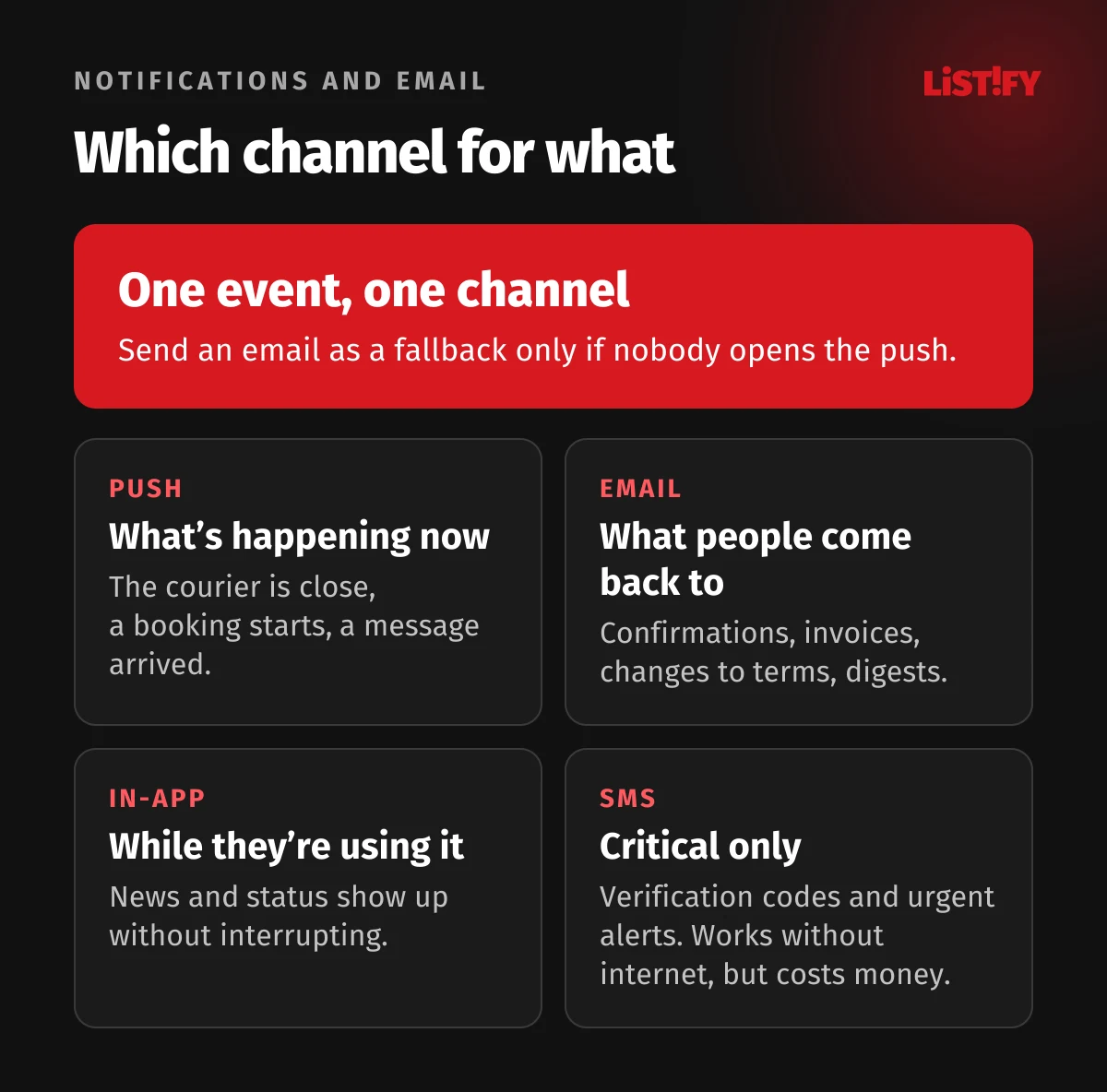
A few rules follow from that. If someone is using the app right now, don’t send a notification. Apple gives an example from its own Mail app: when a message arrives in a mailbox you’re viewing, Mail simply adds it to the list, because a notification would be unnecessary and distracting (Apple HIG). Error messages belong in an in-app alert, not a notification.
Email is best for anything people may want to come back to: confirmations, invoices, changes to terms, digests. Push works for things that lose value within minutes or hours: the courier is around the corner, a booking is about to start, someone sent you a message.
Above all, one event should have one primary channel. If nobody opens the push, you can send an email as a fallback later. Sending both at once is a sure way to annoy someone twice. GitHub handles this well: it can sync read status between email and the web, so what you’ve seen in one place no longer shows up as new in the other (GitHub Docs).
- NetherlandsEmail: 97.7%Mobile internet: 98.3%
- SwedenEmail: 91.7%Mobile internet: 95.3%
- FranceEmail: 89.1%Mobile internet: 89.4%
- GermanyEmail: 87.8%Mobile internet: 87.4%
- SpainEmail: 83.6%Mobile internet: 95.3%
- EU averageEmail: 81.6%Mobile internet: 89.8%
- ItalyEmail: 75.6%Mobile internet: 87.2%
- PolandEmail: 69.2%Mobile internet: 87.3%
Share of all people aged 16 to 74 who sent or received email, or used the internet on a mobile phone, in the previous 3 months. Source: Eurostat, isoc_ci_ac_i and isoc_ci_dev_i, 2025 data.
The gap between email and mobile internet varies a lot by country. In the Netherlands or Germany almost everyone online also uses email, while in Spain, Italy or Poland far more people have mobile internet than use email. If your users are spread across markets, don’t assume email alone will reach all of them.
05iPhone and Android rules you have to work with
Since iOS 15, Apple has divided notifications into four interruption levels. The app sets a level for each message, and the system uses it to decide whether to light up the screen or break through a Focus (Apple Developer).
| Level | What it does | Apple’s example |
|---|---|---|
| Passive | Quietly added to the list, no screen wake, no sound | A restaurant recommendation |
| Active (default) | Alerts normally but doesn’t break through a Focus or a scheduled summary | A game score |
| Time Sensitive | Breaks through a Focus and the summary, and the user can turn this off | An account security issue, a package delivery |
| Critical | Comes through even when the phone is muted, requires Apple’s approval | Health and safety, extremely rare |
Apple has two more rules for marketing. Under App Store guideline 4.5.4, you may only send promotional push notifications to people who explicitly opted in through consent language in your app’s UI, and you must give them a way to opt out in the app. Guideline 5.1.1 forbids making app features or rewards, such as a gift card or discount code, conditional on turning notifications on (App Store Review Guidelines).
Since Android 8.0, every notification has to belong to a channel (the phone’s settings call them categories), and users can turn each category on or off. Once you create a channel, you can’t change its importance. From then on the user is in control (Android Developers). So it pays to have several channels with clear names: “Order status,” “Messages from sellers,” “Deals and offers.” If your app has a single channel called “Notifications,” someone annoyed by deals will switch off order updates too.
Since Android 13, apps have to ask for notification permission just like on iPhone, and on a fresh install notifications are off until the user allows them (Android Developers). Android 15 also softens sound and vibration for repetitive notifications for up to two minutes, and Android 16 groups notifications automatically (Android Developers). Increasingly, the operating system curbs over-sending for you.
We covered when and how to ask for notification permission in detail in How to stop users from deleting your app. The short version: not on first launch, but at the moment people can see what the notifications will do for them.
Web apps
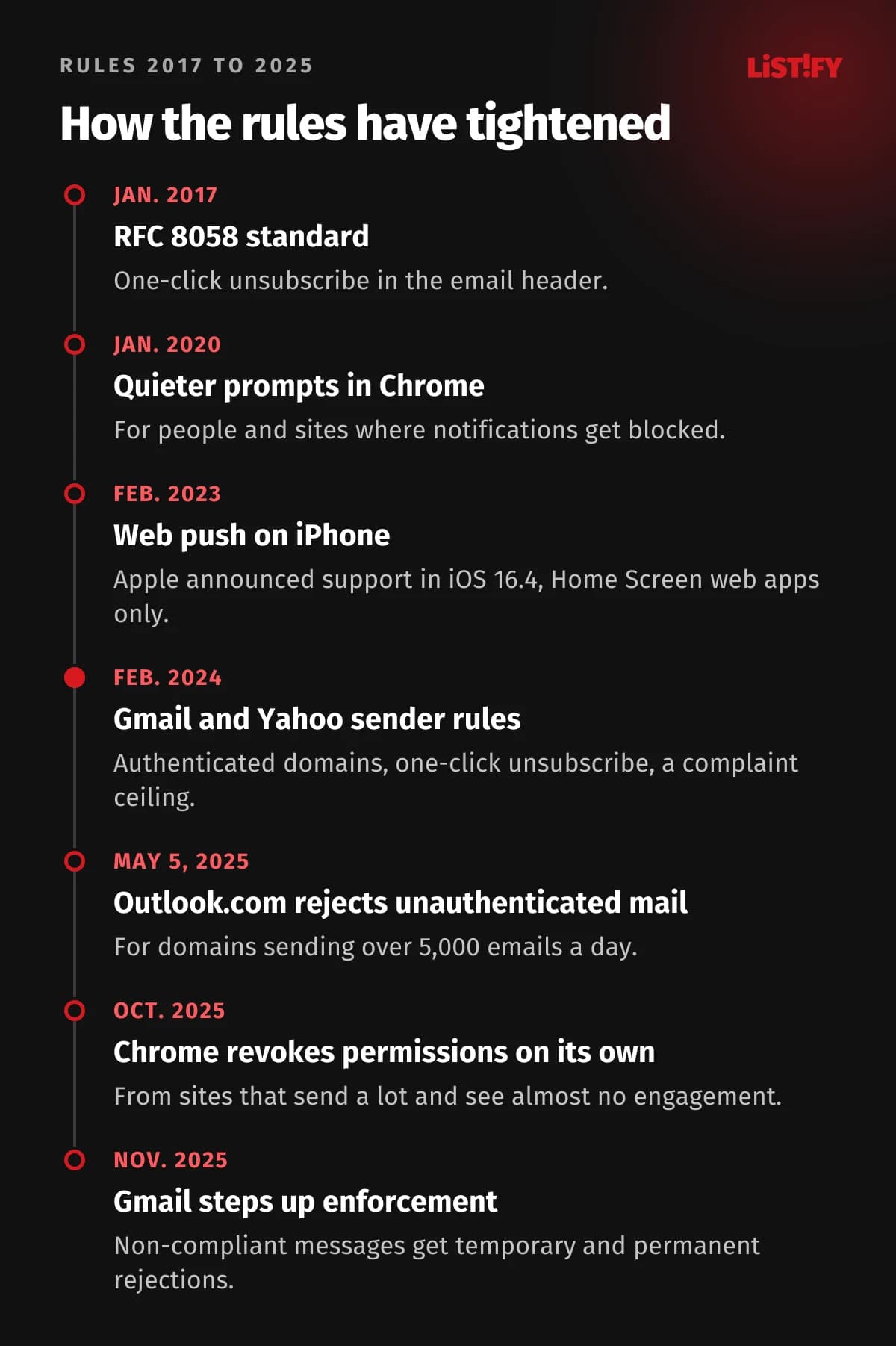
On iPhone and iPad, web push has worked since iOS 16.4, but only for web apps added to the Home Screen, and the permission request has to follow a user action such as tapping a button (WebKit). Since 2020, Chrome has shown a quieter permission prompt to people who usually block notifications and on sites with very low opt-in rates (Chromium blog). In October 2025 it added the automatic revocation mentioned above.
On iPhone 15 Pro and later, Apple Intelligence can also summarize notifications and rewrite them in a shortened form, in supported languages only (Apple, languages). That’s one more reason to put the key information in the first few words.
06Frequency, quiet hours and digests
The strongest evidence that batching works comes from a 2019 randomized trial. People whose notifications arrived in batches three times a day felt more attentive, more productive, in a better mood and more in control of their phones. Hourly batches made almost no difference, and turning notifications off entirely brought more anxiety and fear of missing out (Fitz et al. 2019). The study had 237 participants in India, so treat it as a pointer rather than proof. The direction is clear, though: fewer interruptions in batches beat a constant stream.
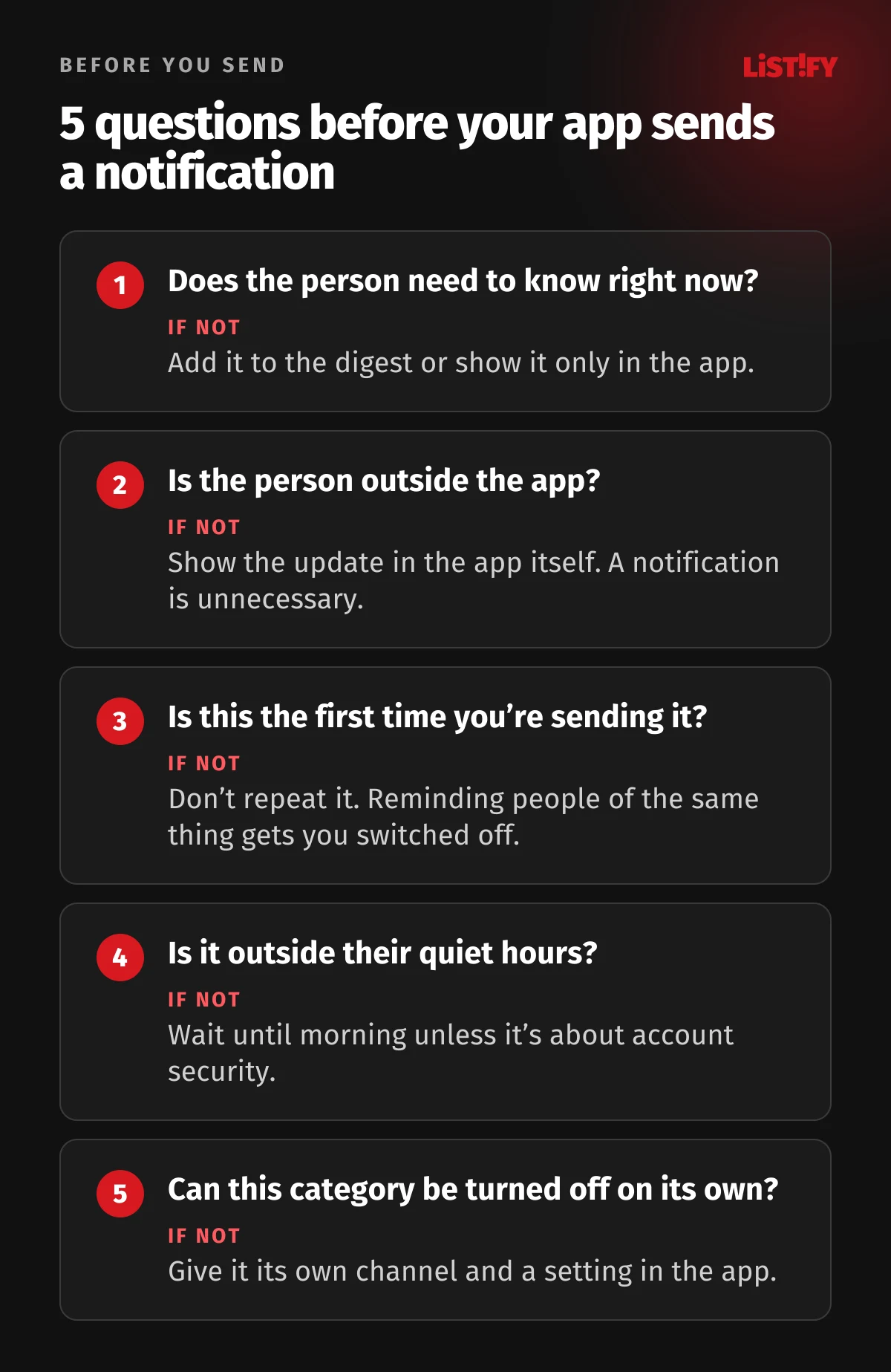
In practice, push notification best practices come down to a few rules you decide up front and enforce in code:
- A daily cap. Decide how many push notifications one person can get per day across all categories combined, excluding essential ones. Anything over the cap waits for the digest.
- Quiet hours in the user’s time zone. A sensible default is 9 p.m. to 8 a.m., and users can change it. Essential messages, such as a suspicious sign-in alert, always get through.
- Grouping. Five likes in ten minutes is one notification, “5 people liked your photo,” not five.
- No repeats. If someone doesn’t respond, don’t send it again. Apple explicitly advises against sending multiple notifications for the same thing.
- Digests instead of a stream. For less important categories, offer a daily or weekly summary by email or in the app.
- Frequency as promised. Someone who signed up for a monthly newsletter shouldn’t start getting a weekly one. Yahoo spells this out in its sender guidelines.
Both big platforms have their own tools that work regardless of what you do. On iPhone, people set up a scheduled summary and Focus modes. On Android, there’s Do Not Disturb. An app that respects them and offers sensible defaults comes across as a considerate guest. An app that tries to get around them ends up switched off.
07Notification settings: what they should include
The notification settings screen is where people dial things down instead of deleting the app. If they can’t find it, they reach for the system switch and turn everything off. Good notification settings include:
- Categories by content, not by technology: “Orders,” “Messages,” “Reminders,” “News and offers.” List essential messages too, just without a toggle and with a line explaining why they always arrive.
- A channel for each category: push, email and possibly SMS. Some people want order status on their phone and invoices by email.
- Frequency: right away, daily digest, weekly digest.
- Quiet hours in the user’s time zone.
- One switch for all marketing. Nobody should have to turn off promotions one by one. US law requires this option in email preference menus.
- A link to the system settings. Google recommends it for Android (Android Developers).
For marketing notifications on iPhone, a settings screen is mandatory. Apple says you must provide an in-app settings screen that lets people change their choice (Apple HIG). For email, the FTC notes that you may offer a menu of message types, but it has to include the option to stop all marketing messages from you (FTC).
For inspiration, look at products that live on notifications. Slack lets people choose between “Everything” and “Mentions and direct messages” and set a schedule for when notifications arrive at all (Slack). GitHub shows why you received each notification (GitHub Docs). The same principle works in a smaller app: when people understand why a message reached them, they’re more likely to leave it on.
Good notification settings belong in the UX from the start. For more on why people abandon apps, see our article on web app UX.
08Emails that reach the inbox: Gmail, Yahoo and Microsoft
Since February 2024, stricter rules have applied to anyone sending more than 5,000 messages a day to personal Gmail accounts. Cross that line once and Gmail treats you as a bulk sender permanently (Gmail FAQ). Yahoo introduced similar rules at the same time but doesn’t publish a threshold (Yahoo). Since November 2025, Gmail has been temporarily or permanently rejecting messages that don’t comply.
| Requirement | Gmail | Yahoo | Outlook.com |
|---|---|---|---|
| Domain authentication (SPF, DKIM) | SPF and DKIM | SPF and DKIM | SPF and DKIM |
| DMARC | Yes, p=none is enough | Yes, p=none is enough | Yes, p=none is enough |
| One-click unsubscribe | Required for marketing (RFC 8058) | Required for marketing | Not required (a working unsubscribe link is recommended) |
| Processing unsubscribes | Within 48 hours (recommended) | Within 2 days | Not specified |
| Spam complaints | Aim below 0.1%, never reach 0.3% | Below 0.3% | Not specified |
| Since | February 2024, stricter since November 2025 | February 2024 | May 5, 2025, above 5,000 emails a day |
- Klaviyo: healthy threshold0.01%
- Gmail: recommended target0.10%
- Gmail and Yahoo: ceiling0.30%
Share of delivered emails that recipients mark as spam. Since June 2024, Gmail offers no delivery mitigation above 0.3%, and senders only become eligible again after 7 consecutive days below that level. Sources: Gmail FAQ, Yahoo, Klaviyo.
One-click unsubscribe is defined in RFC 8058. The email carries two headers, List-Unsubscribe with an https address and List-Unsubscribe-Post, and both must be covered by the DKIM signature. The mailbox can then show an unsubscribe button next to the sender, and a click sends a request to your server with no cookies and no login (RFC 8058). It removes the person only from the list that message belongs to, which is another reason to keep separate lists per category, as described above.
Both Gmail and Yahoo recommend sending service and marketing email separately, from different IP addresses or at least a different sender address (Gmail, Yahoo). In practice that usually means a subdomain, for example mail.yourcompany.com for newsletters and the main domain for order confirmations. If a newsletter draws complaints, password resets stand a much better chance of getting through.
- Gmail87.2%
- Yahoo and AOL86.0%
- Apple76.3%
- Microsoft75.6%
Share of messages that landed in the inbox rather than in spam or going missing. Measured in 2024 on seed addresses used by Validity’s customers, not on real recipients. Source: Validity, Email Deliverability Benchmark 2025.
09How the rules have tightened
Most of the rules above are less than five years old. If your app and email setup were built earlier and haven’t been touched since, there’s a good chance some of them aren’t met.
10What the law says in the EU and the US
In the EU, marketing by email and SMS is governed by Article 13 of the ePrivacy Directive, which each member state has written into its own law (ePrivacy Directive). The core rules:
- Prior consent. Direct marketing by electronic mail, which the directive defines broadly enough to include SMS, is only allowed to people who have given prior consent. The directive applies this to individuals and leaves the rules for business addresses to each country.
- The existing customer exception. If you got someone’s email address when selling them a product or service, you may market your own similar products or services to them without consent. They must be able to object easily and free of charge when you collect the address and in every message.
- No hidden senders. Every marketing message must identify the sender and include a valid address for opting out.
On top of that, the GDPR gives everyone the right to object to direct marketing at any time, and once they do, their data can no longer be used for it (Article 21). They must be told about this right clearly and separately at the latest in your first communication (GDPR). Recital 47 says direct marketing may be a legitimate interest, but that doesn’t let you send marketing emails without consent: for email and SMS, the ePrivacy rules take precedence.
National details vary. In the Czech Republic, for example, the data protection authority treats review requests and birthday greetings as commercial communications and lists push notifications among the channels they’re sent through. Slovakia limited the existing customer exception in November 2025 to one year after the contract ends. Whether a push notification counts as “electronic mail” under the directive isn’t spelled out in its text, so the safest approach is to treat marketing push notifications like marketing emails. Apple requires explicit opt-in for them anyway.
The United States: CAN-SPAM
In the US, commercial email is governed by the CAN-SPAM Act, and despite its name it covers every commercial message, including business-to-business email, not just bulk sends (FTC). The main requirements:
- Honest header information and subject lines.
- The message must be identified as an ad and include a valid physical postal address.
- A clear explanation of how to opt out, a mechanism that keeps working for at least 30 days after sending, and opt-outs honored within 10 business days.
- Opting out can’t require anything beyond a reply email or a visit to a single web page, and it can’t cost anything.
- Penalties of up to $53,088 for each separate email in violation.
Unlike the EU, CAN-SPAM doesn’t require consent up front. It requires that people can reliably opt out. If your users are in both places, design for the stricter EU consent rules, then add what CAN-SPAM specifically asks for, such as a physical postal address and a clear ad label in every marketing email. For borderline cases such as review requests or win-back campaigns to lapsed customers, it’s worth asking a lawyer.
11How to tell you’re overdoing it: what to measure
Email open rates don’t tell you much anymore. When Mail Privacy Protection is on in Apple Mail, it downloads remote content in the background even if nobody opens the message, so those emails register as “opened” (Apple). Data from one large email platform shows how much that inflates the numbers.
- All customersExcluding Apple MPP: 20.7%Including Apple MPP: 33.9%
- EuropeExcluding Apple MPP: 22.8%Including Apple MPP: 36.9%
- North AmericaExcluding Apple MPP: 17.3%Including Apple MPP: 32.5%
Unweighted averages based on data from more than 175,000 Brevo customers in 2025. Source: Brevo, Marketing Orchestration Benchmark 2026.
Instead of opens, track the signals that show whether you’re annoying people:
- The share of users with notifications enabled, and how it changes after each new campaign. Your app can read it straight from the system on both iOS and Android.
- Disabled categories on Android. When people switch off one channel in large numbers, you know exactly what’s bothering them (Android Developers).
- Unsubscribe rate per send. For reference, Mailchimp’s average was 0.22% (data as of December 2023), Brevo’s 0.46%, and 0.51% in Europe (2025). Every platform calculates it differently, so mainly compare yourself with yourself.
- Spam complaints. Gmail doesn’t report them to email platforms, so you’ll only see them in Google Postmaster Tools (Google, Klaviyo).
- Clicks and completed actions, meaning whether the notification led to something, not just whether someone saw it.
An unsubscribe isn’t a failure. According to the DMA, mailbox providers see unsubscribes as neutral, while spam complaints hurt deliverability (DMA). When unsubscribing is easy and visible, people unsubscribe instead of hitting “Spam.”
12How to build it
The most reliable approach is a single place in your app that every message goes through, whether it’s sent as a push, an email or an SMS. If each part of the app sends notifications its own way, there’s no way to enforce a daily cap, quiet hours or deduplication.
- Event. Something happens: an order ships, a message arrives, a deadline approaches.
- Rules. The service looks up the category, reads the user’s settings, time zone and quiet hours, counts how many messages they’ve had today and checks whether the same thing has already been sent.
- Decision. Send now, add to the digest, show only in the app, or don’t send at all.
- Delivery. Push via Apple Push Notification service and Firebase Cloud Messaging (or Expo’s push service for Expo apps), email from an authenticated domain through an email service, SMS through a gateway.
- Log. Record what was sent, to whom and when, and whether it was opened. Without this, none of the measurement in the previous section is possible.
If your app already uses external systems such as a CRM or an email marketing platform, connect them to this service so user preferences apply everywhere. We cover how in our article on API integration. And because Apple advises against putting sensitive information in notifications, think about data security too.
We build the whole notification system as part of our mobile app and web app projects. You’ll find ballpark prices on our pricing page, and how we work walks through the process from design to launch.
13Common mistakes
- A single notification channel on Android, so turning off deals also turns off order status.
- Marketing sent as a Time Sensitive notification to get through a Focus.
- The same message sent as a push, an email and an in-app message at once.
- Alerts at 3 a.m. because the server runs in a different time zone than the user.
- An offer or discount inserted into an order confirmation or invoice.
- Review requests treated as service messages with no way to unsubscribe.
- Newsletters and password resets sent from the same address, so complaints about the newsletter block important emails too.
- An unsubscribe that requires logging in or is buried in the terms and conditions.
- Service emails that look like phishing: an unclear sender, shortened links, pressure to sign in immediately.
14FAQ
How many push notifications a day is too many?
There’s no universal number, and serious studies don’t give one. Content decides: a message from a person or an update on an order someone is waiting for is welcome several times a day, while marketing usually isn’t welcome even once a day. Set a daily cap and watch how the share of users with notifications enabled changes after each campaign.
Do I need consent to send order confirmations or password resets?
No. Purely transactional messages aren’t marketing in the EU or the US. Add an offer, discount or product recommendation and things change: in the EU you then need consent or the existing customer exception, and in the US the email may become commercial, depending on its subject line and whether the transactional part comes first.
Is a review request a marketing message?
In the EU it’s safest to treat it as one. The Czech data protection authority, for example, explicitly classifies review requests and satisfaction surveys as commercial communications. You can usually send them to existing customers under the customer exception, as long as they could object when they gave you their email and every message includes an unsubscribe link.
Do I need one-click unsubscribe in my emails?
If you send marketing email to Gmail addresses at scale (more than 5,000 messages a day), yes, and Yahoo requires something similar. Gmail and Yahoo don’t require it for transactional messages such as password resets or booking confirmations. The law also requires a working opt-out in every marketing email regardless of volume, both in the EU and under CAN-SPAM.
Why did my open rate change when nothing else did?
Open rates have been unreliable since Apple introduced Mail Privacy Protection, because Apple downloads remote email content in the background and registers an “open” even if nobody reads the message. The number depends heavily on how many of your recipients use Apple Mail, and much less on how people actually read your emails. Track clicks, unsubscribes and complaints instead.
Should a web app send notifications, or is email enough?
Web push works on desktop and Android, and on iPhone only for web apps added to the Home Screen. Chrome also revokes permission from sites that send lots of notifications almost nobody engages with, though not from installed web apps. For most web apps we recommend email and in-app messages, with web push offered only for genuinely time-sensitive updates.
15Bottom line: send less, but send what matters
Notifications and email are the most direct way to reach your customers, and the fastest way to lose that access. An app that separates essential, useful and marketing messages, lets people choose the channel and frequency, and respects quiet hours doesn’t have to fight for attention. It gets it when it really counts.
If you’re fixing notifications in an existing app, start by listing every message it sends today. In our experience, a good share of them turn out to be unnecessary, and the important ones get lost among them.
16Sources
Apple, Google, Microsoft and other platforms
- Apple: Human Interface Guidelines, Managing notifications
- Apple: Human Interface Guidelines, Notifications
- Apple: App Store Review Guidelines
- Apple: Apple Intelligence languages and availability
- Apple: Mail Privacy Protection
- Apple: Mail Privacy Protection and privacy
- Android Developers: Notification channels
- Android Developers: Notification runtime permission
- Android Developers: Notifications overview
- Chromium blog: Automatic notification permission revocation, 2025
- Chromium blog: Quieter permission UI for notifications, 2020
- WebKit: Web Push for web apps on iOS and iPadOS
- Gmail: Email sender guidelines
- Gmail: Email sender guidelines FAQ
- Google Postmaster Tools: Spam rate
- Yahoo: Sender Best Practices
- Microsoft: Outlook’s new requirements for high-volume senders
- RFC 8058: One-click unsubscribe
- GitHub Docs: Configuring notifications
- Slack: Configure your Slack notifications
Studies, surveys and statistics
- Pielot, Vradi, Park: Dismissed!, MobileHCI 2018
- Pielot, Church, de Oliveira: An In-Situ Study of Mobile Phone Notifications, MobileHCI 2014
- Fitz et al.: Batching smartphone notifications, Computers in Human Behavior 2019
- DMA: Consumer Email Tracker 2023
- Mailchimp: Email Marketing Benchmarks
- Brevo: Email marketing benchmarks
- Klaviyo: Deliverability metrics
- Validity: Email Deliverability Benchmark 2025
- Eurostat: Internet use, email (isoc_ci_ac_i)
- Eurostat: Mobile internet use (isoc_ci_dev_i)