Your first App Store and Google Play release: a submission checklist
An app can work on a developer’s phone and still be far from a public release. You need the right accounts, a tested build, complete submission details and working access for the reviewer. This guide covers the first release on the App Store and Google Play, from assigning responsibilities to handling a rejection. Nobody can promise approval on the first attempt, but careful preparation can prevent avoidable delays.
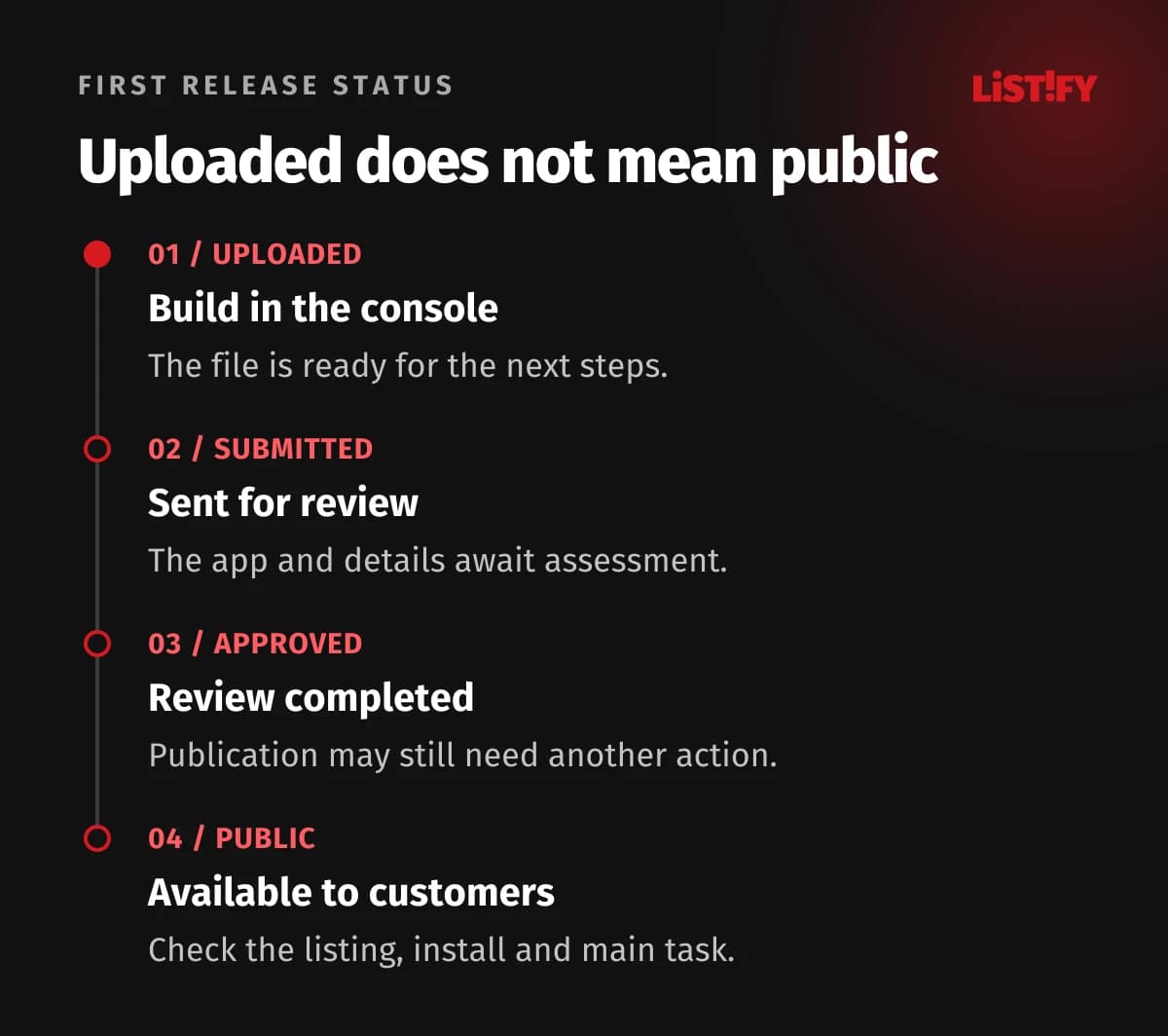
Consider this example: marketing has scheduled a campaign, the supplier says “the app is uploaded” and the business expects customers to download it that evening. In reality, the build is sitting in the console, review credentials are missing and nobody has submitted it. Treat the first release as a project milestone with its own acceptance criteria. This guide covers public distribution of a typical mobile app; enterprise and alternative distribution have separate rules. We checked the official documentation on 6 November 2026.
01What to prepare before your first app submission
Follow a clear sequence: confirm the publisher, complete the accounts, prepare the build and submission details, submit for review, verify public availability. Appoint one release owner to track both stores. That person does not need to complete every field, but must know who supplies each missing detail and who can confirm that it is accurate.
For a company product, we recommend company-controlled accounts with named access for the development supplier. A shared password belonging to one developer makes cover and handover harder. Apple defines responsibilities in the App Store Connect workflow, while Google requires verification of developer account information.
- The business confirms the publisher, target countries, business model, contact details and actual purposes for collecting data.
- The developer prepares the signed build, SDK inventory, technical declarations and fixes.
- The product owner checks the main user journeys, the accuracy of the store listing and the information supplied to reviewers.
Resolve trader status separately from identity verification. Apple has requirements for distribution in the EU. Google requires new accounts to declare their status during registration, with a deadline of 1 February 2027 for existing accounts. Determine the status from your actual activity and distribution plans.
Use an app handover checklist to organise access and delivery records. A shared tracking sheet should contain the account owner and completion status, not passwords.
02Review materials: working access, accurate data and a tested build
Freeze the version you intend to release. Record its build number and use that exact version for final checks. Test a clean installation, login, the main task and returning after closing the app. For bookings, include cancellation; for orders, include a failed payment. Record the scenario, device and result instead of a vague “tested”.
The reviewer needs to reach the important features without calling your colleague. Provide working demo access and instructions for restricted areas. Apple requires accessible backends and explanations of unclear features. Google asks for access instructions when location, membership or special authentication restricts use.
For example, a field service app needs more than an empty technician account. Supply safe demonstration data and explain how to open a job, add a photo and submit a result. Check that access will not expire during review or depend on a one-time code sent to an absent employee. This is about making the submitted functionality reviewable, without weakening customer account security.
Privacy declarations must reflect what the app actually does. Apple App Privacy and Google Data safety also cover third-party libraries and SDKs. Ask the developer to list analytics, crash reporting, advertising and other data transfers. Saying that your company does not store the data itself does not settle the question.
If the app supports account creation, check account deletion too. Apple requires users to initiate deletion in the app. Google’s policy for affected mobile apps includes an in-app path and an accessible web link. Any explanation of data retained to meet legal obligations must match the actual process.
Review the description, screenshots, support links, content rating and any purchases. The listing must not promise a feature planned for a later version. Our app store optimisation guide covers improving discovery and conversion. For submission, the immediate priority is information that is complete, accurate and consistent.
03How to publish an app on the App Store
Create the app record in App Store Connect, attach the correct build to the version and prepare the submission. Apple documents creating an app record separately from submitting an app for review. Treating them as the same action can lead to misunderstandings within a project team.
- Check the account, accepted agreements and the permissions of the person submitting the version. Select the correct app record and platform.
- Upload the tested build. Confirm its identity by its build number, rather than by the familiar app icon.
- Complete required metadata, review information and declarations. Address pricing, availability and purchases where relevant.
- Use Add for Review to add the version. Check the prepared submission, then confirm Submit for Review.
- Monitor the status, reviewer messages and release settings. Verify the approved version from an ordinary customer’s perspective too.
Ready for Review does not mean Apple is reviewing the app. Adding an item to a draft submission and submitting it are separate actions. Likewise, Pending Developer Release means the accepted version is waiting for the developer to release it. The App Store Connect status reference explains these distinctions.
Before submitting, record the version, included items and responsible person. If the app contains paid features, confirm that the reviewer can find and assess them. A screenshot of the purchase screen is not evidence that the complete purchase journey works.
04How to upload and release an app on Google Play
Create the app in Play Console and complete the tasks on its dashboard. Google’s creation and setup guide covers the store listing and distribution preparation. An Android App Bundle is the app’s distribution package; successfully uploading it does not make the app publicly available.
Check the account type before committing to a date. Personal accounts created after 13 November 2023 must complete a closed test with at least 12 testers opted into the closed test continuously for at least 14 days, then apply for production access. Completing the test duration is not automatic approval. These are specific requirements for newer personal accounts, not a universal rule for every company.
- Complete the store listing and relevant App content declarations, including review access.
- Prepare the signed bundle and Play App Signing settings, then test the version delivered through a testing track.
- Meet any production access requirements and select the intended countries.
- Create the production release, attach the correct bundle and resolve blocking errors.
- In Publishing overview, check what you are actually submitting for review. After processing, verify the app’s status and public availability.
Google’s release preparation guide states that a rollout percentage is not available for the first release. Use a testing track before production. Do not plan a first public release by copying instructions for updating an app that customers already use.
Do not close the task with “the upload succeeded”. The publishing status guide distinguishes draft, testing and production states. A link that works for internal testers does not prove that a new customer can install the app.
05When will the app be public, and how should you schedule launch?
Plan three separate milestones: submission materials ready, review submitted and customer communications launched. Account details, testing requirements, reviewer questions and fixes can all consume the buffer between them. Do not base a campaign date solely on the day the developer expects to finish the last feature.
Apple offers release options. Google requires an app to be available already before using managed publishing; it cannot be used when publishing an app for the very first time. For a planned launch, Google recommends a closed testing track first. Check managed publishing requirements against the app’s actual state.
Prepare a short acceptance check for public release: the right country and listing language, the expected version, installation on a supported device, login and completion of the main task. Ask someone outside the development team to perform it. That gives you practical evidence that you can direct customers to the store.
Handover should also name the contact for early bug reports. Our guide to mobile app updates after launch covers ongoing maintenance, monitoring and subsequent versions.
06What to do if the App Store or Google Play rejects your app
First identify what was rejected: the build, particular metadata, review access or a feature that conflicts with a policy. Save the message, policy reference, version and any screenshot. Turn the finding into a reproducible task. Changing an arbitrary sentence and immediately resubmitting can leave the underlying problem untouched.
- Repeat the reported journey on the same version and check whether the issue occurs away from the developer’s phone.
- Assign an owner to the fix. If the issue is unclear usage, provide precise instructions and supporting information.
- Check related requirements after the change. A login fix can affect demo access; an SDK change can affect data declarations.
- Reply with the facts: what changed, where the reviewer can find it and which version is being assessed. Then complete the required resubmission.
Apple provides communication with App Review and an appeal route. Google’s policy status guidance distinguishes rejection, removal and suspension. Do not resubmit an unchanged app while a confirmed violation remains. If you disagree with the finding, explain the specific reason through the official channel.
Store approval is not proof that the whole system is secure. Server permissions and data handling need separate checks; our mobile app security guide explains those responsibilities.
07A checklist for your first app submission
Use this table as a working template, not an exhaustive statement of every rule for every app. Add a name, date and evidence link to each row. Mark it verified, missing or not applicable. A completed sheet cannot guarantee approval, but it can expose unfinished work before you submit.
| Item | Who confirms it | Evidence |
|---|---|---|
| Publisher and accounts | Company representative | Working company access, assigned roles and completed console requirements. |
| Submitted version | Developer | Build number and test results for that version. |
| Review access | Product owner | Checked demo access and instructions for the main features. |
| Data and SDKs | Business and developer | An inventory of transfers and matching privacy declarations. |
| Listing and content | Product owner | Approved text, images, rating and working links. |
| Payments and accounts | Relevant feature owner | Checks of applicable purchase and account deletion journeys. |
| Actual submission | Release owner | Status in both consoles, not just an upload confirmation. |
| Public release | Business | A check of the listing, installation and main customer task. |
If an important item has no owner, assign one first. Missing information about data collection is not a task for someone whose only role is uploading screenshots. A clear handover between business, product and technical contributors does more for release readiness than a generic assurance that everything is done.
08Frequently asked questions about first app releases
How long does App Store and Google Play approval take?
There is no guaranteed duration. Timing depends on the account, app, completeness of the submission and any fixes. Google says reviews for some accounts can take up to seven days, or longer in exceptional cases. Include account verification, any required closed testing and publication in your schedule. A submission date is not an availability date.
Does every new Google Play app require a closed test?
The requirement is not identical for every account. The described minimum of 12 testers and 14 days applies to personal accounts created after 13 November 2023. Developers then apply for production access. We recommend testing real user journeys even when that specific account requirement does not apply.
Can a supplier guarantee publication without rejection?
No. Apple explicitly states that its checklist does not guarantee approval. Thorough preparation helps remove identifiable problems and provides complete review materials. A supplier’s promise, or the approval of another app, cannot replace the store’s decision.
09Sources and scope of verification
Checked against Apple and Google documentation on 6 November 2026. Links in each section support the relevant steps and conditions. Screen labels can vary by console language and account type. The illustrative example and working table are editorial recommendations, not measured publication results.