How to Stop Users From Deleting Your App After a Week: Push Notifications and Retention That Work
Seven days after install, only seven to ten people in a hundred open a typical app. By day 30 it’s three or four. Most of that is decided at the very start: whether people understand within a minute what the app does for them, when and why you ask for notification permission, and whether the messages that follow are ones they actually want. Here are the global numbers, Apple’s and Google’s rules, what EU law expects and a concrete plan for a new user’s first month.
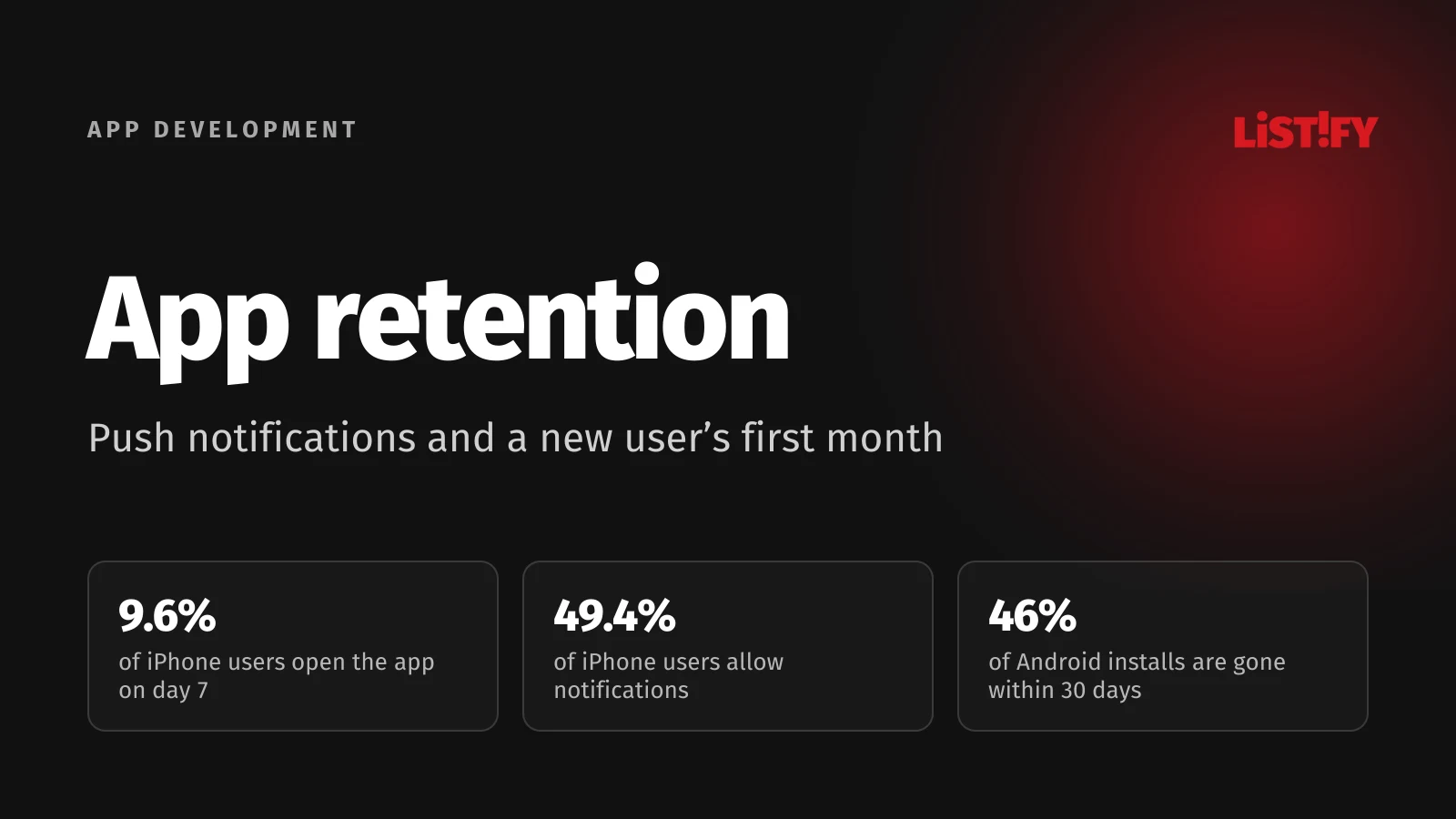
Installing an app takes a few seconds. So does deleting it. Yet every install costs you something: ad spend, a nudge from your store staff, a discount to get people over the line. When nobody opens the app again a week later, both the build budget and the marketing budget go to waste.
Most of the reasons people leave are within your control, and they come down to a handful of product decisions: what people see on first launch, when they’re asked about notifications, which messages you send and how you’ll know whether any of it works.
01The short answer: what decides whether your app stays on the phone
| When | What to do | Why |
|---|---|---|
| First launch | Show the app’s value within a minute, put off sign-up and skip any question you don’t need yet. | Most Android uninstalls happen on day one. |
| After the first successful action | Explain which notifications people will get, then show the system prompt. | On iPhone, the system prompt appears only once. If people decline, you don’t get another chance inside the app. |
| First week | Send only messages tied to what the person did in the app. Marketing only with consent. | Messages triggered by behavior get opened more than three times as often as blasts. |
| Every week | Track day 1, 7 and 30 retention by cohort, plus your notification opt-in rate. | Without measurement you can’t tell whether a change helped or drove people away. |
02How many users come back: the numbers
Retention is the share of people who open your app on a given day after installing it. The standard checkpoints are day 1, day 7 and day 30. The most detailed public data comes from the measurement company AppsFlyer and its Performance Benchmarks tool, broken down by quarter, app category and platform.
In Q1 2026, the typical category saw 22.5% of iPhone users and 18.2% of Android users come back the day after install. By day 7 it was 9.6% and 6.9%, and by day 30, 4.4% and 3.3%. Put differently: out of 1,000 people who download your app, 33 to 44 open it on day 30.
- Day 1Android: 18.2%iOS: 22.5%
- Day 7Android: 6.9%iOS: 9.6%
- Day 30Android: 3.3%iOS: 4.4%
Median across 21 categories, which we calculated from AppsFlyer Performance Benchmarks. For each category, AppsFlyer reports the average per app among its customers, excluding the top and bottom 10% of apps. Day 30 figures vary a lot from quarter to quarter.
The type of app matters a great deal. News, family and sports apps hold on to people far better, while photo apps and AI tools are often used once and forgotten. Benchmark your app against its own category, not the overall average.
- News & magazines18.7%
- Family & relationships16.3%
- Sports13.7%
- Business11.9%
- Finance10.1%
- Shopping8.7%
- Health & fitness8.7%
- Travel7.5%
- Gaming7.4%
- Food & drink6.1%
- Photo & video3.5%
- Generative AI2.9%
Global, iOS and Android combined, installs in Q1 2026. Source: AppsFlyer Performance Benchmarks, average per app excluding the top and bottom 10%. 12 of 21 categories shown.
How many people delete the app outright
Retention tells you who comes back. How many people actually uninstall can only be measured reliably on Android, since uninstall tracking on iOS has been limited since iOS 15. According to AppsFlyer’s uninstall report, 46.1% of Android installs were removed within 30 days in 2024, on average per app. The sample covered 2,200 apps and 1.3 billion installs. Most uninstalls happen on the very first day.
You’ll often see the claim that “77% of users delete an app within three days”. It comes from 2015 data from Quettra, covered Android only and counted lost daily active users, not uninstalls. Andrew Chen, who published the analysis, pointed out explicitly that a “lost” user hasn’t necessarily deleted anything. Best keep it out of your board deck.
03Why people delete apps
There’s no large, recent survey on why people uninstall apps. The one most often quoted is a CleverTap survey of more than 2,000 app users, published in January 2019. It doesn’t say which countries respondents came from, but the ranking is still instructive.
- No longer use the app39%
- Too many ads and notifications28%
- Not enough storage20%
- Technical issues or confusing to use11%
CleverTap survey of more than 2,000 app users, published January 3, 2019. The source doesn’t name respondents’ countries.
So the top reason is the most mundane one: people simply stopped using the app. Most of the rest is in your hands: too many messages, too many ads, and an app that takes up more space than it’s worth.
AppsFlyer’s report adds another cause that companies tend to overlook: the gap between what the ad promised and what people find in the app. According to the same report, users who found an app on their own uninstall it less often than users brought in by paid campaigns.
04First launch: you have about a minute
Since most deletions happen on day one, the first launch is the most important screen in your app. At that point people know nothing beyond what the store listing or the ad told them. Your job is to get them to the first genuinely useful thing as fast as possible.
- Put off sign-up where you can. Let people browse the catalog, run the calculator or open the map first. Ask for an account when they actually need one, for example at checkout.
- Keep the intro to a bare minimum. Hardly anyone reads three screens of generic slogans. One sentence and a live demo of a real feature works better.
- Don’t ask for every permission at once. Location, camera and notifications only make sense next to the feature that needs them.
- Offer Sign in with Apple and Google. Typing a password on a phone is a chore, and one tap is faster. If your iOS app offers Google or another social login, Apple’s guideline 4.8 requires an equivalent privacy-friendly option such as Sign in with Apple.
- Watch your load time. An app that takes ages to open or crashes the first time rarely gets a second chance.
Data from beyond mobile shows how much the start matters. Analytics company Amplitude found that 69% of products in the top tier for bringing new users back on day 7 were also in the top tier after three months. For subscription apps it’s even starker: according to RevenueCat, 55.4% of all cancellations of 3-day free trials happen on the day the trial starts. If people don’t see why they should pay on the first day, most never will.
We go deeper into designing those first steps in our article on web app UX and why users leave.
05When and how to ask for notification permission
Without permission, you can’t send a single notification. That has long been true on iPhone, and on Android it has applied since version 13: according to Google’s documentation, a newly installed app has notifications off by default and must ask for them. In August 2026, 73.8% of mobile page views from Android devices in Europe came from version 13 or newer (StatCounter, which counts web page views, not phones). In practice, the rule covers the vast majority of your users.
That share is your push notification opt-in rate. In Airship’s benchmark for 2024, the median app had notifications enabled for 49.4% of iPhone users and 59.5% of Android users. On Android that’s 12 points lower than the year before, and Airship attributes the drop to the new permission requirement.
- Android2023: 71.3%2024: 59.5%
- iOS2023: 49.1%2024: 49.4%
Source: Airship, Mobile App Push Notification Benchmarks 2025, apps of Airship customers with at least 1,000 active users, average of monthly figures over the year.
Explain first, then ask
On iPhone you get exactly one shot. Apple’s documentation explains that the system shows the prompt only the first time you request permission and remembers the answer. Once someone taps “Don’t Allow”, only they can change it, in Settings › Notifications › [your app]. You can link them straight to your app’s settings, but you can’t show the system prompt again. That’s why a custom screen first works well: say exactly what you’ll send, and trigger the system prompt only after the person agrees.
Apple and Google both advise against asking on first launch. Apple’s example is a to-do app that asks only after the user schedules their first task. Google recommends letting people get to know the app first and asking when notifications clearly make sense: after they order food, follow an account or tap a bell icon.
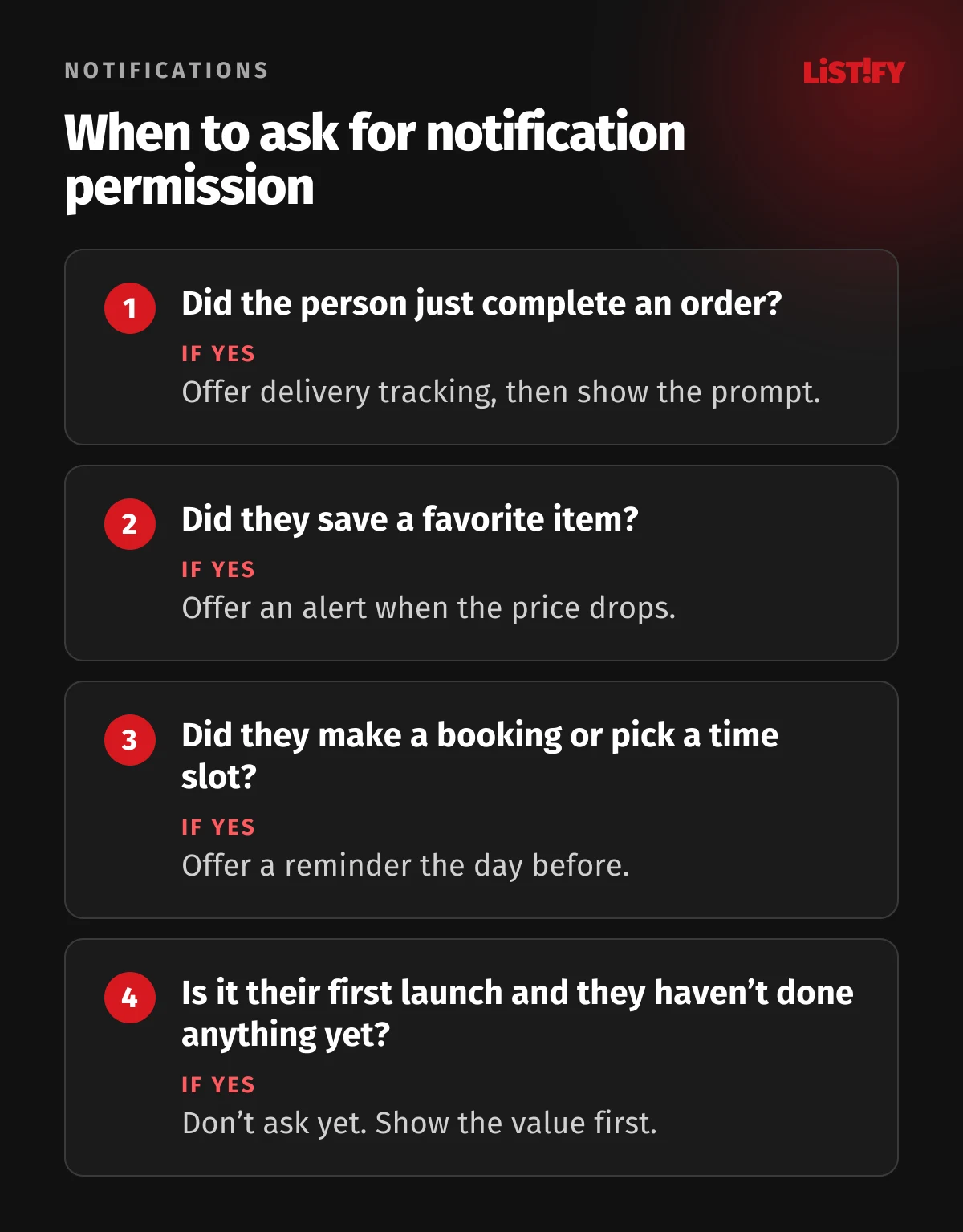
On iPhone you can postpone the prompt with provisional authorization. Notifications then arrive quietly in Notification Center only, with no sound, banner or Lock Screen alert, and each one carries buttons that let people keep your notifications or turn them off. It suits apps whose messages prove their value once people read them.
06Push notification best practices: what to send and how often
Split your messages into two groups. Transactional notifications respond to something the person did or is waiting for: the order has shipped, the appointment is tomorrow, a payment came in. Marketing notifications promote products, discounts or news. People usually want the first kind. For the second you need explicit consent under Apple’s rules, and in the EU it’s safest to assume the law requires it too.
The difference in performance is large. Batch compared its clients’ campaigns between July 2024 and July 2025: notifications triggered by user behavior or context were opened 14.4% of the time, untargeted blasts only 4.19%.
- Triggered by behavior or context14.40%
- Untargeted blast4.19%
Source: Batch push notification benchmark, July 2024 to July 2025, mostly European clients. Average open rate.
How much is too much
There’s no universal number. For reference: according to Airship, the median app sent each user 6.4 notifications a month on Android and 8.3 on iPhone in 2024, or roughly one to two a week. The busiest tenth of apps sent more than 150 a month.
An older Localytics survey of 1,000 US smartphone users from 2017 found that 90% would tolerate one push a week without turning notifications off. Asked how many weekly pushes would make them disable notifications, 37% picked two to five. That’s what people say in a survey rather than what they do, but the direction is clear: start carefully and only increase frequency where the data shows interest.
- Send at sensible times. Use the user’s time zone, not your server’s. Nobody thanks you for marketing at 2 a.m.
- One thing, one message. Apple warns explicitly that repeated notifications about the same thing clutter Notification Center, and people may then turn off all of your app’s notifications.
- Use channels on Android. Put each type of message (orders, news, offers) in its own channel. People can then mute offers without silencing the whole app.
- Build notification settings into the app. Toggles per message type save people from switching everything off. Apple requires an in-app way to opt out of marketing messages.
- Don’t abuse urgency. Time Sensitive notifications break through Focus on iPhone. Apple’s guidelines reserve them for things happening now or within the hour, and forbid them for marketing.
07Apple’s and Google’s rules
Apple covers notifications directly in its store rules. Guideline 4.5.4 of the App Store Review Guidelines says push notifications must not be required for the app to work, shouldn’t carry sensitive personal information, and may be used for promotions or direct marketing only if customers have explicitly opted in through consent language in your app’s UI and can opt out within the app. Abuse can cost you access to the service.
Guideline 2.5.18 keeps display ads out of notifications, and 4.5.3 bans using push notifications for spam. Google Play has a general spam policy that disallows apps sending unsolicited messages, and its ads policy says ads must not impersonate system notifications. We didn’t find an explicit Google Play rule on consent for marketing notifications like Apple’s. On Android, though, data protection law still applies, which brings us to the next section.
08What the law says: consent, GDPR and ePrivacy
Rules differ by country, but in the EU it’s sensible to treat a marketing notification like a marketing email. EU ePrivacy rules require prior consent for electronic direct marketing, with an exception for existing customers and similar products, and national laws implement them. None of them was written with push notifications in mind, so regulators decide case by case.
One concrete example comes from the Czech Republic. In an order dated November 15, 2024, the Czech data protection authority looked at a bank that kept sending marketing emails and marketing push notifications to a client who had opted out. The authority found that push notifications delivered through Apple’s and Google’s servers count as electronic mail under Czech law, and that these ones, given their content, were commercial communications. It fined the bank CZK 50,000 (about €2,050) for the emails and notifications together. The bank argued the client could have switched notifications off on their phone. That didn’t get it off the hook.
What this means in practice:
- Allowing notifications on the phone is not marketing consent. The system prompt covers the technical side. Ask for marketing consent separately, ideally on a screen of your own.
- Honor withdrawn consent everywhere. When someone opts out of marketing, make sure it applies to every channel, push notifications included, not just your newsletter.
- Transactional messages are a different category. Order status or a booking reminder isn’t marketing, as long as you don’t slip an offer into it.
- SDKs have their own rules. Under the ePrivacy rules, storing or reading information on a user’s device needs consent unless it’s strictly necessary. The European Data Protection Board’s Guidelines 2/2023 make clear this can also cover tracking tools inside mobile apps.
People are wary of sharing data, too. According to Eurostat, 55.2% of people aged 16 to 74 in the EU refused to allow their personal data to be used for advertising in 2025, and 52.7% restricted or refused access to their location. An app that asks for everything right after install hits that wall fast.
Have a lawyer check your consent setup, especially if the app handles sensitive data. For the security side of things, see our article on data security in custom software development.
09How to measure retention
Total downloads don’t tell you much about whether an app is working. What matters is how many people from each group of new users keep coming back. That group is called a cohort: for example, everyone who installed the app in the week of September 7. For each cohort, track what percentage opened the app on day 1, 7 and 30.
- Turn on analytics from the first release. Free tools such as Firebase Analytics are enough to start, as long as you collect consent where the ePrivacy rules above require it. App Store Connect and Google Play Console also offer basic reports.
- Define what an “active” user means for you. For a store, an app open isn’t enough; what matters is product views or purchases. For a booking app, a completed booking.
- Track your notification opt-in rate. If it drops after you change the wording or timing of your ask, you know the new version is worse.
- Compare cohorts. If the cohort after a release holds up better than the one before it, the change worked. If it’s worse, you know where to look.
- Test bigger changes. Show half of new users the old flow and half the new one. Otherwise you can’t tell whether an improvement came from your change or from, say, the season.
Watch out for one common misreading. Studies showing that users with notifications enabled stick around longer are comparing two different groups. The people who opt in tend to be the ones interested in the app, and the people who receive notifications are the ones using it. The well-known claim that push notifications “triple retention” comes from a 2016 Airship comparison, not from an experiment with a control group. Another study from the same year, by Leanplum, found a gap of about 1.5 percentage points on day 30, around 20% in relative terms. The only way to learn what your notifications really add is to randomly hold them back from a small share of users.
10Tech stack and costs
Delivering the notification itself is cheap. Messages to iPhones go through Apple’s service (APNs), and to Android through Google’s Firebase Cloud Messaging. Neither charges per message. APNs only requires the Apple Developer Program membership you need anyway to publish on the App Store ($99 a year). Firebase has a default quota of 600,000 messages per minute per project, which Google says covers more than 99% of developers.
React Native and Expo apps often use Expo’s push service, which sends to both platforms through one API. It’s free too, with a limit of 600 notifications per second per project. If you want marketing features (segments, scheduling, A/B tests, reporting), you’ll look at platforms such as OneSignal, Airship or Braze.
| Tool | Price (September 28, 2026) | Note |
|---|---|---|
| Firebase Cloud Messaging | free | default quota of 600,000 messages per minute per project |
| Expo push service | free | 600 notifications per second per project, up to 100 messages per request |
| OneSignal Free | free | up to 1,000 monthly active users per organization (new customers from September 1, 2026, existing ones from October 1, 2026) |
| OneSignal Growth | from $19 a month + $0.012 per monthly active user | $139 a month at 10,000 monthly active users (our calculation; OneSignal counts every active user, whether they allowed push or not) |
| Airship, Braze | not published | price on request |
The bigger cost is the work: designing message types, the consent screen and in-app settings, wiring notifications to orders or bookings, and measurement. If you’re still planning the app, budget for it now. Retrofitting consent and channels into a finished app costs more. For keeping the app healthy after launch, see our guide to mobile app updates and versioning.
11A plan for a new user’s first month
Here’s what that can look like in practice. It’s an example for a store or service app. Adjust the steps and timing to what your app does and what your data shows.
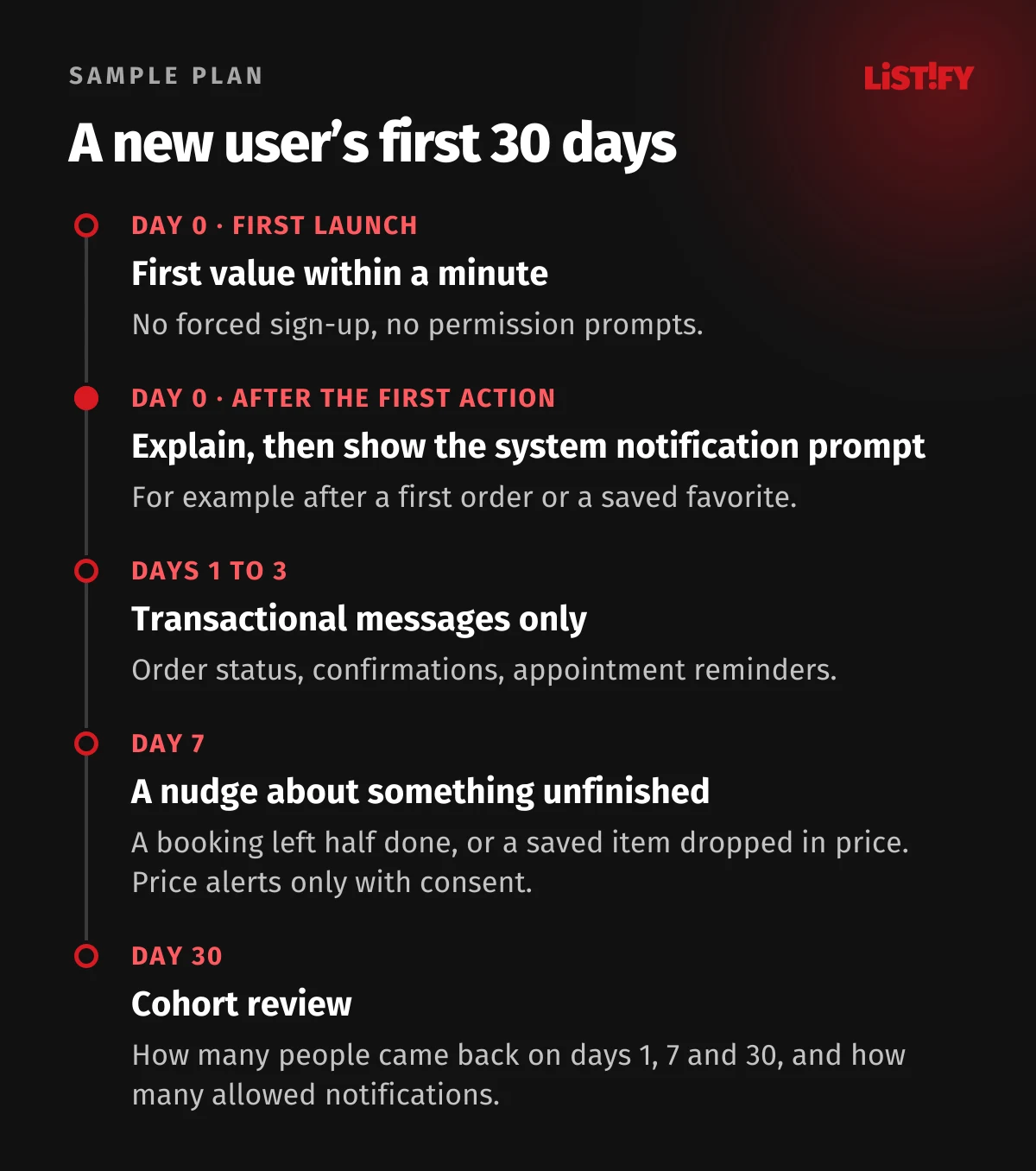
Notice there’s no “We miss you!” message anywhere in the plan. A reminder with nothing in it rarely works. A message tied to something specific works far better: they left a booking half-finished, or an item they saved dropped in price and they turned on price alerts for it.
12The most common mistakes
- Asking for notifications on first launch. People don’t know yet what to expect, and on iPhone a “no” can only be undone by the user in Settings.
- One consent for everything. Allowing notifications on the phone isn’t consent to marketing. Ask for it separately.
- The same message for everyone. Untargeted blasts get opened only about a third as often as behavior-based messages.
- Counting downloads only. Without cohorts and retention you can’t tell whether the app is growing or just burning ad money.
- Ads that promise something the app doesn’t deliver. Paid users then uninstall more often and you end up paying twice.
- Messages in the middle of the night. Send in the user’s time zone, not your server’s.
- No notification settings in the app. People who only want to mute offers will mute everything.
13FAQ
What is a good app retention rate?
It depends on the category. Based on AppsFlyer data for Q1 2026 (our median across 21 categories), 9.6% of iPhone users and 6.9% of Android users came back on day 7. Shopping apps came in at 8.7% for both platforms combined. Benchmark against your own category and, above all, against your previous cohorts.
When should I ask users for push notification permission?
When it makes sense in context, typically after a first order, booking or saved item. Explain on your own screen what you’ll send, then show the system prompt. On iPhone it appears only once.
How many push notifications a week is too many?
There’s no fixed number. According to Airship, the median app sent roughly one to two a week in 2024. Send transactional messages whenever something happens, marketing sparingly and only to people who opted in. Track how many users turn notifications off.
Do I need consent for marketing push notifications?
Yes. Apple requires it under guideline 4.5.4 of the App Store rules, and in the EU marketing notifications can fall under the rules for electronic direct marketing. The Czech data protection authority treated them that way in 2024. Allowing notifications on the phone doesn’t count as marketing consent.
How much does sending push notifications cost?
Delivery through Firebase Cloud Messaging or Expo’s push service is free. Marketing platforms range from free plans to custom pricing, for example OneSignal Growth at $139 a month for 10,000 monthly active users (our calculation from the public price list). The main cost is design and development.
Why do people uninstall apps?
In a 2019 CleverTap survey, 39% said they no longer used the app, 28% were put off by too many ads and notifications and 20% needed the storage. Most uninstalls happen on day one, which is why the first launch matters so much.
14Retention starts on day one
Apps people keep coming back to get the start right: a first launch that shows the value fast, a notification ask at the right moment and messages that follow what the person actually does in the app. Add cohort tracking, without which everything else is guesswork.
If you’re planning an app, take a look at how we work and what it costs. If you’re choosing between native and cross-platform, our comparison of the two approaches will help, and for ways to earn money from an app, see our guide to app monetization models.
15Sources
- AppsFlyer: Performance Benchmarks (retention by category and country)
- AppsFlyer: App Uninstall Benchmarks Report, 2025 edition
- Airship: Mobile App Push Notification Benchmarks 2025 (PDF)
- Batch: push notification and mobile CRM benchmark
- CleverTap: why users uninstall apps (survey)
- Amplitude: the 7% retention rule
- RevenueCat: subscription app trends and benchmarks 2026
- Andrew Chen: Quettra data on losing mobile users (2015)
- MarTech: Leanplum data on personalized push and retention (2016)
- Localytics: how consumers perceive push notifications (2018, Wayback Machine)
- Apple: Human Interface Guidelines, notifications
- Apple: App Store Review Guidelines
- Apple: asking permission to use notifications
- Apple: Human Interface Guidelines, managing notifications
- Android Developers: notification runtime permission
- Android Developers: notification channels
- Google Play: spam policy
- Firebase: pricing
- Firebase Cloud Messaging: throttling and quotas
- Expo: push notifications FAQ
- OneSignal: pricing
- Czech data protection authority: order UOOU-05106/23-18 (PDF, Czech)
- EDPB: Guidelines 2/2023 on the technical scope of Art. 5(3) of the ePrivacy Directive
- Eurostat: individuals managing access to personal data (isoc_cisci_prv20)
- StatCounter: Android version market share in Europe