Mobile app updates after launch: versioning, release strategy and the 2026 Apple and Google deadlines
A mobile app that nobody updates after launch will eventually become impossible to update and hard for new users to find in the store. Apple and Google raise their minimum requirements every year, each new version of iOS and Android changes how phones behave, and your users all update at a different pace. Here is what 2026 demands, how to number your versions, how to release in stages, what to monitor after a release and when forcing an update actually makes sense.
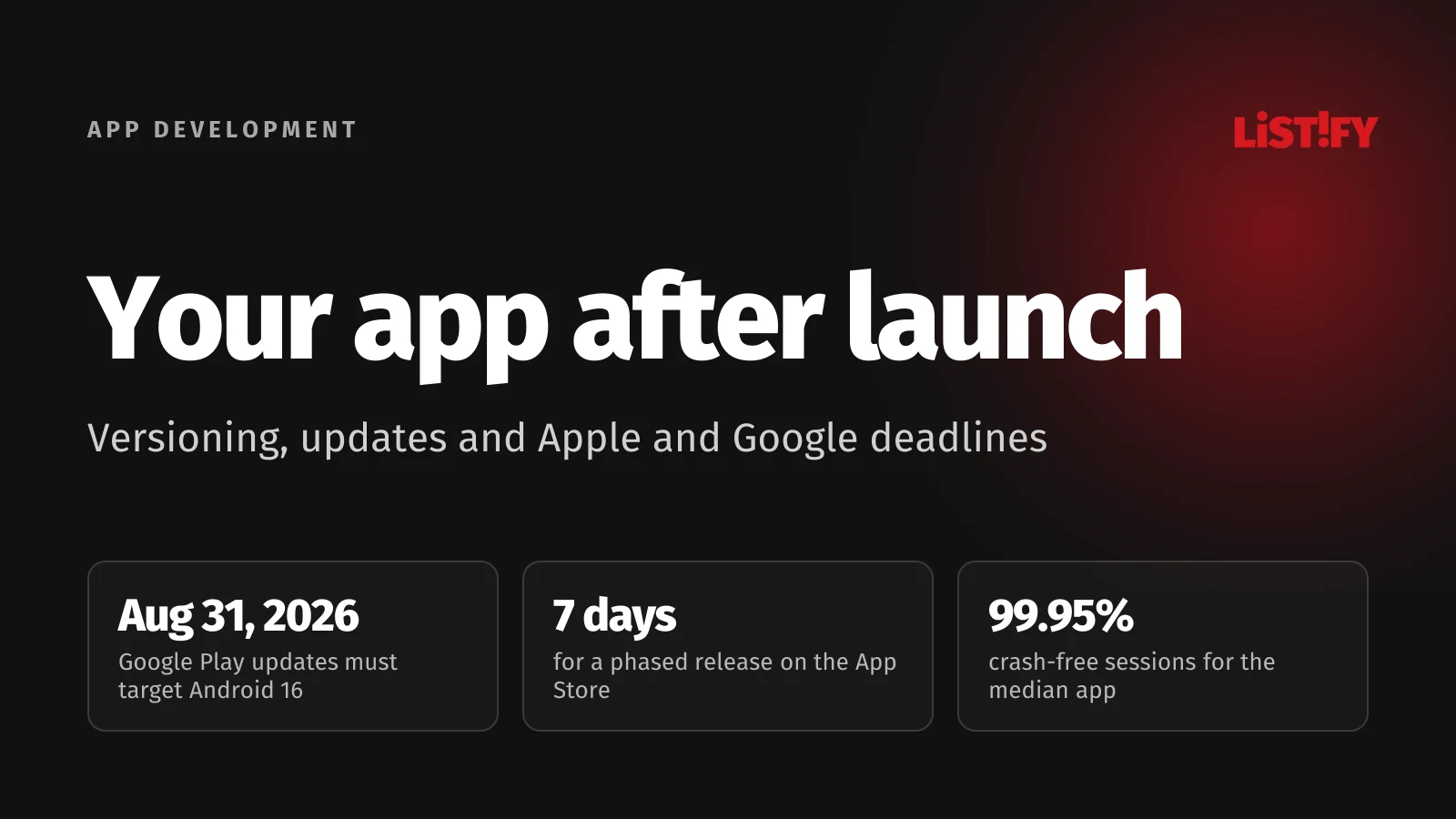
Launch day feels like the end of the project, but for the app it’s day one. A year from now it will run on different phones with a different operating system, the stores will expect newer build tools, and somewhere in the code a bug will surface that no tester ever caught.
Teams that ignore this usually find out at the worst possible moment: they need to ship an urgent fix and the store rejects the build because the app no longer meets this year’s requirements. Below you’ll find Apple’s and Google’s 2026 deadlines, data on which OS versions people actually run, and a release process that keeps updates calm and predictable.
01The short answer: what an app needs after launch
| What | Why | How often |
|---|---|---|
| Store compliance updates | Apple requires a new Xcode, Google a new target Android version. Without them you can’t ship a new release. | Once a year: Apple in spring, Google by August 31 |
| Support for new iOS and Android versions | New OS releases change permissions, UI and background behavior. | Every year, when a new major OS version ships |
| Bug fixes | Crashes and freezes hurt your rating, and Google may show a crashing app less often. | Continuously, based on crash monitoring |
| Library and security updates | Outdated dependencies stop working and may contain known vulnerabilities. | Several times a year |
| New features | An app that stands still loses users and the reason to stay on their phone. | Per your roadmap, often every few weeks |
For a sense of how the most successful apps do it: according to 42matters’ live statistics from September 27, 2026, 47% of the 1,000 most-rated apps on the App Store and 39% on Google Play ship a new version at least once a week. At least once a year, 98% and 97% of them respectively release an update.
- At least weeklyGoogle Play: 39%App Store: 47%
- At least monthlyGoogle Play: 75%App Store: 78%
- At least yearlyGoogle Play: 97%App Store: 98%
The 1,000 apps with the most ratings in each store, as of September 27, 2026. Source: 42matters (Google Play, App Store).
A smaller business app doesn’t need to ship that often. But even an app with no active feature work needs several updates a year just to stay in the stores and keep working on new phones.
02What happens to an app nobody updates
Both stores have rules that gradually push outdated apps out. It isn’t arbitrary: each new OS version brings stronger privacy and security protections, and the stores want apps to use them.
Google Play: a new target Android version every August 31
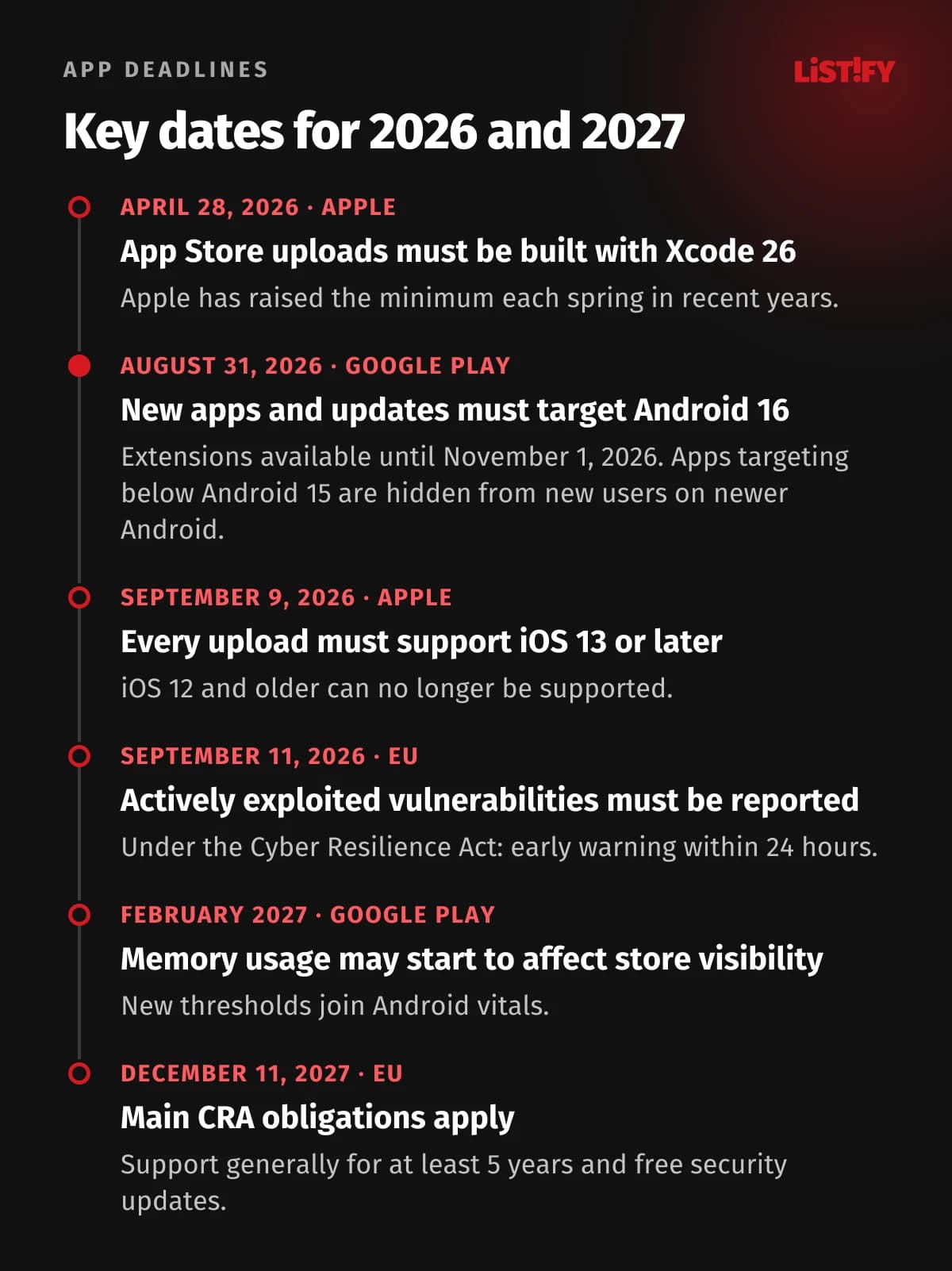
Since August 31, 2026, new apps and app updates for phones and tablets must target Android 16 (API level 36). If you need more time, you can request an extension to November 1, 2026. The bar moves every year: API level 33 in 2023, 34 in 2024 and 35 in 2025 (Google Play).
Existing apps get a lower bar, but it rises too. An app that doesn’t target at least Android 15 (API 35) stays available to people who already installed it, but new users whose phones run a newer Android version than the one it targets won’t be able to find it. Google Play tells them the app was made for an older version of Android. Downloads quietly drop and nobody on your team gets an alert.
Raising the target version isn’t a one-line change. Each new API level changes how the app behaves: which permissions it has to request, what it can do in the background and how notifications work. Raising it means retesting the app.
Apple: a new Xcode every spring and a minimum of iOS 13
Since April 28, 2026, App Store Connect only accepts apps built with Xcode 26 using the iOS 26 SDK. Earlier requirements took effect on April 25, 2023 and April 29, 2024, so the rhythm mirrors Google’s, just in spring. And since September 9, 2026, all apps and updates uploaded to App Store Connect must support iOS 13 or later as their minimum version (the deployment target) (Apple).
Apple also removes abandoned apps on an ongoing basis. This applies to apps that haven’t been updated in three years and have been downloaded rarely or not at all over a rolling 12 months. The developer gets an email and 90 days to submit an update; otherwise the app is removed from the App Store until a new version is approved. Apps that crash on launch are removed immediately. Existing users can keep using the app (Apple).
03Which iOS and Android versions people actually use
Before deciding which OS versions your app will support, look at what people actually run. The best public source worldwide is StatCounter, which measures website visits. It doesn’t count devices, but it’s good enough to gauge the proportions.
In August 2026, 67.5% of mobile visits worldwide came from Android and 32.5% from iOS (StatCounter). The more interesting part is how differently the two platforms update. Of visits from iPhones, 75.2% came from some version of iOS 26. Android 16 accounted for just 26.0% of Android visits (the newer Android 17 was still below 1%), and more than a quarter (27.9%) came from Android 12 or older.
- Android 1626.0%
- Android 1517.2%
- Android 1413.0%
- Android 1314.9%
- Android 12 and older27.9%
Share of website visits from Android phones. Android 17 was below 1%. Source: StatCounter, downloadable data for August 2026 (worldwide).
Apple publishes its own figures. As of June 7, 2026, iOS 26 was installed on 86% of iPhones introduced in the last four years and on 79% of all iPhones (Apple). Google doesn’t publish a comparable public breakdown of Android versions; developers only see it for their own app in the Google Play Console.
What this means in practice: on iOS, supporting the current and previous major version is usually enough. On Android, your app has to handle four or five OS versions and a long list of device makers. If you build with React Native and Expo, the tooling sets part of the floor for you: the current Expo SDK 57 supports iOS 16.4 and later and Android 7 and later (Expo). We compared the two approaches in Native vs. cross-platform app development.
04Version numbers: what 2.4.1 means and why there are two numbers
Every app release actually carries two numbers. The version number is what users see in the store, for example 2.4.1. The build number is internal and must increase with every upload. On iOS they’re called CFBundleShortVersionString and CFBundleVersion; on Android, versionName and versionCode.
Android is strict about the build number: Google Play won’t accept a versionCode you’ve used before, and the system won’t install a lower versionCode over a higher one. The maximum value Google Play allows is 2,100,000,000 (Android Developers). If you generate build numbers from a timestamp, make sure the format fits under that limit.
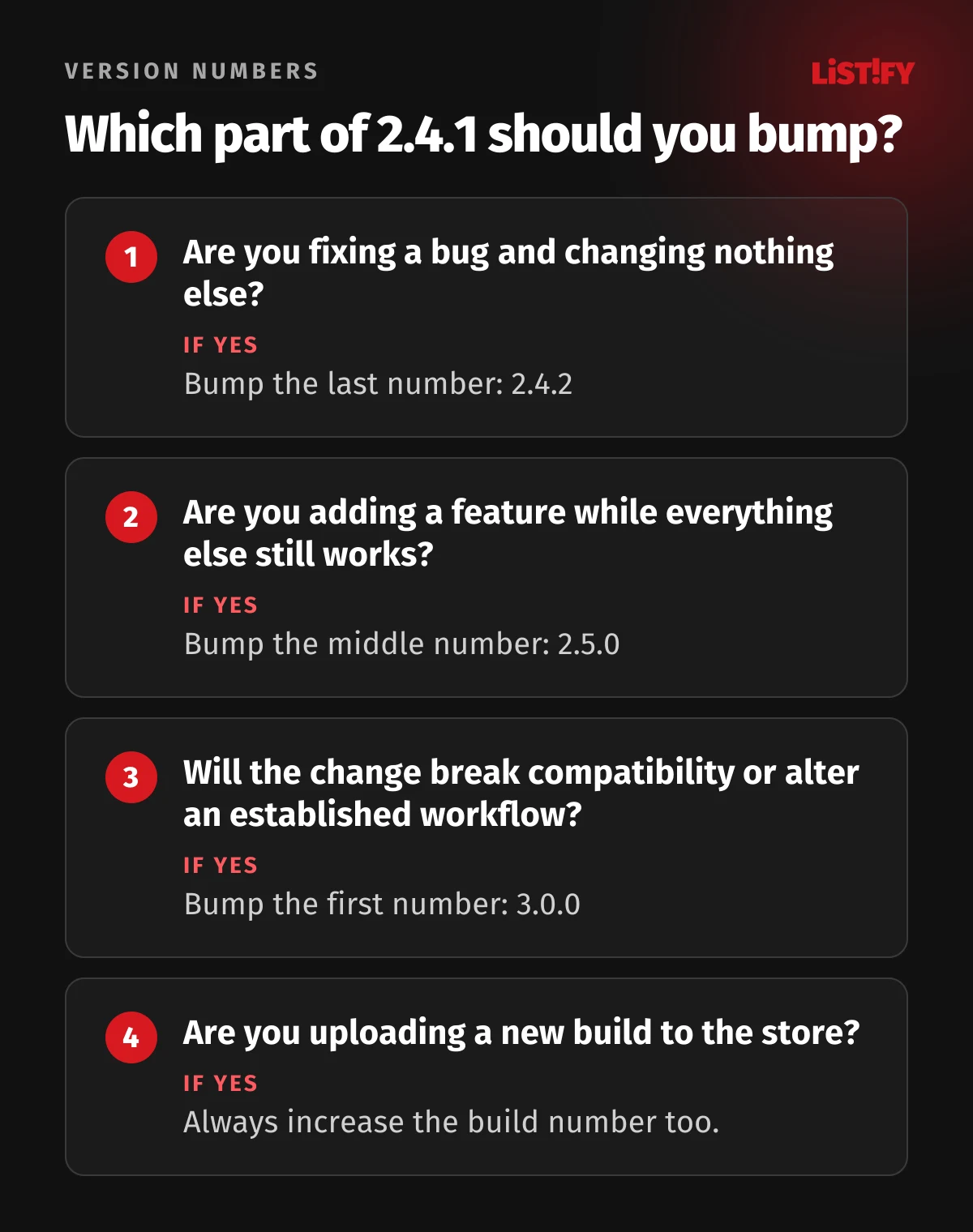
For the version number, most teams use semantic versioning (semver) in the form MAJOR.MINOR.PATCH. The rules on semver.org were written for libraries and APIs, but most app versioning best practices boil down to a simplified form: the last number for fixes, the middle one for new features, the first for major changes.
Every version also gets release notes. On the App Store, “What’s New” allows up to 4,000 characters and isn’t available for the first version; on Google Play, you get 500 characters per language and the notes can’t be promotional. Apple also offers promotional text of up to 170 characters that you can change at any time without a new version (Apple, Google Play). Write them for people: what got better and what got fixed, not “bug fixes and improvements” every single time.
05Testing before release: TestFlight and Google Play testing tracks
Every version should go through real people on real phones before everyone gets it. Both stores offer free tools for this.
- TestFlight (Apple): up to 100 internal testers from your team and up to 10,000 external testers you invite by email or public link. A build stays available for 90 days. The first build for external testers must pass App Review; subsequent builds may not require a full review (Apple).
- Internal testing (Google Play): up to 100 testers, and a new build reaches them within minutes (Google Play).
- Closed and open testing (Google Play): closed tests for selected people by email list, open tests for anyone who joins. Tester feedback doesn’t affect your app’s public rating.
Watch out for one trap when setting up your account. Developers with a personal Google Play account created after November 13, 2023 must run a closed test with at least 12 testers opted in continuously for 14 days before they can publish. It used to be 20 testers, so older guides are out of date. Organization accounts are not subject to this requirement (Google Play). Register a business app under an organization account and you save two weeks and future ownership headaches.
Think about account ownership from day one. If only your vendor holds the developer accounts and credentials, every update depends on them. If that has already happened, our guide on taking back your website from an unresponsive developer covers steps that apply to apps as well.
06Staged rollouts: how not to break the app for everyone at once
Even thorough testing won’t catch everything. That’s why a new version should roll out gradually rather than to everyone at once. If something goes wrong, only a small share of people is affected and you can stop the rollout.
App Store: seven days, from 1% to everyone
Apple’s phased release spreads an update over seven days. On day one, 1% of users with automatic updates get it; on day seven, everyone does. You can pause the rollout for up to 30 days in total, or release to everyone at any time (Apple).
- Day 11%
- Day 22%
- Day 35%
- Day 410%
- Day 520%
- Day 650%
- Day 7100%
Share of users with automatic updates who receive the new version during a phased release. Anyone can download it manually at any time. Source: Apple.
One detail often gets missed: phasing only applies to automatic updates. Anyone who taps “Update” in the App Store gets the new version right away. A phased release lowers the risk, but it doesn’t guarantee that only 1% of people will see a bad build.
Google Play: you choose the percentages
On Google Play, you pick the percentage of users yourself and have to raise it manually; it doesn’t increase automatically. You can also start with a limited set of countries. If something breaks, you can halt the rollout, but you can’t roll back: users who already received the new version stay on it. The fix is a new release with a higher build number (Google Play).
Spotify shows what this looks like at scale. It ships a new version of its app every week, first to a small percentage of users and the next day to everyone. When a severe issue turns up, it halts the rollout and prepares a fix. With this process, more than 95% of releases reach all users; the rest are canceled and the changes wait for the next week (Spotify Engineering).
How long review takes
Apple says that on average, 90% of submissions are reviewed in less than 24 hours, and you can request an expedited review to fix a critical bug (Apple). Google processes updates as soon as possible, but for certain accounts and apps review can take up to seven days or longer in exceptional cases. Managed publishing lets you decide exactly when approved changes go live (Google Play). Build in a buffer for any release tied to a date, such as a campaign or a pricing change.
07Crashes and stability: what to monitor after a release
Once a version ships, the most important part begins: measuring whether the app behaves in the wild the way it did in testing. Tools like Sentry or Firebase Crashlytics capture every crash along with the device, OS version and the code path that led to it.
Google monitors app stability itself and uses fixed thresholds. If more than 1.09% of daily active users experience a crash on average across devices, or more than 8% on a single phone model, Google may make the app less discoverable and show a warning on its store listing. For freezes (ANRs), the threshold is 0.47%. Google looks at the last 28 days, and starting in February 2027, memory usage will affect visibility too (Android Developers).
How do other apps compare? According to Instabug (now Luciq), which analyzed apps using its own platform in 2024, the median app had 99.95% crash-free sessions. The bottom quarter of apps scored 99.77% or less, the top quarter 99.99% or better (Luciq). A gap of a few tenths of a percentage point sounds harmless, but in actual crashes it’s large: roughly 23 versus 1 crash per 10,000 sessions.
- Weaker apps (25th percentile)23
- Median5
- Stronger apps (75th percentile)1
Crash-free session rates (99.77%, 99.95% and 99.99%) converted to crashes per 10,000 sessions. Data from apps on the Instabug platform in 2024; the source does not state the number of apps. Source: Luciq.
Stability shows up in your ratings. Back in 2019, Google reported that 42% of users who leave a 1-star review mention stability or bugs. The same post noted that when developers reply to a review, users raise their rating by 0.7 stars on average (Android Developers Blog). Replying to reviews after every release pays off.
Keep in mind that crashes don’t only come from your own releases. In May and July 2020, a server-side change at Facebook crashed iOS apps that used its SDK, including Spotify and Pinterest (GitHub). Monitor crashes between releases too, not just in the days after one.
08Getting users to update, and when to force it
Publishing a new version isn’t enough; it has to reach people. On iPhone and iPad, automatic app updates are on by default, but users can turn them off and update manually (Apple). There’s no reliable public data on how quickly users adopt new app versions, and Apple and Google don’t publish any. What is clear is that some users will stay on old versions for a long time.
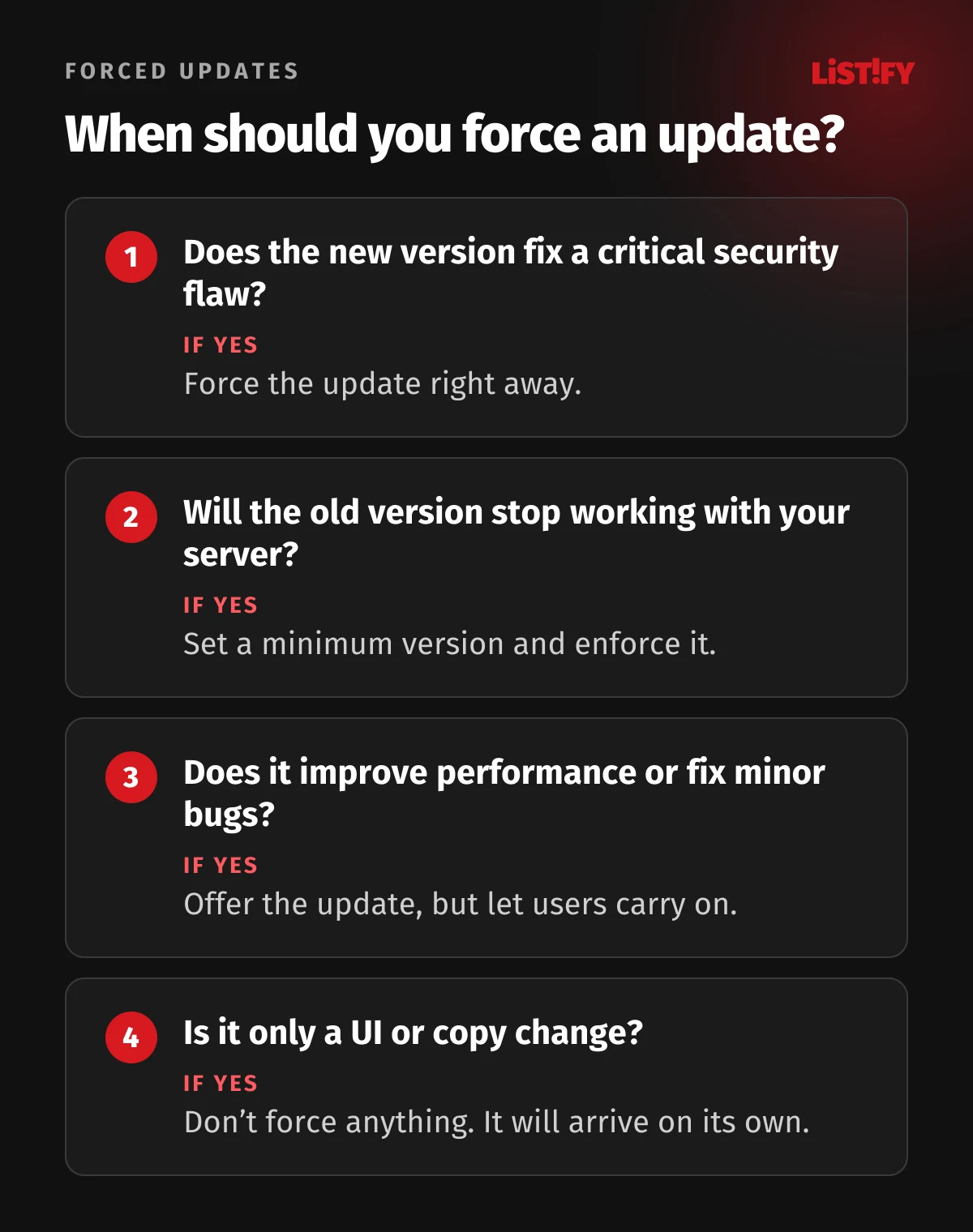
Your app and your backend have to account for that. When you change a server API, older app versions must keep working for as long as people use them. Force an update only when an old version can no longer work with your backend or leaves users exposed to a serious security flaw.
- Android: Google’s in-app updates API comes in two forms. A flexible update downloads in the background while the user keeps working. An immediate update takes over the screen and the user can’t continue without updating. You can assign each release a priority from 0 to 5 through the Google Play Developer API (Android Developers).
- Google Play Console: can also prompt users on an outdated or broken version to update, without any code changes, as long as the app uses Play App Signing and is published as an Android App Bundle (Google Play).
- iOS: Apple has no equivalent API. The usual approach is for the app to fetch a minimum supported version from your server at launch and, if it’s running an older one, show a prompt that links to the App Store.
Use forced updates sparingly. People who see one after every minor tweak start treating it as an obstacle. Google’s own guidance is to request nothing for minor UI improvements, offer a flexible update for performance improvements and reserve immediate updates for critical security fixes.
09Updates without store review: OTA and feature flags
With React Native, some changes can go straight to users’ phones without a new store review. These are over-the-air (OTA) updates, and in the Expo ecosystem EAS Update handles them. It can replace JavaScript, styles and images. It can’t ship new native code, permission changes or an Expo SDK upgrade; those need a new binary (Expo).
Apple allows this only within limits. Section 3.3.1(B) of the Apple Developer Program License Agreement lets apps download interpreted code as long as it doesn’t change the app’s primary purpose, doesn’t bypass OS security features and doesn’t create a storefront for other apps. App Review Guideline 2.5.2 forbids downloading code that introduces or changes features or functionality (Apple, App Review Guidelines). In practice, OTA is for quick bug and copy fixes. New features belong in a regular, reviewed release.
If you used Microsoft CodePush, note that App Center was retired on March 31, 2025. Microsoft released a standalone version of CodePush that you can host yourself (Microsoft Learn).
The second tool is feature flags. A new feature ships hidden inside the app and you switch it on from the server, even for just a portion of users. If something goes wrong, you turn it off without a new release. Meta described working this way in 2017, rolling out code releases independently from new features (Engineering at Meta). Flags do add complexity, so remove the ones you no longer need (martinfowler.com).
For smaller apps, Firebase Remote Config does the job. Since September 1, 2026, though, it’s no longer free without limits: fetches are free up to 100,000 per day per project, and beyond that, on the pay-as-you-go Blaze plan, you pay $0.06 per 10,000 requests (the free Spark plan simply stops at 100,000) (Firebase). Never put passwords or other secrets in remote config.
10What the law says about updates (if you sell in the EU)
If your app serves consumers in the European Union, whether they pay with money or with their personal data, EU law requires you to provide the updates needed to keep it in conformity. The obligation runs to your customers, whatever your contract with a development agency says.
Digital Content Directive (EU) 2019/770, Article 8(2)
The trader must inform consumers about updates, including security updates, needed to keep the digital content or service in conformity, and supply them. The period is either the one set in the contract or the one a consumer can reasonably expect; the directive sets no fixed number of years. It has applied since January 1, 2022 and also covers apps that consumers “pay for” with personal data (EUR-Lex).
Empowering Consumers Directive (EU) 2024/825
Member states must apply it from September 27, 2026. It requires traders to disclose the minimum period during which free software updates are provided, where the producer makes that information available. Concealing that an update will harm functionality, or presenting a feature update as necessary, are now unfair practices. Not every member state transposed it on time (Czechia, for example, had not passed its implementing law as of September 28, 2026), so check the rules in each market you sell to (EUR-Lex).
Cyber Resilience Act (Regulation (EU) 2024/2847)
A mobile app offered commercially, even for free, is a product with digital elements, and a company that markets an app built for it under its own name counts as the manufacturer. Since September 11, 2026, actively exploited vulnerabilities must be reported (early warning within 24 hours, notification within 72 hours). From December 11, 2027, manufacturers must set a support period of at least five years (shorter only if the app is expected to be used for less time) and provide free security updates during it, separately from feature updates where technically feasible (European Commission).
European Accessibility Act
Since June 28, 2025, it covers mobile apps for e-commerce and consumer banking, among others; microenterprises providing services are exempt. The exemption for old content only applies if it isn’t updated after that date, so every new release has to meet the accessibility requirements (EUR-Lex).
Have a lawyer assess the specific obligations for your app and markets. From a development standpoint, the takeaway is simple: an update plan and clear responsibility for it belong in the contract from the start. For more on protecting data in custom apps and systems, see Data security in custom software development.
11A mobile app maintenance plan: what to budget for every year
You’ll often read that app maintenance costs 15% to 20% of the original development cost per year. That figure is usually attributed to analyst firms, but we couldn’t trace it to any published study. It’s more reliable to build the budget from concrete items:
- Spring: move to the new Xcode. In recent years Apple has made it mandatory in late April; the 2027 requirement hasn’t been announced yet. Review libraries and upgrade the Expo SDK or native dependencies at the same time.
- Summer: raise the target Android version before August 31 and test the behavior changes the new API level brings.
- Before new iOS and Android versions ship: test the app on the OS betas and release fixes no later than the day the new system comes out.
- Continuously: crash and rating monitoring, review replies, security patches for dependencies and small fixes.
- Per your roadmap: new features, ideally on a steady cadence such as every two to four weeks, so fixes and features don’t pile up.
- Once a year: revisit the minimum supported OS versions using your own app’s analytics, renew developer memberships (the Apple Developer Program is billed annually) and audit access.
Add running costs outside development: servers and databases, crash monitoring tools and any paid tiers of services like Firebase. If the app earns money in the stores, factor in Apple’s and Google’s commissions, which we broke down in App monetization models.
12The most common post-launch mistakes
- Developer accounts in the vendor’s name. When the relationship ends, you can’t ship even a hotfix.
- Dealing with store deadlines after they pass. A critical fix then has to wait for the new target Android version or the new Xcode.
- Releasing to everyone at once. Without a staged rollout, a bug can reach most of your users within a day or two.
- Changing the backend without considering old versions. Users who haven’t updated suddenly see errors and leave 1-star reviews.
- Forcing updates for minor changes. People get used to the prompts, stop taking them seriously or delete the app.
- No crash monitoring. You learn about problems from reviews, which is too late.
- “Bug fixes and improvements” as release notes. A missed chance to show users the app keeps getting better.
13FAQ
How often should a mobile app be updated?
At least several times a year to keep up with store requirements and new OS versions, even with no new features planned. Apps under active development often ship every few weeks. Among the 1,000 most-rated apps on the App Store, 47% release a new version at least once a week.
What happens if I don’t update my app?
On Google Play, new users on newer Android versions eventually can’t find it, and you can’t publish an update until you meet the current target API level. Apple asks developers of apps that haven’t been updated in three years and have minimal downloads to submit an update within 90 days, or removes them from the App Store. Existing users keep the app in both cases.
What’s the difference between a version number and a build number?
The version number, such as 2.4.1, is what users see in the store. The build number is internal and must increase with every upload. On Android they’re versionName and versionCode; on iOS, CFBundleShortVersionString and CFBundleVersion.
Can I roll back a bad app release?
Not in the traditional sense. On Google Play you can halt a staged rollout, but users who already got the new version stay on it. On the App Store you can pause a phased release. The fix is always a new version with a higher build number. For JavaScript changes in React Native, EAS Update lets you republish a previous working update.
When should I force an app update?
Force an update when the new version fixes a critical security flaw or when the old version can no longer work with your backend. For performance improvements and minor fixes, offer a flexible update and let people keep using the app; for UI and copy changes, don’t prompt at all.
How long does app review take?
Apple says that on average 90% of submissions are reviewed in under 24 hours, and you can request an expedited review for a critical bug. Google processes updates as soon as possible, but for certain accounts and apps review can take up to seven days or longer in exceptional cases.
Am I legally required to provide updates?
If you serve consumers in the EU who pay with money or personal data, yes. Under the Digital Content Directive, traders must supply the updates needed to keep digital content or services in conformity and inform consumers about them, including for apps paid for with personal data. From December 11, 2027, the Cyber Resilience Act adds obligations such as free security updates for a support period that is generally at least five years.
14Bottom line: plan for updates from day one
An app in the store needs ongoing work. Plan for it in your budget and in your contract with developers: who tracks Apple’s and Google’s deadlines, who monitors crashes, how fast bugs get fixed and whose name is on the developer accounts. Teams that have these answers ship new versions calmly and without nasty surprises.
If you’re still planning your app, see how we work and what it costs. If you already have an app and aren’t sure what state it’s in, start by checking its target Android version, its Xcode version and who has access to the developer accounts.
15Sources
- Google Play: target API level requirements
- Google Play: app testing requirements for new personal accounts
- Google Play: testing tracks
- Google Play: staged rollouts
- Google Play: publishing and review
- Google Play: prompt users to update
- Android Developers: version your app
- Android Developers: in-app updates
- Android Developers: Android vitals
- Apple: upcoming requirements
- Apple: App Store Improvements
- Apple: release a version update in phases
- Apple: TestFlight overview
- Apple: App Review
- Apple: iOS and iPadOS usage
- Apple Developer Program License Agreement
- Semantic Versioning 2.0.0
- Expo: EAS Update
- Firebase: pricing
- StatCounter: Android version market share worldwide
- StatCounter: iOS version market share worldwide
- 42matters: App Store update frequency
- Luciq: Mobile App Stability Outlook
- Spotify Engineering: How we release the Spotify app
- EUR-Lex: Directive (EU) 2019/770
- EUR-Lex: Directive (EU) 2024/825
- EUR-Lex: European Accessibility Act, Directive (EU) 2019/882
- European Commission: Cyber Resilience Act