Remote Employee Security: VPNs, Laptops and Home Networks
An employee connects through a VPN but uses a family laptop, saves files in a personal cloud account and has no idea whom to call if the device goes missing. An encrypted connection does not close those gaps. Secure remote work needs coordinated rules for identity, devices, data, connections and incident response.
The aim is not to make the person at the kitchen table responsible for every security decision. The organisation should provide a workable way to do the job, verify controls and help when something goes wrong. This guide connects those responsibilities from onboarding through access removal.
01Map who needs access to what
Start with roles, applications and devices. Sales needs CRM access, accounting needs financial systems, and developers need different infrastructure permissions. Record whether people only read data, download it, change it or export it in bulk. Include contractors and personal devices already being used informally, or you will secure only the visible part of the workflow.
Give each service an owner, an access approver and a support contact. The NIST guide to telework and BYOD treats remote access, client devices and organisational policies together. A smaller team needs that coordination too; buying a licence does not create it.
02Protect identity and limit permissions
Use individual company accounts rather than shared logins. Assign only the required roles and separate everyday work from administration. Require multifactor authentication for important services and use phishing-resistant methods where supported. Account recovery needs to work even when the employee no longer has the lost phone.
NIST describes WebAuthn as an example of phishing resistance based on binding authentication to the correct service. That does not protect against every device compromise or stolen session. See our MFA and passkey rollout guide for method selection and application authentication for roles and session handling.
03Accept a laptop based on verified controls
| Laptop control | What to require | Evidence to check |
|---|---|---|
| Updates | A supported OS, browser and work applications | Last successful update and unresolved exceptions |
| Disk encryption | Enabled protection and a managed recovery key | Device status and a controlled recovery route |
| Accounts and locking | An individual account, limited rights, automatic locking | The everyday account is not permanently privileged |
| Protection and monitoring | Approved endpoint protection and an alert owner | A verified alert and response process |
| Work data | Approved storage and a recovery route | A successful restore of an important file |
Sending a checklist is not evidence that the controls are in place. Administrators need visibility of the relevant device state and a process for exceptions. Unsupported hardware, disabled protection and failed updates need remediation and ownership. Access restrictions should come with support so employees are not pushed into unsafe workarounds.
NCSC recommends disk encryption where physical theft is a risk, while noting that it does not itself protect data on a running system. Manage unlocking, accounts, updates and recovery keys as well. Treat remote wiping as an additional platform-dependent capability that requires a reachable device, rather than a guaranteed response to theft.
For a personal laptop, agree the permitted work, separation of business data and support boundaries in advance. Employees should understand what the organisation manages and can remove. If the required protection cannot be verified without excessive intrusion into personal use, choose a company device or a more restricted access method.
04Choose remote access for the actual application
A company remote-access VPN can provide a route into a private network. A consumer VPN that reroutes internet traffic does not replace company identity management or access to internal systems. A public cloud application may instead use direct HTTPS with controlled identity and device requirements. Choose around the application and risk. Our cloud networking and VPN guide covers topology in detail.
Check permitted services, DNS, behaviour during interruption and access revocation. Being connected must not automatically expose the entire network. Split and full traffic routing have different operational consequences, so administrators should decide the configuration. Employees should not disable protection or install an alternative client to work around a slow connection.
05Set a practical baseline for home Wi-Fi
FTC guidance recommends WPA3 or WPA2 encryption, replacing default administrator credentials and keeping router software updated. The Wi-Fi password and router administrator password are separate credentials. An unsupported router offering only WEP is unsuitable. If an internet provider supplies the router, establish who actually maintains its firmware.
Separate visitors and connected household devices where the router supports it, checking actual isolation rather than trusting a “Guest” label. Disable unnecessary remote administration, WPS and UPnP after assessing the effect on household services. Provide understandable support instead of expecting every employee to become a home-network administrator.
When travelling, use an approved connection method. Do not bypass certificate warnings or sign into business accounts on someone else’s computer. HTTPS protects transport to the service, but company policy may require additional controls. A personal hotspot is a connectivity option, not a replacement for device and account security.
06Keep business data recoverable and controlled
Define where documents are created, who may share them and whether downloading outside the work environment is permitted. Personal email or chat is not an automatic fallback. Decide how local copies are protected and restored. Synchronisation can propagate deletion too, which is why backup and tested recovery need their own plan.
In meetings, share only the necessary window and verify participants. NCSC’s meeting guidance recommends understanding where recordings, transcripts and shared files are stored and who can access them. Apply the same scrutiny to an AI note-taker: who enabled it and where does meeting information go?
07Rehearse loss, suspicious messages and access failures
| Situation | Employee action | Organisation’s responsibility |
|---|---|---|
| Lost laptop | Report through a known channel and describe the circumstances | Assess exposure, revoke access and coordinate the response |
| Unexpected sign-in approval | Decline and report it | Investigate the account, sessions and possible credential exposure |
| Suspicious software or remote support | Stop work and follow the incident procedure | Contain the incident, preserve evidence and restore trusted operation |
| Approved access stops working | Contact support instead of using a personal workaround | Provide a safe alternative or repair |
Give employees a known contact they can reach without company email. If something looks wrong, they should stop the risky activity and follow the incident procedure. They should not erase logs, reinstall the laptop or engage with the suspected scammer themselves. Encourage prompt reporting; fear of blame can turn uncertainty into a damaging delay.
A lost locked laptop with an encrypted disk and a stolen active session are different situations. Administrators need the actual circumstances and an assessment of exposed services. Connect rehearsals with workplace phishing preparation; training should explain your specific response rather than stop at a general awareness quiz.
08Connect onboarding, role changes and offboarding
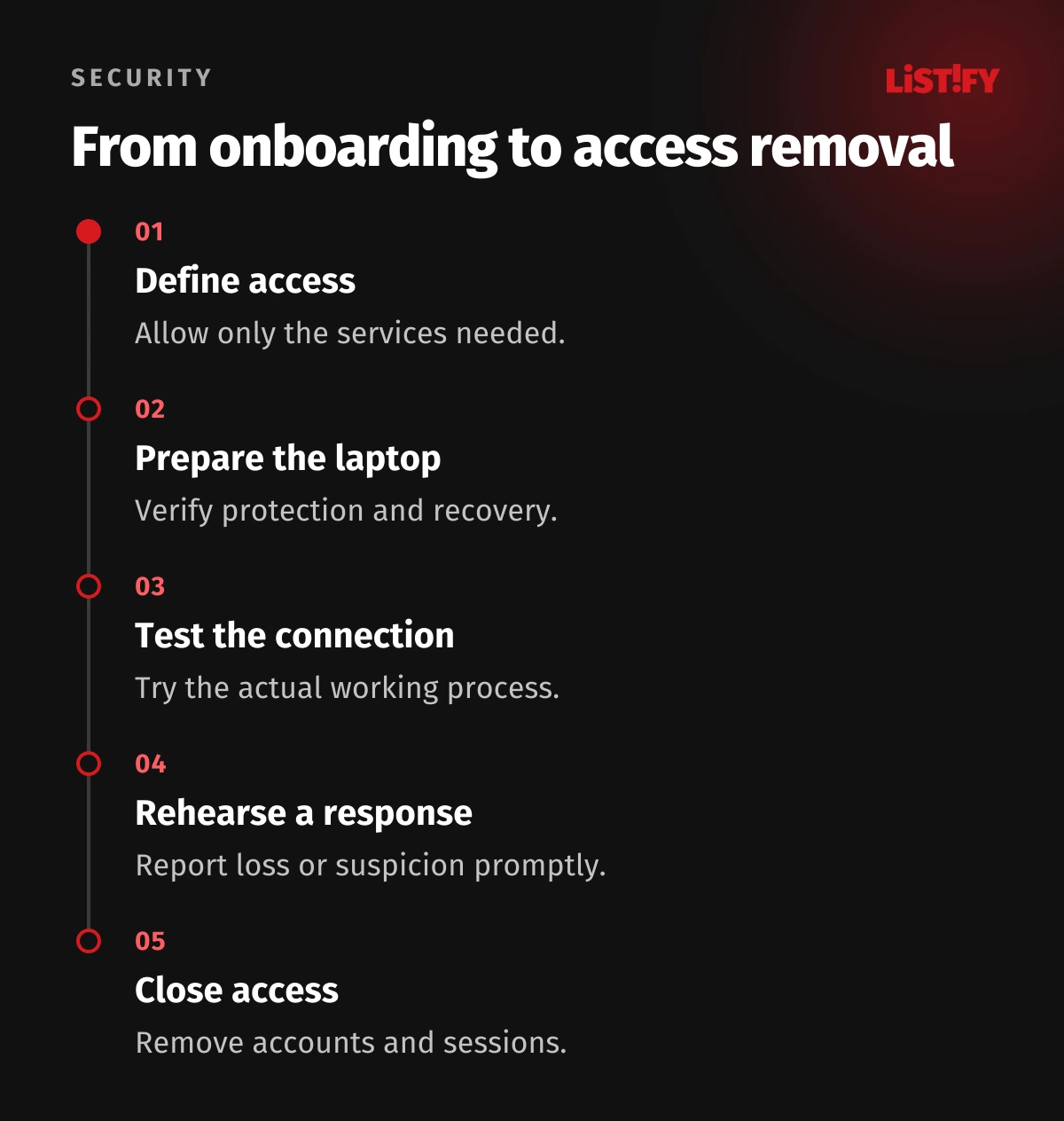
Before someone starts, check the device, authentication enrolment, application access and account recovery. When their role changes, review existing permissions as well as new ones. When they leave, address accounts, groups, VPN certificates, active sessions, shared links and work files. Returning a laptop does not revoke access from another device.
One owner should confirm completion even when several people perform the tasks. Record exceptions and verify actual access refusal through an appropriate check. For custom systems, see data security in bespoke applications.
09Pilot a verifiable baseline before expanding
Start with a small group covering different roles and devices. Try normal work, connection failure, a lost phone and access removal. Review outstanding updates, unmanaged devices, recovery and incident handling. Measure device coverage against a complete known inventory, not merely the devices already reporting to your management tool.
Tell us the team size, systems used and current remote-access method. Listify can review application and data protection boundaries, identify access gaps and propose priorities. We will define any device-management work and coordination with your IT provider around the actual environment.
10Frequently asked questions
Is paying for a VPN enough?
No. You need suitable access design, protected accounts, managed devices and data and incident procedures. A consumer VPN may not provide any route into your internal systems.
Can employees use personal laptops?
Only under an agreed arrangement with verifiable controls. Define data handling, updates, support, privacy and access removal. If that cannot meet the requirements, provide a company device or restrict the access method.
Does disk encryption protect a signed-in account?
Disk encryption protects stored data under the relevant conditions. It does not by itself stop malware on a running device or misuse of an active session. Device and identity controls are still required.
Should a lost laptop wait until the next morning?
Report it promptly through the designated channel. The organisation should define reporting outside normal hours and who decides the response based on severity. Do not wait for visible evidence of misuse.
What is a useful first step for a small business?
Inventory people, devices, services and access. Check authentication for important accounts and updates and encryption on laptops. Establish incident reporting and offboarding, then address the specific gaps the inventory reveals.