Cloud networks and VPNs: connect your business without opening everything
The VPN tunnel is connected, but employees still cannot open the internal application. The cause may be routing, DNS, a firewall, an identity policy, or the application itself. A working business connection depends on the complete path, not the green status beside one gateway.
A cloud network defines how resources communicate. A VPN can provide an encrypted connection between networks or from a user's device. Neither concept, by itself, decides which employee may use an application or whether the service will remain available during an outage.
Begin with the actual business flows: who connects, from where, to which service, and under what conditions. That gives your infrastructure team a useful design problem and gives the business a way to assess the result beyond a diagram full of network symbols.
01Separate the network, connection and access decision
Cloud providers offer virtual networks with addressing, subnets, routing, and traffic controls. Amazon's VPC documentation describes a logically isolated virtual network and its components. Isolation does not automatically make every resource secure; your configuration still determines exposure and permitted communication.
A site-to-site VPN typically connects an office or other network to the cloud. Remote-access or point-to-site arrangements connect individual devices. Private endpoints can provide a private network path to supported services. These solve different connectivity problems and should not be chosen interchangeably because they all sound private.
| Requirement | Possible approach | Questions to resolve |
|---|---|---|
| Office systems need a cloud application | Site-to-site VPN with defined routes | Address ranges, DNS, traffic rules, redundancy and office internet |
| Remote staff need selected internal services | User VPN or appropriate application access | Identity, device conditions, permitted destinations and support |
| Application needs a supported cloud service privately | Private endpoint or provider-specific private connectivity | DNS, service configuration, access controls and costs |
| Public customers need a website | Controlled public application endpoint | TLS, application protection, identity where needed and backend isolation |
| Several networks exchange traffic | Reviewed hub or interconnection design | Routing scope, segmentation, overlap and operating ownership |
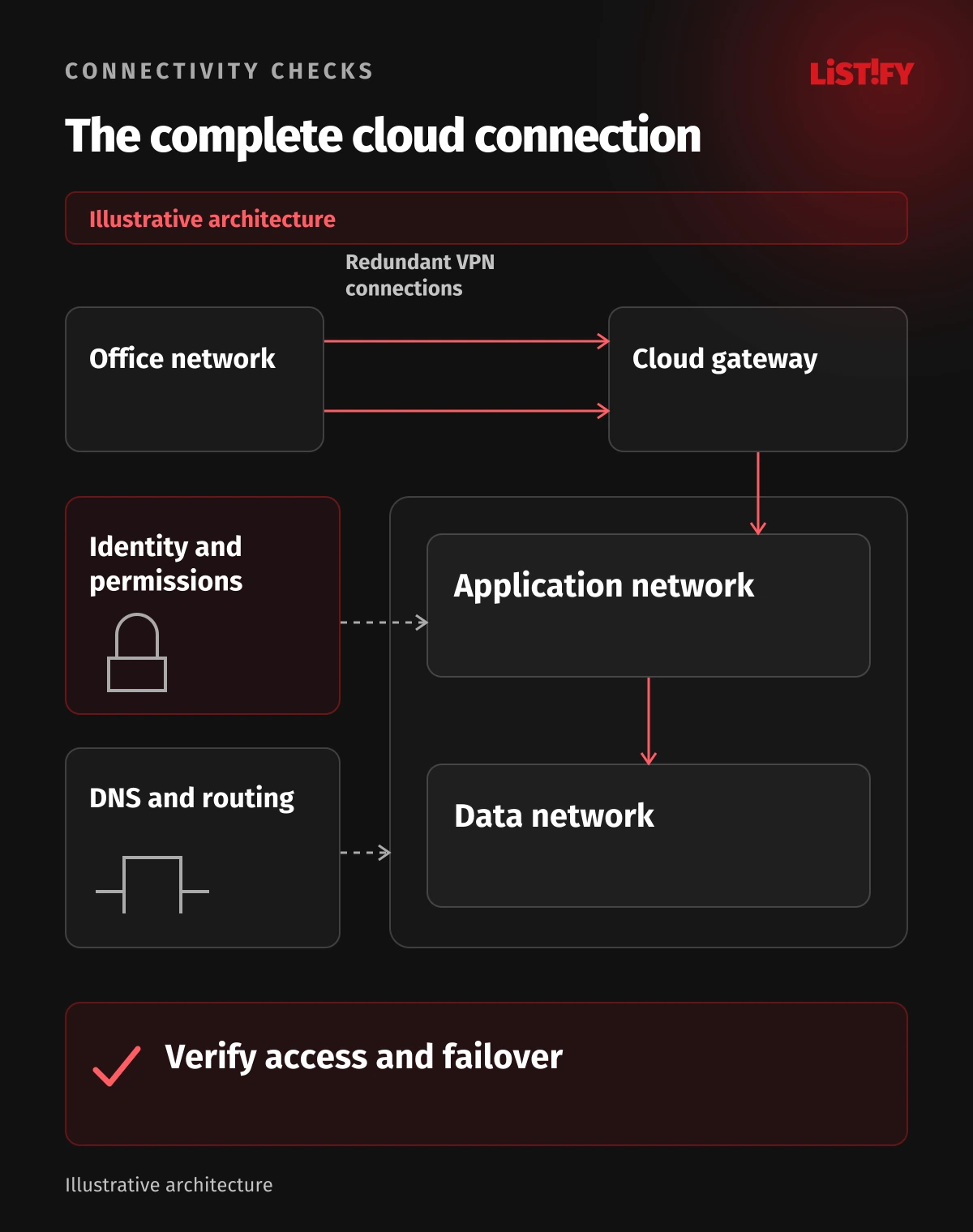
Keep application authorization explicit. A connection may reach a server while the user still lacks access to the records or operation. Conversely, an internet-facing business application may have strong identity controls. Evaluate the complete design instead of using network location as a proxy for permission.
02Plan addresses and routes before connecting environments
Inventory the address ranges already used by offices, cloud environments, remote users, and partners. Overlapping ranges can prevent ordinary routing from distinguishing destinations. Renumbering or carefully designed translation may be possible, but neither should be a surprise discovered during the production cutover.
Allocate space deliberately for expected growth and separate environments where their risk or operating needs differ. Record the purpose and owner of each range. Avoid creating identical networks repeatedly from a convenient template when they may need to connect later.
Define both directions of the traffic path. A request that reaches a service still needs a valid return route. Check route tables, gateway behavior, firewall rules, and any intermediary appliance. Routing all traffic through an inspection point may also affect availability and costs.
Agree whether remote users use a full or split tunnel and why. The decision affects which traffic goes through the organization, local network interaction, bandwidth, and controls. Review the actual client, endpoint policy, application requirements, and threat model rather than declaring either mode universally safe.
Include IPv6 if it is part of your environment. A policy designed only around IPv4 can leave an unexpected route or a confusing failure. The team should know which protocols are supported and test the paths that devices and applications actually use.
03Treat DNS as part of the connection design
Applications normally connect by name. A VPN can be healthy while a device resolves that name to an unsuitable public address or cannot resolve it at all. Decide which DNS service answers each namespace and how office, remote, and cloud clients reach it.
Private endpoints often require service-specific DNS configuration. Microsoft's private endpoint DNS documentation explains the relevant naming and resolution behavior. A successful DNS lookup is separate from data access, and private DNS changes can also affect resolution for other services.
Plan forwarding, private zones, and the client behavior as a system. Avoid relying on a manual hosts-file entry as a production solution. It can conceal a design problem on one administrator's laptop while employees and applications continue to use the wrong destination.
Test by the actual hostname from each relevant location. Check the resolved address, connection, certificate behavior, and application response. Include a remote user, the office, an application server, and a permitted partner if their access is in scope.
04Limit traffic and authenticate the actual user
Allow the communication required by the workload, with understandable rules and ownership. Separate user access, administration, application traffic, and data services where appropriate. An office connection should not automatically expose every cloud resource to every device in the building.
AWS security group documentation describes instance-level traffic controls and their stateful behavior. Other controls can behave differently. Do not copy a rule between security groups, network ACLs, firewalls, and application policies without checking its meaning.
For remote access, use appropriate authentication and account lifecycle management, including strong MFA where supported. Review device requirements, privileged access, session behavior, and what happens when an employee leaves or a device is lost. Shared credentials make investigation and offboarding harder.
NIST's zero trust architecture publication treats access around resources and authorization rather than implicit trust based on network location. This does not mean every business needs to buy a product with that label. It is a useful reason to verify identity and access instead of treating a successful VPN connection as unlimited trust.
Keep service encryption and application security in the design. A tunnel protects a particular link; it does not replace appropriate TLS, patching, authorization, secret handling, or controls on the systems at either end. Our cloud and server security guide discusses related operating responsibilities.
05Design resilience for the whole business path
Availability depends on more than the cloud gateway. The office router, internet provider, power, DNS service, authentication system, application, and database may each be a dependency. Decide which failures matter to the business and what fallback is realistic.
AWS Site-to-Site VPN documentation describes two tunnels in each VPN connection. Configure and test the intended use of both; the existence of a second tunnel does not demonstrate that your office equipment or routing will fail over correctly.
Azure's high-availability guidance describes gateway and connectivity design options. Their value depends on the topology and devices at both ends. Two cloud components sharing a single office internet connection still leave that connection as a potential failure point.
Test a controlled failure with the application owners. Observe interruption, recovery, routes, user experience, and any sessions or background work affected. Define an acceptable outcome before the test. Do not assume a vendor's service availability statement proves your complete business workflow meets the same target.
06Budget for traffic and maintain a usable operating record
A network design can create costs for gateways, public addresses, private endpoints, traffic processing, logging, and data transfer. Review the current provider pricing and expected traffic pattern for the chosen configuration. A small compute bill does not establish a small infrastructure bill.
Consider where traffic travels. Repeated transfer between locations, regions, or services can affect both cost and latency. Avoid quoting a universal monthly VPN price when the topology, availability needs, traffic, and provider charges differ.
Monitor connection health and the actual application path. Useful evidence may include tunnel events, authentication outcomes, DNS failures, relevant flow information, and application errors. Keep collection proportionate and protect logs that reveal user activity or internal addressing.
Maintain a diagram, address plan, route and rule ownership, DNS dependencies, support contacts, and change history. Azure VPN Gateway's overview illustrates why gateway type, connectivity mode, and configuration details matter. The operating record should reflect what is deployed, rather than the first design presentation.
Review access and configuration after changes. A new office, supplier, application, or merger can change the network assumptions. Keep old temporary rules from becoming permanent access simply because nobody remembers their original purpose.
07Test one complete flow before the production cutover
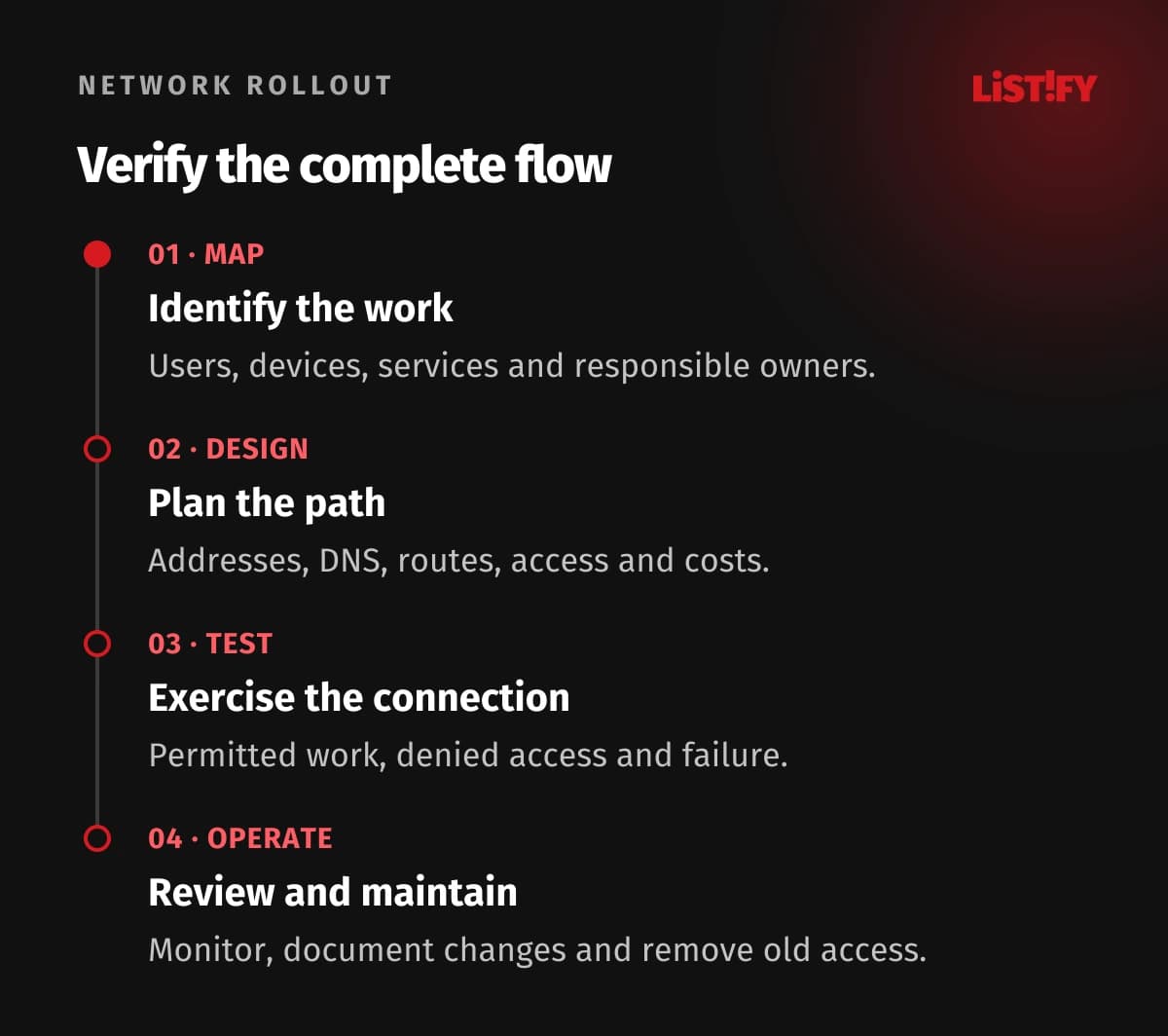
- Map the business flow. Identify users, devices, destinations, owners and required service behavior.
- Design the path. Agree addresses, routes, DNS, access, dependencies and costs.
- Test the full connection. Verify permitted access, denied access, application work and controlled failure.
- Operate and review. Monitor health, document changes, test recovery and remove obsolete access.
Use a limited pilot that represents the actual work. Connecting one administrator to one server by IP address is not sufficient if employees use a hostname, different devices, and several application dependencies. Check both expected access and a request that should be denied.
Prepare a cutover and rollback procedure with clear responsibilities. Review the sequence of DNS, route, and application changes and the evidence used to continue or stop. A planned migration should not depend on opening every firewall rule to discover the problem under time pressure.
08Questions about business cloud networks and VPNs
Does a connected VPN mean the application will work?
No. Check the complete path, including routes in both directions, DNS, traffic controls, identity, permissions, and application dependencies. Tunnel status only describes part of the connection.
Do remote employees need the same connection as the office?
Not necessarily. Site-to-site connectivity joins networks, while remote access serves individual devices. Choose the approach from the applications, identity requirements, devices and operating needs.
Are private IP addresses enough to secure a service?
They limit certain connectivity patterns but do not replace traffic rules, identity, authorization, encryption, patching, or application security. Review the actual routes and exposure.
Why do overlapping addresses matter?
Networks using the same address range can make routing ambiguous when connected. Inventory ranges before design and assess renumbering or translation where needed.
Can we test a private endpoint by using its IP address?
That can help diagnosis, but production applications often need the correct hostname and DNS behavior. Test resolution and application access from every relevant location.
Does a second VPN tunnel guarantee availability?
No. Configuration, routing, office equipment, internet access, DNS, identity and the application all matter. Test the intended failure and recovery behavior.
What should be in the operating handover?
Include the deployed topology, address and DNS plans, routes and rules, ownership, costs, monitoring, support contacts, changes, recovery tests and the process for removing obsolete access.