Application authentication: SSO, MFA and user management
A user signs in successfully and opens another company’s order. A former employee leaves, but their existing session still works. Sign-in is only the start. A dependable application connects identity, permissions, recovery and timely removal of access.
01Separate identity, permissions and sessions
Authentication establishes which account is acting. Authorisation decides what that account may do. A session maintains the signed-in state between requests. Design them together, but verify each separately. Successful sign-in does not establish permission to download a particular invoice.
Before choosing a service, list employees, customers, contractors, administrators and automated integrations. Identify who creates each account, its organisation and who approves its permissions. A human account and an integration have different lifecycles. Sharing an administrator password between both makes those responsibilities difficult to manage.
02SSO does not replace application access rules
Single sign-on lets applications use an identity provider's sign-in. An organisation can centralise authentication policy and some account administration. Each application still needs to associate the user with the right organisation and decide which operations are permitted.
OpenID Connect adds an identity layer to OAuth 2.0. OAuth itself concerns delegated authorisation; it is not a complete sign-in protocol. SAML is another federation mechanism encountered in enterprise integrations.
| Term | Purpose | Does not replace |
|---|---|---|
| SSO | A shared sign-in experience | Permissions for particular records |
| OIDC or SAML | Passing verified identity between systems | Account approval |
| OAuth 2.0 | Delegated access to resources | A complete sign-in design |
| MFA | Verification using different factor types | Secure recovery and sessions |
| SCIM | User and group management across systems | Immediate termination of every session |
Confirm the protocols supported by the customer's actual environment. Decide who may connect another organisation and how their authority is established. Knowing a company name or email domain should not be sufficient to take control of its administration.
03Use maintained implementations and validate responses
Writing a protocol implementation yourself introduces avoidable failure points. Ask for a maintained library and an explanation of response validation. RFC 9700 sets out current OAuth security recommendations, including PKCE and redirect URI checks. An identity token should not automatically be treated as an access token for an arbitrary API.
Request negative tests for an unexpected issuer, wrong audience, expired token, invalid redirect and incorrect organisation mapping. Do not automatically link existing accounts simply because two sources return the same email address. Establish trustworthy linking conditions and a safe way to resolve conflicts.
04Choose MFA around threats and recovery
Two passwords are not two different factors. A combination might use something a person knows and an authenticator they possess. NIST distinguishes phishing resistance; manually entered one-time codes do not provide it by themselves. The number of screens is not a useful security measure.
Passkeys use cryptographic keys associated with a particular service, as explained by the FIDO Alliance. They may synchronise between devices or remain bound to one authenticator. Choose supported options around account sensitivity, user devices and recovery requirements.
Set stronger expectations for administrators than for low-risk access. Consider fresh verification when changing billing details, adding an administrator or replacing an authenticator. Demonstrate the journey for somebody without a smartphone, a replacement device and loss of all usual authenticators.
Our guide to rolling out MFA and passkeys in a business covers the organisational programme. Application design also needs to connect the resulting identity to specific permissions and existing sessions.
05Do not let recovery bypass the protection
Where passwords remain, support password managers, limit attempts and check known compromised passwords. Use established password storage rather than designing a private encryption scheme. OWASP authentication guidance also covers reauthentication for sensitive changes.
OWASP recovery guidance includes single-use, expiring tokens and responses that avoid unnecessarily revealing whether an account exists. Add change notifications and an explicit policy for existing sessions. Recovering an MFA method deserves the same attention as resetting a password.
Support staff need a procedure for verifying the requester, approving exceptions and recording their actions. An urgent call from an alleged director should not automatically disable protection. For important accounts, agree a second approver and controlled emergency access in advance. Rehearse the process using a test account.
06Turn roles into specific operations
Start with a permission matrix: view an order, amend it, approve a discount, export customer records and manage members. A vague administrator role tends to accumulate everything. Role-based access control assigns permissions to roles; you may also need conditions for record ownership, organisation or transaction value.
OWASP recommends least privilege and checks on every request. Hiding a button is not an access control. The server must reject a forbidden action when someone sends the request outside your interface as well.
| Illustrative role | May do | May not automatically do |
|---|---|---|
| Salesperson | Edit an assigned quotation | Export every customer |
| Approver | Approve an exception within scope | Promote themselves to administrator |
| Organisation administrator | Manage their company's members | Read another company's records |
| Support | Handle an approved support case | Keep unrestricted access to every account |
Adapt this example to actual responsibilities and test combinations of roles. When someone switches between organisations, check search, exports, attachments and links in notifications. Separation must hold beyond the main list of records.
07Make sign-out and permission removal effective
Specify protected cookies, appropriate expiry and server-side invalidation. OWASP session guidance covers attributes including Secure, HttpOnly and SameSite. Those attributes alone do not replace the complete design for protection against forged requests.
Distinguish signing out of the application, signing out of the identity provider and removing access on all devices. Find out how long existing tokens remain usable after permission changes. Record an acceptable delay and measure it, including an open browser and any mobile client.
Also test what happens when a suspended account returns through a browser tab that has been open for days. A reassuring message on the sign-in page is irrelevant if an existing API session continues to authorise sensitive work.
08Manage joining, role changes and leaving
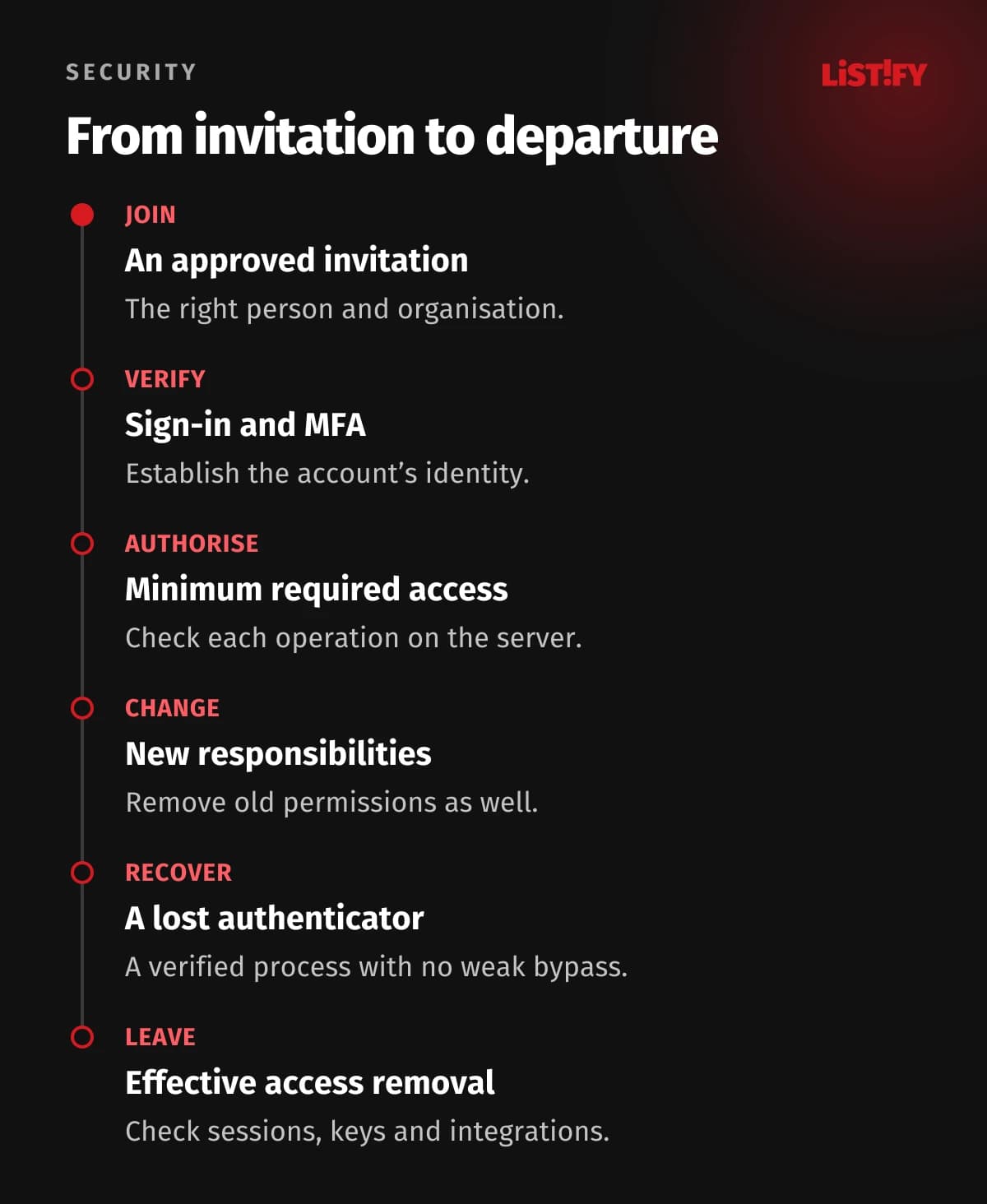
An account should have an owner, a purpose and, where appropriate, an end date. Approve the organisation and minimum permissions on joining. Remove old permissions when responsibilities change instead of only adding new ones. On departure, handle sessions, API keys, shared links and unfinished work.
SCIM standardises user and group management across systems. Still verify what your integration actually does after deactivation. It may prevent a new sign-in without terminating every existing access path. Successful synchronisation does not prove that offboarding is complete.
Assign someone to review exceptions and accounts that have not been used for a long time. Decide how service accounts are owned when their original creator leaves. This avoids a choice between breaking an important integration and retaining an unnecessary personal account.
09What to accept before launch
- An approved permission matrix and tests of forbidden operations.
- Sign-in through the real identity provider, including an outage scenario.
- Account recovery, email changes and authenticator replacement.
- Sign-out, permission removal and deactivation in existing sessions.
- An audit trail of role changes and recovery without passwords or tokens in logs.
- Ownership of upgrades, incidents and periodic access reviews.
For each test, record the application version, account, expected result and observed result. Acceptance should establish behaviour, rather than merely ticking “SSO complete”. A particularly useful test exposes the difference between someone who has signed in and someone authorised to perform the operation.
10Managed identity or your own deployment
A managed identity provider can take responsibility for updating and operating sign-in infrastructure. Your organisation still owns account policy, integration and incident decisions. Running the identity system yourself additionally requires people who can handle upgrades, recovery, availability and keys. Compare the actual division of work, rather than just licence prices.
Include active users, customer organisations and required enterprise SSO connections in the brief. Check whether audit records, provisioning, recovery methods and export are included in the proposed plan. Request an exit procedure explaining what can be transferred, how authenticators will be enrolled again and who owns migration support.
11Plan migration without losing account ownership
Map existing identities first. One person may have several accounts, a changed email address and membership of several companies. Use a stable internal identifier so changing an address does not create a different owner of historical orders. Establish a controlled process for ambiguous matches instead of merging them silently.
- Check accounts, memberships and roles in a test environment without production secrets.
- Include an administrator, a contractor and a member of two organisations in the pilot.
- Test new sign-in, recovery and behaviour in an old session.
- Prepare user communication, support coverage and an outage procedure.
- Retire old access routes according to the agreed plan and inspect the audit trail.
Fallback routes need an owner and an end date. Otherwise, the old password-only login can become a permanent exception. A rollback should not disable protection for everyone. Decide beforehand which accounts can perform emergency work and how that access is supervised.
12An illustrative customer administrator departure
Imagine an administrator of company A who is also an ordinary member of company B. Remove their membership of A. The application should preserve permitted work in B while rejecting an export from A, an old attachment link and changes to A's members. Test those routes independently.
Then deactivate the whole account and test an open browser, another device and personal API keys. The audit trail should show who made the change and when it took effect. This is an illustrative acceptance scenario, not a claimed product test. It exposes failures that trying a fresh sign-in alone will miss.
13Common questions about authentication
Is SSO sufficient without MFA?
SSO describes a shared sign-in experience. Its strength depends on the methods and policies used. Apply appropriate MFA to sensitive accounts and test alternative access routes.
Do we need to build authentication ourselves?
A proven service or maintained implementation is usually worth considering. Your application still needs correct permissions, safe account linking and a departure process.
Do passkeys stop every attack?
No. They improve phishing resistance at sign-in, but do not repair exposed records, a stolen session or an inadequate recovery procedure.
How do we verify that access removal works?
Deactivate a test user and try to continue through their existing sessions and integrations. Compare the result with the agreed invalidation time.
Planning a portal or changing its sign-in? Our web application service can help define identities, roles and acceptance scenarios. Start with the people, organisations and operations the system must distinguish.