Mobile App Security: Where to Store Data, How to Encrypt It, and How to Protect Your API
A secure mobile app keeps sensitive data only in the phone’s built-in vault (the Keychain on iPhone, Android Keystore on Android), talks to its server over encrypted connections only, ships with no secret keys inside, and relies on a server that checks on every request whether this user may see this exact record. Below we look at where apps fail most often, what changed in 2025 and 2026, and what to put in your contract with the developer. Current as of October 2, 2026.
From a security point of view, a mobile app is unusual: its entire code ends up in the hands of everyone who downloads it, not just your team. An attacker can take it apart, read the strings inside, watch its traffic to your server and send their own requests to that server. Anything the app “knows” can be found out, and anything it sends can be imitated.
That is the idea behind everything that follows. Treat the phone and the app as hostile territory. Real protection has to live on the server and in deciding what you store on the device in the first place. For the wider picture of web app and server security, see our web app security checklist.
01Quick answer: what a secure app needs
| Area | What to ask your developer for | Why |
|---|---|---|
| Stored data | Tokens and passwords only in the Keychain, or encrypted with a key from Android Keystore | Regular app storage is readable and ends up in backups |
| Data in transit | HTTPS only (TLS 1.2 or later), no exceptions for plain HTTP | Unencrypted traffic can be read on public Wi-Fi |
| Secret keys | None in the app, paid services called through your own server | Anyone who unpacks the app can pull the key out |
| Sign-in | System browser, PKCE, short-lived tokens with rotation | This is what IETF best practices for native apps require or recommend |
| API | Server-side permission check on every single record | Ranked first among API risks by OWASP |
| Verification | A penetration test against OWASP MASVS before launch | Without a test, you don’t know what you’ve bought |
02Why it matters now
Banking, shopping, and health have moved to the phone. According to Eurostat, 89.9% of people aged 16 to 74 in the EU used the internet on a mobile phone in 2025, and 69.7% used internet banking. In some countries the share is far higher: 95.6% in the Netherlands and 84.9% in Czechia.
- Netherlands95.5%
- Czechia84.9%
- Austria79.0%
- France78.3%
- Spain74.8%
- Germany70.7%
- EU average69.7%
- Hungary69.2%
- Slovakia60.5%
- Poland58.2%
- Italy56.4%
Source: Eurostat, dataset isoc_ci_ac_i (indicator I_IUBK), updated April 17, 2026. Internet banking in the last 3 months, on any device.
Where the money goes, attackers follow. The Verizon 2026 Data Breach Investigations Report found that exploiting vulnerabilities is now the most common way into an organization (31% of breaches with a known entry point), and that in phishing simulations the median click rate for voice and SMS lures is 40% higher than for email (Verizon DBIR 2026). Malicious apps also get through official stores. In January 2024, Czech banks warned that the Anatsa banking trojan was spreading through a phone cleaner app on Google Play and had hit hundreds of their customers (Czech Banking Association, in Czech).
03Where mobile apps fail most often
A widely used list of risks is the OWASP Mobile Top 10. The current edition is from 2024 (OWASP):
- Improper Credential Usage, such as passwords and keys written into the app.
- Inadequate Supply Chain Security, meaning third-party libraries and SDKs.
- Insecure Authentication/Authorization.
- Insufficient Input/Output Validation.
- Insecure Communication.
- Inadequate Privacy Controls.
- Insufficient Binary Protections against reverse engineering and tampering.
- Security Misconfiguration.
- Insecure Data Storage.
- Insufficient Cryptography.
Automated testing shows how common these flaws are. In 2023, NowSecure scanned nearly 6,500 popular apps and 95% of them failed at least one of the seven OWASP MASVS categories in use at the time (the privacy group was added in 2024) (NowSecure). Take this with a grain of salt: NowSecure sells testing, and “fail” means any finding from its tool, not a proven attack.
- At least one category95%
- Network communication (NETWORK)54%
- Platform interaction (PLATFORM)47%
- Code quality (CODE)43%
Source: NowSecure press release, October 30, 2023, automated analysis of nearly 6,500 popular apps. The press release does not list the other categories.
04Storing data on the phone: what goes where
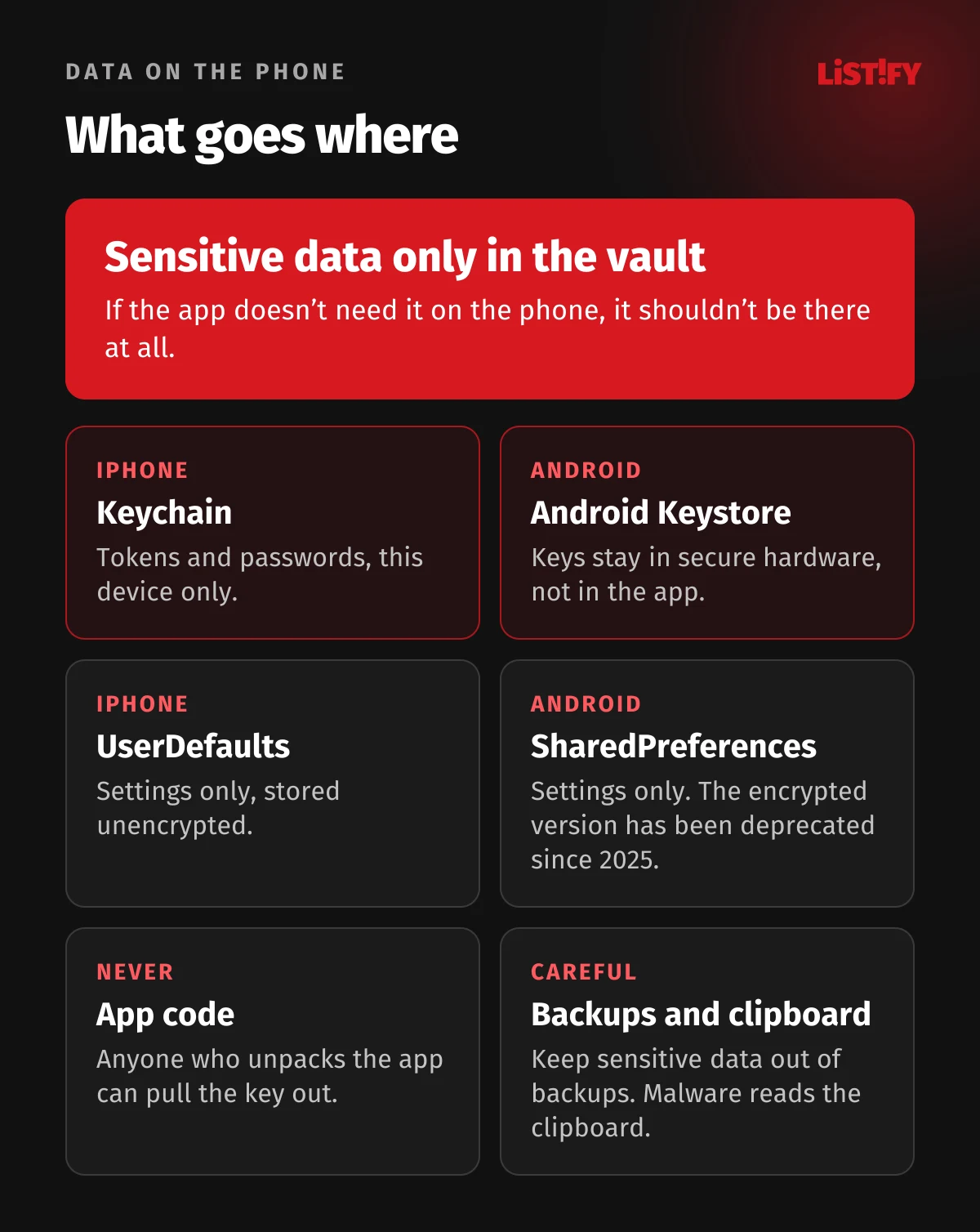
The simplest rule: if the app does not need a piece of data on the phone, it should not be there. Every extra item can leak from a lost phone, from a backup or through a malicious app. Whatever has to stay on the device, such as a sign-in token, belongs in the vault the operating system provides.
iPhone and iPad
- The Keychain is built for passwords, tokens and keys. For sensitive items, use the “this device only” option, which makes the item available only while the phone is unlocked and keeps it from migrating to another device (Apple).
- UserDefaults is for settings only. Apple says plainly that the system stores it on disk unencrypted and that personal or sensitive data belongs in the Keychain instead (Apple).
- Files are protected by Data Protection. The default class, however, makes files readable once the user first unlocks the phone after a restart, and keeps them readable even while the screen is locked. For sensitive files, the developer should set the strictest class, NSFileProtectionComplete (Apple).
Android
- Android Keystore holds encryption keys so that the key material never enters the app’s process. On devices with secure hardware, the keys can’t be extracted even if the operating system is compromised, although an attacker could still use them on that device (Android Developers). Tokens and sensitive data are encrypted with a key from the Keystore.
- Don’t use EncryptedSharedPreferences in new projects. In 2025 Google deprecated the whole Jetpack Security Crypto library in favor of platform APIs and direct use of Android Keystore, and says there will be no further releases (Android Developers). Tutorials from 2019 to 2024 still recommend it.
- Backups: by default Android backs app data up to Google Drive. Google advises excluding sensitive data from backups (Android Developers). For apps targeting Android 12 or later, turning backup off is not enough, because on some devices device-to-device transfer still works (Android Developers).
Screenshots and the clipboard
When an app goes to the background, the system takes a snapshot of its screen for the app switcher. If a card number or a code is visible, it stays in that image (OWASP MASWE-0038). On Android, the FLAG_SECURE window flag blocks screenshots and casting to non-secure displays (Android Developers). This is not theoretical. In September 2025, the Slovak national CERT described Android malware targeting Czech and Slovak users that could record the screen, read and change the clipboard, and tap through a banking app to approve transfers (SK-CERT, in Slovak).
05Encryption in transit: HTTPS with no exceptions
On iPhone, App Transport Security enforces encrypted connections. It is on by default, requires TLS 1.2 or later and blocks connections that do not meet its requirements (Apple). A developer can switch it off with the NSAllowsArbitraryLoads key, but must justify that during App Store review (Apple). Disabled App Transport Security was one of the flaws the Czech cybersecurity agency NÚKIB listed in its July 2025 warning about the DeepSeek app, together with the outdated 3DES cipher and sensitive data recoverable from the device cache (NÚKIB, in Czech).
Since Android 9, cleartext traffic is blocked by default for apps that target Android 9 or later. It can only be allowed explicitly in the app’s configuration (Android Developers). When you audit a finished app, these exceptions are the first thing to look for.
Certificate pinning: yes or no?
Pinning means the app trusts only a specific certificate or key of your server. It protects against forged certificates, but it comes with a risk: if you change the certificate or the certificate authority, the app stops connecting until users install an update. That is why Google explicitly does not recommend pinning for Android apps. If your developer uses it anyway, there should be backup pins, at least one key fully under your control, and a short expiration period (Android Developers). It makes sense mostly for banking and similarly sensitive apps; a typical online store usually doesn’t need it.
06An API key inside an app is not a secret
A key written into the app code can be seen by anyone who unpacks the app. Google puts it bluntly: an attacker with reverse engineering tools can retrieve a hardcoded secret very easily (Android Developers). Obfuscating or encrypting the key inside the app does not change this. According to OWASP, those techniques deter extraction but do not prevent it (OWASP MASWE-0004).
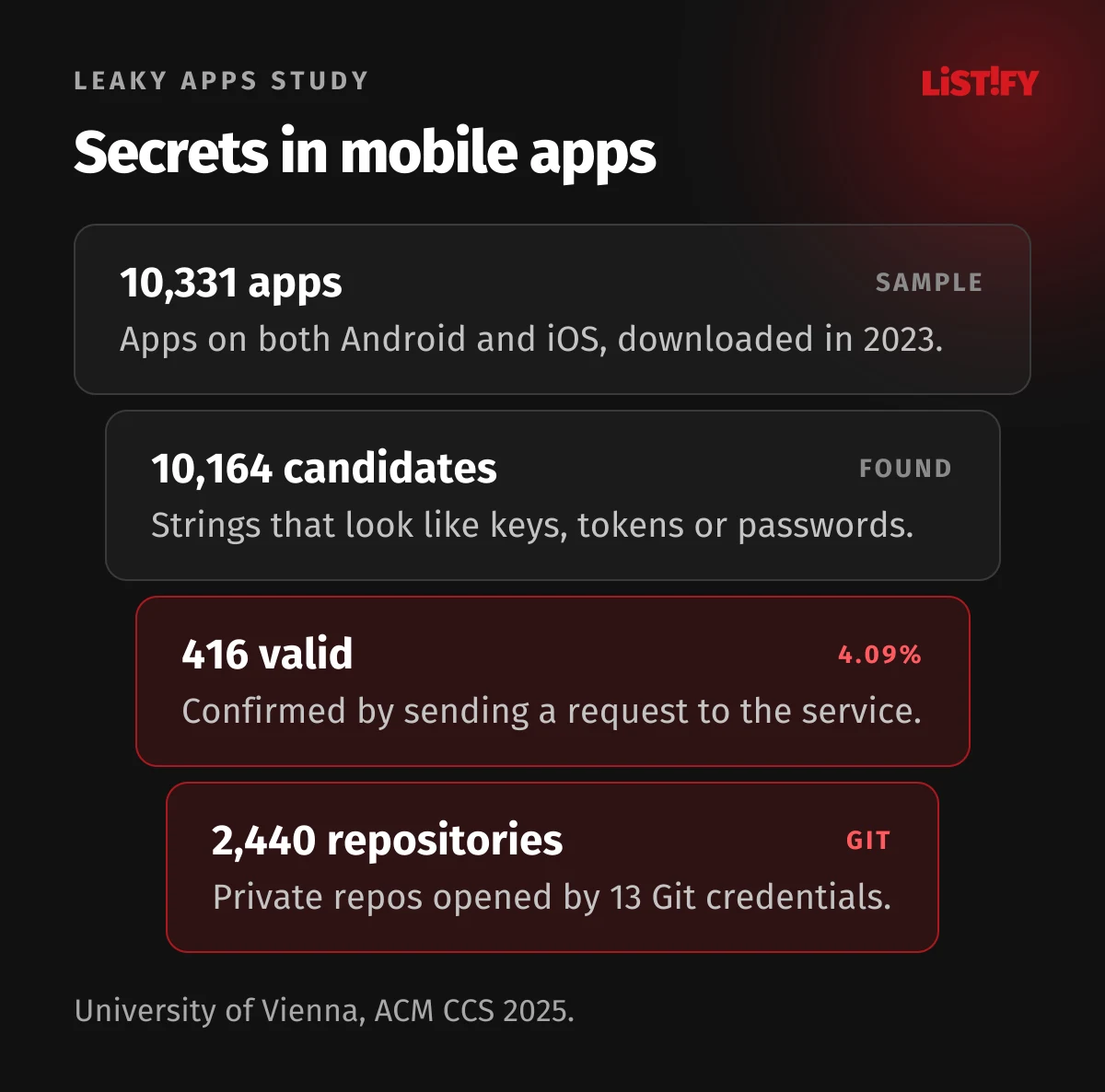
Researchers at the University of Vienna measured what this looks like in practice. They analyzed 10,331 apps available on both Android and iOS and actually tested the 10,164 potential credentials they found in the apps downloaded in 2023. Of those, 416 worked, including 13 Git credentials that opened 2,440 private source code repositories. Valid credentials turned up in 1.94% of Android apps and 2.83% of iOS apps (Leaky Apps, ACM CCS 2025).
The second lesson from the study is less comfortable: developers remove a key from the next version of the app but often forget to revoke it. According to the study, the 2023 Android version of Viber had AWS credentials inside a native library. They were gone in the 2024 version but still valid (Leaky Apps). An earlier Symantec analysis from 2022 found 1,859 apps with hardcoded AWS credentials, and 53% of them used the same AWS keys as other apps, because the keys came from shared libraries or third-party SDKs (Symantec).
What to do with keys
- Firebase: an API key restricted to Firebase services does not need to be secret. Your data is protected by Firebase Security Rules and App Check, not by hiding the key. The exception is the Gemini API key, which should never be in the app (Firebase). A rule that lets anyone read and write means anyone who guesses your project ID can steal, modify or delete the data (Firebase).
- Maps and other public keys: restrict them to the package name and signing certificate fingerprint (Android) or the bundle ID (iOS). Keep in mind that in a mobile app a key only gets replaced when users update, which can take months (Google Maps Platform).
- Payments, AI, email, SMS: secret keys for paid services belong only on your server. The app calls your server, and the server calls the service.
- A leaked key is not fixed by removing it from the next release. Revoke it immediately and issue a new one.
How keys leak through packages and developer tooling is covered in our article on npm supply chain attacks and API keys.
07Protecting the API: sign-in, tokens and authorization
A mobile app is just a window into your server. An attacker doesn’t have to use the app at all; sending the same API requests from another tool is enough. Anything that must hold true has to be enforced by the server.
Sign-in by the book
- OAuth 2.0 sign-in in a native app should run in the system browser, not in a WebView inside the app. The IETF best practice RFC 8252 states that native apps MUST NOT use embedded user agents and also requires the PKCE extension (RFC 8252, RFC 7636).
- The newer RFC 9700 from January 2025 requires refresh tokens for public clients to be either sender-constrained or rotated on every use. It also bans outright the password grant, in which the app sends the user’s username and password straight to the authorization server (RFC 9700).
- Access tokens should be short-lived and carry only the permissions the app actually needs.
Checking whose data the user is reading
OWASP ranks BOLA (Broken Object Level Authorization) first among API security risks. The server checks that the user is signed in but not whether order #1043 actually belongs to them. Change the number in the request and you are reading someone else’s data. OWASP recommends an authorization check in every function that accesses data using an ID from the user (OWASP API1:2023).
Peloton is the textbook example. In 2021 its API returned private user data even to people who were not signed in. The first “fix” only added a sign-in requirement, so anyone who registered an account could still see the same data (Pen Test Partners). Authentication is not authorization.
Rate limits and app attestation
Your API should limit the number of requests to stop password guessing, bulk data scraping and surprise bills from paid services (OWASP API4:2023). On top of that, you can verify that a request comes from your unmodified app on a genuine device: Play Integrity API on Android and App Attest on iOS. Both vendors warn that this is not a standalone defense. Google recommends combining Play Integrity with other signals (Android Developers), and Apple notes that App Attest cannot definitively detect a device with a compromised operating system (Apple). The older SafetyNet Attestation API was fully shut down in January 2025 (Android Developers).
For connecting your app with other systems, see our guide to API integration best practices.
08Biometrics that can be bypassed
Fingerprint or face sign-in feels secure, but the implementation is what counts. If the app simply waits for an “authenticated” answer and lets the user in, an attacker who controls the app can fake that answer. OWASP lists this as a weakness of its own (OWASP MASWE-0020).
Done properly, biometrics are tied to a cryptographic key. On iPhone, a Keychain item is unlocked only after Face ID or Touch ID succeeds inside the Secure Enclave (Apple); on Android, BiometricPrompt is used with a CryptoObject (Android Developers). Decisions about sensitive actions should still always be made on the server.
09Obfuscation and tamper protection
Obfuscation makes code harder to read. On Android this is done by R8, which mainly shortens class and method names and shrinks the app (Android Developers). Against an experienced attacker it buys time, but it doesn’t protect secrets.
Protection against reverse engineering, tampering and running on rooted phones makes sense for banking, payments, real-money games and apps with valuable content. OWASP has a dedicated testing profile for it, MAS-R, in which the attacker is the device user (OWASP). For a typical business app, the money is better spent on the server and on testing.
10What happens when it goes wrong
In July 2025, data leaked from Tea, a US app meant to help women stay safe while dating. According to the company’s statement, an attacker accessed about 72,000 images, including roughly 13,000 selfies and photo IDs submitted for account verification. They sat in a legacy storage system that had not been migrated when the company moved to a new one (Tea, archived statement). 404 Media reported that, according to the users who found it, the data sat in a public Firebase storage bucket with no authentication (404 Media). A few days later a second database surfaced with 1.1 million private messages, which, according to the researcher, any signed-in user could access (BleepingComputer).
Four rules follow from this, and they apply to every app: store only what you need, delete ID documents once verification is done, never leave cloud storage public, and shut down the old storage when you migrate.
- United States11.50
- Benelux7.37
- Global average4.99
- Germany4.93
- United Kingdom4.17
- Italy4.12
- France4.05
Source: IBM and Ponemon Institute, Cost of a Data Breach Report 2026, 602 organizations in 16 countries and regions, breaches from March 2025 to February 2026. The report gives no EU-wide average.
The same report found that 53% of breached organizations had not encrypted sensitive data both at rest and in motion (IBM). Server-side data protection and breach response are covered in our article on data security in custom software development.
11What the law says: GDPR and the Cyber Resilience Act
GDPR
Article 32 of the GDPR requires controllers and processors to put in place security appropriate to the risk, and lists “the pseudonymisation and encryption of personal data” and “a process for regularly testing, assessing and evaluating the effectiveness” of those measures as examples. Article 25, data protection by design and by default, requires that only the personal data necessary for each purpose is processed by default (GDPR). Breaching these two articles can lead to fines of up to €10 million (about CZK 245 million) or 2% of worldwide annual turnover, whichever is higher (Article 83(4)).
Cyber Resilience Act
Regulation (EU) 2024/2847, the Cyber Resilience Act or CRA, covers mobile apps too. Recital 11 says that when a mobile app needs access to an API or a database provided through a service developed by the manufacturer, that service falls within the scope of the regulation as well (CRA). The manufacturer also includes a company that has an app designed or developed by someone else and offers it under its own name, even free of charge (Article 3(13)). So if an agency builds your app, the manufacturer’s obligations under the CRA will usually be yours, not the agency’s.
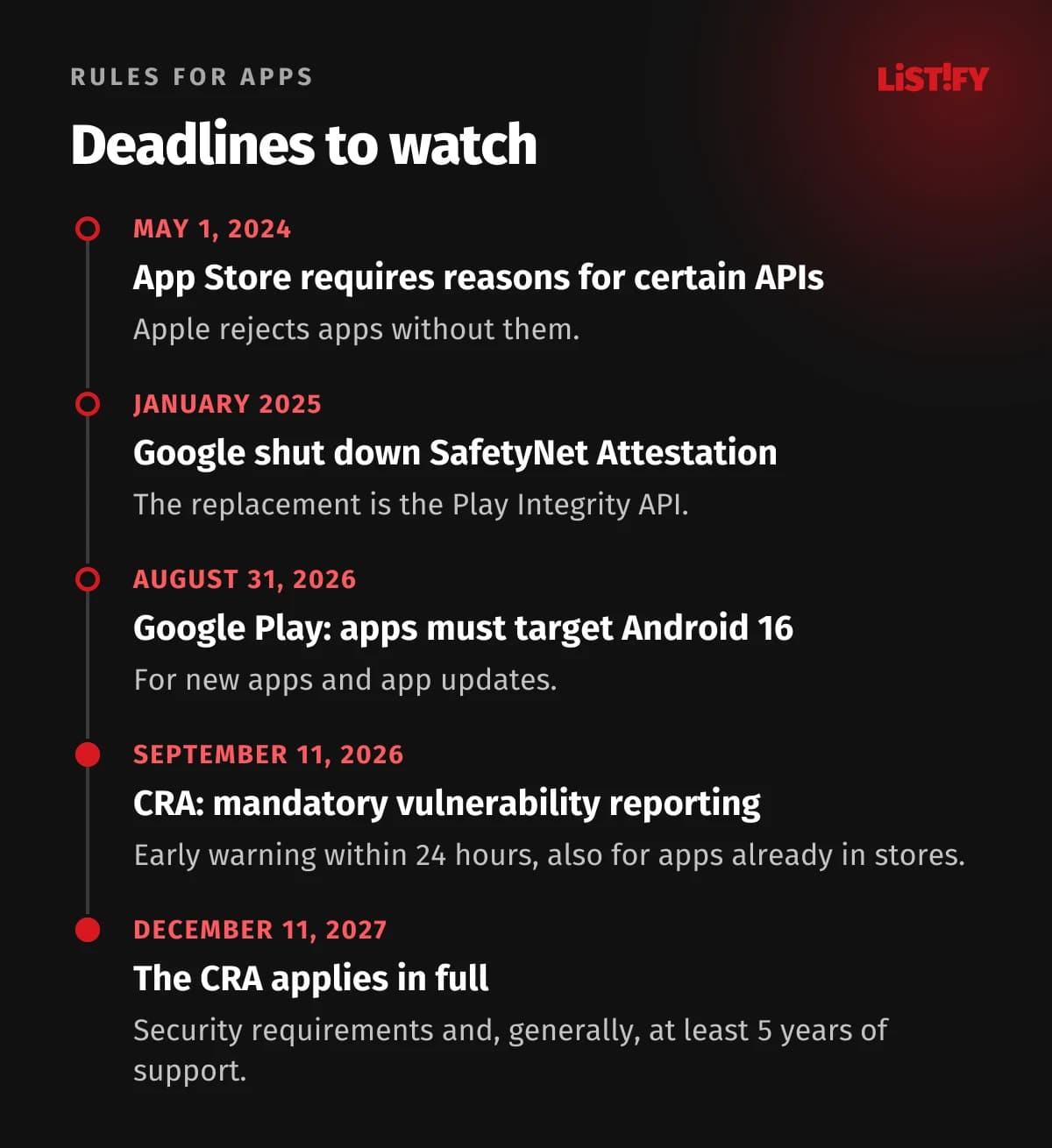
- From September 11, 2026, manufacturers must report actively exploited vulnerabilities: an early warning within 24 hours, a notification within 72 hours and a final report within 14 days after a corrective or mitigating measure is available (Article 14). This also applies to apps that are already in the stores (European Commission).
- From December 11, 2027, the whole regulation applies, including the essential security requirements in Annex I and a support period with updates that is generally at least 5 years (Articles 13 and 71). For apps already on the market before that date, these requirements apply once the app is substantially modified (Article 69).
- Most apps fall into the default category, where self-assessment by the manufacturer is enough (European Commission).
- Fines for breaching the essential requirements or the reporting duties can reach €15 million (about CZK 367 million) or 2.5% of worldwide annual turnover, whichever is higher (Article 64).
National cybersecurity laws implementing the NIS2 directive apply to regulated entities, not to every app. If the company ordering the app is regulated, though, it usually has to reflect its security requirements in the contract with the developer. Our article on app security for executives explains NIS2 and the CRA from a management perspective.
12App Store and Google Play rules
- Apple: since May 1, 2024, App Store Connect rejects apps that do not declare, in their PrivacyInfo.xcprivacy file, why they use certain system APIs (the required reason APIs). These APIs could be misused to identify a device by fingerprinting, which Apple does not allow (Apple).
- Google Play: since August 31, 2026, new apps and app updates must target Android 16 (API level 36), with an extension available until November 1, 2026 (Google Play). Even a small bug fix release therefore has to target API level 36, which can mean code changes and extra testing. Why you should budget for regular updates is covered in our article on mobile app updates after launch.
- The Data safety form on Google Play must be completed by every developer, even if the app collects no data. It asks whether data is encrypted in transit and whether users can request deletion (Google Play).
- The Independent Security Review badge on Google Play goes to apps assessed by an authorized lab under the MASA program, based on OWASP standards. It is optional and paid for by the developer, and the certification is valid for 365 days (App Defense Alliance). It isn’t necessarily scoped to verify that your Data safety declaration is accurate (Google Play).
13How to verify security and what it costs
The benchmark is OWASP MASVS. The current version, 2.1.0 from January 2024, has 24 controls in eight groups: storage, cryptography, authentication, network, platform, code, resilience, and privacy (OWASP MASVS). The old L1, L2 and R “levels” are no longer part of the standard; they moved into testing profiles in the MASTG (OWASP):
| Profile | Protects against | Typical use |
|---|---|---|
| MAS-L1 | Other apps installed on the device | News, calendar, name and email as the most sensitive data |
| MAS-L2 | Also an untrusted operating system and physical access to the phone | Health, payments, location, access tokens |
| MAS-R | The device user, including reverse engineers and cheaters | An add-on where the app’s own logic is valuable |
| MAS-P | Focuses on protecting personal data | An add-on to the other profiles |
Prices vary a lot by market. German firm AWARE7 quotes €5,000 to €15,000 (about CZK 122,000 to 367,000) to test one platform, iOS or Android, at a day rate of €1,350 excluding VAT (AWARE7, in German). Czech firm Integra gives an average of CZK 90,000 (about €3,700) and 5 to 8 person-days per platform (Integra, in Czech). US estimates from VikingCloud range from $12,500 to $40,000 per mobile test including the backend (VikingCloud). Hire an independent firm rather than the team that built the app, and have the fixes confirmed by a retest.
It pays to plan security into the budget and schedule from the start. You can see how our development process works on the how it works page and check indicative prices in our pricing. Still choosing between native and cross-platform? See native vs cross-platform app development.
14What to ask your developer for: a checklist
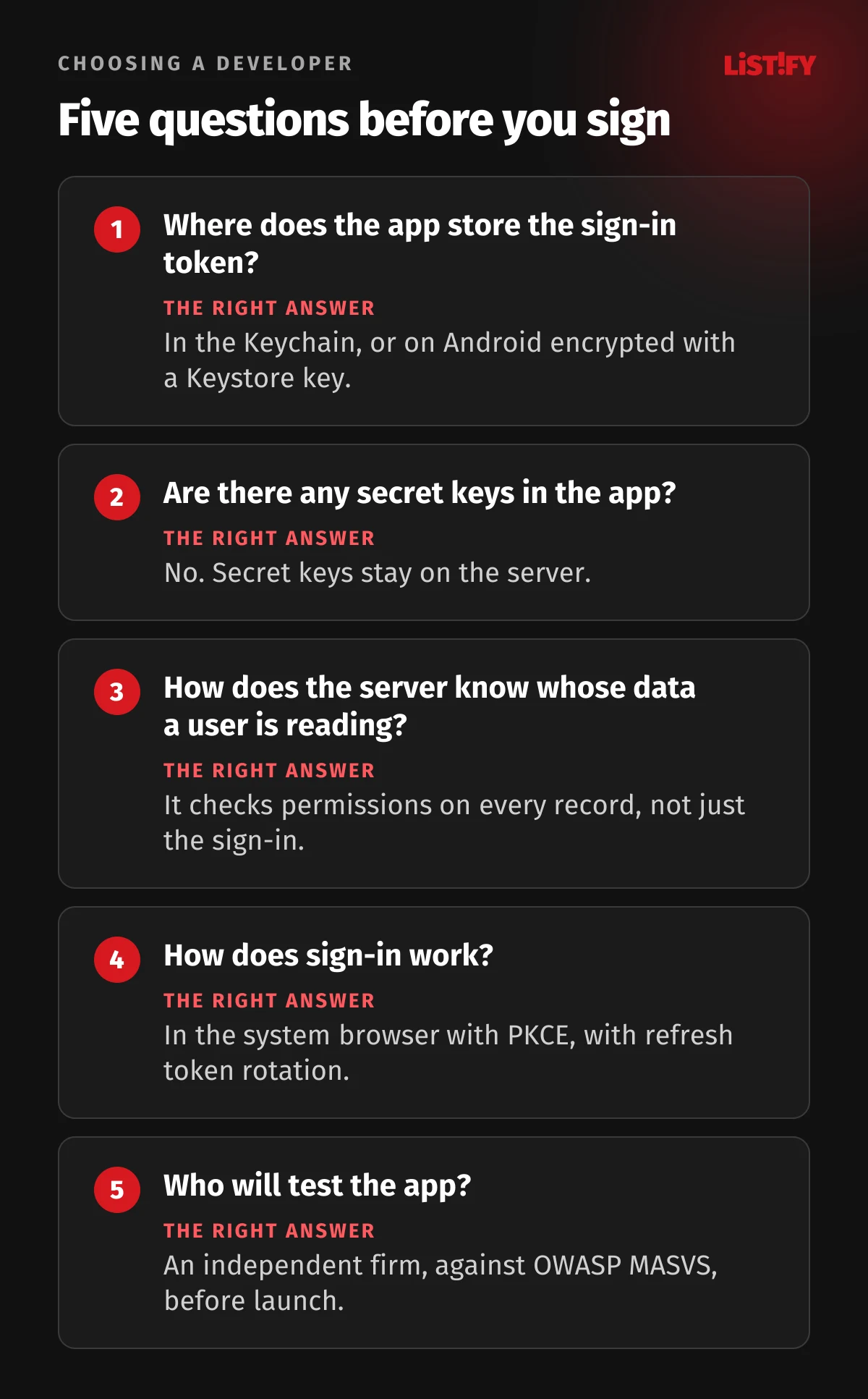
- A list of the data the app stores on the phone, and exactly where it stores it.
- Tokens in the Keychain or, on Android, encrypted with a key from Android Keystore. No EncryptedSharedPreferences in new projects.
- No secret keys in the app, checked with a tool such as gitleaks in the repository and with a scan of the unpacked release build.
- HTTPS only. No NSAllowsArbitraryLoads and no cleartext traffic allowed on Android.
- Sign-in through the system browser with PKCE, refresh token rotation and short-lived access tokens.
- Server-side authorization checks on every record, plus rate limiting.
- Firebase or other cloud database rules reviewed before launch, with no public access.
- Sensitive screens hidden in the app switcher, and sensitive data kept out of backups and the clipboard.
- A penetration test against OWASP MASVS and a retest after fixes.
- A process for reporting vulnerabilities under the CRA and an update plan for several years ahead.
If your app is already live and you are not sure where it stands, start with an audit of what it stores on the phone and a review of the API. For end users, we have a guide on how to secure your phone and accounts.
15Frequently asked questions
Is it safe to have an API key in a mobile app?
Only if it is a public key that is restricted and cannot unlock anything sensitive on its own, such as a Firebase or Google Maps key limited to your app. Secret keys for paid services, payments or AI should never be in the app, because anyone who unpacks it can extract them. They belong on your server.
Where should an app store the sign-in token?
On iPhone, in the Keychain, ideally with the “this device only” option. On Android, encrypted with a key from Android Keystore. Not in UserDefaults, SharedPreferences or regular files.
Can we keep using EncryptedSharedPreferences?
Existing apps keep working, but Google deprecated the entire Jetpack Security Crypto library in 2025 and will not release new versions. Use Android Keystore directly in new projects and plan the switch for older apps at the next major update.
Is certificate pinning required?
No. Google actually does not recommend it for Android apps, because the app stops connecting after a certificate change. It makes sense for banking and similarly sensitive apps, with backup pins and a short expiration period.
Does the Cyber Resilience Act apply to our company app?
Very likely, if you offer it in the EU under your own name, even for free. From September 11, 2026 you must report actively exploited vulnerabilities, and from December 11, 2027 all requirements apply to new apps, and to existing apps after a substantial modification. There are exceptions, for example software a public administration develops only for its own use. Check the specific impact on your business with a lawyer.
How much does a mobile app penetration test cost?
It depends on the market and the scope. In Germany, AWARE7 quotes €5,000 to €15,000 per platform; in Czechia, Integra gives an average of CZK 90,000 (about €3,700); US estimates run from $12,500 to $40,000 including the backend. Testing the API and backend is often priced separately.
Is approval by the App Store and Google Play enough?
No. Store review covers the app itself and the store’s rules. It does not check whether your API lets a signed-in user read other people’s data, or whether your cloud database is properly locked down. The server, database and app logic need a test of their own.
16Sources
- OWASP Mobile Top 10 2024, OWASP MASVS 2.1.0, MAS Testing Profiles, OWASP API Security Top 10 2023
- Apple: UserDefaults, Data Protection, Keychain, App Transport Security, App Attest
- Apple: Required reason APIs
- Google: Android Keystore, Jetpack Security Crypto, Network Security Config, Play Integrity, target API level, Firebase API keys
- IETF: RFC 8252, RFC 7636, RFC 9700
- Research: Leaky Apps, University of Vienna 2025, Symantec 2022, NowSecure 2023
- Research: IBM Cost of a Data Breach 2026, Verizon DBIR 2026
- Law: GDPR, Cyber Resilience Act, European Commission on the CRA
- Statistics: Eurostat