Launching a Web App? Check These 105 Things Before Attackers Do
Before you push a web app to production, you need four things nailed down: who can access which data, where your secrets live, how clean your dependencies are, and how you’ll know when someone is attacking you. Everything else, from security headers to backups to compliance, builds on those four.
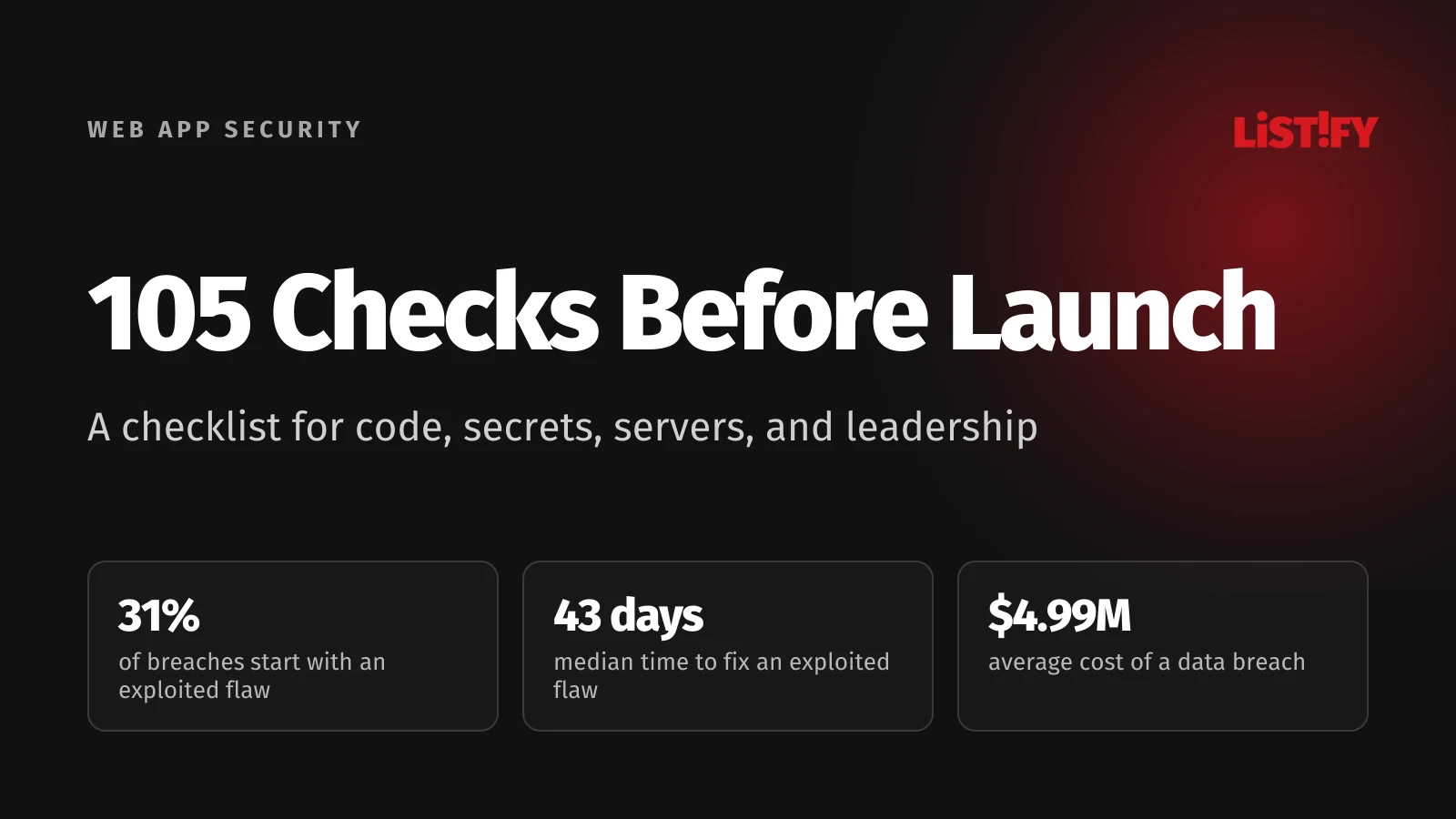
You have less time than ever. For the first time, exploiting vulnerabilities is the most common way attackers get in: 31% of breaches, compared with 16% for phishing and 13% for stolen credentials (Verizon 2026 DBIR). Scanners find a new domain within seconds of its TLS certificate being issued (UCSB, IEEE EuroS&P 2023). And the average data breach now costs $4.99 million globally and $11.5 million in the US (SecureWorld, on IBM’s 2026 report).
- Exploited vulnerability31%
- Phishing16%
- Stolen credentials13%
Share of breaches by initial access vector. Verizon 2026 DBIR.
Most breaches still start with something mundane: a debug mode left on, a key committed to a repo, a library nobody updated. This 105-point checklist covers your code, dependencies, infrastructure, and leadership responsibilities, and each area links to a detailed guide on how to test it yourself. All figures are current as of September 27, 2026.
01Seven Things That Changed in 2026
| Trend | What happened | What it means for you |
|---|---|---|
| AI writes the code | AI now generates roughly half of all committed code, and on average only 56% of its output passes security tests | AI-written code gets the same review and scanning as a junior developer’s |
| Dependency attacks | Axios in March, TanStack in May 2026, and before that the Shai-Hulud worm, which compromised more than 500 npm packages | Locked versions, delayed updates, and isolated CI/CD secrets |
| Long-lived tokens are gone | npm revoked all classic tokens on December 9, 2025, and login sessions now last two hours | Publish from CI with OIDC (trusted publishing) |
| AI agents inside apps | OWASP released its first Top 10 for agentic applications in December 2025 | An agent should only do what the signed-in user can do |
| Shorter certificates | Since March 15, 2026, public TLS certificates last 200 days at most, dropping to 47 days in March 2029 | Certificate renewal has to be automated |
| Leaked AI keys | Leaked secrets for AI services rose 81% in 2025 | Model API keys belong in a secrets manager, never in the frontend |
| New reporting deadlines | Since September 11, 2026, makers of digital products sold in the EU must report actively exploited vulnerabilities within 24 hours | An incident plan with deadlines and named owners |
Table sources: Veracode, July 2026, CISA, TanStack, CISA, GitHub Changelog, OWASP GenAI, CyberInsider, The Hacker News, on GitGuardian, European Commission.
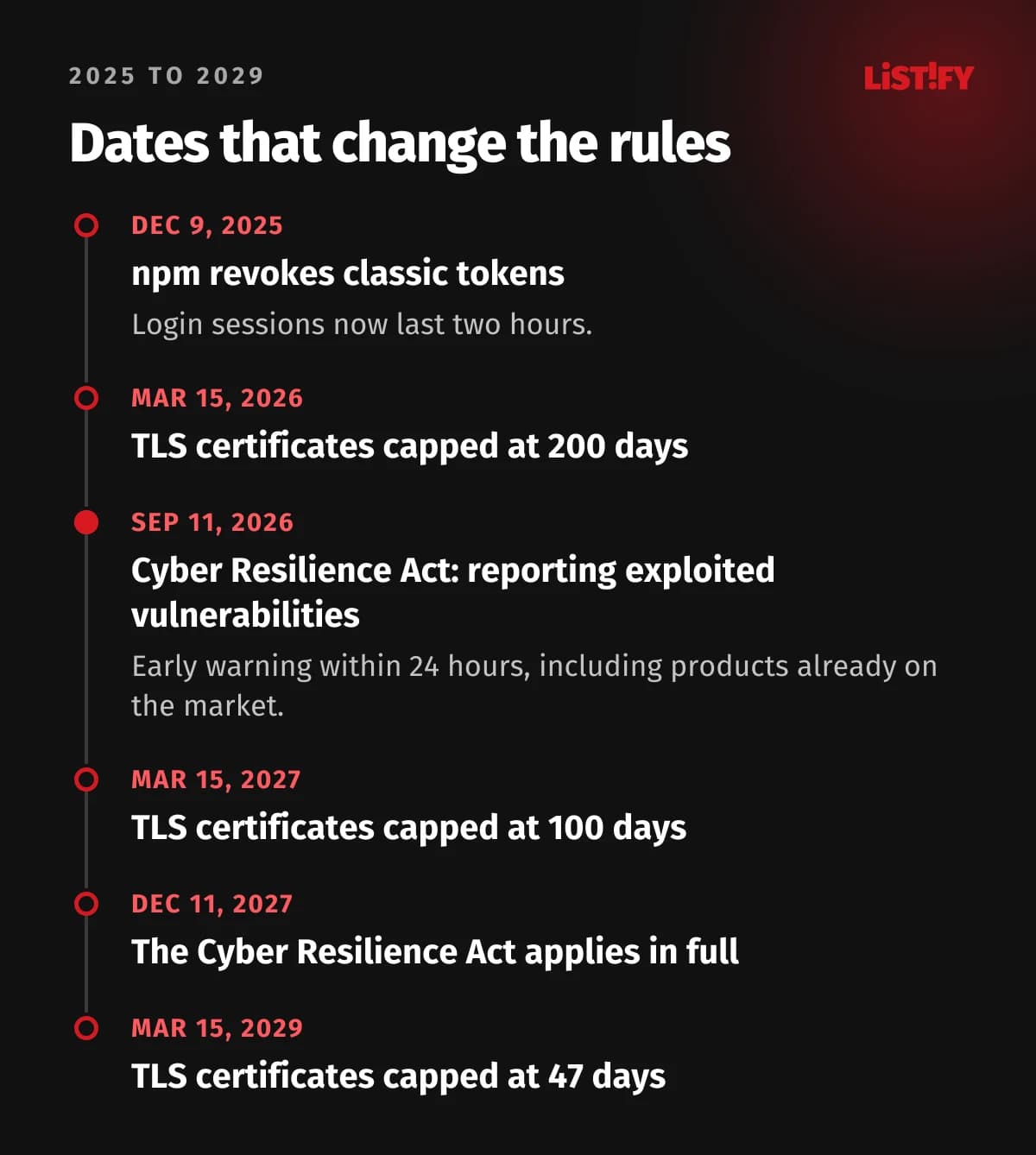
All seven come down to speed. Code ships faster, attacks arrive faster, and regulators want faster reports. Anything a machine can check should not depend on someone remembering to do it.
02The Four Areas You Need Under Control
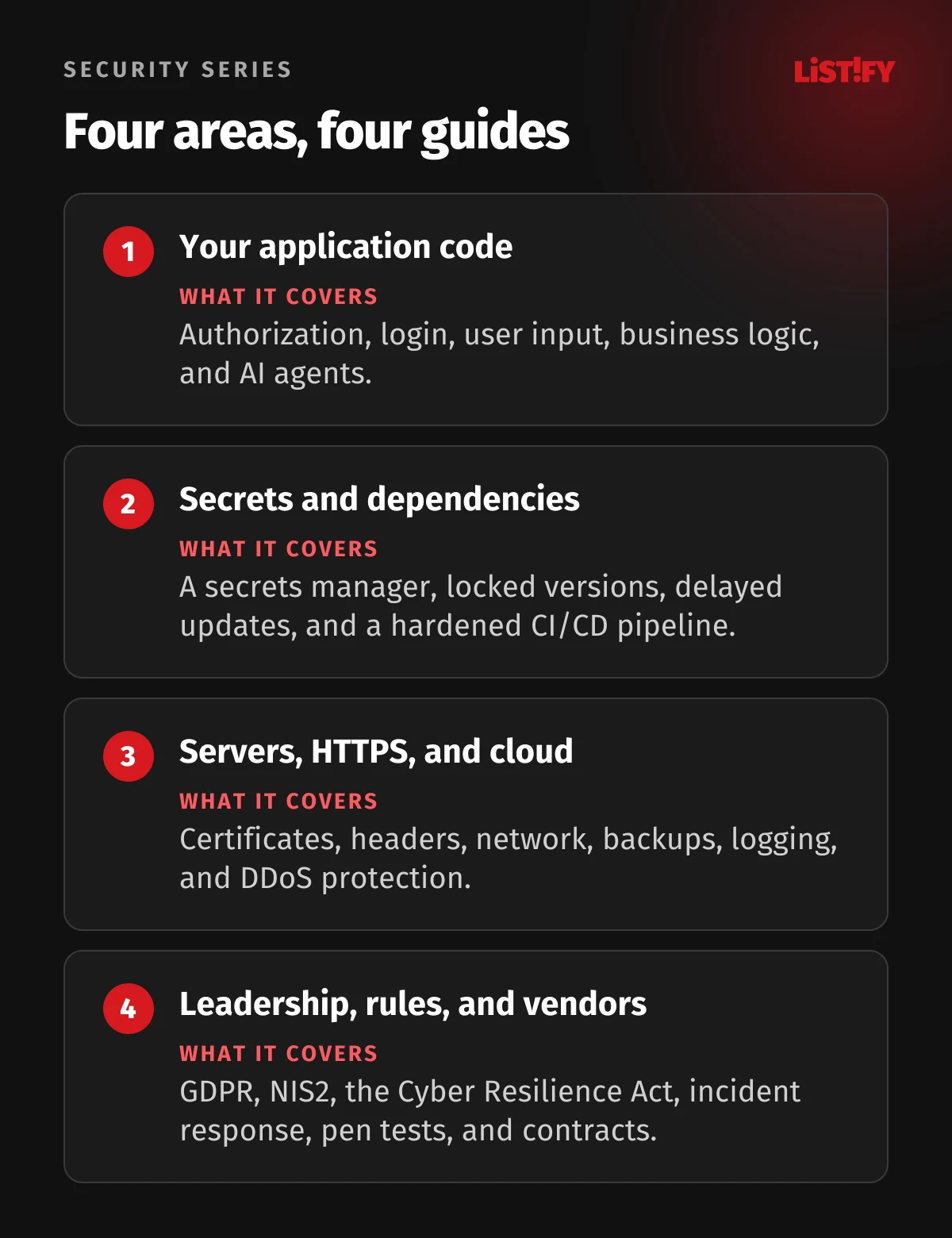
Your application code
Broken access control is still number one in the OWASP Top 10:2025 (OWASP). The classic mistake: the server never checks whether invoice 1235 actually belongs to the logged-in user. Weak login flows, unvalidated input, business logic holes, and AI agents with too many permissions fall into the same bucket. The full breakdown is in Change One Number in the URL: The Code Flaws That Leak Your Data.
Secrets and dependencies
In 2025 alone, 28.65 million passwords, tokens, and API keys ended up in public GitHub commits (GitGuardian). Attackers also steal them through compromised libraries you install yourself. How to protect your keys and lock down dependencies and CI/CD is covered in One npm install Was All It Took: How API Keys Get Stolen in 2026 and How to Stop It.
Servers, HTTPS, and cloud
Attackers began exploiting React2Shell, a critical flaw in React and Next.js, within hours of its disclosure (AWS). Organizations take a median of 43 days to fix vulnerabilities like that (watchTowr, on the Verizon 2026 DBIR). Certificates, headers, cloud configuration, backups, logging, and DDoS protection are all in They Already Know Your Staging Server: How to Lock Down Hosting, HTTPS, and Cloud Before Launch.
Leadership, regulation, and vendors
Under GDPR, a personal data breach has to be reported within 72 hours (GDPR, Article 33). A penetration test of a typical web app or SaaS product runs $5,000 to $30,000 (Blaze Information Security). GDPR, NIS2, the Cyber Resilience Act, incident response, and vendor contracts are covered in A Data Breach Now Costs $4.99 Million on Average. What Leadership Must Do Before Launch.
03Checklist Part 1: Before Launch (Blockers)
The checklist has three parts. Everything in Part 1 is a launch blocker: until it’s done, the app doesn’t go to production. Part 2 is for launch day, Part 3 for your first month live. Copy it into your task tracker and assign an owner to every item.
- Before launch (blockers)89
- Launch day7
- First 30 days and beyond9
105 items in total.
Access control
- Every endpoint checks permissions on the server, and the default is deny.
- A test with two accounts in two organizations returns no data from the other account.
- Customer data is isolated, ideally with row-level security in the database.
- The server only saves allowlisted fields, so mass assignment doesn’t work.
- The admin panel requires MFA and is reachable only through SSO, a VPN, or allowlisted IPs.
- Features that fetch URLs use a domain allowlist and block private IP ranges and cloud metadata.
- State changes use only POST, PUT, PATCH, or DELETE, and forms carry a CSRF token.
Authentication and sessions
- Minimum password length is 15 characters, with no composition rules and paste allowed.
- New passwords are checked against a list of breached passwords.
- Passwords are hashed with Argon2id, with bcrypt only where Argon2id isn’t available.
- Users can turn on passkeys or TOTP, and admins are required to.
- Login, signup, and password reset are rate limited and don’t reveal whether an account exists.
- Password reset tokens are random, single use, and valid for an hour at most.
- Changing a password ends all sessions and triggers an email to the user.
- Session cookies are HttpOnly, Secure, and SameSite, and a new session ID is issued at login.
- Logging out ends the session on the server.
- OAuth and OpenID Connect use PKCE, state, and an exact redirect_uri match.
Input and file uploads
- All SQL queries are parameterized, and every raw query has been reviewed.
- Every endpoint validates input against a server-side schema.
- Output is escaped automatically, and every raw HTML spot has been reviewed and sanitized.
- The app never deserializes objects from untrusted sources, and XML parsers have external entities disabled.
- Uploads are type-checked by content, size-limited, stored outside the web root, and served from a separate domain, with SVG handled safely.
Secrets and configuration
- A scan of the full Git history comes back clean, and every key that ever leaked has been rotated.
- Secrets live in a secrets manager, never in code, Dockerfiles, or CI config.
- Frontend environment variables (NEXT_PUBLIC_, VITE_) contain no secrets.
- Production has its own keys with least-privilege permissions.
- Debug mode is off, and error pages show no technical details.
- /.env, /.git/, backups, phpinfo, and /actuator all return 404.
- Swagger and GraphQL introspection are disabled or behind login.
- Default accounts, passwords, and sample apps are removed.
- CORS allows only specific domains.
- Source maps are not publicly accessible.
HTTPS, domain, and headers
- Certificates renew automatically via ACME, and expiration is monitored.
- Only TLS 1.2 and 1.3 are enabled, and SSL Labs gives you an A or better.
- HTTP redirects to HTTPS, and HSTS is set.
- CSP runs at least in Report-Only mode, with a date to switch to enforcement.
- X-Content-Type-Options, Referrer-Policy, Permissions-Policy, and frame-ancestors are set.
- DNS has a CAA record, and the domain has SPF, DKIM, and DMARC.
- No CNAME record points to a decommissioned service.
- Your registrar and DNS accounts have MFA and a transfer lock.
Dependencies and CI/CD
- The lockfile is committed, and CI installs with npm ci or the equivalent.
- No known critical vulnerability in dependencies without a documented exception.
- New package versions are adopted after a delay of several days.
- Dependency install scripts are restricted.
- An SBOM exists.
- GitHub Actions are pinned to a commit SHA, and GITHUB_TOKEN has minimal permissions.
- CI authenticates to the cloud with OIDC.
- The main branch is protected, and production deploys require approval.
- Developer accounts on GitHub, npm, and your cloud have phishing-resistant MFA.
- Containers run as non-root from a minimal base image.
Infrastructure
- Production runs in a separate cloud account or project.
- The cloud root account uses a hardware key or passkey and isn’t used day to day.
- Databases, caches, and queues are not reachable from the internet.
- Only ports 80 and 443 are open to the internet, and SSH and RDP are not public.
- Storage buckets block public access, and files are shared via signed URLs.
- Firebase or Supabase rules have been reviewed for every table.
- Staging requires login and holds no production personal data.
- The OS and runtime are on supported versions.
- The app sits behind a CDN with DDoS protection, and the origin only accepts traffic from the CDN.
Data and backups
- The app collects only the data it needs and has defined retention periods.
- Connections to the database and internal services are encrypted.
- Disks and databases are encrypted, and sensitive fields are encrypted at the application level too.
- A payment provider handles card data, and the app never stores it.
- Backups are encrypted, and at least one copy is immutable or in a separate account.
- Restoring from backup has been tested and timed.
Logging and errors
- Logins, permission changes, and admin actions are logged to a central system off the server.
- Logs contain no passwords, tokens, or card numbers.
- Alerts on suspicious patterns go to a named person and have been tested.
- External uptime monitoring and error tracking are running.
- The app fails closed, and calls to external services have timeouts.
AI features (if you have them)
- No agent combines untrusted input, access to sensitive data, and a way to send data out without human approval.
- Agents only have the signed-in user’s permissions.
- Irreversible actions require human confirmation.
- Model output is treated as untrusted input, and images in responses load only from allowlisted domains.
- Model API keys live only on the backend, with per-user limits and a monthly spending cap.
- You’ve tested for prompt injection.
- You have a data processing agreement with the model provider.
Business logic and bots
- Prices, discounts, and quantities are calculated on the server.
- Concurrent requests involving money or credits are handled with locks or atomic operations.
- Webhooks are verified by signature.
- Signup and forms have bot protection, and SMS and email sending is rate limited.
- Rate limits apply to the API, login, signup, and search.
Leadership and compliance
- A penetration test is done, and all critical and high findings are fixed and retested.
- Your incident response plan names a decision maker and includes contacts, playbooks, and kill switches.
- Reporting deadlines (GDPR 72 hours, NIS2 and CRA 24 hours) are in the plan with named owners.
- GDPR records of processing and data processing agreements are in place, plus a DPIA for high-risk processing.
- You’ve determined whether NIS2 applies to you.
- You’ve checked whether the Cyber Resilience Act covers your product.
- A /.well-known/security.txt file exists, and the address in it works.
04Checklist Part 2: Launch Day
- Run a final dependency and secrets scan on the exact build going to production.
- Check headers with MDN HTTP Observatory and the certificate with SSL Labs on the production domain.
- Confirm /.env, /.git/, and debug pages return 404 in production.
- Confirm production logs and alerts actually arrive.
- Take a backup right before launch and test your rollback path.
- Make sure the team knows who’s on call for the first few days and how to reach them.
- Delete test accounts, test data, and temporary firewall exceptions.
05Checklist Part 3: The First 30 Days and Beyond
- Review logs and alerts daily for the first week.
- Switch CSP from Report-Only to enforcement.
- Set up regular dependency updates and fix deadlines: critical within 48 hours, high within 14 days.
- Subscribe to security advisories for your frameworks and to the CISA Known Exploited Vulnerabilities catalog.
- Test a restore from backup once a quarter.
- Review who has access to production and the cloud, and remove what isn’t needed.
- Run a tabletop exercise based on your incident response plan.
- Schedule your next pen test: once a year and after every major change.
- Consider a private bug bounty program.
06FAQ
What should I check before launching a web app?
Four things come first: server-side authorization, secrets kept out of your code, locked and up-to-date dependencies, and logging with alerts. After that come HTTPS and security headers, cloud configuration, backups, a penetration test, and your legal obligations.
What is the OWASP Top 10?
A list of the ten most critical security risks for web applications, published by the nonprofit OWASP. The current edition is from 2025, and its top three are broken access control, security misconfiguration, and software supply chain failures (OWASP).
Is Cloudflare enough to secure my website?
No. A CDN and web application firewall stop DDoS attacks and common automated exploits. They can’t tell that a user is reading someone else’s invoice or that an API key leaked from your repo. Those have to be fixed in the app itself.
Is AI-generated code secure?
Not by default. According to Veracode’s July 2026 report, AI-generated code passed only 56% of security tests on average, and the best model scored 68% (SD Times).
How much does a penetration test cost?
A web app or SaaS pen test typically costs $5,000 to $30,000, and a standard commercial engagement runs $10,000 to $35,000 (Blaze Information Security).
How fast do I have to report a data breach?
Within 72 hours of becoming aware of it under GDPR (GDPR, Article 33). Organizations covered by the EU’s NIS2 directive owe an early warning within 24 hours of becoming aware of a significant incident (NIS2 Directive, Article 23). In the US, deadlines depend on your state and industry.
07Sources
All figures are current as of September 27, 2026. Each detailed guide lists additional sources.
- Verizon: 2026 Data Breach Investigations Report
- watchTowr: Verizon 2026 DBIR
- UCSB: Certificate Transparency as a reconnaissance source (IEEE EuroS&P 2023)
- SecureWorld: IBM 2026 Cost of a Data Breach Report
- OWASP Top 10:2025
- OWASP Top 10 for Agentic Applications 2026
- Veracode: 2026 GenAI Code Security Report
- SD Times: Veracode on AI-generated code
- GitGuardian: State of Secrets Sprawl 2026
- The Hacker News: 9 takeaways from State of Secrets Sprawl 2026
- CISA: Widespread Supply Chain Compromise Impacting npm Ecosystem
- GitHub Changelog: npm classic tokens revoked
- AWS: China-nexus groups rapidly exploit React2Shell (CVE-2025-55182)
- CyberInsider: TLS certificate lifespans reduced to 47 days by 2029
- European Commission: Cyber Resilience Act reporting obligations
- GDPR (EUR-Lex)
- NIS2 Directive (EUR-Lex)
- Blaze Information Security: Penetration testing cost 2026