Custom software for payroll firms: inputs, approvals and individual payslips
Connect employers, approved payroll inputs and individual payslip delivery. A custom portal can work around the payroll application you already use.
Illustrative situation: A client’s HR contact sends attendance data, a manager adds bonuses in another spreadsheet and a correction arrives just before processing. Your payroll specialist must establish which version applies, who approved the change and whether it reached the calculation. Afterwards, payslips need to reach the right individuals.
Custom software for payroll firms should coordinate information collection, approval and delivery by employer, employee and pay period. It can connect a client portal, CRM, website and internal work queue. Your existing payroll application can continue performing the payroll calculations.
Describe one ordinary payroll cycle to Listify. Start with the points where information is re-entered or the approved version is unclear.
01A payroll portal can complement the calculation engine
Commissioning a custom system does not necessarily mean developing another payroll engine. You may need to solve the work around calculation: collecting attendance, tracking employee changes, approving variable pay, checking the batch and releasing outputs appropriately.
CRM manages the commercial relationship with an employer. Employee access serves a different purpose and requires different permissions. Adding a “payroll” folder to each contact is insufficient. A custom CRM design should distinguish the client organisation, employment relationship, individual and processing period.
02Twenty-one modules for a payroll bureau
Employers and incoming information
- 1. Agreed service scope: Record each employer’s services, contacts, input deadlines and authorised approvers.
- 2. Reliable employee matching: Use an agreed identifier linking the individual, employer and employment relationship. Matching names alone is insufficient.
- 3. Joiners, changes and leavers: Guide clients through the required information and show what still awaits verification or completion.
- 4. Attendance and absence inputs: Give submissions a period, origin and receipt status. Return conflicting entries to the relevant contributor.
- 5. Bonuses and variable pay: Preserve the period, recipient and approver for each amount so amendments do not remain isolated email attachments.
- 6. Automatic reminders: Chase missing items only, stop on receipt and assign delivery failures or delays to an accountable specialist.
- 7. Input-specific questions: Keep answers with the correct individual and period so clients do not repeat the context when staff provide cover.
Approval and processing
- 8. Periods and batches: Give each payroll run an owner, target date and precisely defined set of inputs.
- 9. Input checks: Flag missing identifiers, unexpected changes and conflicting values. A format check does not establish that the underlying information is correct.
- 10. Version-specific approval: Approvers confirm defined inputs. A subsequent amendment creates another version and requires a new decision.
- 11. Payroll application handover: Transfer supported data through a verified import or interface. Rejected rows remain visible for resolution.
- 12. Output review: A designated reviewer compares results with approved inputs and investigates unexpected differences before release.
- 13. Employer confirmation: Where required by the agreed process, the client approves a specified output. Batch approval does not itself send payments.
- 14. Payslip assignment: Match every document to the correct person and period. Ambiguous items must not be published automatically.
Delivery and practice management
- 15. Employee access: Employees see their own released documents only. An account within an employer must not expose colleagues’ outputs.
- 16. Delivery records: Distinguish publication, notification and any available receipt evidence. Failures require an agreed alternative process.
- 17. Employer reports: Authorised contacts receive only the agreed reports and information appropriate to their responsibilities.
- 18. Billing preparation: Distinguish recurring fees, processed items and exceptional work according to each client’s contract.
- 19. Website, enquiries and CRM: Create a contact, service requirement and response task from each relevant new enquiry.
- 20. Important activity records: Trace changes to access, approvals and document publication. Define who may inspect these records themselves.
- 21. Capacity and cover: Show open batches, complexity and the substitute who can take over during a specialist’s absence.
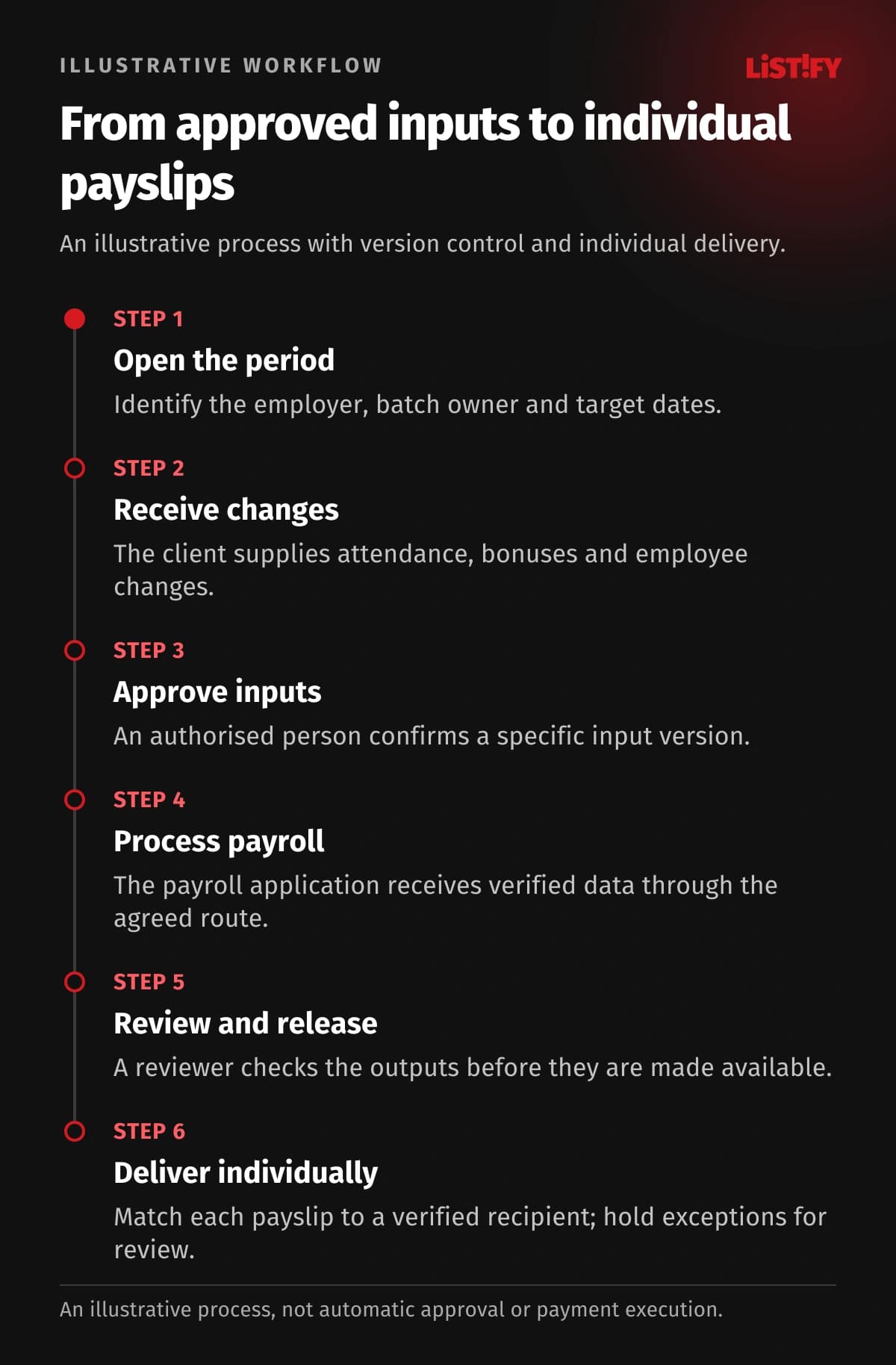
03An illustrative cycle with approved inputs
This is a proposed workflow rather than a measured customer case study. Calculations remain in the existing payroll application.
- Open the period: Prepare employer requests, assign the batch owner and set internal target dates.
- Receive changes: The client supplies attendance, variable pay and personnel changes for identified individuals.
- Approve inputs: Authorised people confirm a specified version. Missing or disputed information returns for resolution.
- Process payroll: The application receives approved data through the agreed route, with rejected items resolved.
- Review and release: A reviewer checks outputs and an authorised person decides which documents may be released.
- Deliver individually: Payslips become available to the correct recipients, while exceptions and corrections remain traceable.
04Approval does not cover every future amendment
If a client approves the inputs and later changes a bonus, the original approval does not automatically apply to the revised version. Show the difference, batch status and person responsible for deciding what happens next.
| Event | Required system response |
|---|---|
| Input approval | Record the version, time and approving person |
| Later correction | Create an amendment and assign a new approval step |
| Ambiguous payslip recipient | Block publication and send the item for review |
| Failed notification | Record the failure and initiate the agreed fallback |
The illustrative chart counts repeated manual entries in named records. It does not claim that software calculates the correct pay automatically or saves a specific amount of time. Professional release of the batch remains a separate action.
- Payroll period deadlineModel: separate records: 3Model: connected design: 1
- Approved bonusModel: separate records: 2Model: connected design: 1
- Batch releaseModel: separate records: 1Model: connected design: 1
Illustrative model, not a measurement. The deadline is entered in the client calendar, batch list and handover checklist (3); an approved bonus in the approval sheet and import template (2). The proposed design enters each once and uses a verified transfer (1). Professional batch release remains manual (1). Counts are not time savings or a guarantee of correct calculation. Recipient identity, version and transfer availability must be verified.
05Sensitive information needs individual permissions
A client’s HR contact manages only the authorised employer and agreed information. A manager approving bonuses does not necessarily need other payroll documents. Payroll specialists have assigned clients; employees have their own outputs. Technical administration should not automatically inherit these operational permissions.
The EDPB’s data security guidance emphasises access according to need. Design multi-factor authentication, client separation, encrypted transfer, access records, leaver handling and backup recovery. The appropriate legal and organisational requirements depend on where and how the practice operates; these features alone do not establish compliance.
Assess connections against the actual capabilities of each payroll application. Our system integration guide outlines the questions. An API may expose only selected records, and no particular connection should be promised before verification.
06The first release, website and project cost
An existing portal may suit a standard process. Consider custom development when client-specific rules, complex approvals or several applications repeatedly force workarounds. Start with one employer, input collection, version approval and a batch overview. Add payslip delivery only after verifying identities and permissions.
The website should explain your services, onboarding and required client cooperation. An enquiry form can collect approximate workforce size and the existing application without requesting named payroll information. Connect it to CRM and assign a person to respond. Detailed records belong in the subsequent controlled handover.
Development cost depends on scope, migration, roles and connections. Identify third-party services and support separately, including responsibilities for future application changes. Let us define a first release around your real payroll approval process.
07Migration and operation without an internal IT team
Standardise employer, individual and employment identifiers first. Trial migration should include similar names, multiple employment relationships and revoked access. Use a limited, appropriately protected dataset. Matching employee counts alone does not demonstrate correct document assignment.
Our legacy-system migration guide explains the broader process. Agree alternative input handover, recovery responsibilities and incident contacts before launch. Keep an explicit decision point for switching each employer rather than assuming every client moves together.
Listify can provide analysis, design, development, handover and contracted support. Your own IT team is not a prerequisite. Hosting is arranged with a selected provider; Listify does not operate the hosting itself. The handover should cover administration instructions, data exports and the agreed route for requesting changes.
08Questions payroll firm owners ask
Must we replace our payroll application?
No. The first project can connect information collection and output delivery around the existing application. A new calculation engine is a different scope.
Will employees see colleagues’ pay?
The proposed employee role must allow access only to their own documents. Test this during batch imports and changes to document assignment as well.
Can payslips be handled automatically?
Yes, after validating the format and unambiguous identity matching. Uncertain items must await review rather than being guessed from similar names.
What happens after an approved input changes?
Create a new version and assigned approval step. Preserve history and identify the inputs or outputs affected by the amendment.
Can every existing application connect?
Each connection needs verification of supported data, formats, licences and permissions. Controlled file transfer may be appropriate in some cases.
Does the portal guarantee compliance or delivery?
Not automatically. Rules must fit the specific context, and delivery failures need monitoring and an agreed fallback process.
09Start with responsibility boundaries
Prepare an anonymised batch and identify who may edit, approve and view it. Explore Listify’s custom software services and our questions for choosing a development partner. We can design a payroll portal and connected operational system around your firm.