Custom software for judicial enforcement offices: cases, payments and communication
Design case records, financial reconciliation and controlled communication around the work of a judicial enforcement office.
An illustrative payment arrives without a usable reference. A participant asks for an updated balance while a staff member prepares a document using older figures. All three activities concern the same case. Disconnected records make the office reconstruct the position before taking the next step.
Custom software for judicial enforcement offices should connect cases, participant roles, documents, financial movements and controlled tasks. This concerns offices exercising judicial enforcement functions. Responsibilities and procedures vary by jurisdiction and must shape the design from the outset.
Show us how a bank receipt reaches the correct enforcement file. Matching, approval and reconciliation can define a useful first release for your office’s permitted activities.
01Design around the work your office actually does
Creditors, debtors, representatives, employers and other parties need distinct relationships and permissions. The foundation is a case with supported events. Money received must remain distinguishable from the office’s own income, with a clear source and processing history for every amount.
| Situation | Supporting record | Control |
|---|---|---|
| Incoming payment | Bank transaction and case | Matching and allocation |
| Participant enquiry | Verified role and current statement | Disclosure scope |
| Procedural action | Documents and verified events | Authorised decision |
0220 modules to consider for your practice
Select modules where responsibility or financial traceability is currently unclear. Separate preparation from authorisation in each workflow. Case administrators, finance staff and the professional authorised to decide an enforcement step should not automatically share the same permissions.
Cases and participants
- Case register. Connect internal and court references, status and responsibility. Preserve links between related cases without merging their records.
- Participant roles. Record each party’s role within the individual case. A shared contact must not inherit the same access everywhere.
- Representation records. Store the evidence and scope of authority. Review a changed representative before altering future communications.
- Intake checks. Track missing documents and inconsistent identifiers. An incomplete case needs a visible reason for waiting and an accountable owner.
- Event history. Connect documents, communications and status changes chronologically. Corrections should preserve the earlier entry and the reason for change.
Documents and procedural work
- Incoming documents. Preserve original files, source information and metadata. Ambiguous case matching enters a queue for staff review.
- Working templates. Use verified case data for drafts and identify who reviewed the content before a document is finalised.
- Service evidence. Distinguish sending, delivery evidence and a professionally confirmed triggering event. Opening a portal message is not automatically official service.
- Proposed deadlines. Present the event, rule and proposed date. A responsible professional confirms its procedural significance in the applicable jurisdiction.
- Approval stages. Separate preparation, review and execution. The application must not independently determine whether an enforcement measure is legally available.
Payments and financial records
- Bank imports. Preserve transaction identifiers and source information. Reimporting the same file must not create a second copy of each payment.
- Matching exceptions. Queue missing references and amount discrepancies. Similar names alone should not resolve an ambiguous payment.
- Financial components. Keep principal, additional amounts and cost categories distinguishable using rules professionally approved for the relevant procedure.
- Allocation proposals. Show source figures and proposed entries before an authorised reviewer approves further processing and checks totals.
- Balance reconciliation. Compare case records, bank transactions and accounting outputs. Every difference needs ownership, explanation and a recorded resolution.
Communication and office oversight
- Participant portal. Provide verified users with approved material and statements according to their specific role and the office’s reviewed procedure.
- Enquiry handling. Attach a request to its case, owner and status. Check current information and the requester’s authority before responding.
- Complaints records. Preserve the submission, supporting material and approved response separately from routine administrative enquiries.
- Work queues. Show outstanding work by reason and responsible person. Completion should require the necessary review rather than encourage premature closure.
- Case handover. Check balances, documents and unresolved requests. Preserve history and financial relationships when a file is closed or transferred.
03A model workflow from intake to closure
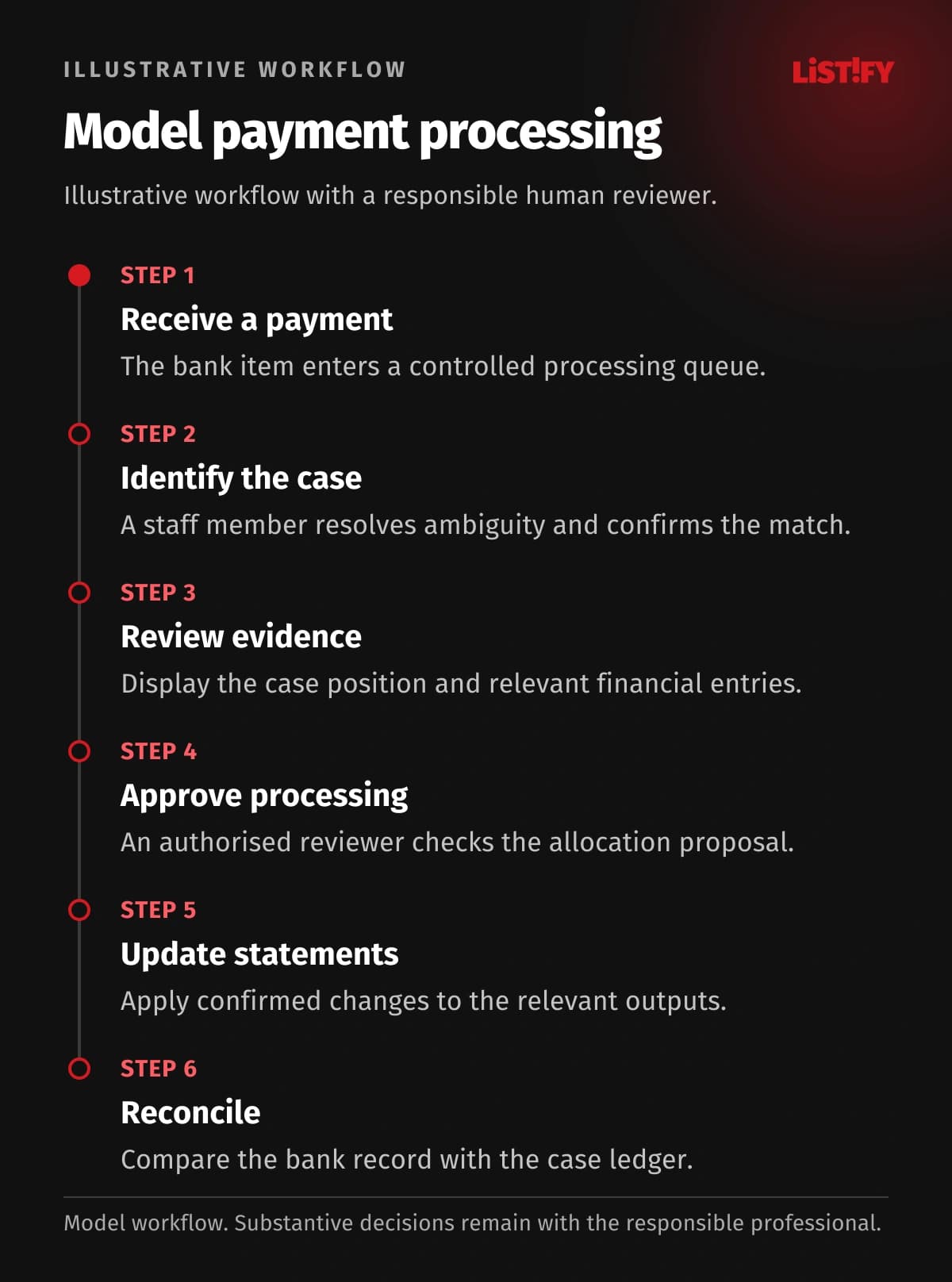
The illustration describes operational handling of a receipt, not a result achieved by an office or a legal enforcement procedure. An authorised person confirms allocation and financial treatment. Decisions about enforcement action and deadlines remain subject to the applicable jurisdiction, powers and verified circumstances.
- Receive a payment. The bank item enters a controlled processing queue.
- Identify the case. A staff member resolves ambiguity and confirms the match.
- Review evidence. Display the case position and relevant financial entries.
- Approve processing. An authorised reviewer checks the allocation proposal.
- Update statements. Apply confirmed changes to the relevant outputs.
- Reconcile. Compare the bank record with the case ledger.
This model concerns payment administration. It does not prescribe an enforcement measure. An unidentified payer remains an unresolved exception until supported.
04Connect the website, portal and daily work
The website should explain contact routes and administrative arrangements. A verified portal can share approved documents and financial statements. An ordinary form or portal message does not automatically replace official submissions or service. Explain the distinction before someone sends a request.
Before an API integration, check bank interfaces or exports, case-system capabilities and the office’s access rights. Repeating an import must not duplicate a receipt; correcting its allocation needs a traceable record. If direct access is unavailable, plan a controlled file transfer with reconciliation.
- Payment referenceModel: separate records: 3Model: connected design: 1
- Case on a requestModel: separate records: 2Model: connected design: 1
- External confirmationModel: separate records: 1Model: connected design: 1
Illustrative counts of separate manual entries of the same information, not measured results. Payment reference: financial ledger, matching sheet, case card (3→1). Case reference: enquiry log and task queue (2→1). External confirmation: manual entry outside the system (1→1). No savings are guaranteed; any APIs and permissions require verification.
05Choose existing software, an extension or custom development
First test whether your established enforcement product supports the authoritative records and approval process. An additional application should not create an independently maintained balance for the same case. A broader custom system becomes relevant when configuration cannot resolve recurring mismatches between work queues, permissions and financial records.
Retain a suitable core case product and add reconciliation tools, a portal or enquiry coordination. Define the authoritative record and retain traceable financial changes.
A comparison with custom CRM must include payment validation, access controls and finance training. Bespoke development does not guarantee lower costs. Acceptance should cover a repeated import, an unidentified payer and a corrected allocation whose totals and history remain consistent.
06Make permissions and security specific
Intake staff receive documents, caseworkers prepare work and authorised professionals approve designated actions. Finance staff process payments with additional review for changed bank details. External users must not receive unrestricted internal notes or other parties’ material.
Add separate permissions for importing, correcting and approving receipts to multifactor authentication and change logs. Exports must respect case restrictions. Remove access when staff leave and approve temporary support access explicitly. Test restoration of financial relationships as well as files. Set retention and deletion rules for the office’s specific categories of records.
07Plan the first release and migration
A first release could focus on bank imports, unmatched transactions and reconciliation. Pilot valid payments, duplicates and incorrect matches before extending other areas.
For migration from legacy systems, carry case identifiers alongside individual movements and their history. Compare transaction counts and totals by case, not just the overall balance. Keep unresolved receipts visibly open. Plan the cutover so a previously imported bank movement cannot return as a new transaction.
08Budget, implementation and support without an IT department
Bank data sources, matching rules, correction history and approval roles are major cost drivers. Estimate the import queue, reconciliation and any portal separately. Define which totals and exception cases the office will verify at each acceptance stage; approve further case-management scope with its budget implications visible.
Compare transaction counts and totals by case. Verify correction history and test an external user attempting to access an unrelated file.
An in-house IT department is unnecessary. Nominate an operational owner and someone authorised to confirm the financial rules. Listify can provide design, development, testing, training and agreed support. Allocate infrastructure, update and recovery responsibilities, including the response to a stopped import or reconciliation difference. Handover should document the checks and correction procedures.
09Frequently asked questions
Is ordinary debt collection CRM suitable?
Judicial enforcement requires case roles, procedural documents and controlled financial records. A sales or collection workflow should not be adopted without this assessment.
Can software choose an enforcement measure?
It can organise evidence and checklists. The authorised professional assesses and approves the action under the relevant legal framework.
Can the portal accept official submissions?
That requires specific legal and technical verification. Until confirmed, design it for administrative communication and controlled information sharing.
Can all payments be matched automatically?
Clear transactions can follow verified rules. Ambiguous references, duplicates and discrepancies require an exception queue and staff review.
Can we retain our existing software?
Yes, subject to confirmed exports or interfaces. Establish access rights, data ownership and responsibility for correcting rejected exchanges.
How can we proceed without internal IT?
Appoint an operational owner and professional reviewer. Listify can design the pilot and support arrangement around concrete acceptance scenarios.
Review your office’s payment workflow with Listify. Bring an anonymised receipt and case, an unresolved allocation and your current exports. We can scope an internal application and any supporting website or portal around your authorised roles and review points.