Custom software for insolvency practitioners: claims, assets and case oversight
Keep claims, asset records and financial movements connected without confusing their status. A guide to custom software for insolvency practices.
An illustrative team is updating a creditor claim, an asset record and a draft report while another bank transaction arrives. Each person works carefully, yet the outputs must be compared manually before they can be used. The problem is the relationship between records, not simply a missing contact database.
Custom software for insolvency practitioners should connect proceedings, parties, claims, assets, documents and financial movements. CRM provides structured relationships and communication. Professional assessments remain with the responsible practitioner, with workflows adapted to the applicable appointment and jurisdiction.
Walk us through the evidence for one claim in a specific appointment. The missing links, review responsibilities and route to an approved record can define the first useful software release.
01Design around the work your office actually does
A debtor, creditor, representative and interested party have different roles. A submitted claim, its assessment, an asset and a realised receipt are separate records. One interface should preserve those distinctions and support the types of insolvency or restructuring work the practice actually undertakes.
| Record | Connect | Keep distinct |
|---|---|---|
| Claim | Submission, evidence and assessment | Claimed and reviewed position |
| Asset | Item, source and supporting documents | Valuation and realised proceeds |
| Finance | Bank, case and approved output | Estate funds and practice income |
0220 modules to consider for your practice
Scope the modules around the checks your team performs. Claims, assets and bank movements can be delivered in stages, but they need a common case identifier from the outset. For each module, distinguish staff preparation from the insolvency professional’s approval and preserve the source of every proposed figure.
Cases, parties and supporting material
- Case record. Combine references, procedure type and responsible staff. Related proceedings remain separate records with explicit links.
- Party roles. Set access by each person’s role in the particular case. A contact record must not open every related document.
- Document intake. Preserve the source and filing history of each attachment. Review uncertain case matches before further use.
- Information requests. Give each request a specific item, owner and status so staff can see what prevents the next review.
- Event history. Connect documents, approvals and changes chronologically. Retain authorship and the earlier record when information is corrected.
Creditor claims and assessment
- Claims register. Connect the creditor, individual claim items and evidence. One creditor may have several items with different states.
- Import review. Treat extracted information as a proposal. Compare amounts, identifiers and relationships against the source before confirming entries.
- Assessment workspace. Collect evidence and working notes against each item. The application does not determine the legal merits or priority of a claim.
- Recorded conclusions. Preserve the reviewer, date and reasoning. Distinguish the creditor’s original position from the professionally confirmed assessment.
- Related disputes. Link the claim to further proceedings, documents and tasks so developments remain connected to their original context.
Assets and financial movements
- Asset inventory. Record descriptions, sources, evidence and verification status. Keep preliminary information visibly separate from approved records.
- Valuation and realisation. Distinguish estimates, approved processes, transaction documents and actual proceeds. One amount cannot represent all of these stages.
- Administration expenses. Connect costs to the relevant case or asset, supporting invoice and approver, making their purpose traceable.
- Bank reconciliation. Match receipts and payments to the correct records. Unidentified transactions and repeated imports need controlled exception handling.
- Distribution proposals. Display the inputs and draft allocation for professional review. Further financial actions require the appropriate approvals.
Tasks, collaboration and reporting
- Event based dates. Show the event and rule supporting a proposed deadline. The responsible professional verifies the facts and confirms the date.
- Draft reporting. Prepare working outputs from reviewed data with traceable sources. Check completeness and consistency before using them externally.
- Information portal. Allow authorised people to supply requested evidence within a specific case and approved information scope.
- Workload dashboard. Show incomplete claims, unmatched transactions and items awaiting decisions, distinguishing administrative delay from a substantive exception.
- Closure and transfer. Check finances, outstanding tasks and storage. Preserve relationships and change history when another colleague takes over.
03A model workflow from intake to closure
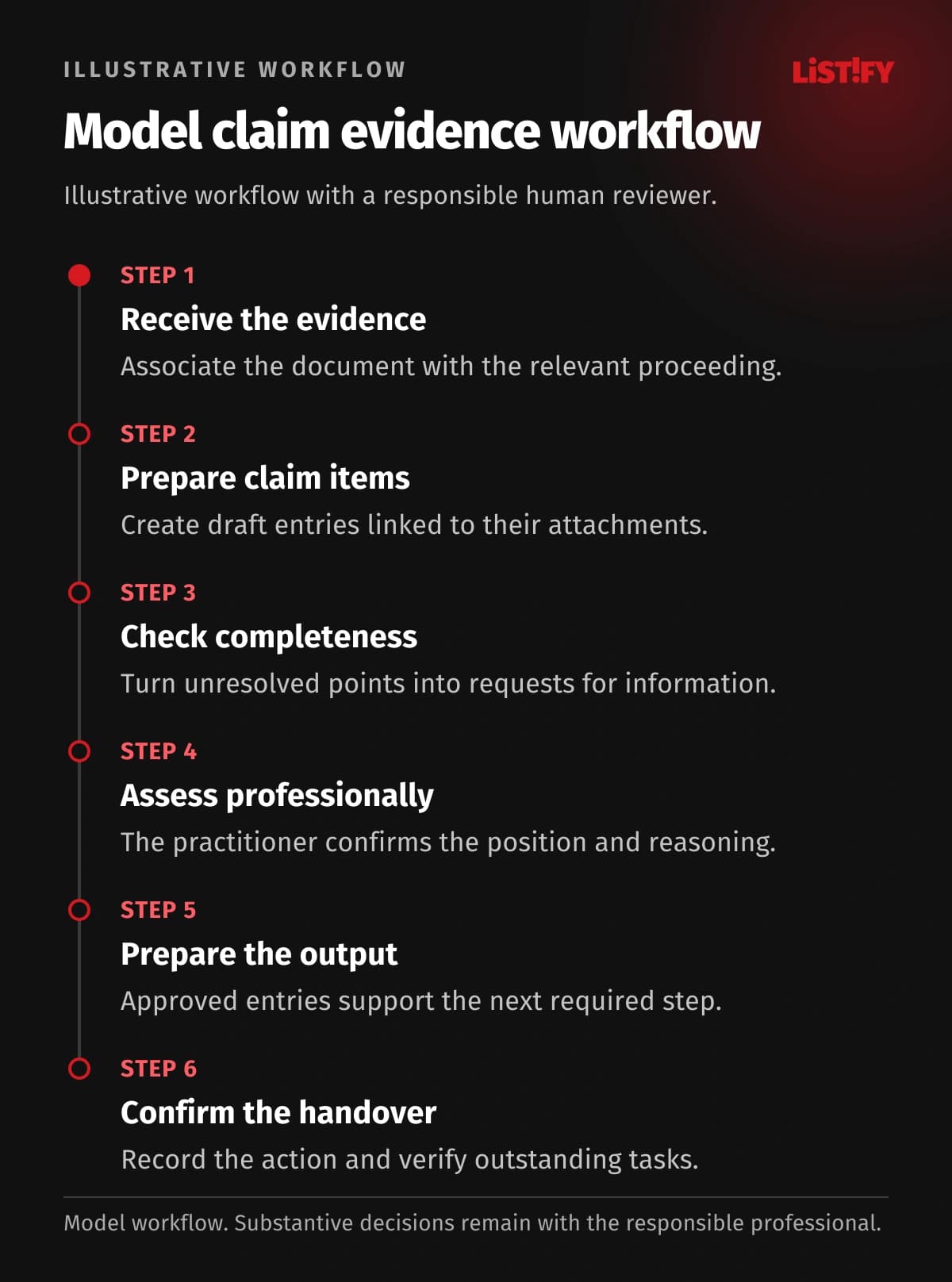
This model illustrates handling claim evidence, not a client outcome or mandatory insolvency procedure. The practitioner or authorised professional confirms the assessment and relevant dates under the applicable framework. An internal application record does not itself determine whether a claim is admitted or how it ranks.
- Receive the evidence. Associate the document with the relevant proceeding.
- Prepare claim items. Create draft entries linked to their attachments.
- Check completeness. Turn unresolved points into requests for information.
- Assess professionally. The practitioner confirms the position and reasoning.
- Prepare the output. Approved entries support the next required step.
- Confirm the handover. Record the action and verify outstanding tasks.
This model describes work on claim evidence. Preparing an output does not automatically file or publish it in an official register.
04Connect the website, portal and daily work
The practice website should explain contact routes and document preparation. A portal can support controlled cooperation and requests for evidence. It does not replace official registers, publication or filing procedures. Distinguish a working draft, a submitted document and a verified filing outcome.
For an API integration, verify available interfaces, permissions and identifiers for cases and records. Incoming documents must retain their source and confirmed relationship. Do not mark an exchange complete without checking the result; where no supported interface exists, plan a controlled export and manual confirmation.
- Creditor nameModel: separate records: 3Model: connected design: 1
- Asset identifierModel: separate records: 2Model: connected design: 1
- Register referenceModel: separate records: 1Model: connected design: 1
Illustrative counts of separate manual entries of the same information, not measured results. Creditor name: intake, claims register, working report (3→1). Asset identifier: inventory and cost record (2→1). Official filing reference: manual entry (1→1). No savings are guaranteed; any APIs and permissions require verification.
05Choose existing software, an extension or custom development
First assess whether the current insolvency product correctly represents claims, assets and appointments. A new dashboard must not flatten those relationships into a single contact card. Broader custom development is worth considering when staff repeatedly reconnect these records manually and configuration cannot preserve the required checks or handovers.
Where specialist software covers the main procedure, Listify can add a portal, evidence checks or internal reporting. Assess full replacement only after establishing the data relationships and external dependencies.
When comparing custom CRM, include validation of links between the claimant, claim and supporting evidence. Bespoke development may cost more than adapting your current product. Acceptance should cover multiple claims from one creditor and a revised assessment without losing the original statement or its source.
06Make permissions and security specific
Administrators prepare evidence, assigned professionals assess items and the practitioner approves designated outputs. Finance staff receive controlled payment access. Creditors must not automatically see internal assessments or confidential material concerning other parties.
Apply permissions to the specific case, its documents and exports. Separate working notes from approved material for sharing, and retain assessment change history. Combine multifactor authentication with prompt account removal and approved, limited support access. Restoration must recover claim-to-evidence relationships. Agree retention by record category and the obligations applicable to the appointment.
07Plan the first release and migration
Start with cases, claims, attachments and information requests. Test multiple items from one creditor and an incorrect import. Add asset and financial modules after confirming the basic relationships.
For migration from legacy systems, map cases, creditors, individual claims and attachments separately. The same creditor does not mean the same claim. Compare counts and amounts by agreed category, preserve verification status and check asset and bank links. Finish the cutover plan by naming the authoritative record for each data type.
08Budget, implementation and support without an IT department
Relationship complexity, imported claim quality, asset records and financial controls shape the estimate. Price these workstreams separately. The first release should trace a confirmed entry back to its evidence; reporting and further automation can then be estimated against a validated foundation rather than unresolved spreadsheets.
Compare claim counts and agreed category totals. Test changed representation, duplicate documents and recovery of the link to an original attachment.
You do not need an internal IT team. Nominate someone who understands case records and a professional who approves the operating rules. Listify can provide design, development, testing, training and agreed support. Allocate infrastructure, update and recovery responsibilities, including failed imports or broken evidence links. Documentation should explain correction without overwriting the history of an assessment.
09Frequently asked questions
Is a general CRM sufficient?
It can support contacts. Claims, estates, proceedings and financial relationships need a specialist model beyond an ordinary sales record.
Does the portal replace an official register?
No. It supports internal oversight and cooperation. Official filings and publication retain their applicable procedures, with any integration separately verified.
Can the system decide a claim?
It organises evidence and review information. A responsible practitioner or authorised professional confirms the substantive assessment under the applicable framework.
Can claims be extracted automatically?
Extraction can propose entries. Amounts, identifiers and uncertain information must be checked against the source before being accepted.
How are funds kept separate?
Each financial record needs an explicit case relationship, source and review trail. Design transfer and approval rules around the practice’s actual responsibilities.
What is needed for an initial estimate?
An anonymised case, claim and asset examples, your software list and recurring exceptions. These provide the basis for a concrete first release.
Scope the first release for your insolvency practice with Listify. Bring an anonymised claim and attachments, an asset record and the route to a working report. We can plan the connections between case records, internal review and a cooperation portal while preserving the meaning of each record.