Custom CRM and software for tax advisers: case files, deadlines and review
A practical guide to connecting tax engagements, document requests, verified deadlines and professional review through custom software.
Illustrative situation: A client sends additional documents, a colleague changes a draft return and a partner needs to know what is ready for review. There is a date in the calendar, but nobody can immediately explain which case it applies to or who last checked it. The information exists, but its connections are missing.
Custom software for tax advisers should connect clients, case files, supporting documents, verified deadlines and responsibility for each action. CRM, a client portal, a website and internal applications can form a coherent process. Professional judgement and tax calculations remain with designated specialists and the appropriate preparation tools.
Show Listify an anonymised example of one engagement. We can identify where software should assist and where it must wait for an adviser’s decision.
01A tax file needs more than a contact and a reminder
One client may have several entities, reporting periods and types of engagement. A return, an advisory assignment and a response to a notice may have different documents, deadlines and teams. Start by connecting the client, relevant entity and specific case.
A custom CRM can support both business development and ongoing service. Tax practices also need to see who confirmed a deadline, which version awaits review and what evidence shows an action is complete. A green status alone is not proof that a filing succeeded.
02Twenty modules for a tax practice workflow
Accepting engagements and collecting information
- 1. Clients and represented entities: Distinguish individuals, companies and authorised contacts. Similar names must not merge separate case files.
- 2. Engagement scope: Record the service, period, responsible adviser and exclusions that do not form part of the current instruction.
- 3. Authority records: Track relevant documents, scope and validity checks. Access to a client portal does not itself establish authority to represent someone.
- 4. Client questionnaires: Ask questions appropriate to the assignment and preserve authorship and changes rather than repeatedly circulating disconnected forms.
- 5. Document requests: Give each requested item a purpose and status. Distinguish missing documents from supplied but unsuitable versions.
- 6. Automatic reminders: Chase outstanding requests only, stop after receipt and route failed delivery or prolonged delays to the responsible person.
- 7. Case communication: Keep questions and answers with the correct engagement. Internal professional notes must not become client-visible by accident.
Preparation, deadlines and review
- 8. Case-specific deadlines: Record the obligation, relevant circumstances, verification source and adviser who confirmed each applicable date.
- 9. Internal milestones: Separate information collection, preparation and review targets from the external deadline so managers can see remaining review time.
- 10. Changes and extensions: Require a reason and supporting evidence when a date changes. Preserve the previous date and its history.
- 11. Working versions: Distinguish source documents, draft calculations and final outputs. Reviewers should always know which version they are assessing.
- 12. Open technical questions: Give unresolved issues an owner and a recorded decision so material uncertainty does not remain in a private inbox.
- 13. Second-person review: Assign review according to the practice’s rules and record comments, responses and their resolution.
- 14. Output approval: Keep client approval separate from internal approval and connect each to a particular document version.
Completion and practice management
- 15. Submission evidence: Distinguish prepared, sent and evidenced states. Attach the appropriate acknowledgement or outcome to the relevant case.
- 16. Follow-up obligations: A new notice or information request creates a task with a separately checked deadline rather than an easily overlooked note.
- 17. Time and additional scope: Record consultations, reviews and expanded instructions to support client discussions and billing.
- 18. Team capacity: Distinguish case volume from complexity and identify assignments that depend entirely on one specialist.
- 19. Website enquiries: Connect the enquiry form to CRM, the relevant service and an owner. Initial contact should not require a complete tax file.
- 20. Archive and handover: Preserve approved outputs, supporting information and decision history under agreed access and retention arrangements.
03An illustrative engagement from instruction to evidence
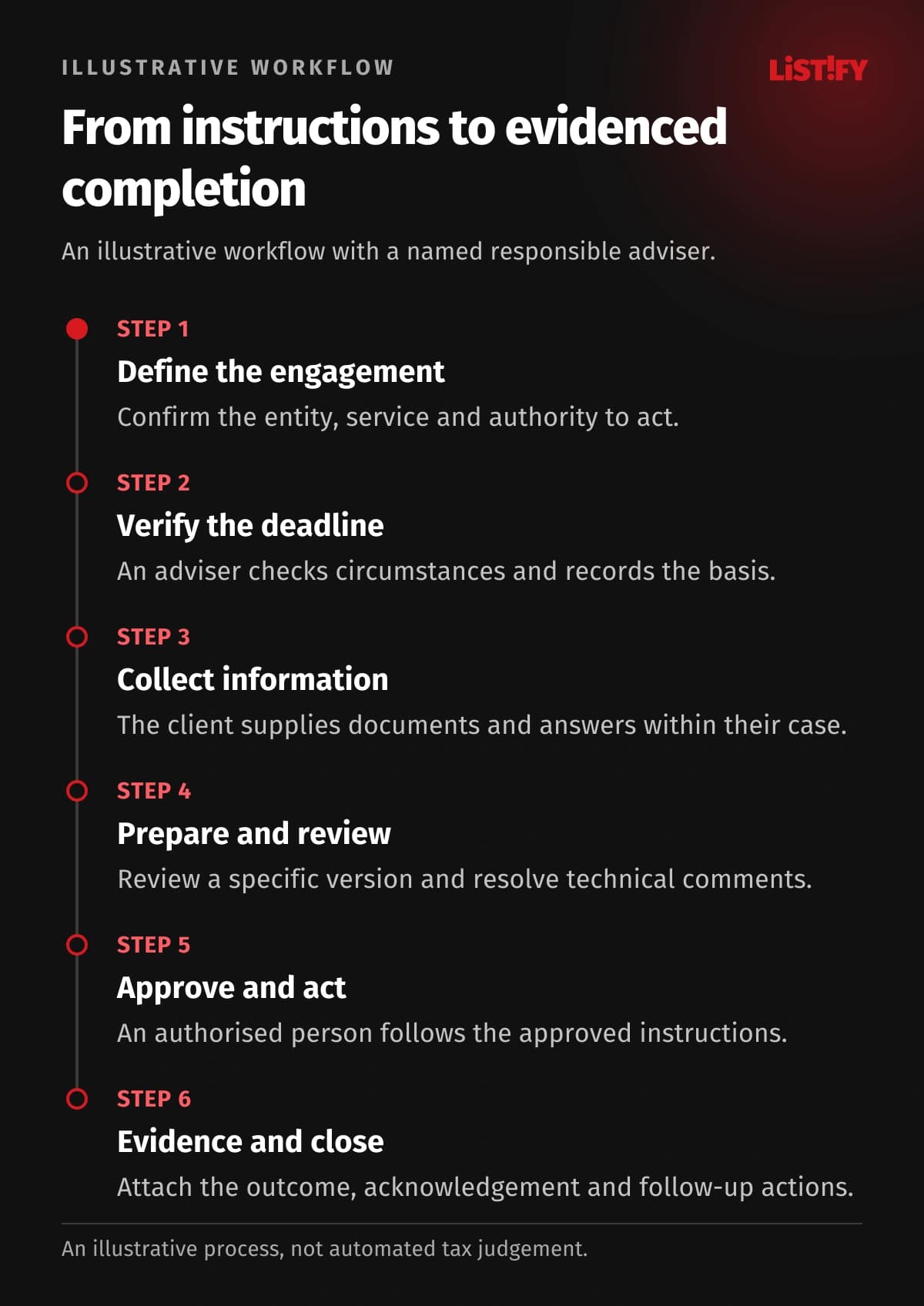
This proposed workflow assumes the practice uses a separate professional preparation application. Actual steps depend on the service, jurisdiction and circumstances of the case.
- Define the engagement: Confirm the client, entity, service, responsible adviser and required authority.
- Verify the deadline: An adviser assesses the circumstances, records the basis and sets internal milestones.
- Collect information: The portal shows requests, received documents and questions that still prevent preparation.
- Prepare and review: The preparer hands a specific version to the reviewer and resolves their comments.
- Approve and act: An authorised person follows the approved instructions using the available submission route.
- Evidence and close: Attach the appropriate acknowledgement, outcome and any subsequent actions.
04Store the reason behind every deadline
Do not build a universal calendar that assumes every client follows the same rules. The responsible adviser should confirm the applicable jurisdiction, obligation, triggering event and any extension or exception. A software reminder supports that decision; it does not make the decision correct.
| Information | What the system should preserve |
|---|---|
| External deadline | Date, obligation, verifying person and source |
| Internal milestone | Preparation or review target and task owner |
| Changed deadline | Reason, supporting evidence and previous date |
| Completion | Output and appropriate evidence of the action performed |
The illustrative chart shows repeated entry of the same verified information into separate records. It does not promise automated legal judgement or timely filing. Professional approval remains a human action. Where a connected calendar is unavailable, the design must state who maintains it and reconciles changes.
- Verified deadlineModel: separate records: 3Model: connected design: 1
- Responsible adviserModel: separate records: 2Model: connected design: 1
- Professional approvalModel: separate records: 1Model: connected design: 1
Illustrative model, not a measurement. An adviser-confirmed deadline is entered in the case file, calendar and team spreadsheet (3); the case owner in the file and work board (2). The proposed design enters each once and shares it (1). Professional approval remains manual (1). This neither determines the correct deadline nor guarantees timely filing. Connections and permissions require verification.
05Separate client, assistant and adviser permissions
An assistant may check document completeness without authority to approve a technical conclusion. Advisers work on assigned files, reviewers on designated reviews and clients on released material for their engagements. Cross-team access should be explicit and traceable.
Define multi-factor authentication, access removal when staff leave, a separate testing environment and tested backup recovery. Verify integrations against the actual application, supported records and permissions. Our API integration guide helps frame supplier questions. Do not make an unverified direct filing connection essential to operating the practice; retain an agreed alternative route.
06Scope the first release, website and budget
Compare an existing practice application with your requirements before commissioning development. Custom software becomes worth considering when approval rules, complex client relationships or work across several tools repeatedly require manual workarounds.
A first release can cover case files, document requests, confirmed dates and ownership. Test one engagement type before expanding the workflow. Your website should explain specialisms, services and how clients start working with you. An enquiry creates a contact for assessment before the firm accepts the engagement.
Development cost depends on scope, permissions, migration and integrations, not simply screen count. Separate development, external services and ongoing support in the proposal. Walk us through one typical tax file and we can define a practical first stage.
07Migration and support without an internal IT team
During migration, distinguish clients, entities, engagements, periods and file versions. Active deadlines require particular attention: matching imported row counts does not establish that the dates are correct. The adviser responsible for the files should approve the trial migration.
Our guide to data migration from existing records explains the preparation. Agree fallback working arrangements, exports and recovery responsibilities. Listify can provide analysis, design, development, handover and contracted support without requiring your own IT department. Hosting is arranged with a selected provider; Listify does not operate it itself.
08Questions tax practice owners ask
Will software determine the right deadlines?
It can offer rules and reminders. A responsible professional must confirm their applicability, relevant circumstances and the resulting date for each case.
Does it replace tax preparation software?
It does not have to. The proposed system coordinates the surrounding work while calculations continue in your existing professional application.
Can internal notes remain private?
Yes. Visibility rules should form part of the design and be tested with each relevant role before clients receive access.
Can it chase missing documents automatically?
Yes, using request status and agreed intervals. Received items stop generating reminders, while delivery failures and exceptions reach an accountable person.
Does it guarantee a correct submission?
No. It supports controls and records. Technical correctness, authority and checking the outcome require explicitly assigned professional responsibility.
Must we implement every module?
No. Start with one engagement type and real handovers. Add capabilities according to what staff and clients learn from using the first release.
09Design around the advisers’ actual work
Prepare an anonymised case and the rules for handing it between people. Our guide to choosing a development partner supports the discussion. Explore Listify’s custom software services or discuss a CRM, portal or connected system for your tax practice.