Custom CRM and software for real estate agents: website, clients and transactions
Viewings during the day, copying contacts and listing updates at night. Explore twenty practical options for a custom CRM, website and app, with a realistic first phase for an independent agent.
Custom CRM and software for real estate agents can bring your website, contacts, viewings and transactions into one workspace. For an independent agent, the investment should reduce repetitive administration and help deliver what clients have been promised. Its scope needs to suit your actual workload and budget.
Illustrative scenario: after your third viewing, another owner calls. You search for a note about a promised floor plan. That evening, you update a listing price, copy enquiries into a spreadsheet and prepare a seller report. Administration follows you home.
A custom CRM is one answer; a connected website may be enough. These twenty options help you choose a manageable first phase.
01What should a system do for one agent?
Your morning overview should show whom to call, where to go and what to prepare. During a conversation, find the last agreement. Afterwards, record the outcome and next step quickly. Start with those requirements.
Consider the website and existing tools together. If your agency or network requires a particular property system, we first check integration options and access rights. A new application should not create another place to enter the same information.
Describe your normal working day. We can recommend whether to start with a website, an integration or a small CRM. See our custom software development service for the wider options.
For a broader decision framework, read our comparison of existing CRM products and custom development, including situations where a custom build is not justified.
02Contacts and personal transactions: five capabilities
1. Contacts connected to properties
A contact record should show what the person is selling, what they have enquired about and which properties they have viewed. Those relationships give you context for the next call, rather than leaving you with a name and number.
2. Every enquiry has a next step
New enquiries need a response deadline, note and task. A short outstanding list distinguishes someone who has received a proposal from someone still waiting for their first reply. The system should make that difference obvious.
3. Buyer requirements you can reuse
Record budget, location, timing and financing status. After an unsuitable viewing, keep the reason too. When another property becomes available, you can avoid recommending something with the same drawback and explain why the new option may suit.
4. A clear view of your transactions
Separate an initial contact, potential instruction, active listing and agreed sale. Each stage should show what depends on you and what awaits the client. Your overview then represents commitments, rather than just a collection of coloured cards.
5. Notes you can find quickly
A short call note is useful if it can be found later. Search by name, address or phone and simple labels can help when you remember only part of an earlier conversation or have several similarly named contacts.
03A website that supports your work: five capabilities
6. Service pages with a clear process
Selling, letting and buying assistance need distinct explanations. Visitors should understand what you do, what you need from them and how the first conversation works. A photograph and phone number alone leave those questions unanswered.
7. Listings maintained in one place
Your website can use approved records from a CRM or existing property system. We check how descriptions, photographs and status changes are available. The objective is one update with confirmation that it actually reached the website.
8. An enquiry form for property owners
A potential seller requires different questions from someone booking a viewing. A short form can collect property type, location and timing. A valuation request should clearly lead to a consultation unless a verified automated valuation service is provided.
9. References with a real story
Show completed work and explain what you helped clients resolve. The administration interface should make updates easy and identify materials cleared for publication. Genuine examples communicate more than invented results or unsupported claims about being the best.
10. Useful content for your locations
Share practical local knowledge, your working process and answers to common property questions. Give the website a clear structure and usable mobile presentation. Producing almost identical pages with different town names adds little for a prospective client.
Our step-by-step guide to custom website development covers the brief, content administration and connections to everyday business operations.
04Viewings and work away from the desk: five capabilities
11. Appointments with the right information
A calendar entry should contain the address, contact, arrangements and documents. Allow travel time and make clashes visible. Before a meeting, you should not need to open several folders simply to reconstruct the appointment context.
12. Confirmation and rescheduling
Clients can receive confirmation and a simple way to request changes. You may approve appointments yourself or offer selected time slots. A fully open public calendar is not necessary for every agent or property.
13. Viewing outcomes from your phone
Record interest, objections and the next step after a visit. The form needs to be short enough to use while out. Immediate notes are more useful than trying to distinguish several similar conversations later that evening.
14. Files attached to the right property
Condition photographs, floor plans and working documents belong with their listing. Separate internal pictures from approved marketing assets. When sending information, select from an organised set rather than searching the entire photo library on your phone.
15. An unmistakable saved status
With a weak signal, you must know whether a note was saved. Offline work requires local storage, later synchronisation and conflict handling. Having an application on your phone does not automatically mean it works without an internet connection.
05Client service and business visibility: five capabilities
16. Updates for the seller
Owners can receive an approved summary of viewings, feedback and next steps. A prepared report may be sufficient; others benefit from a client portal. Choose according to communication frequency and what the owner actually needs to see.
17. Documents and agreed deadlines
A checklist identifies missing documents and who must supply them. Signing services can be connected according to document requirements and the chosen provider. An emailed draft must remain distinguishable from a completed document returned by the relevant parties.
18. Costs and expected fees
Keep photography, advertising and other costs beside the expected fee. Record received commission separately. A simple view can help you decide where another expense is justified and which transactions need attention before spending more.
19. Reminders for ongoing care
After handover, receive reminders of agreed follow-up. Keep communication preferences and restrictions with the contact. Automation should support relationships without sending identical messages to everyone.
20. Following enquiries through to outcomes
Keep an enquiry's source and later outcome together. That helps identify pages or campaigns producing relevant conversations. A phone-link click is not a completed appointment, and a submitted form is not yet a new instruction.
06An illustrative working day with a connected system
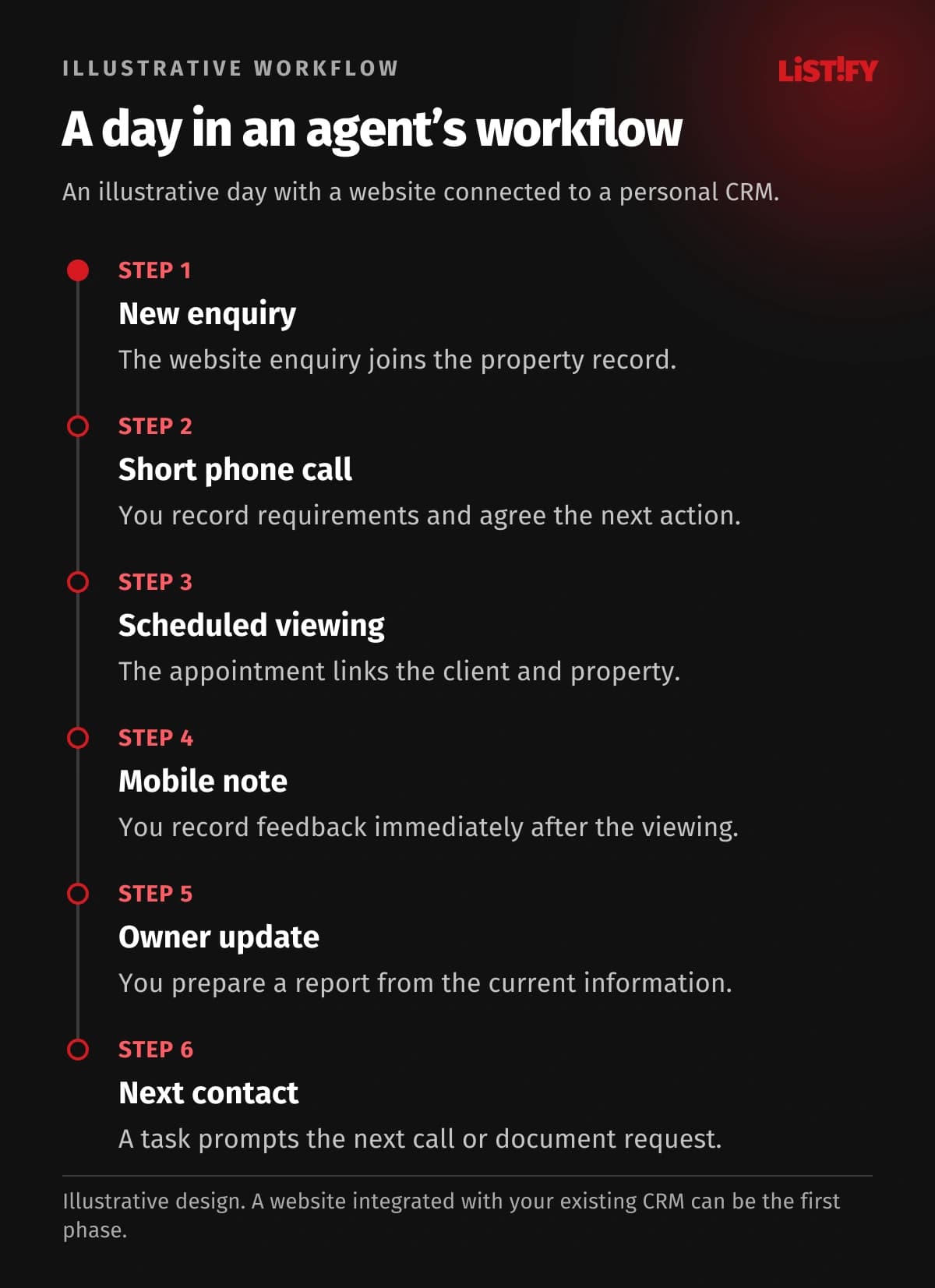
You open three priorities: call a new seller, obtain a missing document and confirm an afternoon viewing. The new contact already contains their website form and property details. After the call, you add the appointment and next step.
Following the viewing, you record feedback on your phone, send an approved floor plan and prepare a seller update. A reminder covers the next conversation. Not every action needs automation. What matters is that information carries forward instead of being recreated in several places.
- Client phone numberModel: before integration: 2Model: proposed design: 1
- Viewing appointmentModel: before integration: 2Model: proposed design: 1
- Viewing noteModel: before integration: 1Model: proposed design: 1
Illustrative workflow, not a measurement. The phone number is kept in contacts and a working spreadsheet (2); the appointment in a planning sheet and calendar (2). The proposed design uses one connected workspace. The agent still writes the viewing note once (1). No saving is guaranteed; any required partner APIs must be verified.
07Starting without an internal IT specialist
At Listify, we first review your current tools and working day. We choose one problem with a clear outcome, such as turning a website enquiry into a CRM task. You try the proposed process on your phone and check awkward situations: rescheduling, repeat contacts and missing information.
We test a sample before migrating spreadsheet or CRM records. Field mapping and duplicate checks come first. Documents and history need identifiable owners, with a clear way to verify the import.
Handover should leave you able to update the website, create a case, find a contact and request help. Agree support, hosting and external-service costs, account access, backups, data exports and future supplier handover arrangements.
For the transfer itself, see our guide to migration from spreadsheets and legacy systems, including relationship checks, duplicate handling and trial imports.
08Budget and when an existing tool is enough
Costs depend on website scope, workflows, migration, integrations and any client portal. A native mobile application adds development and maintenance. Compare the full operating cost, not just the initial build.
| Your need | Where to start |
|---|---|
| A professional presence and direct enquiries | A custom website with enquiry forms |
| No duplicate listing entry | Check an integration with existing software |
| A distinct process from contact to aftercare | A focused first CRM release |
If contacts, tasks and a calendar cover your needs, an existing product may be quicker and cheaper. Custom development is justified when it solves a specific constraint and its value supports the investment and ongoing costs.
When comparing suppliers, use our questions for choosing a software development company to discuss handover and support as well as the price.
09Frequently asked questions
Does custom CRM make sense for one agent?
It can suit particular rules or connections. A small contact list rarely justifies it. We compare targeted improvements and existing tools first.
Can I start with a website only?
Yes. It may pass enquiries into your current system, with other capabilities added later. We verify the available integration before confirming the scope.
Can I update listings without a developer?
That can be included in the requirements. We design administration for the text, photographs and records you want to manage yourself, including any publication checks.
Do I need an App Store application?
No. A mobile-friendly web application supports many everyday tasks. Separate mobile development should follow specific requirements, not the assumption that every business needs an app.
How long does launch take?
Timing depends on scope, available materials and integrations. We agree the first phase after defining those requirements. A website form and a complete CRM are different projects.
What if I later hire another agent?
We can consider future roles and shared access in the design. There is no need to build every team-management feature before you need it.
10Start with the task taking your time
Your website, CRM and applications should fit the way you win instructions and support clients. You do not need technical terminology or a completed specification. We need to understand the work you want to improve.
Arrange a consultation about custom CRM and a website for your real estate business. Tell us your tools and three tasks to simplify. We will propose a practical first phase.