Custom CRM for financial advisers: clients, cases and teams in one system
Client records in spreadsheets, documents in email and commissions tracked separately? Explore how a custom system can connect advisers, assistants and managers, and when building your own makes sense.
An illustrative scenario: the owner of a financial advice firm starts the morning with three spreadsheets: new enquiries, mortgage applications and commissions. An assistant searches email for documents. An adviser mentions a client's fixed-rate period is ending, but nobody knows who should follow up. Everyone is working; a shared view is missing.
A custom CRM for financial advisers connects client records, active cases and ongoing service around the way your firm works. It can also include a website, client portal, mobile application, branch management and connections to other tools. The practical test is whether people find what they need and know what to do next.
Does this sound familiar? Tell us where your team loses track. You do not need technical terminology or a finished specification for the first conversation.
01What the system should help an owner understand
An owner needs straightforward answers. Which enquiries are waiting? Where are documents missing? Who covers an absent adviser? How much commission has actually arrived? Which clients are due a follow-up?
A contact list covers only part of this work. Financial advice involves continuing relationships, multiple products and coordination between advisers, assistants and managers. We design around these connections. Advisers see their cases, assistants see assigned work and managers see the relevant team or branch overview. Access to individual records follows agreed responsibilities.
The first release should solve a defined problem: enquiry handling, ongoing client service or commission reconciliation. Other parts can follow when their requirements are clear.
02Twenty-four capabilities to consider
This is a menu for discussing scope, not a packaged product or a requirement to build every feature.
Clients, households and ongoing service
- Client records. Keep contact details, the responsible adviser and current cases together. When someone calls, find the person rather than the latest spreadsheet.
- Household relationships. Link household members and shared cases. Set document and information access separately; a family relationship does not automatically grant access to every record.
- Product overview. Record existing agreements, providers and significant dates. Distinguish a product already held by the client from a new case in progress.
- Communication history. Keep meeting notes, agreed actions and relevant correspondence together. A colleague providing cover can understand what has already been discussed.
- Documents and versions. Associate supporting documents with the client and case. Identify the current version and who supplied it without searching several folders.
- Client service plans. Give each review an owner and a date. Completing a meeting can create a follow-up task so service continues beyond signing.
Enquiries, advisers and teamwork
- Website enquiries. A form creates an enquiry with its source and the client's request. The adviser receives useful context without retyping an email.
- Potential duplicate checks. Matching contact details can flag an existing record. A person reviews ambiguous matches to avoid combining two different clients.
- Assignment and cover. Route enquiries by branch, product or capacity. When an adviser is absent, ownership of the next action remains clear.
- Delegated tasks. Advisers give assistants a specific request, deadline and supporting information. Both can see progress without repeatedly reading the same email thread.
- Calendars and reminders. Connect appointments to clients and cases. Integration with an existing calendar depends on its available features and the permissions granted.
- Roles, teams and branches. Configure access for advisers, assistants and managers. Larger networks can also define case transfers and changes in responsibility.
Cases, dates and commissions
- Product-specific workflows. Mortgage, insurance and investment cases can follow different steps. A shared overview still shows which cases need attention and who should act.
- Document checklists. Show what has arrived and what is missing. Assistants can follow up on the outstanding items instead of reconstructing progress from inboxes.
- Important date tracking. Use recorded dates and agreed rules to flag fixed-rate periods ending, renewals or service reviews. Assign responsibility and record the outcome.
- Expected commissions. Record forecast amounts and the rules behind them where commission applies. Keep forecasts clearly separate from money actually received.
- Received commission matching. Match available statements to agreements. Send discrepancies and unrecognised items for review rather than silently overwriting existing figures.
- Reversals and allocation. Keep adjustments linked to their original entries. Allocate amounts between advisers, teams and the firm according to your agreed arrangements.
The website, client portal and management view
- A connected website. Service pages, adviser profiles and forms lead into an enquiry process. Define who responds and what the prospective client receives next.
- A client portal. Clients can supply documents, see requested actions or ask for contact. The information displayed depends on the scope and access design.
- Mobile access. Make appointments, tasks and brief notes accessible while away from the office. Choose a separate app when it adds capabilities you actually need.
- Management reporting. Review open cases, overdue work and branch results. Agree what each measure means so different teams do not count business differently.
- Partner connections. Assess data transfers against available interfaces, data quality and contractual permissions. In some situations, a controlled import is the practical option.
- Change history and exports. Trace selected changes and export data in an agreed format. This supports operational checks and a future system handover.
Our step-by-step guide to custom website development covers the brief, content administration and connections to everyday business operations.
03One case, from first contact to ongoing service
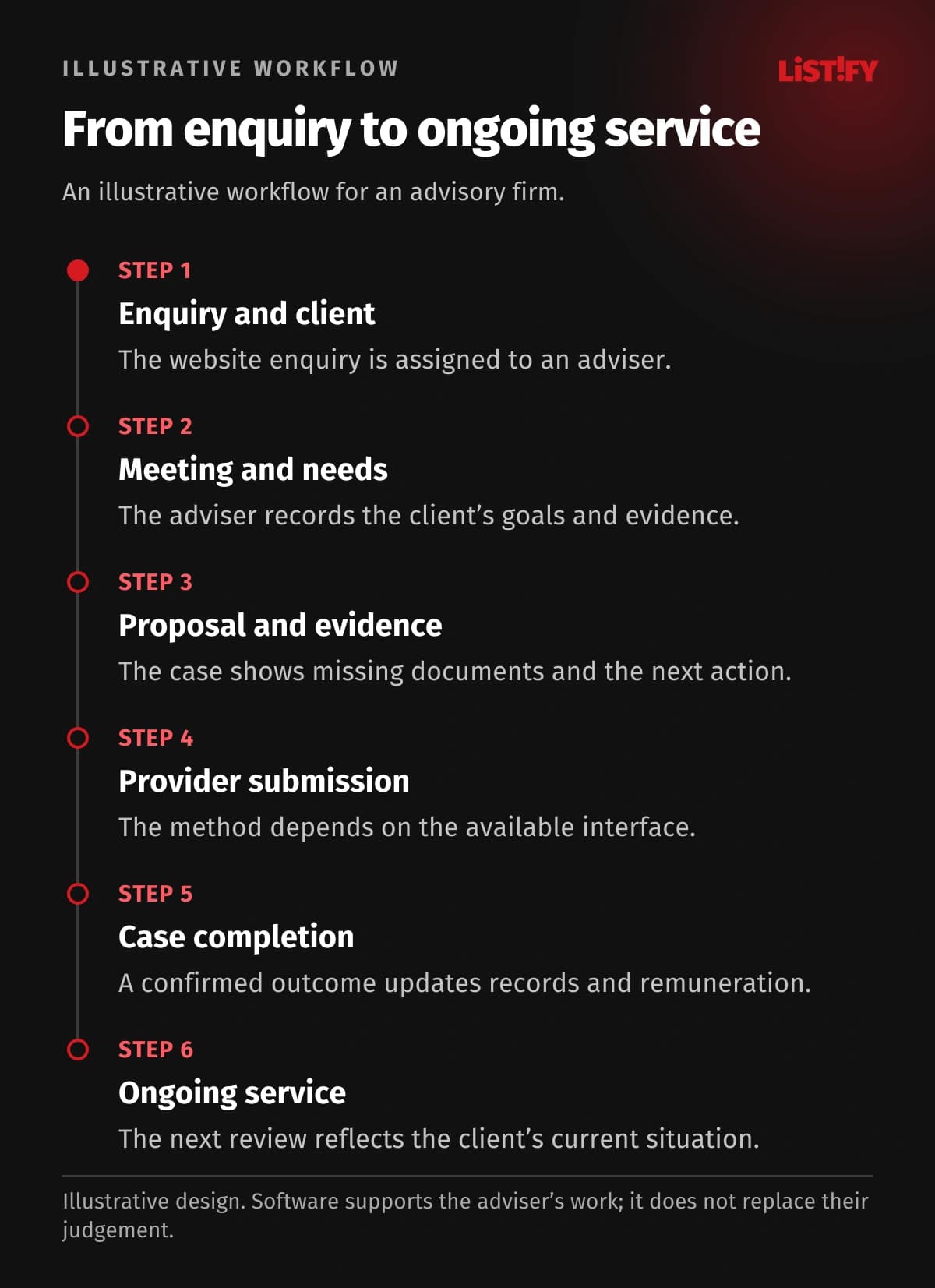
Consider an illustrative mortgage enquiry. A website contact matches an existing client, so the system suggests their adviser. The adviser arranges a meeting and assigns document collection to an assistant. The client supplies the requested files through the portal.
After submission, the team sees the recorded application status and next action. Automatic updates depend on an available partner connection; otherwise, an authorised person updates the record. Any expected and received commission is tracked separately. Future contact follows the client's service plan.
Walk us through one typical case in your firm. A real working process is a better starting point for scope than a long list of technologies.
04An existing CRM or a custom system?
An established CRM may be the right choice when its workflows fit your work, its connections meet your needs and your team can use it effectively. Many products already offer automation, documents and reporting. These capabilities alone do not justify custom development.
| Your situation | What to consider |
|---|---|
| You mainly need contacts, tasks and a conventional case overview. | Try established tools using one of your own cases. |
| You have distinctive commission rules, several branches and complex handovers. | Compare configuration options with a custom design. |
| Your existing system works but lacks a website or portal. | Explore adding and connecting the missing part. |
Compare implementation, operation, future changes, data transfer and the ability to change suppliers. A monthly licence fee is only one part of the decision.
For a broader decision framework, read our comparison of existing CRM products and custom development, including situations where a custom build is not justified.
05Moving records without losing their relationships
Migration starts with an inventory of spreadsheets, the existing CRM, documents and available statements. Decide what to transfer, how to identify the same client and how to preserve links to agreements and advisers.
- Inspect a data sample and identify difficult records.
- Agree correction rules and who resolves unclear information.
- Run a trial import, checking counts and relationships.
- Plan final updates, the switch to the new system and access to previous records.
A pilot group should test actual tasks before rollout to further teams or branches. Moving records requires a working plan, not just a file upload button.
For the transfer itself, see our guide to migration from spreadsheets and legacy systems, including relationship checks, duplicate handling and trial imports.
- Client phone numberModel: before integration: 3Model: proposed design: 1
- Document statusModel: before integration: 2Model: proposed design: 1
- Bank confirmationModel: before integration: 1Model: proposed design: 1
Illustrative workflow, not a measurement. The phone number is in a client record, mortgage sheet and service plan (3); document status in a checklist and adviser note (2). The proposed design uses one shared record. Confirmation in the bank portal remains manual (1). No saving is guaranteed; required partner APIs must be verified.
06Do you need an internal IT department?
No. You need someone who understands the business and can decide priorities. LISTIFY can handle analysis, interface design, development, testing, handover and agreed support. Advisers and assistants help check that the proposed system fits everyday work.
Handover includes the agreed documentation and training. Operational responsibilities must be explicit: support, updates, backups and recovery. Hosting is supplied by the chosen provider; LISTIFY does not run its own hosting infrastructure. Management scope and third-party costs are agreed in advance.
When comparing suppliers, use our questions for choosing a software development company to discuss handover and support as well as the price.
07What determines the cost?
Cost depends on workflow complexity, data, user roles, commission rules, migration and integrations. A client portal or separate mobile app adds scope. Two firms with the same number of advisers may need substantially different systems.
Separate implementation from ongoing operation and development. For the first release, ask for a defined scope, acceptance process and stated assumptions. Measure improvement through enquiry handling time, missing documents or repeated data entry. Time saved does not automatically become an equivalent reduction in payroll.
08Frequently asked questions
Can we start with client records and tasks?
Yes. The first release can address one complete workflow. Its data design should account for agreed future additions so the foundation does not need unnecessary rebuilding.
Must we replace our website?
No. We first assess whether existing forms and relevant features can connect. A replacement makes sense when the current site prevents the required workflow or business goals.
Can you connect banks and insurers?
We assess each proposed connection. Available interfaces, permissions and contractual terms determine feasibility. We do not promise automatic transfer of every data item before checking these conditions.
Can an assistant support several advisers?
Yes. Access can follow assigned teams, cases and activities. The design should also cover absence, team changes and what happens when someone leaves.
What happens to incomplete or incorrect data?
The system can flag missing information and provide a review list. Someone must own corrections to ambiguous records; importing data does not establish its accuracy.
What happens after launch?
Support, maintenance and further development follow the agreed scope. Before handover, define contacts, issue handling, responsibilities and the conditions for a future transfer to another supplier.
09Start with the work that causes the most friction
You do not need to decide in advance whether the answer is a CRM, internal system, client portal or website. Describe how you acquire clients, hand over work and provide ongoing service. That gives us the basis for a first release.
Explore our custom software development services or arrange a conversation about your system. Bring a specific business situation; we can develop the technical brief together.