Custom CRM and software for insurance brokers: clients, policies and commissions
Client records in spreadsheets, policies in inboxes and commissions in a separate file. Custom CRM can connect your brokerage’s book of business, servicing and teamwork. Explore 20 practical features, website and portal integrations, cost drivers and a phased rollout.
Custom CRM and software for insurance brokers connect client records, policies, book-of-business management, servicing and commissions around the way a brokerage works. A website, quote enquiry tool, client portal and mobile workspace can use the same information. The objective is straightforward: every request has an owner, and staff can follow a case without rebuilding its history.
Consider this illustrative scenario. A commercial client calls on Monday to add a vehicle. Their usual broker is on holiday. An assistant searches an inbox for the latest policy schedule, another colleague starts a quote for the same customer, and Friday's commission statement is still missing from the spreadsheet. Each task takes a few minutes. Together, they prevent the office from taking on more work.
01When a custom system makes sense
A custom CRM becomes relevant when your processes extend beyond keeping contacts: you work with different insurers and products, have specific allocation rules, reconcile commissions or need your website connected to internal operations. Established insurance software may already meet many of these needs. The decision depends on actual workflows, available integrations and total cost.
You do not have to commission an entire platform at once. The first release might cover policies and renewals, commission reconciliation or website enquiries. At LISTIFY, we map the work that currently causes the most friction and propose a practical scope. Arrange a consultation about your brokerage.
For a broader decision framework, read our comparison of existing CRM products and custom development, including situations where a custom build is not justified.
02Clients and policies: features 1 to 5
1. A single client record
Calls, emails, policies and tasks belong to a person or business. Duplicate detection can flag similar records, but merging must preserve distinct people and their history. Staff should not need several inboxes open before speaking to a client.
2. Households and business relationships
A household may contain several policyholders and insured people. A commercial account may have branches, contacts and related companies. A system should preserve these relationships without automatically giving every contact access to every document.
3. Policy records suited to each product
Motor insurance requires different information from commercial liability cover. Purpose-built forms display the relevant fields, policy status and supporting documents. Amendments and versions remain traceable instead of overwriting the previous information without a record.
4. Insured assets in context
Vehicles, buildings and other insured assets can be linked to clients and policies. A change of premises should trigger a review task for the responsible broker, rather than remaining an isolated note on someone's phone.
5. A usable view of the book of business
Staff can filter by account owner, product, renewal date and missing documentation. Management can follow changes in the portfolio. Everyone must share the same definition of an active policy, otherwise even a new application will produce conflicting reports.
03Client service and teamwork: features 6 to 10
6. Renewal reminders with clear ownership
A reminder needs a deadline, an owner and a next action. Lead times should reflect your products and service process. Unresolved tasks become visible to a supervisor so that a reminder does not simply become another unread email.
7. Policy changes as trackable requests
An address update, vehicle change or payment request gets its own status. Staff can see what the client supplied, what reached the insurer and what remains outstanding. Receiving a request must not automatically mean the change has been completed.
8. Support during a claim
Photographs, correspondence and requested documents can sit alongside the claim support case. The broker knows what to obtain and whom to contact. Tracking assistance to a client is distinct from the insurer's decision about coverage or payment.
9. Cover for absences and account handovers
Holidays and staff changes should not leave cases unowned. Access can follow a person's role and assigned accounts. Removing a departing colleague's access must preserve the business records and make outstanding work available to the right replacement.
10. Document completeness checks
The system can track required documents, approvals and current versions for each case type. Your responsible specialists define applicable recordkeeping rules and retention periods. Software should implement those requirements and retain a traceable history of actions.
04Commissions and operations: features 11 to 15
11. Imports instead of statement re-entry
Partners may supply different statement formats. Supported imports need mapping rules, duplicate-file detection and a clear error list. An unfamiliar format should enter a review queue rather than quietly introducing incorrect figures into the records.
12. Matching with an audit trail
Payments can be matched to policies and periods. Missing identifiers or multiple possible matches become exceptions for review. A confirmed correction records who made the decision, so the next reconciliation does not begin from an unexplained adjustment.
13. Expected and received commission separately
Forecast income is not cash in the bank. Reporting should distinguish expected commission, money received and discrepancies requiring follow-up. This gives the owner a more useful basis for cash planning than a single combined production figure.
14. Commission splits and clawbacks
Custom rules can reflect roles, shares and changes to arrangements over time. A clawback links to the original transaction and recipient. Review before payment helps prevent a new rule from silently recalculating a previously closed commission period.
15. Reports for management and accounting
Managers need service backlogs, production and commission status; accountants need checked supporting data. Reports should state their period and link back to source records. Connections to accounting software depend on the capabilities of the particular application.
05Website, portal and mobile: features 16 to 20
16. Website enquiries directly into CRM
A form captures contact details, the requested product and enquiry source. An existing client can be routed to their account owner. A new lead receives an owner and response target instead of sitting in a shared mailbox waiting for someone to act.
17. Quote tools with a defined next step
An indicative calculation and a binding insurance journey are different projects. A quote tool needs a defined rate source, validity and next step. Direct placement depends on available partner services and permissions verified before implementation.
18. A client portal for documents and service
Clients can provide documents, view available policies and follow requests. Access must be checked for individuals, businesses and authorised representatives. A difficult-to-guess link alone is not an adequate access design for sensitive policy documents.
19. Work from a phone
A broker can find a client, record a meeting note and create a follow-up task while away from the office. A responsive web application may be sufficient. A separate mobile app should be justified by device features and offline requirements.
20. Integrations that reveal failures
Automated transfers need a last-success indicator and visible error handling. Missing information must not appear as zero production. Insurer integrations depend on technical access, contractual arrangements and the data each partner actually makes available.
Explore LISTIFY's custom software development services. Where existing tools work well, the first project can connect them or add a missing module.
When planning data transfers, use our practical guide to connecting systems through APIs, which covers data ownership, checks and recovery when a connection fails.
06Follow one case from request to reconciliation
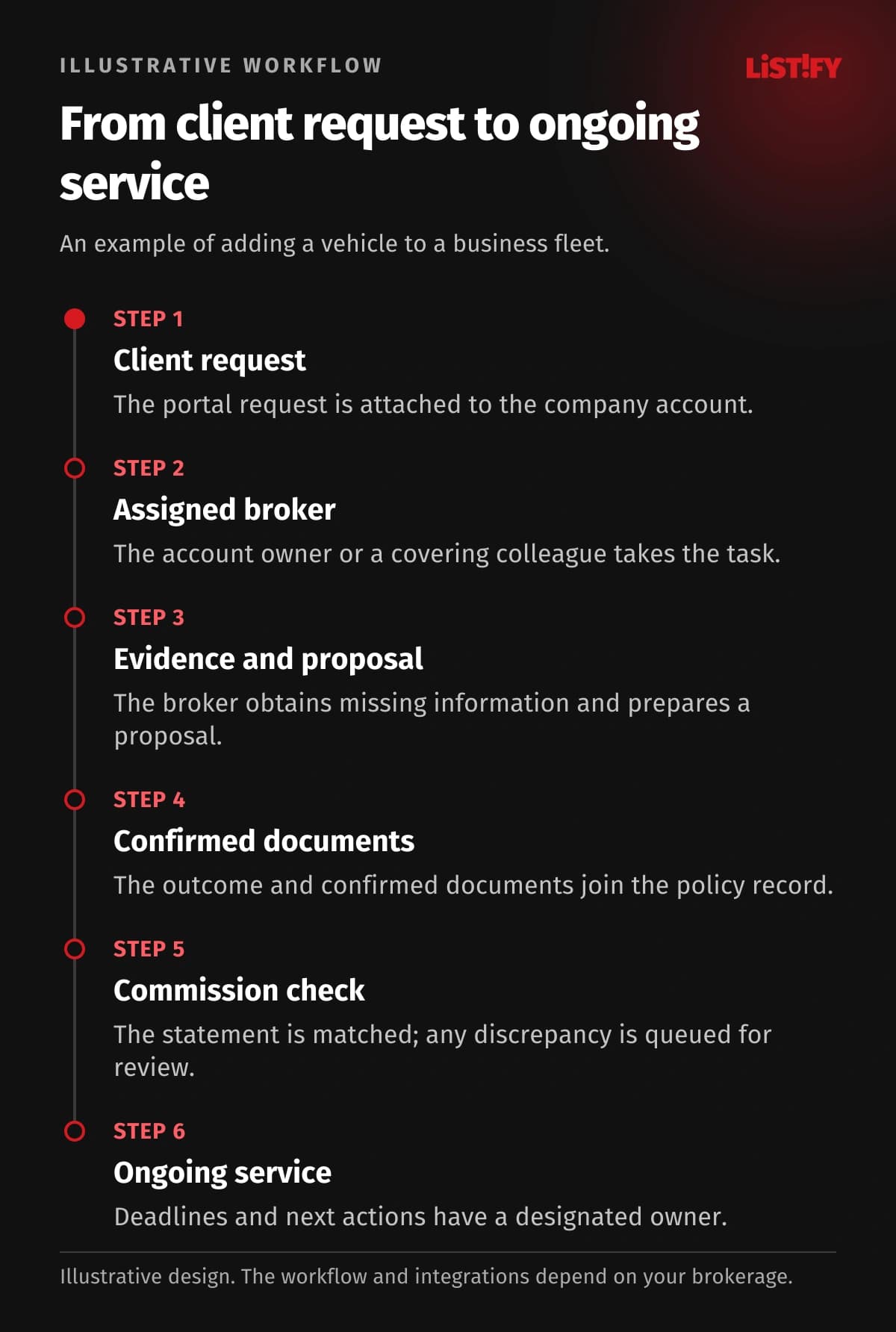
In an illustrative workflow, a client adds a vehicle to their fleet. The portal request attaches to the company account and reaches the covering broker. A checklist identifies missing information. The broker obtains it, prepares the proposal and records the client's decision. Confirmed documents become part of the policy record. A later commission statement matches to the transaction, while any difference waits for review. The client, assistant and manager see the parts of the same case relevant to them.
- Policy numberModel: before integration: 3Model: proposed design: 1
- Renewal dateModel: before integration: 2Model: proposed design: 1
- Insurer confirmationModel: before integration: 1Model: proposed design: 1
Illustrative workflow, not a measurement. The policy number is entered in policy, commission and service records (3); the renewal date in policy records and a calendar (2). The proposed modules share one record. Confirmation in the insurer portal remains manual (1). No saving is guaranteed; required partner APIs must be verified.
07Choosing the first release and understanding cost
Start with a problem whose current process and desired outcome you can describe. Cost depends on product variety, data quality, commission rules, integrations and availability requirements. Compare discovery, development, migration, training, partner charges, operation and future changes. Custom software is not automatically cheaper than an established brokerage platform.
Before migration, field meanings should be agreed and a sample tested. A pilot team works through real scenarios, including exceptions and handovers. The operating agreement defines monitoring, backups, recovery checks, updates and support response. You do not need an internal development team, but you do need someone who understands the business and can make process decisions.
For the transfer itself, see our guide to migration from spreadsheets and legacy systems, including relationship checks, duplicate handling and trial imports.
08Frequently asked questions
Must we replace all our existing tools?
No. We first assess what works and what can be connected. Replacing the entire platform makes sense only when a smaller change cannot resolve the important limitations.
Can you move clients and policies from spreadsheets?
Migration is designed around the exports available. We examine structure, duplicates, attachments and relationships, then verify the resulting records against the source data.
Can the system connect to every insurer?
Direct integration must be verified with each partner. Some provide APIs, others offer file exports, and some steps may remain controlled manual processes.
Can we start with commission management alone?
Yes, provided the required identifiers and source information are available. A module can work alongside existing records and be extended in later releases.
Who handles support after launch?
Maintenance and support arrangements are agreed before deployment. Handover should include access, documentation, exports and clear responsibility for each operating service.
What should we bring to the first conversation?
Your team size, current tools and one troublesome workflow. An anonymised spreadsheet structure or a description of its fields is enough for initial discussions.
09Build around the way your brokerage works
LISTIFY can design and develop your CRM, policy management, commission module, client portal and website around the work your team actually performs. We start with a scope whose value you can assess and identify sensible later stages.
Tell us how you currently manage clients, policies and commissions. We will discuss dependencies, integration options and a practical first step.