SEO audit: find what is holding your website back
A useful SEO audit tells you what to fix first, which pages need attention and how to check whether the work helped. A list of warnings from a tool cannot make those decisions for you. Your pages might be indexed but targeting the wrong questions. They might attract visitors who will never become customers. This guide shows you how to separate those problems and turn Search Console findings into work your team can actually deliver.
This guide is for business owners and people commissioning website improvements. You do not need to manage a server to use it. You do need evidence, a clear business question and a way to check the work. We reviewed the linked Google documentation on October 23, 2026. The workflow and teaching examples are our recommendations, not promises of a particular increase in traffic.
An audit diagnoses current obstacles. Our guide to SEO strategy covers longer-term choices about content, markets and investment. Start here if you first need to understand where your website is losing ground.
01Start with a business question, not a tool score
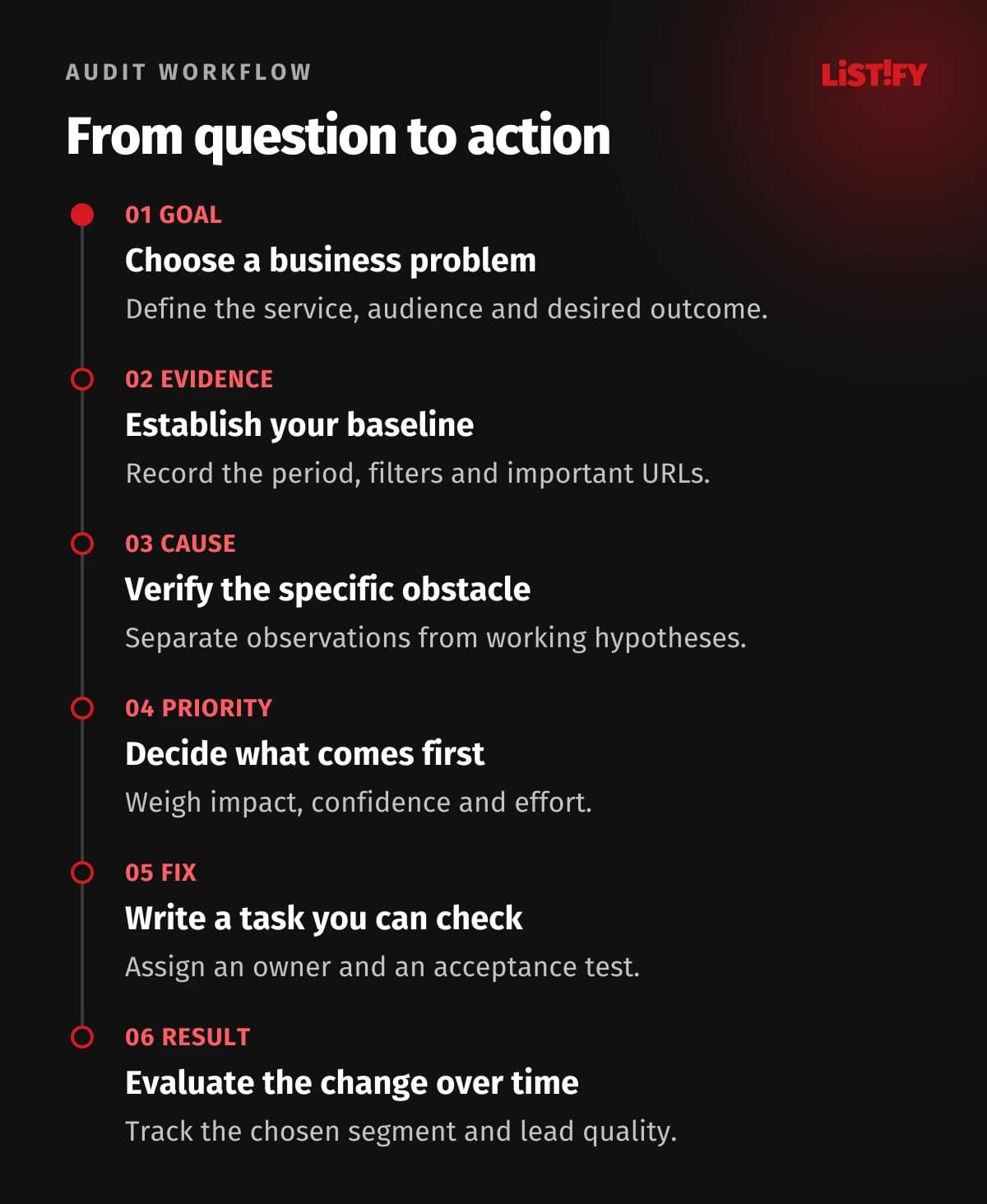
“Improve our SEO” is too broad to be a useful brief. Try this instead: our repair service pages have stopped bringing inquiries from the area we serve, while blog traffic has stayed steady. That question identifies the pages, audience and outcome worth investigating. For a new website, the question might be whether search engines can find the services you want to sell at all.
List three to five important services or product categories and give each a business goal. Include the countries you serve, languages you support, seasonal patterns and available capacity. If the business cannot accept more work, more visits may not be the immediate priority. Better-qualified inquiries might be more valuable.
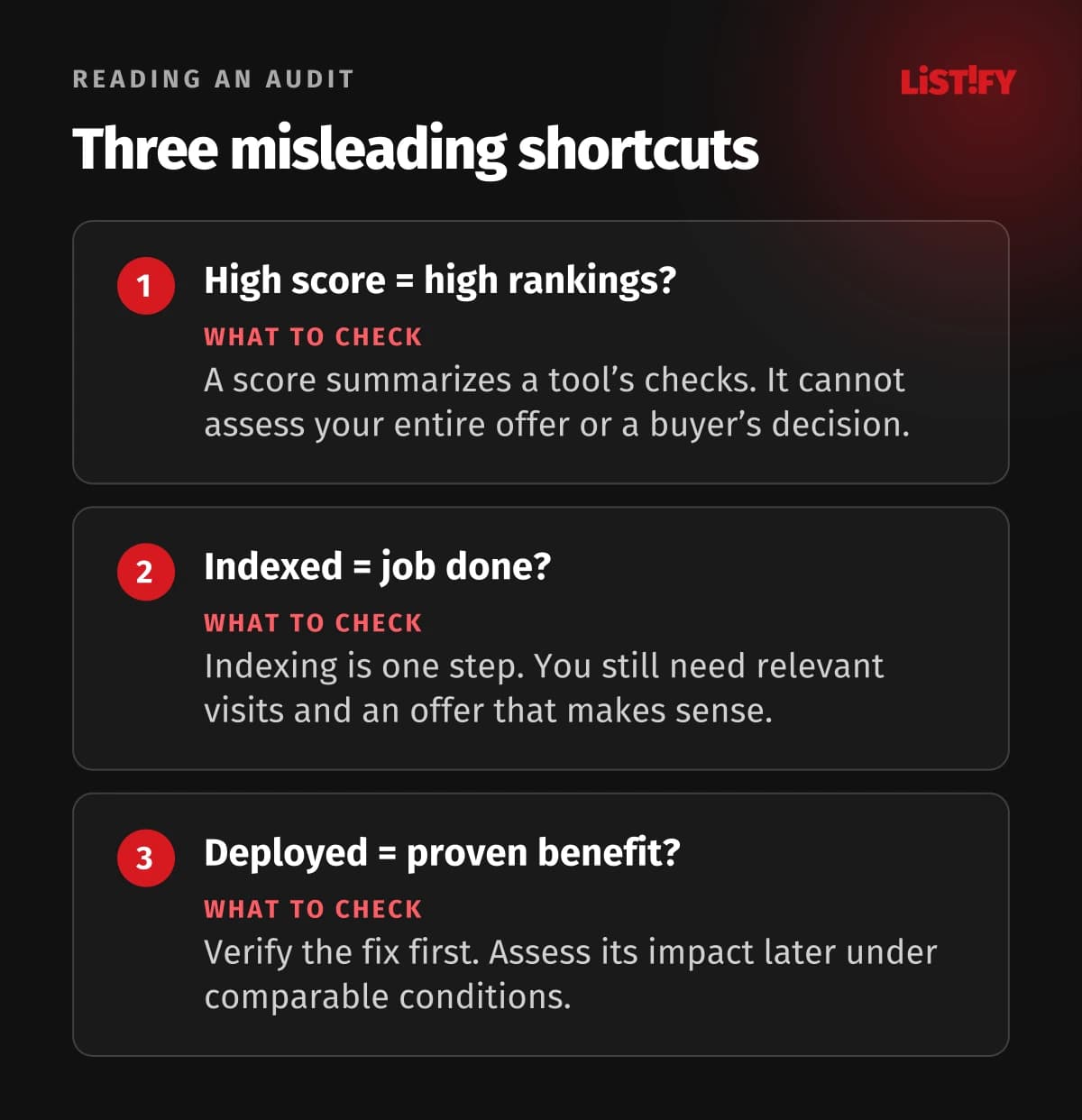
An SEO score is a tool’s assessment, not a grade issued by Google. Google does not promise a first-place ranking or indexing for every page. A score can help compare the same checks before and after a fix. It cannot tell you whether people want your service or whether your offer answers their needs.
Agree on the audit’s boundaries before work starts. Otherwise, somebody may inspect your entire archive while overlooking the one form that should generate your highest-value projects.
02Separate indexing, search visibility and sales
When performance drops, rewriting the copy can feel like an obvious response. First establish where the customer journey breaks down. A page that loads successfully may not be indexed. An indexed page may rarely appear for useful searches. A relevant visitor may still leave because the offer or inquiry process is unclear.
| What you see | First question | What to inspect |
|---|---|---|
| Important URL is not indexed | Should this be a separate search result? | Indexing status, access and canonical URL |
| Indexed page has few impressions | Does it answer a genuine customer need? | Queries, content and competing pages |
| Impressions remain but clicks fall | Did the query mix or results page change? | Comparable segments and titles |
| Visits arrive but inquiries do not | Does the offer and contact journey work? | Forms, mobile usability, tracking and relevance |
A heating installer, for example, might attract visitors to an article about maintaining an existing unit. Those readers may have no interest in a new installation. A shortage of installation inquiries does not, by itself, prove a technical fault or poor rankings. The article’s purpose and its connection to the service page need separate consideration.
Record observations and explanations separately. “This page receives few clicks” is an observation. “It needs a pricing section” is a hypothesis that needs supporting evidence.
03Gather the evidence and choose a useful page sample
Request access to Search Console, available analytics and an inquiry or sales report. Give people the permissions needed for their work, and make sure the business retains access to the findings after the engagement ends. An exported spreadsheet without its filters is incomplete evidence: another person should be able to reproduce the result.
List your page types: core service, secondary service, category, product, article, contact page and language version. For each type, choose an important URL, a problematic URL and a comparable page that appears to work well. This can reveal a template problem shared by many pages. Large websites also need broader technical crawling; a small manual sample cannot represent an entire catalog.
Add a timeline of changes, including launch dates, URL changes, analytics replacements, major content edits and outages. Ask the sales team about changes to prices, availability or the handling of inquiries. Those details can explain business results that an SEO tool cannot see.
04Compare like with like in Search Console
The Performance report shows clicks, impressions, click-through rate and average position. Segment by page, query, country and device. Average position is not a fixed ranking that every customer sees. A changing query mix can move the average even when your most important searches remain steady.
Use periods of comparable length. For a seasonal business, also compare the equivalent period from the previous year when that data is available. Separate searches for your brand from broader service searches. A publicity campaign may increase branded searches enough to hide a decline elsewhere. New informational articles can similarly increase total impressions while service pages stand still.
The query table is not a complete record of every search. Search Console anonymizes some queries and aggregates data in different ways. Totals may differ from table rows and analytics visits. Check the measurement methods before treating the difference as a tracking failure.
Write the filters beside each conclusion: mobile devices, a particular country, a group of service pages and the comparison dates, for instance. “Traffic is down” then becomes a finding that somebody else can verify.
05Check indexing on the pages that matter
The Page indexing report helps identify groups of excluded URLs. The objective is not to index every address your website can generate. Duplicates, internal search pages and deliberately excluded pages may belong outside the index. Look for missing pages with a distinct purpose and business value.
Use URL Inspection for a specific address. Distinguish Google’s last indexed version from a live test. The live test helps check current access, but it does not guarantee future indexing or rankings. In the indexed report, also inspect the canonical URL Google selected.
Connect the finding to the page’s role. If a key service is linked through an old redirected URL or is reachable only through an internal search form, specify where a normal internal link should lead. If several location pages are almost identical, first decide whether they genuinely offer customers different information.
Requesting another crawl is not a substitute for correcting the underlying problem. Confirm that the fix is live before requesting reprocessing. Repeated requests without changes do not provide new evidence about what is holding the page back.
06Prioritize technical findings by their consequences
Start with problems that block important content or affect a whole template. Then address isolated issues with smaller consequences. For every finding, ask for an example URL, a way to reproduce it and its scope. A warning affecting one obsolete page deserves a different discussion from the same warning on every product page.
Be careful with robots.txt and noindex. A crawler blocked from accessing a page may never see its noindex instruction. Preventing crawling and removing a page from the index are different jobs. Changes belong with somebody who understands the intended behavior of the website.
For duplicates, align internal links, sitemaps and canonical signals. A canonical URL is a preference signal, not an unconditional instruction to Google. Similar page names do not automatically mean duplicate content. Do not combine offers that address different needs just to reduce a crawler’s warning count.
Before changing a shared template, record its current behavior and prepare a rollback. Test a main service page, a long article and a page containing a form. One shared component can affect content, navigation and usability at the same time.
07Judge content by the decision it helps a customer make
Choose a few commercially important searches and write down what the person is trying to accomplish. Do they want an explanation, a price, a local supplier or a comparison? Check whether the page supports that task. Repeating a phrase in headings cannot replace missing information about scope, process or limitations.
For a repair business, customers may need to know which equipment you service, where you travel, what they should prepare and when they will receive a price. For business software, integrations, data responsibilities and migration may matter more. The audit should name these gaps precisely. “Add more content” gives a writer neither a subject nor a purpose.
Review search results for context, rather than using competitors’ pages as a script to copy. Distinguish your company’s documented experience from general advice. If a project outcome is unknown, obtain the evidence or narrow the claim. Invented testimonials and statistics do not make a page more credible. For supporting evidence, use our testimonial and case-study guide.
Sometimes the right recommendation is to split an overextended page. Sometimes it is to combine two weak answers or leave strong content alone. Explain the reason and account for the consequences for URLs and links.
08Review the routes between pages and website versions
Map the route from the home page through a category to a specific offer. Could a customer find the relevant service without knowing how your company is organized? Link labels should explain their destination. Important offers need an intentional place in the structure, rather than depending on a footer link or an old article somebody happens to discover.
For an online store, distinguish useful categories from filter combinations that create additional URLs. Do not disable every filter just because there are many of them. Some combinations may match real demand; others repeat essentially the same inventory. Our guide to ecommerce categories, filters and duplicate content covers that decision in more detail.
For multilingual websites, check links, contact details, service availability and country selection as well as translated copy. Keep the distinction between a translated page and a market the business can actually serve. More language versions do not solve missing support or delivery arrangements. See our international marketing guide for the broader launch process.
After a redesign, add a separate check of old and new addresses. Every important offer should have a clear current destination and a documented decision about its previous URL.
09Test performance and forms as a customer would
Lab tests and real-user data can show different results. Lab tests help reproduce problems under controlled conditions; field data reflects the audience’s actual experience. State which kind of evidence supports each finding. One run on a fast office computer cannot cover every customer’s situation.
On a phone, complete a real task: open a service, understand the offer, find prices or conditions and submit a test inquiry. Check errors, keyboard behavior, confirmation and delivery. Arrange the test with the sales team so it is not mistaken for a genuine lead. A recorded analytics event does not prove that the message reached the right person.
Good Core Web Vitals do not guarantee strong rankings. Prioritize concrete obstacles, such as an inaccessible button, a shifting form or an offer that takes too long to appear. Chasing the final point in a synthetic score may be less valuable.
Document the device and steps needed to reproduce each issue. If there is too little field data, say so and supplement it with targeted manual testing. A small sample should not be presented as the experience of every visitor.
10Include the quality of inquiries
An audit may reveal that the business measures only form submissions. Sales staff still need to distinguish suitable inquiries from spam, job applications and people outside the service area. Agree on a simple definition of a qualified lead and apply it consistently. Otherwise, a higher conversion count may simply create more administrative work.
- Page AForm submissions: 20Qualified leads: 10
- Page BForm submissions: 40Qualified leads: 8
Invented teaching example, not client data or an expected outcome. Each page receives 1,000 visits over the same period. Qualification means meeting the same agreed business criteria.
Page B generates more forms but fewer suitable opportunities. That does not establish the cause: the service, audience or qualification process could differ. The chart explains why one metric is insufficient. It is not a benchmark or an assessment of a real website.
For a long sales cycle, track how opportunities develop over time. Do not automatically credit a contract signed today to a page changed yesterday. Combine the information available from analytics and sales, and be explicit about visits or contacts that cannot be reliably connected.
11Turn findings into work somebody can accept
Ask for a prioritized list with affected URLs, an owner, dependencies and an acceptance check. Separate confirmed defects from proposed experiments. A qualitative estimate of value is preferable to an invented traffic forecast when the evidence does not support a number.
| Finding | Action | Acceptance check |
|---|---|---|
| Core service has an unintended noindex | Remove the instruction from the relevant template | Inspect the deployed page, then monitor indexing |
| Form hides a required-field error | Add a clear error and appropriate focus | Complete the task on mobile and with a keyboard |
| Service scope is missing | Add information approved by its owner | Check accuracy, then evaluate the change over time |
Explain each priority using business importance, confidence in the diagnosis and effort. A quick minor fix does not automatically outrank a serious problem. Equally, rebuilding the entire website may be unnecessary when changing one template would address the cause.
12Verify the fix and its impact at different times
A technical fix can often be checked shortly after deployment. Its search impact requires further observation. Plan those checks separately: who will confirm the page behaves correctly, and who will later evaluate the chosen segment? Keep the deployment date and a record of other changes made at the same time.
When traffic falls, consider seasonality, demand, migration and changes in search itself. Google recommends diagnosing the cause before reacting. A decline following a website change does not prove that the change caused it. Apply the same caution to an improvement.
A first work cycle could establish a baseline, remove confirmed blockers and prepare one content test. Set its length according to the website and available team, rather than a universal promise of results in a month. Low traffic may require a longer observation period or other supporting evidence.
A useful audit also explains what remains unknown and what does not need changing. When choosing a supplier, request an anonymized example of a task and its acceptance check. The length of a presentation tells you little about whether a developer or writer can act on it.
13Frequently asked questions
Can we carry out a basic SEO audit ourselves?
Yes, if you have access to the data and can separate observations from assumptions. Start with important services, indexing and the inquiry journey. Assign broad changes to URLs, crawling rules or templates to somebody who can check the consequences and prepare a rollback.
Do we need a paid SEO tool?
Not for an initial review. Search Console, available analytics and manual checks provide a useful foundation. A crawler can make a large catalog or complex templates much easier to inspect. Buying software does not replace interpreting the findings or understanding business priorities.
Does a low SEO score mean we need a new website?
No. First identify the issues behind the score, their consequences and whether they can be fixed in the current system. A rebuild should depend on platform limitations and total costs, rather than a single summary score.
Why are fewer pages indexed than our website creates?
Some addresses may be duplicates or deliberately excluded. The important question is whether distinct services and categories customers should find are available. Investigate the specific status and intended role of any missing important page.
How often should we repeat the audit?
Revisit it after substantial website changes, an unexplained decline or a change in your offer or markets. Monitor agreed indicators between reviews. A small, stable website does not need a new lengthy presentation of the same findings every month.
When will we know whether the fixes helped?
Confirm correct deployment first, then examine the chosen segment over a comparable period. Timing depends on traffic, seasonality and the type of change. Agree in advance on sufficient evidence and the circumstances in which it is still too early to conclude.
What should the main deliverable be?
A supported, prioritized task list with owners, dependencies and acceptance checks. It should include the baseline, comparison method and unresolved questions. Both the people changing the website and those approving the budget need to be able to use it.
14Sources
Primary documentation reviewed on October 23, 2026. The lead counts and suggested workflow are explanatory examples created for this article.