Ecommerce Search: Why It Matters and How to Improve It
A customer searches for a product you sell, but your store says it cannot find anything. Or it returns dozens of items without making the right one easy to identify. Good search connects the words customers use with the products in your catalog. Start with real queries, accurate product data and understandable results. A more expensive engine or an AI label cannot replace these foundations.
Search is more than a box in the header. It is the journey from a customer’s intention to a suitable offer. That journey includes autocomplete, typo handling, result ranking, filters, variant availability and a useful next step when the requested item is missing. One weak part can undermine an otherwise capable system.
This guide covers what to check before choosing a tool, how to recognize a useful improvement and who should look after search once it is live. Product examples and numerical calculations are illustrative. They are not measured results from a particular store or a promise of additional revenue.
01Why search matters to the shopping experience
Someone looking for a particular coffee machine does not want to learn your category structure first. They need to confirm that you sell it, see the price and check availability. Another visitor types “small coffee machine for the office” and is still exploring. Search should help both people even though their requests differ in specificity. It also supports returning customers who want to buy an item they already know.
Failure does not always produce an empty page. The engine might bury the correct product on page three, show accessories instead of the main item, or display an unavailable variant without explaining the problem. The commercially useful question is whether customers find a suitable offer, rather than how many records the engine returns. Search and category navigation also support each other. Repeated searches for a basic category can point to a navigation problem as well as an opportunity to improve search.
A higher conversion rate among visitors who use search does not, by itself, prove that search caused more orders. These visitors may already know what they want before they enter a query. Comparing them with other visitors can generate questions, but cannot establish the effect of changing the search experience. Before investing, identify specific failures, establish how often they occur and test whether the proposed fix addresses them.
02Test customer queries, not just names from your admin panel
Start with actual search terms, support requests and the language your sales team hears. Add control queries for important product ranges. Original research from Baymard Institute distinguishes, among other types, exact products, product categories, features and use cases. The practical lesson is straightforward: checking a few product titles does not test the full search experience.
| Query type | Illustrative example | What to verify |
|---|---|---|
| Exact product or SKU | AB-240-B | Finds the specific model and correct variant. |
| Typing and language variation | cofee machine, coffee machine | Handles a reasonable error without changing intent. |
| Common synonym | rucksack, backpack | Understands the words customers use in this catalog. |
| Feature | waterproof backpack 30 l | Uses reliable, populated product attributes. |
| Compatibility | filter for model AB-240 | Returns items with verified compatibility. |
| Information beyond products | returns policy | Helps the visitor find the relevant information. |
Define the expected outcome before testing each query. Sometimes this is one product, sometimes a suitable group or a link to help content. Record what should not appear too. For a spare part, a similar but incompatible model can be worse than an honest statement that there is no exact match. Include less common queries and products with modest sales, otherwise you will optimize only the items that already perform well.
Run the initial check on a phone and a computer. Save the query, date, position of a suitable product and a short description of the issue. This becomes a usable repair brief and a repeatable way to check that a new feature has not broken something that previously worked.
03Fix the catalog and the flow of product data first
A search engine works with the information it receives. Recording the same capacity as “30l”, “30 L” and “thirty liters”, without a shared attribute, makes filtering and matching harder. Standardize brands, categories, units, colors, identifiers and technical properties. A creative marketing name is fine, but you still need an unambiguous product type alongside it. Accuracy does not mean stuffing every possible keyword into the title.
Define the source of truth for price, availability and product attributes. It may be your store, ERP or product information system. What matters is a controlled update process for the search index, the copy of your data used for fast retrieval. Check what happens when someone renames a product, deletes a variant or triggers an import that fails. A new price in the administration panel does not necessarily mean a new price in autocomplete.
The index must respect sales channels, language and customer access. Do not send private B2B products or customer-specific prices to an anonymous visitor simply because the interface will hide them later. Maintain appropriate titles and attributes for every supported language. Translating page text is different from maintaining a localized catalog and search rules.
Before replacing the engine, review a sample of failing products with the catalog owner. If missing compatibility information or inconsistent sizing is the cause, improving the data will also benefit category pages, product details and exports. Changing the search provider alone is likely to move the same underlying problem somewhere else.
04Give typos, accents and synonyms different rules
For catalogs serving languages with diacritics, test ordinary queries both with and without accents. Be forgiving with words and careful with identifiers. A single changed digit in a part number can describe a different product. Algolia’s documentation, for example, allows typo tolerance to be disabled for selected attributes, including SKUs. Check the options in the system you actually use.
Build synonyms around your own assortment. “Rucksack” and “backpack” may be useful equivalents; a brand and an entire product category are not automatically interchangeable. Someone searching broadly for a tablet may welcome several brands, while a precise branded query carries a narrower intention. Algolia distinguishes regular and one-way synonyms, a useful conceptual distinction even when you use another tool.
Test every new rule against related queries. A change that fixes one empty page can add irrelevant products for other customers. Check each supported language separately, including word forms and specialist abbreviations. Maintain a rule list with an owner, reason and review date. Later, you can tell whether a rule still solves a real problem or simply preserves an exception for an item you stopped selling.
05Make autocomplete useful on a real phone
After a few characters, offer a comprehensible choice. Separate query suggestions, categories and individual products so customers can tell where a tap will take them. For products, a clear name, image and relevant price can help. A suggested query may need only readable text. Do not squeeze the entire catalog into a small panel. Choose the number and format of suggestions around customer tasks rather than the maximum your plugin can render.
Test mobile search with the keyboard open. The input, close control and relevant suggestions must remain reachable. Preserve the query and useful context when a customer returns from a product page. Enter should have a predictable effect: without an explicitly selected suggestion, it should submit the current query. Receiving a delayed server response must not redirect the visitor or replace what they are still typing.
Include keyboard and screen reader use in the same test. The W3C combobox pattern describes naming the field, communicating expansion, navigating suggestions and closing with Escape. Verify the implementation in practice, including visible focus. Adding ARIA attributes alone does not establish that the interaction works.
Autocomplete should remain an aid. Customers must still be able to submit and edit their own query without choosing a suggestion. For the wider context of designing for small screens, see our guide to mobile-first design.
06Put relevance ahead of commercial promotion
First establish which products answer the query. Then consider commercial priorities among suitable offers. Clearance stock, margin or a seasonal campaign may influence ranking, but should not push an exact product below an unrelated bestseller. Precision matters for a product-code query. A broad category query leaves more room to consider range, availability and popularity.
Merchandising is a deliberate commercial adjustment to the offer. Every manual boost therefore needs a defined scope, a reason and an end date. Record which queries it affects and who approved it. Without that discipline, old campaigns, personal preferences and automatic rules accumulate until nobody fully understands the order. The customer then sees the history of your configuration instead of a useful answer.
Review the first screen of results as a whole. Ten colors of one jacket may be less helpful than several matching models. Grouping variants can make the list easier to scan, but must not hide differences that matter to the query. For compatibility, size or capacity, customers still need to know which variant matches. The commercial team and catalog owner should share concrete expectations for representative searches, rather than relying on a vague instruction to “promote the best products”.
07Match filters and availability to the requested variant
After a broad search, customers often need to narrow their choice. Present filters relevant to the results: shoe size, backpack capacity or cable connector. Active restrictions should be visible and individually removable. Result counts should reflect the current combination. If the engine extracts an attribute from the query and applies it as a filter, show that interpretation so the customer can correct it.
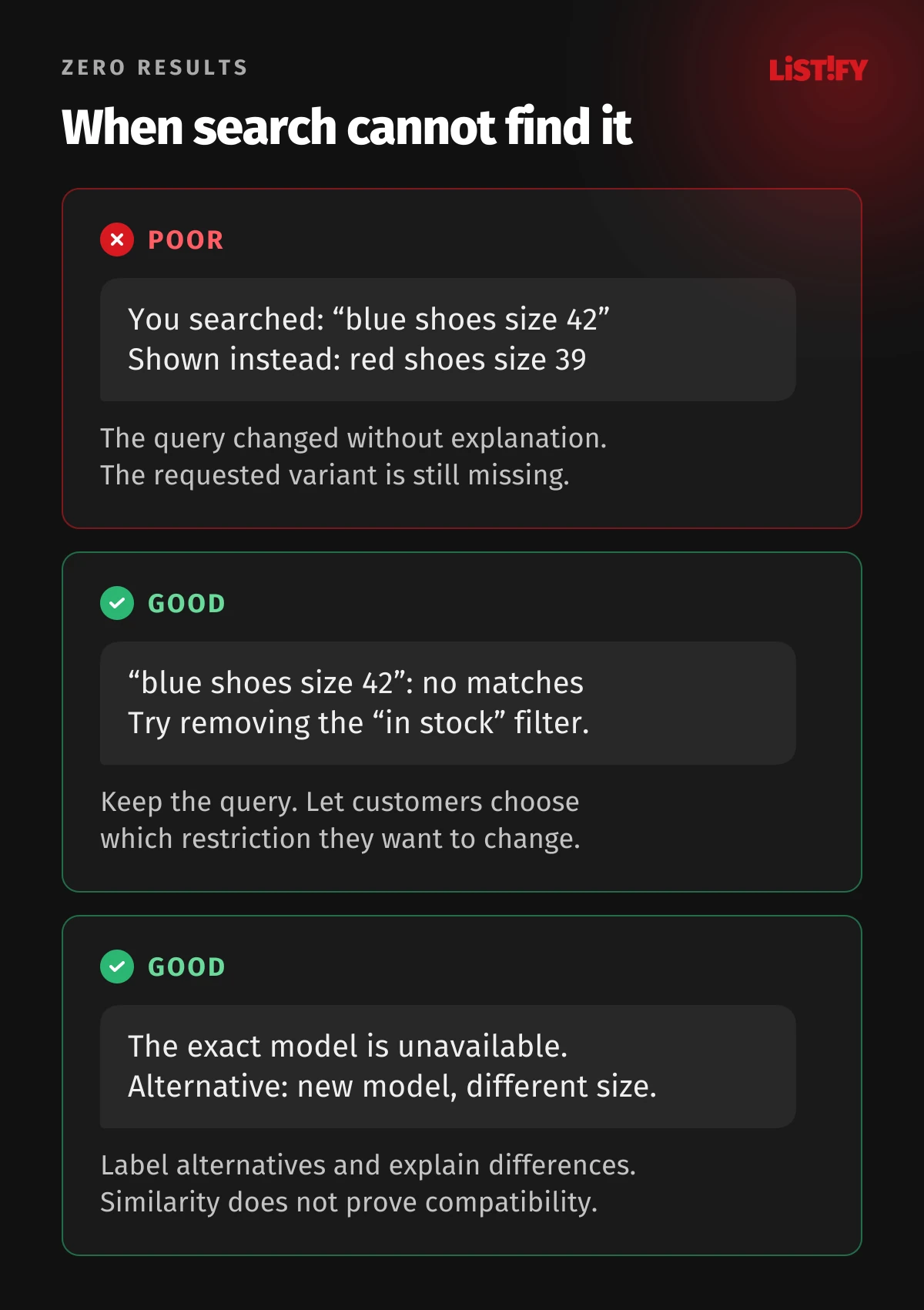
Distinguish product availability from variant availability. A query for “blue shoes size 42” is not satisfied by a model available only in red size 39. A result card can still show the model, but must explain whether the requested combination exists and can be ordered. The click should lead to the matching variant or at least preserve clear context. Otherwise, the customer has to repeat the same selection.
An unavailable model does not always need to disappear. For an exact query it may help someone confirm specifications, find a successor or request a stock alert. For a broad search, available alternatives will often deserve earlier placement. Label a successor as an alternative and verify compatibility in the product data. A similar name or visually identical component does not prove that two products are interchangeable.
08Explain an empty result instead of disguising it
Keep the original query visible and explain what happened. Distinguish a missing product, restrictive filters and a technical failure. If the server has not responded, “Nothing found” misrepresents your assortment. Offer a retry or a route to category browsing. If filters removed all matches, offer a targeted way to relax them rather than sending the customer back to the homepage.
Make spelling suggestions transparent, for example: “No matches for your original query. Try coffee machine.” Label alternative offers and keep the original text editable. Never silently drop an important condition. A request for a gluten-free product should not turn into general product results without a clear explanation. Changes to dimensions or compatibility deserve the same care.
Offer the closest relevant category, verified alternatives or human help if you actually provide selection support. Filling the page with random bestsellers is not a search repair. Preserve the original count of direct matches in your measurement too. If recommendations are counted as query matches, your zero-result rate can look better while the customer’s unmet need remains unchanged. Separating these concepts keeps both the interface and the analytics honest.
09Measure speed through to a usable result
A fast search-server response does not necessarily mean fast search for the customer. The interaction also includes sending the query, network travel, response processing and rendering the product cards. Measure the time from the action to a usable result on real devices. Alongside typical response time, inspect slower cases and failures. An average can hide problems affecting customers on older phones or mobile connections.
For autocomplete, reduce unnecessary requests while the user types and ensure an older response cannot overwrite a newer query. Deliver result images at appropriate sizes. Provide a loading state for slow responses and a clear next step for outages. The interface should not shift so that a customer accidentally taps a different product.
Freshness is another kind of speed. Agree how quickly changes in price or availability need to appear in search based on your actual operation. Then measure update delay and failures. If results are temporarily cached, define when they must be refreshed. A single universal target without considering catalog changes, traffic and integrations would be an arbitrary number.
10Measure the whole search journey
Define the events you need: a submitted query, displayed results, suggestion selection, product click, filter change and the subsequent commercial action. Separate autocomplete from the full results page. Do not count every keystroke as a new search. Where the system supports it, connect results and clicks using a request identifier, product identifier and position.
GA4 can collect view_search_results automatically from a URL parameter. This does not automatically cover autocomplete or a custom interface without that parameter. Shopify Search & Discovery reports describe results-page activity and exclude predictive-search interactions. Verify the actual coverage of your implementation with a test visit.
Track searches without a direct match, reformulations, clicks, exits and completed purchases. Document the denominator and time window for every metric. “Conversion after search” might mean any purchase in the session or a purchase of a specific product shown in results. Those are different questions. Break down the data by device, language and query type so the overall average does not conceal deterioration in a smaller part of the catalog.
Do not pass personal details accidentally entered into the search field to analytics services. Establish a removal process and check URLs as well as event parameters. Measurement restrictions and consent choices can affect coverage, so avoid presenting the reports as a complete record of every customer.
11Validate changes with tasks and a controlled experiment
First rerun your query test set. Then ask several people to complete specific tasks without coaching: find an exact model, choose the right variant or identify an alternative to an unavailable item. Observe where they hesitate and whether they understand the results. A small usability test can reveal an interaction problem, but cannot determine its revenue impact.
If traffic supports an experiment, compare the old and new experience in randomly assigned, stable groups. Choose the primary metric, expected effect size, required sample and stopping rule in advance. For a ranking test, assignment can happen at the first search. For a test changing the visibility of the search field, assignment must happen before visitors decide whether to use it. Otherwise, group selection depends on behavior that the change itself can influence.
An illustrative calculation: 120 of 1,000 submitted queries have no direct match, a rate of 12%. After a catalog repair, 80 queries in another equally sized set have no match, a rate of 8%. The difference is 4 percentage points. This is a useful operational signal, not automatic proof of additional sales: query mix, stock or campaigns may have changed between the two periods.
Alongside the primary outcome, monitor speed, errors, irrelevant clicks and any returns associated with incorrect compatibility. If traffic is insufficient for a reliable experiment, acknowledge the uncertainty and combine task testing with longer observation of specific repairs. Do not turn a weekly fluctuation into a claim of proven return on investment.
12When semantic or AI search is worth considering
Semantic search attempts to match meaning rather than relying only on matching words. It can be a candidate when customers describe their needs in varied language and your catalog serves many different use cases. Before buying, select problematic queries and compare the output with your existing system. Evaluate accuracy, explainability, response time, cost and your ability to correct an unsuitable result.
A small, well-structured assortment may work well with conventional search, synonyms and filters. Even in a large catalog, similarity in meaning cannot replace an exact SKU, dimension or verified compatibility relationship. A combined approach must respect hard constraints and avoid treating approximate similarity as a guaranteed match. If you add a conversational assistant, its descriptions should be grounded in current product data.
Do not pay for another layer simply because its label is fashionable. Identify which customer tasks the current system cannot handle and why. Better catalog data or a clearer autocomplete interface may solve more of the practical problem than a new algorithm. For the wider platform decision, read our comparison of Shopify and custom ecommerce.
13Assign an owner and start with specific repairs
Search needs one person accountable for the outcome and collaboration across several roles. The catalog owner fixes data, a developer maintains integration and response behavior, and the commercial team approves relevant promotional priorities. An analyst checks measurement and helps evaluate changes. In a small store, fewer people may cover these roles, but responsibility should not fall into the gap between a plugin supplier and someone who will “look at it eventually”.
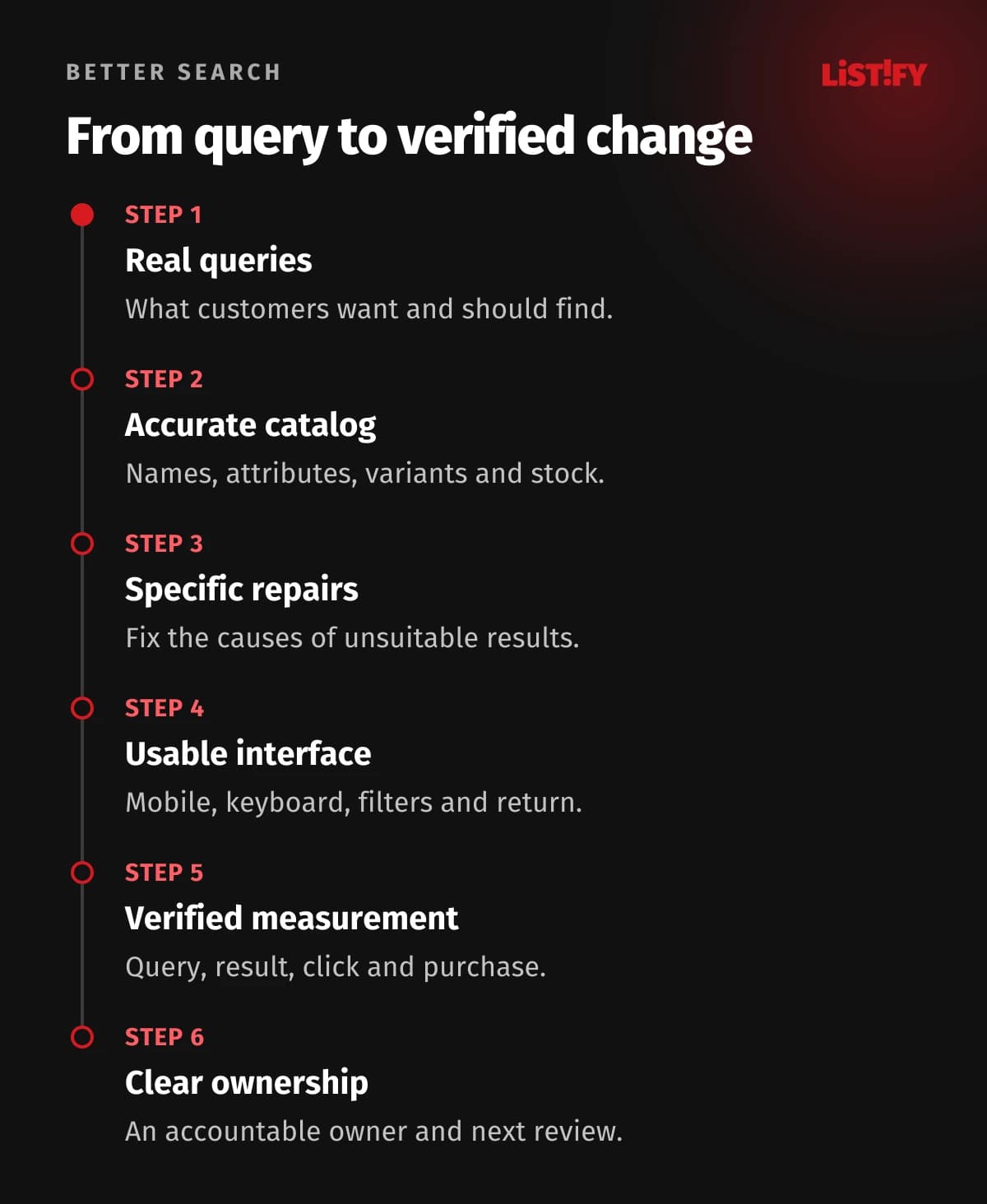
- List important queries and expected results, including variants and unsuccessful searches.
- Check product data, language, item visibility and updates to price and availability.
- Fix recurring, specific failures and add each one to the repeatable query test set.
- Verify autocomplete, keyboard use, mobile filters and the return from a product detail page.
- Fill measurement gaps and run a complete test journey through to an order.
- Evaluate the change, record the outcome and assign the next review and its owner.
Schedule reviews around catalog and operational changes. Check search immediately after a major import, a new collection or an integration change. During routine reviews, inspect new zero-result queries, expired campaigns, unhelpful synonyms and delayed index updates. Keep a change history so you can quickly reverse a rule that damages other searches. This turns search quality into a maintained part of the business instead of a feature checked only at launch.
14Ecommerce search questions answered
Does a small store need good search?
It depends on how customers shop. Even a few dozen technical products can require precise code and compatibility searches. A simple assortment with clear categories may be well served by a basic implementation. Decide from customer tasks and real queries, not product count alone.
Should search correct every typo automatically?
Tolerance helps with ordinary words, but can return a different product for a code or number. Prioritize exact matches and distinguish rules by data type. Whenever you change the meaning of a query or present an alternative, make that clear to the customer.
What should we show if we do not sell the requested product?
Keep the original query, clearly state that there is no matching item and offer a relevant category, verified alternative or help. Do not count recommendations as direct matches. Customers can understand the offer, and your data still records demand that the catalog did not satisfy.
Does a higher conversion rate among search users prove quality?
No. Search users may have stronger purchase intent from the beginning. A controlled experiment with appropriate group assignment is more suitable for estimating the effect of a change. Interpret before-and-after observations alongside campaigns, stock and changes in visitor mix.
When do we need an external search service?
When you understand specific limits of the existing system, such as language support, relevance control, updating a large catalog or measurement capabilities. Check available settings and data quality first. Compare operating cost, integration, support and the ability to move your rules as well as headline features.
How often should synonyms and rankings be reviewed?
Base the frequency on catalog changes and search volume. Give routine reviews an owner, and run additional checks after significant changes. Set end dates for manual campaigns. Test each new rule against a stable query set so fixing one situation does not break another.
Do we have to rebuild the store to improve search?
Often you do not. Better data, adjustments to an existing tool or an improved interface may solve the problem. A larger change makes sense when the platform cannot support the required behavior or a series of workarounds would be harder to maintain. The scope should follow the verified cause.