Custom CRM and software for patent attorneys: matters, dates and client instructions
Connect IP matters, client instructions, documents, dates and costs. Listify builds custom CRM, portals and software around your patent practice.

Illustrative situation: an office communication arrives while a client confirms additional representation and an overseas associate sends an invoice. The information sits in different tools. The patent attorney needs to identify the relevant matter, who will verify the operative date and whether instructions to proceed have actually been received.
01Custom CRM for patent attorneys needs an IP-specific data model
Custom CRM and software for patent attorneys connects clients, matters, territories, representation, documents, dates and costs. A contact with a task is insufficient. An application is not a granted patent, and patents, trade marks and registered designs need different information.
If your practice already uses a suitable specialist docketing platform, replacing it need not be the first project. A client portal, instruction workflow or connection to billing may be the missing piece. Listify can build that layer and verify the available interfaces.
Show us one type of matter and its path through the practice. We can scope a first module that supports professional work and distinguishes automated suggestions from confirmed decisions.
02Six modules for clients and matters
1. Clients and relevant parties. Distinguish instructing clients, applicants, rights holders, inventors and contacts. Changing a billing address must not silently change the recorded owner of a right.
2. Matter types and status. Separate patent applications, granted patents, trade marks, designs and utility models where relevant. Procedural status determines the fields and tasks required by the approved configuration.
3. Families and territories. Related filings retain their own identifiers, offices and territories. A family overview supports navigation without collapsing separate proceedings and dates into one record.
4. Representation. Preserve authority documents, scope of representation and changes over time. An overseas associate has an assigned role; an address-book entry is not itself evidence of authority.
5. Scope and budgets. Separate professional fees, official fees, translations and anticipated associate costs. Clients approve an intelligible scope rather than a total whose inclusions are unclear.
6. Acceptance and relationships. Check relevant relationships and team availability before activating a matter. Identified issues need an owner; the application does not make the final professional conflict assessment.
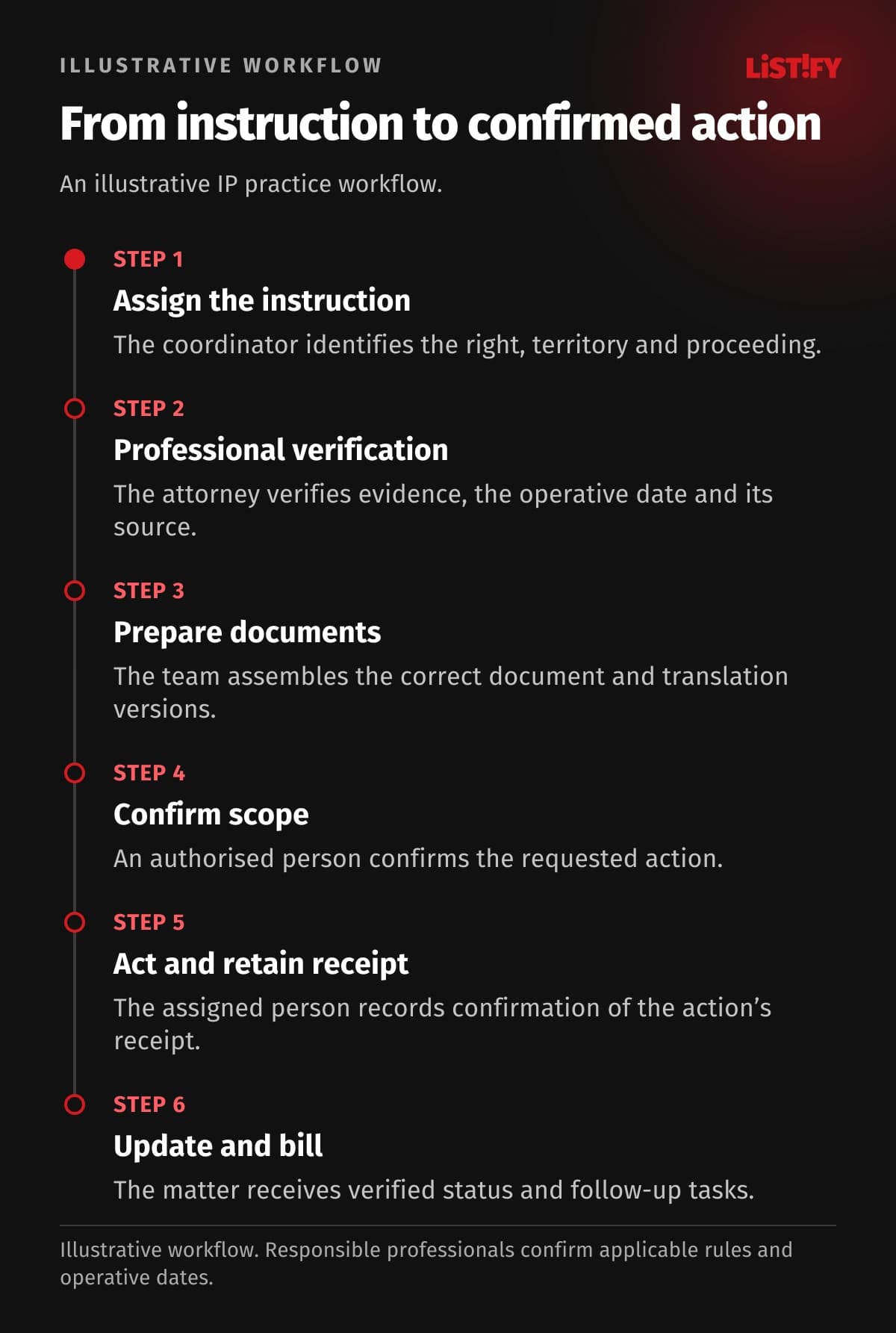
03An illustrative path from instruction to confirmed action
- The coordinator links the client instruction to a particular right, territory and proceeding.
- The attorney verifies scope, required information and the relevant date with its source.
- The team prepares a versioned package of documents, approved wording and any translations.
- The client or another authorised person confirms the required action through the agreed process.
- The assigned person performs the action using an available channel and attaches confirmation of receipt.
- The matter receives a verified status, follow-up tasks and billing information.
This describes office operations, not a filing procedure for every jurisdiction. For example, EUIPO distinguishes the specific goods and services covered by a trade mark application. The system should retain the approved specification as well as class numbers; a class identifier is not the complete instruction.
04Six modules for docketing and documents
7. Professionally confirmed dates. Each deadline records its event, source document, determination method and confirming person. Automated calculation can propose a date, but the operative entry follows the agreed verification process.
8. Official correspondence. Keep office communications, decisions and delivery information with the matter. An incoming email and a legally relevant event may need separate records under rules set by the professional.
9. Document packages. Version claims, drawings, representations, goods and services lists and translations. Before acting, staff can verify the intended package instead of assembling the latest files from an inbox.
10. Client instructions. Approval requests specify the recipient and scope. Reminders stop when resolved; absent instructions or failed delivery become assigned tasks rather than disappearing into email.
11. Filing confirmation. Sending a package and receiving confirmation are different states. Record identifiers, receipts and errors. A failed transfer must not create an apparently completed filing.
12. Maintenance and renewals. Distinguish the right, procedure and fee type. The professional confirms the source and date; staff record client instructions, the action taken and supporting evidence.
- Confirmed due dateBefore integration: 3Proposed design: 1
- Official fee amountBefore integration: 2Proposed design: 1
- Professional verificationBefore integration: 1Proposed design: 1
Illustrative model, not a measurement. A verified date appears in the matter, calendar and client report (3); a fee amount in a cost sheet and billing record (2). The design shares approved data. Professional verification is still recorded once (1). This is not a legal deadline calculation or a savings guarantee.
05Six modules for economics and communication
13. Fees and currencies. Official fees, professional charges and associate disbursements use separate categories. Preserve the currency, conversion basis and source so a cost can be explained to the client.
14. Billing preparation. Link approved time, actions and disbursements to the matter. Finance can distinguish billable items from those still awaiting review or client authorisation.
15. Overseas associates. A handoff specifies scope, attachments, responsibility and the expected response. Monitor outstanding work without giving an external associate access to the entire client portfolio.
16. Client portal. Show the portfolio records, documents and decision requests authorised for that client. Changing a contact requires an access decision; internal notes and information about other clients remain separate.
17. Specialist website. Explain filing, trade mark and design services through appropriate enquiry routes. Collect basic context first; confidential technical material enters a subsequent controlled intake process.
18. Oversight and history. Managers see unconfirmed dates, missing instructions and incomplete transfers. Attorney, coordinator and finance roles limit access, while important changes and exports remain traceable.
06A first phase without a universal calendar for every right
| Record type | Distinctions to preserve |
|---|---|
| Patent application | Proceeding, status and related documents |
| Granted patent | Territory, verified status and maintenance work |
| Trade mark | Classes and exact goods and services wording |
| Registered design | Representations, subject matter and proceeding |
The EPO maintains dedicated fee information. Applicable rules must be checked for the office and situation involved. A first release can connect contacts, matters and client instructions around existing specialist software. Our existing versus custom CRM guide explains the broader choice.
07Migration, cost and operations without internal IT
Preserve identifiers, relationships between proceedings, territories and confirmed dates during migration. Similar client names are not enough to merge applicants automatically. Both a coordinator and an attorney should examine the trial import, especially sources, documents and outstanding actions. Read our migration guide.
Budget depends on portfolio scope, proceeding types, permissions and integrations. Building a multi-jurisdiction rules engine is a different undertaking from adding a portal to an existing system. Listify starts with discovery and a prototype, then pilots ordinary matters alongside missing instructions and failed transfers.
The selected provider supplies hosting. Agree support, backup, recovery, administration and code and data handover before launch. Your process owner must understand practice operations and responsibilities. Our development partner questions help prepare the discussion. Let us scope the first module around your current records.
08Frequently asked questions
Will CRM replace specialist docketing?
It need not. Retaining verified specialist software while adding a portal, communications or billing can be preferable. Replacing deadline rules requires a separate scope and rigorous validation.
Can software determine the correct deadline?
It can propose a date from an approved rule and input. Keep the source and professional confirmation visible. We do not promise one universal calculation for every office and proceeding.
Can patents and trade marks share a platform?
Yes, through a common client overview with distinct matter types and workflows. Related rights share a client relationship, not automatically every deadline, field or procedural rule.
What if an office or associate has no API?
Use a controlled manual handoff or a supported import. Record the action separately from confirmation. An unavailable interface cannot be solved merely by promising automation.
Can clients see applications in preparation?
Only the material deliberately shared with their role for that matter. A portal can support approval of specific documents and instructions without exposing all internal working versions.
Where should a small practice begin?
Choose a recurring problem such as instruction approval, cost visibility or document handoff. First assess what existing products can do, then define the justified custom module.
09Connect professional work with daily practice operations
Bring Listify an anonymised matter, a role map and your current tools. We can design custom software, CRM, a portal or a website for your IP practice. Start with a specific information handoff whose correct outcome your team can confidently validate.