Custom CRM and software for expert witnesses: instructions, evidence and reports
Custom software for expert witnesses: instructions, evidence, inspections, report versions and billing. Design your practice CRM and portal with Listify.
Illustrative situation: an instructing client adds a question, a colleague uploads further photographs and the expert returns from an inspection. The draft report still references the original instructions. The practice owner needs to know what changed, who will assess it and which version can be issued.
01Custom software for experts must preserve case context
Custom CRM and software for expert witnesses connects instructing clients, questions, evidence, inspections, authors and issued report versions. The essential task is tracing the information an expert used and identifying whether later material requires further work. A contact database alone cannot do that.
A tailored system can suit a practice with several experts, disciplines and evidence handoffs. A solo expert may be better served by an existing product. Development becomes relevant when staff repeatedly copy information or cannot reliably distinguish working documents from issued reports.
Walk us through one type of instruction. Listify can define a useful first release around your practice and the specialist tools you already use.
02Six modules for accepting instructions
1. Instructing parties and contacts. Distinguish the organisation instructing you, day-to-day contact, report recipients and billing details. A personnel change must not overwrite earlier instructions or delivery history.
2. Defined questions. Record the accepted instruction, purpose and expected output as a version. An additional question becomes a change to assess rather than silently altering the author’s existing brief.
3. Discipline and expertise. Assign the matter to the appropriate expert and field. Check competence and availability before acceptance; a responsible professional confirms whether the practice should take the work.
4. Parties and relationships. Record relevant people and organisations. A known connection can prompt assessment, but the system does not determine independence, conflicts or the acceptability of an instruction.
5. Scope and commercial terms. Keep agreed work, estimates, fees and any advance payment with the instruction. Distinguish additional scope from clarification of evidence already requested.
6. Scheduling and capacity. Link inspections, drafting, internal review and intended delivery. A coordinator sees dependencies on client cooperation and can adjust the plan with a recorded reason.
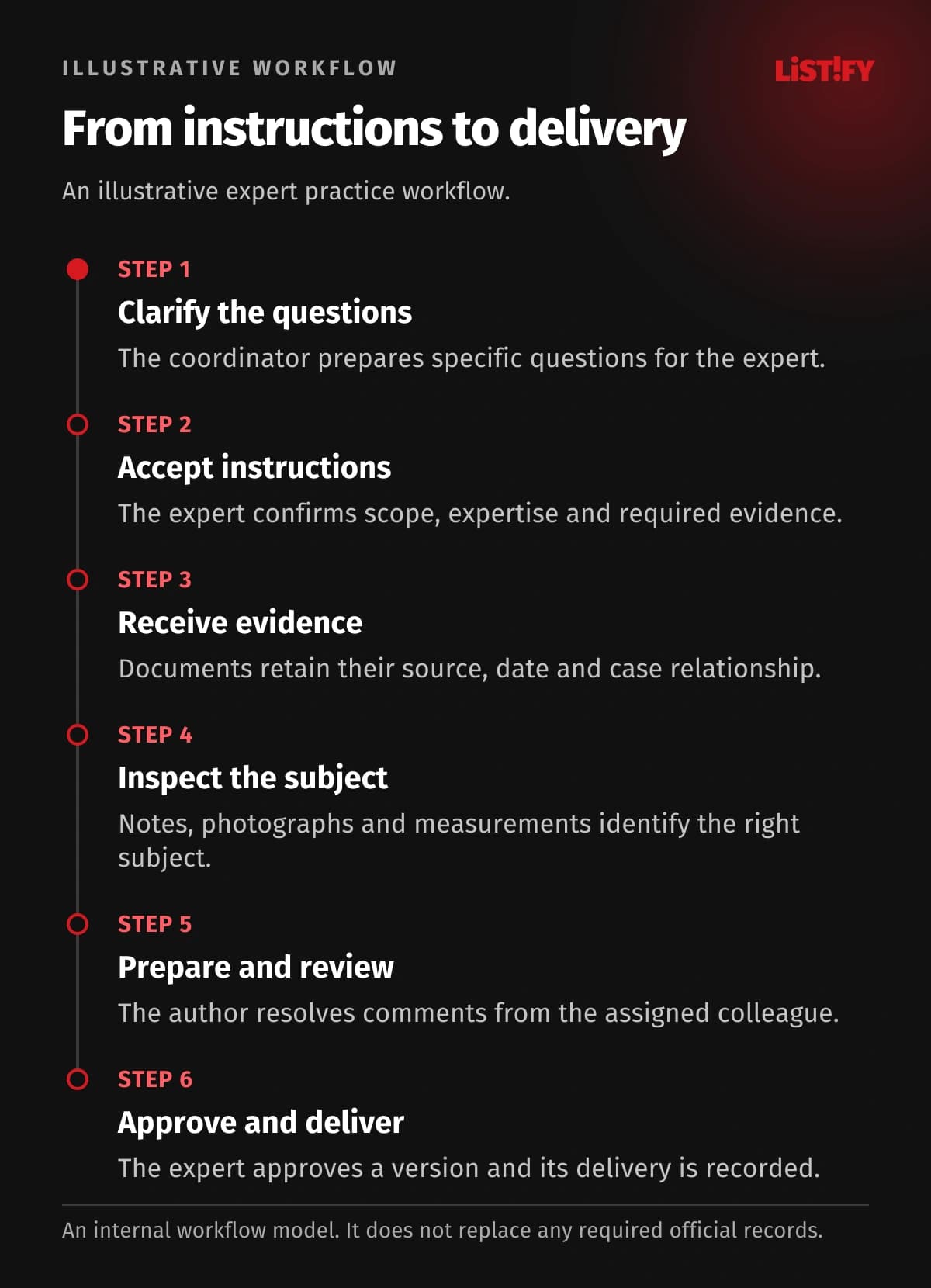
03An illustrative technical report workflow
- The coordinator creates the enquiry and gathers the questions for the expert to assess.
- The expert accepts defined instructions and confirms the evidence needed and intended work plan.
- The client supplies documents through a controlled workspace, with source, date and case links preserved.
- Inspection notes, photographs and measurements are associated with the correct subject.
- The author prepares the report and an assigned colleague performs any agreed internal review.
- The expert authorises a specific version for issue, and the practice records delivery and related administrative actions.
This is an internal workflow example. It does not replace any official register, filing system or professional record required in your jurisdiction. Those obligations and the intended use of the report must be established by the expert. A potential integration is a separate item to verify, not an assumed capability.
04Six modules for evidence and expert work
7. Evidence requests. Each requested item has an owner and status. Receipt is different from completeness or suitability; an expert can return an item with a precise explanation.
8. Provenance and versions. Separate originals, working copies and supplements. Record who supplied material and when it arrived so a conclusion does not depend on an unidentified file labelled final.
9. Site inspections. Connect location, participants, plans and equipment. Add photographs and notes from a phone. If offline work is needed, define how pending uploads and conflicts will be handled.
10. Measurements and samples. Record subject identifiers, handoffs and responsible people at the level required by the discipline. A sample, photograph and derived calculation should remain distinguishable objects.
11. Specialist calculations. Attach the spreadsheet version, inputs or export from the specialist application. CRM can preserve the relationship without rebuilding the tool used to perform expert calculations.
12. Author and reviewer. Link comments to an identified version and record their resolution. Internal review is a defined practice choice; completing a task does not transfer responsibility for the expert opinion.
- Inspection appointmentBefore integration: 2Proposed design: 1
- Instructing contactBefore integration: 2Proposed design: 1
- Expert conclusionBefore integration: 1Proposed design: 1
Illustrative model, not a measurement. An appointment appears in a matter sheet and calendar (2); a contact in an address book and case record (2). The design shares each from one record. The expert still records a conclusion once (1). These are entry counts, not measured time savings.
05Six modules for delivery and practice operations
13. Controlled issue. Deliver an identified approved report and its attachments. Preserve recipients, delivery method and confirmation so the practice knows what was actually issued.
14. External record references. Keep the internal matter number separate from any official reference. A person confirms the external identifier; the CRM should not imply it creates an official record.
15. Time and expenses. Attribute work, travel and costs to the matter under the agreed billing arrangements. Approved information can pass to accounting without reconstructing it from calendars.
16. Instructing client portal. Share requests, supplied material and deliberately released status information. Internal drafts and working notes remain outside that workspace according to the agreed permissions.
17. A specialist website. Explain each discipline and capture appropriately qualified enquiries. Gather basic context first and request sensitive evidence through the subsequent controlled intake process.
18. Access and activity records. Authors, coordinators, external collaborators and accounts staff need different views. Access changes, important edits and exports should leave a history the practice can examine.
06A first release and the existing-product alternative
| Situation | Practical first step |
|---|---|
| One expert with straightforward matters | Existing practice software and organised storage |
| Frequent changes to instructions | Versioned questions and evidence |
| Several authors and inspections | Capacity, visits and controlled handoffs |
| A suitable specialist calculation tool | Retain it and connect practice administration |
The first release might cover matters, accepted instructions, evidence and issue of approved reports. The pilot should include an additional question and a rejected document. Our custom CRM decision guide compares broader options.
07Migration, budget and support without internal IT
Map the relationship between instructions, subjects, evidence and issued reports before migration. Preserve historical identifiers and filenames in traceable fields. Duplicate contacts can be merged, but similar attachments may capture different conditions. An expert therefore checks the trial import alongside the technical team. Read our guide to migrating existing records.
Cost depends on disciplines, permissions, historical documents, mobile requirements and integrations. Listify provides discovery, prototypes, implementation and training in phases. Hosting comes from the selected provider; backup, recovery, administration and support are agreed around the operating needs. Include documentation, code ownership and usable exports in that agreement.
You do not need an internal development team, but you do need an expert who owns the process decisions. Our development partner checklist helps clarify responsibilities. Let us explore the first module using an anonymised matter.
08Frequently asked questions
Does custom software replace an official register?
Not automatically. Internal administration and official records serve different purposes. Required identifiers, filings and available integrations must be verified for the relevant jurisdiction and professional activity.
Will the system write the expert opinion?
It can support templates, structure and reuse of confirmed details. The expert determines the assessment, methodology and conclusions. A completed form is not sufficient authority to issue a report.
Can one practice support several disciplines?
Yes. Templates, fields, roles and workflows can differ while contacts, billing details and capacity remain connected. Access to case content should follow a deliberate permission model.
What happens when evidence arrives after issue?
It becomes a new event against the original matter. The expert decides what follow-up is required. The previously issued version remains identifiable rather than being overwritten.
Is a separate mobile app necessary?
A responsive website may cover photographs, notes and inspection schedules. A dedicated app needs a clear reason, such as controlled offline work or a particular device integration.
How will the first release be assessed?
Test realistic cases: a new instruction, missing evidence, an amended question and report delivery. Verify traceability and role-specific work rather than judging only the appearance of screens.
09Design the system around your discipline
Share an anonymised matter structure and your current tools with Listify. We can design a CRM, portal, website or application that connects instructions to delivery. Start with a practical problem that your team can describe and validate.