Custom CRM and software for auditors: engagements, evidence and review
Custom CRM for auditors, client portals, PBC requests and engagement workflows. Build software around your audit practice with Listify.
Illustrative situation: the client uploads a revised trial balance after an assistant completes a working paper. The manager is preparing the file for review, while the engagement partner needs to know which conclusions could be affected. Finding the answer should not require reconstructing several email conversations.
01Custom CRM for auditors starts with engagement acceptance
Custom CRM and software for auditors connects client relationships, reporting periods, document requests, engagement teams and approved outputs. It helps an owner see who accepted an engagement, what remains outstanding and who can authorise the next step. Professional judgement and audit conclusions remain with the responsible auditor.
A custom layer can make sense when specialist audit software supports the methodology but client onboarding, capacity planning and document collection happen elsewhere. Replacing working papers need not be the first project. We identify repeated administration and gaps in responsibility before defining the scope.
Show us one engagement from enquiry to completion. Listify can propose a first module and connections to the tools you want to retain.
02Six modules for clients, independence and planning
1. Clients and groups. Keep legal entities, group relationships, contacts and reporting periods connected. A new finance director becomes the current contact without rewriting the history of previous engagements.
2. Acceptance and continuance. Collect information for the partner’s decision. A prospective engagement remains visibly different from an accepted one, so resource planning does not silently become an approval.
3. Independence records. Request relevant confirmations from team members and assign exceptions for assessment. The system records the decision and its basis; a completed form does not itself establish independence.
4. Engagement terms. Version proposals, agreed scope and responsibilities. The partner can identify which version the client approved, instead of relying on the latest attachment found in an inbox.
5. Staffing and cover. Plan assistants, managers, partners and review roles against availability and required experience. A client delay becomes a visible staffing decision across the affected engagements.
6. Engagement budgets. Compare planned effort with recorded work by area. Managers can explain deviations caused by new evidence or additional scope while there is still time to act.
03An illustrative engagement from acceptance to archive
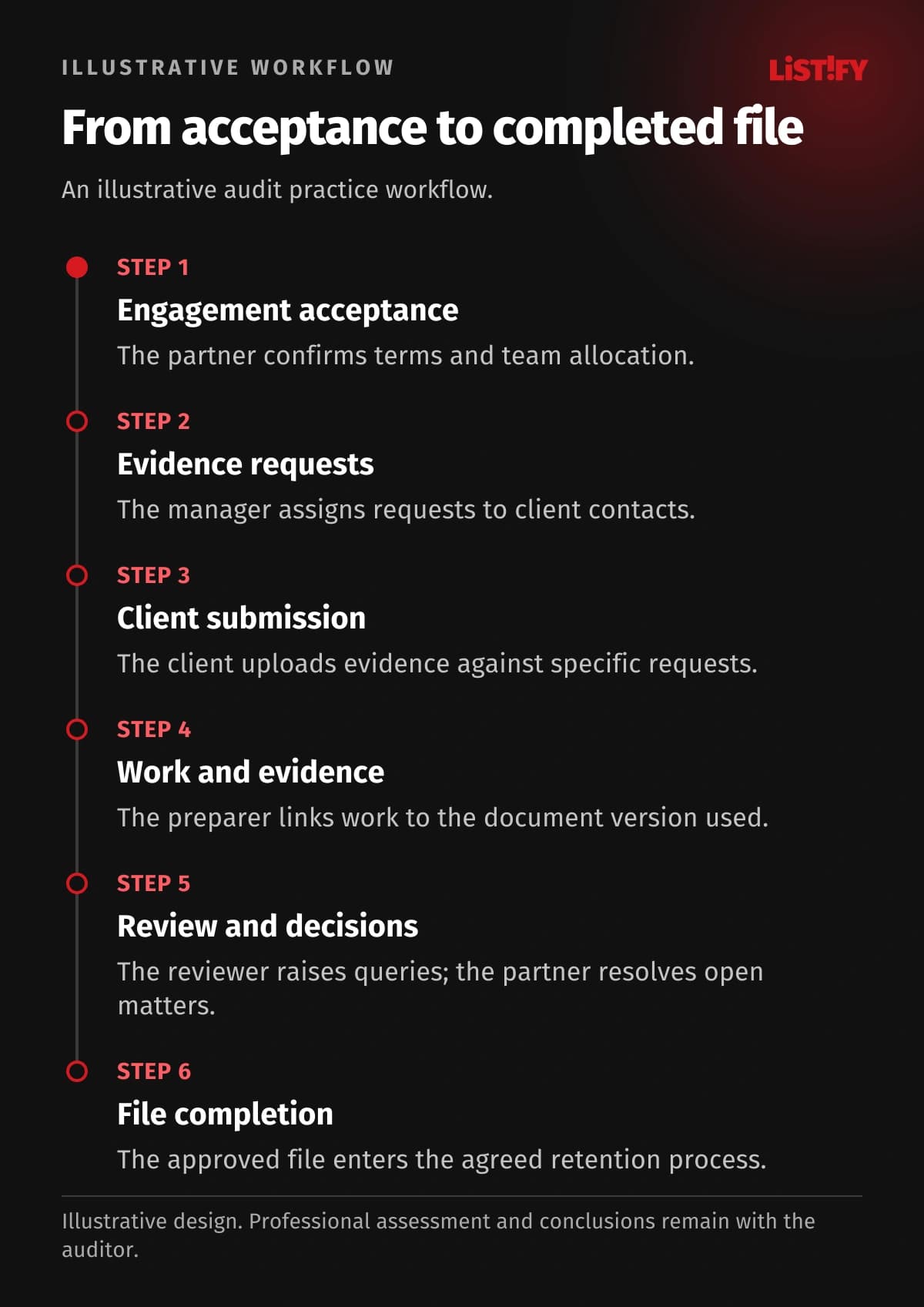
- The partner accepts the engagement and confirms its terms and team.
- The manager creates the reporting period and assigns document requests to client contacts.
- The client uploads evidence against specific requests. The team accepts it or requests clarification.
- The preparer links work performed to the version of evidence actually used.
- A designated reviewer raises queries. The preparer responds and the partner follows unresolved matters.
- The file enters its agreed completion and retention process once the required conditions have been confirmed.
This is an operational example, not a universal audit methodology. The IAASB handbook distinguishes auditing and quality management standards. Your responsible professionals determine the applicable requirements, effective dates and local obligations before we translate your process into software.
04Six modules for evidence and review
7. PBC requests. Give each item provided by the client an owner, period, due date and status. Uploaded evidence remains distinct from evidence that a team member has reviewed. Reminders stop when the requested item arrives; failed message delivery creates a coordinator task.
8. Client portal. Client staff access assigned requests and deliberately shared outputs. Internal working papers, commercial assessments and team discussions remain outside their permissions unless explicitly authorised.
9. Document provenance. Preserve the sender, date and request link. A replacement file alerts the responsible preparer while the preceding version remains traceable rather than disappearing silently.
10. Working paper links. Connect work performed with the evidence used. When a document changes, the responsible auditor can identify affected work and decide what needs reassessment.
11. Review queries. Every query has an author, recipient and resolution record. Where an engagement quality review is required, model that role and its permissions separately from ordinary supervisory review.
12. Completion and retention. Show outstanding matters before file completion. Retention rules, version preservation and subsequent additions follow the approved requirements of the practice rather than a universal software default.
- PBC request due dateBefore integration: 3Proposed design: 1
- Client contactBefore integration: 2Proposed design: 1
- Professional conclusionBefore integration: 1Proposed design: 1
Illustrative model, not a measurement. A due date is entered in the request list, email and calendar (3); a contact in CRM and the PBC list (2). The proposed design shares each from one record. The auditor still records a conclusion once (1). These are entry counts, not measured time savings.
05Six modules for running the practice
13. Time recording. Attribute effort to an engagement, period and activity. Separate normal delivery, agreed additional work and internal rework so managers can interpret the figures properly.
14. Billing preparation. Approved time or a milestone prepares an accounting handoff. Track both the intended invoice and confirmation that the accounting application accepted the information.
15. Portfolio oversight. Show engagements waiting for clients, review or a partner decision. Managers can address the specific constraint instead of collecting broad progress estimates in meetings.
16. Website enquiries. Capture the requested service, reporting period and basic organisation details. Request sensitive evidence later through an appropriate controlled channel rather than a public enquiry form.
17. Access and history. Limit access by engagement and role. Cover arrangements can expire, departures trigger access removal, and important changes or exports leave a usable activity record.
18. Integrations and exports. Connect supported accounting, calendar and document interfaces. Failed transfers need a status and an owner. Test exports of records, relationships and files during design.
06What to build and what to retain
| Current need | Practical starting point |
|---|---|
| Suitable methodological working papers | Retain the specialist audit platform |
| Evidence scattered across emails | A PBC portal linked to engagements |
| Unclear capacity and approvals | A practice operations module |
| A small team with standard requirements | Evaluate an existing product first |
A first release could cover clients, periods, requests and handoff to the manager. Pilot it on an agreed engagement, including rejected evidence and temporary cover. Our comparison of existing CRM products and custom development explains the broader decision.
07Migration, cost and support without an internal IT team
Migration separates the client, reporting period, engagement and individual document. Identical filenames are not proof of duplication. A trial import checks relationships, permissions, file counts and representative historical files. Our migration guide covers the preparation.
Cost depends on roles, approval rules, historical files, integrations and operating requirements. Discovery, prototypes, implementation, validation and training belong in the scope. Ongoing costs include the selected infrastructure, storage and support arrangements. Hosting is supplied by the selected provider; system administration is agreed separately. Establish code ownership, documentation and data exports before development starts.
Your practice needs a process owner and users who can validate realistic cases. Listify handles design and implementation. Before launch we agree backup and recovery responsibilities, the support contact and the handover package. Let us review the first phase using your current request list.
Use our questions for choosing a development partner to agree support, handover and operating responsibilities before signing the development contract.
08Frequently asked questions
Will this replace our audit software?
It does not have to. A custom layer can connect practice operations and a client portal to existing working papers. Replacing the specialist platform requires a separate assessment.
Can the client see the entire file?
Permissions define the shared areas. Clients can see requests and approved documents while internal notes and working papers remain restricted. The access model is agreed explicitly.
Does the system guarantee standards compliance?
No. It supports an approved process and records its execution. Your auditors determine professional requirements, methodology and conclusions, including any jurisdiction-specific obligations.
What happens when evidence changes?
The earlier version is preserved and the replacement is linked to its request. The responsible preparer receives a task to assess the impact and any further review required.
Do we need a mobile app?
A responsive web interface often covers request monitoring and client visits. A dedicated application should address a defined need, such as controlled offline capture.
How is the project priced?
We review one engagement, the systems involved, roles and representative records. The proposal defines a concrete first phase and separates migration, further development and ongoing support.
09Start where information loses its context
Bring an anonymised PBC list, a role map and an example review handoff. Listify can design a CRM, client portal or practice module around your audit firm. The first release should solve a recognisable operating problem and provide a sound basis for further development.