Website maintenance and updates: what monthly care should include
Monthly website care should help customers complete important tasks and give you a tested way to recover when something fails. A list of updated plugins and a green uptime indicator are not enough. You need to know who handles incidents, what gets tested, how data is restored and which requests count as new development. Here is how to define the service, assess its reports and compare proposals by their actual scope.
Imagine a business website that loads normally but stops delivering inquiries after a form change. The hosting dashboard says the server is running. The administrator has installed the updates. Yet the sales team is losing opportunities. This hypothetical example explains why maintenance should start with the job the website does for the business.
The following checklists and service boundaries are an editorial framework to adapt to your operation. The suggested routines and numerical examples are not universal standards or guaranteed LISTIFY results. Technical sources were checked on October 28, 2026.
01The short answer: what a monthly fee should cover
A useful maintenance service answers four questions. Does the website work? Are its components supported and maintained? Can the team restore the service? Who makes decisions when something goes wrong? Each answer needs evidence, such as a completed form test, a deployment record, a recovery exercise and an up-to-date escalation contact.
The fee does not buy a promise that nothing will ever fail. It buys an agreed level of prevention, monitoring and response. A brochure website depends on accurate content and working contact routes. An online store also depends on product variants, prices, payments, stock and order transfers. Page count alone cannot describe this scope.
| Area | Work to agree | Evidence to receive |
|---|---|---|
| Monitoring | Check availability and selected customer tasks | Check results and an incident summary |
| Updates | Assess, test and deploy changes | What changed, when and with what result |
| Backups | Check backup jobs and test restoration | Coverage, last recovery test and measured duration |
| Access | Maintain accounts and operational contacts | A current ownership and responsibility list |
| Planning | Separate repairs, prevention and development | Priorities, estimates and approvals |
02Hosting, maintenance and development are separate services
Hosting supplies the environment in which the website runs. It may include some updates, backups or support, but providers draw the boundaries differently. Restoring a server does not necessarily include checking whether a contact form creates the right CRM record or whether a product feed contains correct prices. Ask where hosting responsibility ends and application responsibility begins.
Maintenance preserves agreed behavior and addresses operational risks. Development adds behavior, such as a language, delivery method or accounting integration. Some tasks sit between the two. Moving to a supported software version may require changes to old code. Agree when that work belongs in the maintenance fee and when a separate estimate is required.
Compare proposals using the same tasks and support hours. An offer without an on-call service, staging environment or data restoration provides a different service from one that includes them. Our guide to business websites built with Next.js and Astro explores the link between technology choices and ongoing ownership.
03Start with an inventory of the service you run
List the domain, DNS, hosting, content management system, libraries, plugins, licenses, email delivery, analytics and integrations. Record the business owner, technical administrator, billing owner and renewal date for each item. Add the location of access instructions and documentation. Do not put passwords into a shared inventory spreadsheet.
Then identify a small set of critical journeys. A prospect submits an inquiry and the sales team receives it. A customer orders an available product variant and the warehouse receives the correct quantity. An editor publishes an article and its translated version appears. Each journey needs an owner who can assess the outcome, not just a technician who can start a test.
Taking over an older site may require more work in the first month than in later months. Missing documentation, unsupported components and uncertain backups must be investigated first. It is premature to promise routine maintenance before the handover scope is understood. Keep discovery findings separate from the normal monthly workload so that the initial bill and the remaining risks are clear.
04Monthly billing does not mean checking once a month
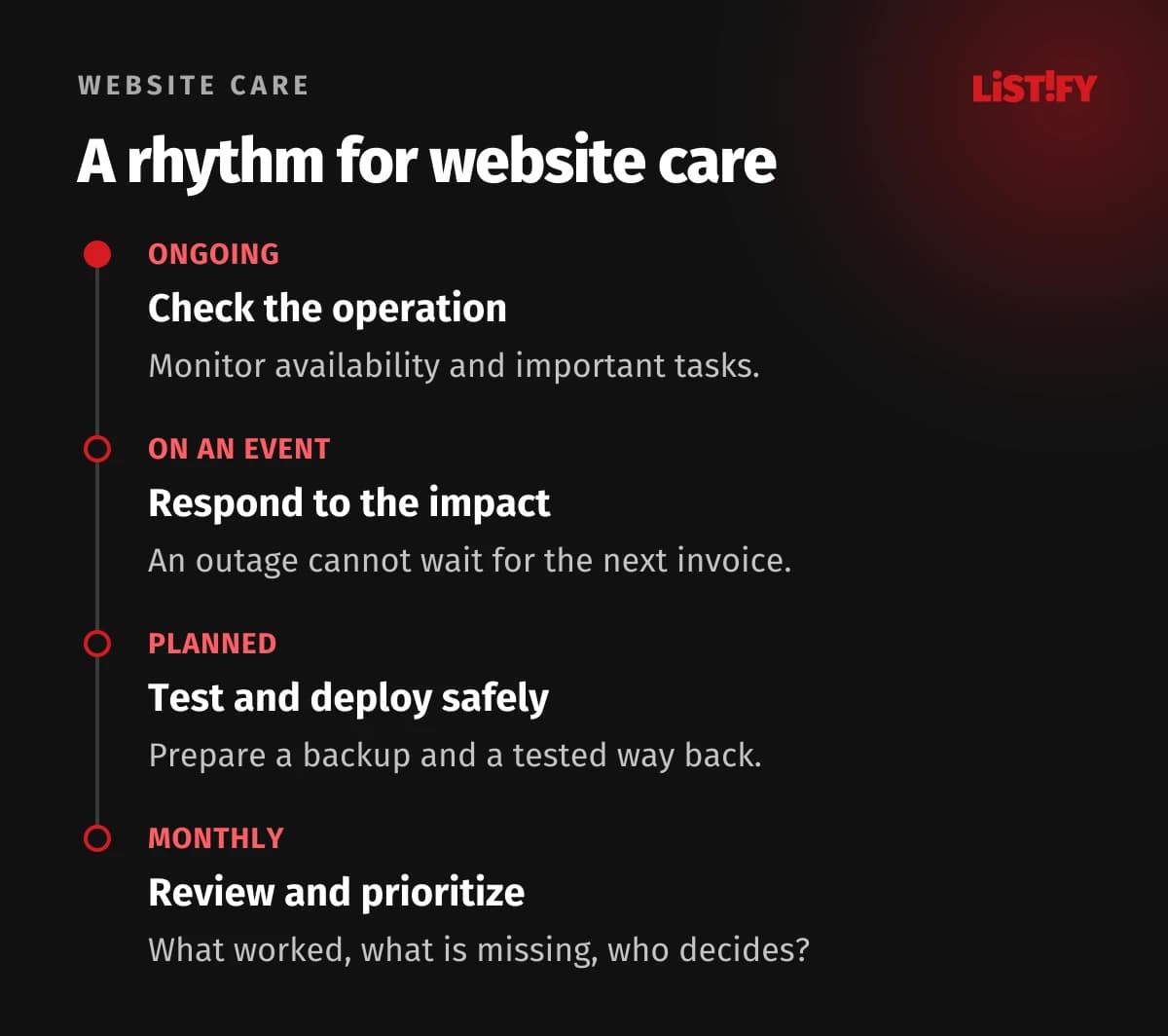
A month is a useful interval for billing and review. It is not a suitable delay for investigating a broken checkout or a serious security problem. Separate ongoing automated checks, event-driven response, planned changes and periodic reporting. Backup frequency should follow acceptable data loss rather than the invoice date.
NIST describes patch management as a process that includes identifying, prioritizing, installing and verifying updates. For a business owner, the practical requirement is simple: the team should explain why one issue needs attention now while another can wait for a planned maintenance window.
Before a major campaign or seasonal peak, reduce unnecessary changes and check critical journeys. This is not a reason to postpone an urgent fix automatically. The decision should consider the impact, available mitigation and safe deployment options. Record a postponement, including who accepted the remaining risk and when it will be reviewed.
05An update is finished when the important journeys work
Before a routine change, prepare a current backup, an impact assessment and a way back. Check important compatibility risks in a staging environment. Avoid bundling unrelated interventions where possible: it becomes harder to identify the cause of a failure. Secure staging and use only the data required for meaningful tests.
The official WordPress update guide recommends a backup before starting. For applications with third-party libraries, OWASP describes validating a patched dependency in a test environment. Completing an updater does not demonstrate that a particular business process still works.
- Record the existing version and the reason for the change.
- Check the backup and prepare the rollback procedure.
- Apply the change in staging and examine affected dependencies.
- Run the important customer and staff journeys.
- Deploy at the agreed time and verify production behavior.
- Record the result, remaining issues and follow-up work.
For automatic updates, decide which changes can run without prior intervention and which checks must follow. Automation reduces repetitive work; someone still needs to investigate a failed check. Include the support lifecycle of the runtime and database. Current plugins on an unsupported foundation do not constitute complete maintenance.
06A backup is useful only if you can restore what matters
Check whether the backup includes the database, uploaded media, configuration and other material needed to run the service. Some code can be rebuilt from a repository. Orders and customer uploads may have no other source. Document external dependencies too: backing up your application does not automatically preserve information held by another provider.
The official WordPress backup documentation distinguishes files from the database and recommends copies in different locations. Also assess whether a production-account failure or compromise could remove every copy. Agree access restrictions, retention and alerts for failed backup jobs.
Restore into an isolated environment. Check more than the home page: inspect selected records, sign-in behavior and relationships between data. The restored copy must not send real customer messages or create duplicate payments. Record which backup was used, what the exercise covered and the time required to reach a usable result.
An online store needs particular care when rolling back its entire database after an update. New orders may have arrived since the backup. Reverting code and restoring data are different actions. The recovery plan must address those newer records and reconcile the store with stock, payments and other connected systems.
07Agree how much data and downtime the business can tolerate
Two questions help size the solution. The recovery point objective, or RPO, expresses acceptable data loss as a period of time. The recovery time objective, or RTO, sets a target for restoring the service. Both should reflect business needs and be tested. A target in a presentation is neither a measured recovery time nor an automatic contractual guarantee.
Consider an illustrative store receiving a steady 12 orders an hour. If recovery relies only on a backup eight hours old, 96 orders could be absent from that restored copy. With a backup 15 minutes old, the corresponding number is three. The calculation excludes other recovery sources and assumes all relevant orders were created after the selected backup. It is not a prediction for your store.
- Backup eight hours old96
- Backup 15 minutes old3
Illustration: 12 orders per hour multiplied by backup age. These are not measured client results or a promise that no more than three orders could be lost.
More frequent copies do not necessarily make restoration faster. Fresh data is of limited help if the team is waiting for account access, a large archive transfer or a database restart. Include detection, decision-making and validation in the operational recovery exercise. The complete scenario tells you whether the plan is useful in practice.
08Monitor the tasks customers need to complete
A home-page check detects some outages. It does not catch every sign-in failure, search error, broken form or payment problem. Add selected user journeys to infrastructure checks. Automated checkout tests need a safe testing arrangement so they do not distort stock, accounting or analytics.
Google’s Site Reliability Engineering guide distinguishes observation of internal state from checks of externally visible behavior. Combining them is useful on a business website. Application errors help investigate the cause; a successful form journey shows whether a visitor can complete the task.
Every alert needs a recipient and an expected next step. An email sent to an unread inbox is not an incident response. Check the monitoring system itself as well, for example by detecting missing scheduled runs. Otherwise a green status may simply mean that the checks stopped running.
Investigate performance by operation and device. A single speed-test score cannot explain why a particular order takes too long. Our guide to web application performance explains how to trace a slow operation through the interface, API and database.
09Responding to an incident is different from resolving it
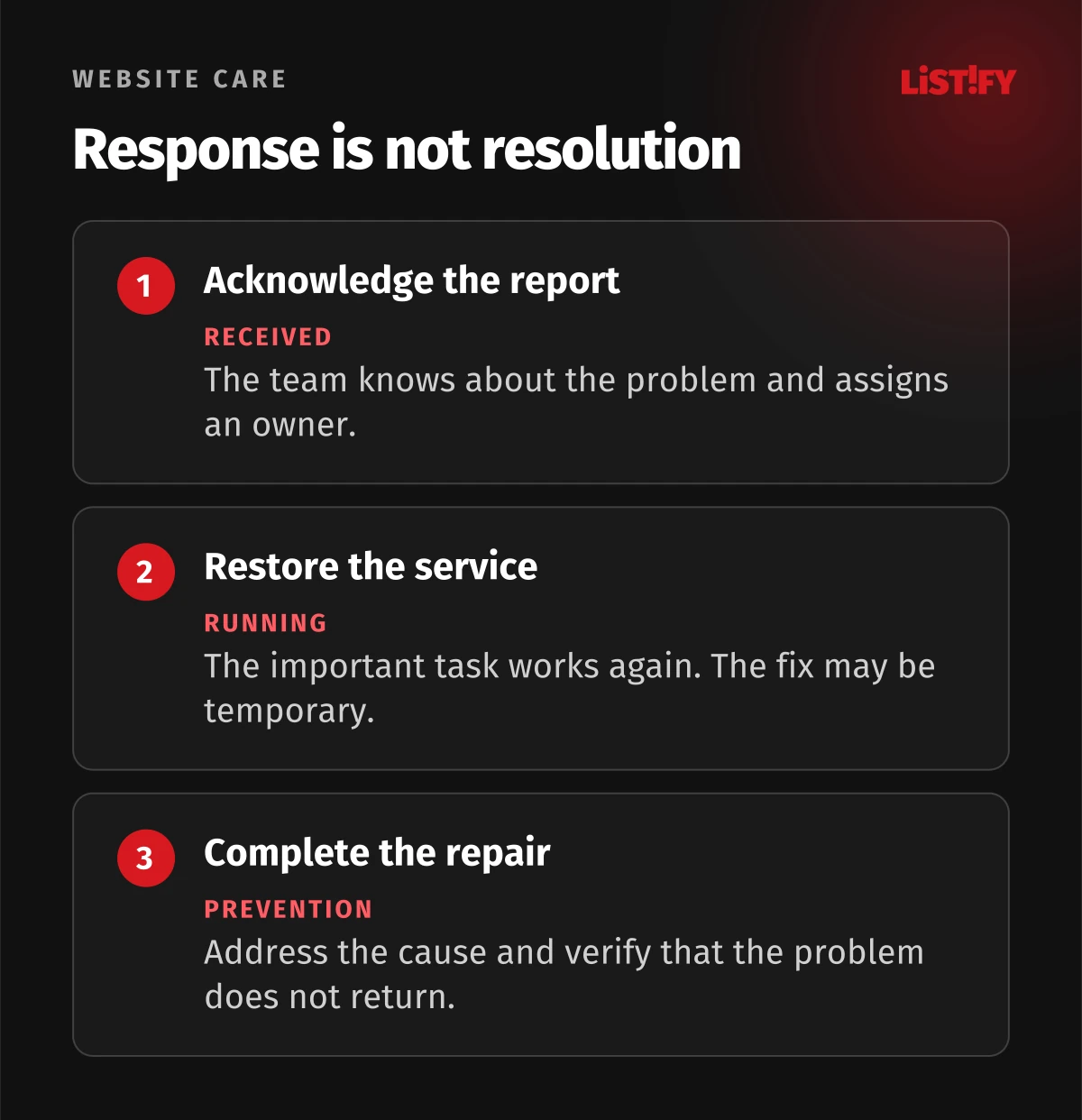
A proposal may promise a response within a specified time. Ask when the clock starts and what counts as a response. Acknowledging a report, beginning investigation, restoring a usable service and delivering a permanent fix are different outcomes. Support hours and the out-of-hours reporting channel matter as well.
Classify incidents by business impact. A broken checkout normally has a different priority from a misaligned icon. For each level, agree who can authorize emergency action, who receives updates and how frequently those updates should arrive. If the maintainer cannot access a third-party service, define how the issue will be escalated to its operator.
After a significant incident, record the cause, impact and preventive action. Do not stop at identifying the person who made the last change. A missing test, ineffective alert or unclear decision right may have contributed. The purpose of the record is to improve the process, with an owner for each agreed action.
10A useful monthly report supports decisions
The first page should tell you whether critical journeys worked, what changed, which problems remain open and what the team needs from you. Each problem needs a business impact, a recommended next step and an owner. A long export from a monitoring tool is not automatically a useful report.
| Item | Information that helps |
|---|---|
| Operations | Incidents, their impact and exactly what was measured |
| Changes | Deployed updates and results of important checks |
| Backups | Successful jobs, gaps and recovery exercises |
| Risks | Unsupported components, exceptions and remediation plans |
| Capacity | Included work, approved extras and remaining capacity |
| Next month | Ordered priorities and decisions needed from the client |
A month without incidents does not mean the service had no value. Equally, the absence of incidents does not prove that the maintenance work was done well. Look for evidence that agreed checks took place and that their outcomes were reviewed. An unmaintained website can remain stable for a while by chance.
11Compare scope before comparing the fee
First establish the importance of each function. A small informational website may reasonably use a limited support schedule if the business can temporarily rely on phone and email. A system that staff need throughout the working day may require different arrangements. Justify the decision through business impact rather than the prestige of a technology.
Include tools, staging, backup storage, licenses and out-of-hours interventions in the comparison. For development hours included in a fee, ask what consumes the allowance, how overruns are approved and whether unused capacity rolls over. For recurring tasks, identify the evidence you will receive instead of relying on a broad description such as full care.
LISTIFY’s maintenance and support service covers the relevant operational arrangements. For a specific site, use the findings of a handover assessment and a current proposal. This article cannot determine the appropriate package, responsibility boundaries or takeover cost for your project.
12Your first-month checklist
- List domains, operational services, licenses and account owners.
- Identify critical customer journeys and the people responsible for their outcomes.
- Set acceptable data-loss and recovery-time objectives.
- Confirm backup coverage and arrange the first restoration exercise.
- Define routine and urgent updates and the checks that follow deployment.
- Agree incident reporting, support hours and escalation.
- Separate the maintenance fee, development work and separately estimated tasks.
- Review the first report and a prioritized remediation plan.
Ask to see one complete change: staging, testing, deployment and production verification. A second demonstration can cover restoration from a selected backup. Seeing the process often reveals uncertainties that a contract or presentation leaves unresolved.
Start with the most important function and extend coverage according to risk. You do not need to automate every edge case in the first month. You do need a record of the gaps, interim manual checks and when the team will revisit them.
13Frequently asked questions
Does a small informational website need maintenance?
Yes, although the scope may be modest. It still depends on a domain, hosting, content and often a form or external service. Identify what can change and the impact of a failure, then agree suitable checks and support hours.
Are automatic updates enough?
They help with repetitive work but do not independently validate every important customer journey. Define which updates are automatic, how failures are detected and who handles them. Significant changes may need prior testing and a prepared rollback.
Is the hosting provider’s backup sufficient?
It may form part of a suitable solution. Check coverage, age, retention, separation from the production account and restoration procedures. Request a practical test. A statement that backups exist does not demonstrate recovery within your required time.
How often should a website be updated?
There is no universal calendar. Schedule routine changes around the operation and assess urgent security issues as they arise. Monthly billing is not a reason to leave a serious problem unresolved until the next month.
Does monthly maintenance guarantee zero downtime?
No. It reduces risk and prepares a response, but errors, attacks and third-party failures remain possible. Ask for measurable checks, recovery objectives and responsibility boundaries rather than an absolute promise.
Are content edits and new features included?
That depends on the agreement. Separate technical maintenance, editorial changes and new behavior. If the fee includes development capacity, clarify request handling, estimate approval and treatment of unused hours.
Can a new team take over maintenance?
Usually, but it first needs access to accounts, code, data and documentation and must assess their condition. The assessment may identify work required before routine support can begin. Base the schedule and cost on that actual scope.
14Sources and method
Technical sources were checked on October 28, 2026. The checklists and comparison tables are editorial proposals for defining a service. The order calculation is hypothetical and uses no LISTIFY client data.