Custom software rollout: In phases or all at once?
A new business system can start with sales and take over other functions later. Or the whole company can switch on one agreed date. The right choice is not determined by the number of modules. It depends on whether you can separate a working business process, keep data authoritative and manage the transition.
We recommend considering a phased rollout where a self-contained part delivers value and can work reliably with the rest of the business. A single cutover can make sense for a tightly connected process or when an old system is being retired, but readiness must be demonstrated. Neither option guarantees smooth operations on its own.
At Listify, we start custom software projects by mapping processes, roles and dependencies. That should produce more than a feature list: it should explain who works where during each phase and when the next part can go live. This guide helps you assess that plan before development begins.
01What a phased rollout and a big bang cutover mean
In a phased rollout, the new system takes over defined functions, groups of users or locations in stages. A big bang approach switches the agreed scope at one point in time. Big bang does not mean building and testing everything at once; it primarily describes the operational cutover.
Microsoft’s deployment strategy guide distinguishes big bang, phased and parallel approaches. It highlights temporary interfaces for phased deployment and the additional demands of parallel operation. Assess the choice against the whole workflow, budget and the team’s ability to handle change.
A business module is more than a new screen. To be useful, it needs an input, a responsible user, a decision and a handoff to the next business function. Switching application versions is a separate layer: blue-green and canary deployment can support either business rollout strategy.
02How to choose between phases and a single cutover
| Question | What supports phases | What may support one cutover |
|---|---|---|
| Can a complete part of the workflow stand alone? | The module has its own input, outcome and controlled handoff | Splitting it would break one indivisible transaction |
| Can the old system cooperate? | A usable interface or controlled transfer exists | Temporary connections cannot be made reliable |
| What capacity does the team have? | The team can manage smaller repeated changes and interim operations | Training, support and decisions can be concentrated around one transition |
| When does the old system end? | There is time to prove the pilot and adjust the next phase | There is a fixed retirement date and the whole scope will be ready |
| What will coexistence cost? | Temporary interfaces have a reasonable cost and a retirement plan | A lengthy overlap would cost more than a well-prepared single cutover |
Phases spread change over time but create work around the interim arrangement. Budget for temporary integrations, support for both systems, reconciliation and repeated training. Separate the cost of the target system from the cost of reaching it. A cheap first module does not necessarily mean a cheaper project.
A small operation with one tightly linked workflow and a prepared team may be a reasonable exception in favour of a single cutover. A fixed retirement date is a constraint, not proof of readiness. If the full scope cannot be verified in time, address scope or fallback operations instead of simply choosing a more ambitious launch date.
03Choose the first module around completed work
Choose a pilot with visible value and dependencies you can control. In a service business, this could run from an enquiry through a quotation and approval to a confirmed job. A contact directory alone may be easy to launch, but it will not prove that people can complete their daily work.
- Define the start and finish: what enters the module and what the next team must receive.
- Include the normal path and important exceptions, such as a price change, rejected quote or cancellation.
- Choose representative users who will handle real situations and have time to provide feedback.
- Define which jobs enter the pilot and where work already in progress will finish.
- Agree in advance what the pilot must demonstrate and what permits further rollout.
A pilot involving only an enthusiastic manager will not test cover arrangements or everyday user mistakes. One successful day will not test period-end work or a recurring report either. Set the pilot duration around the relevant business cycle and frequency of exceptions, not a universal number of weeks.
04A model pilot: new sales workflow, existing invoicing
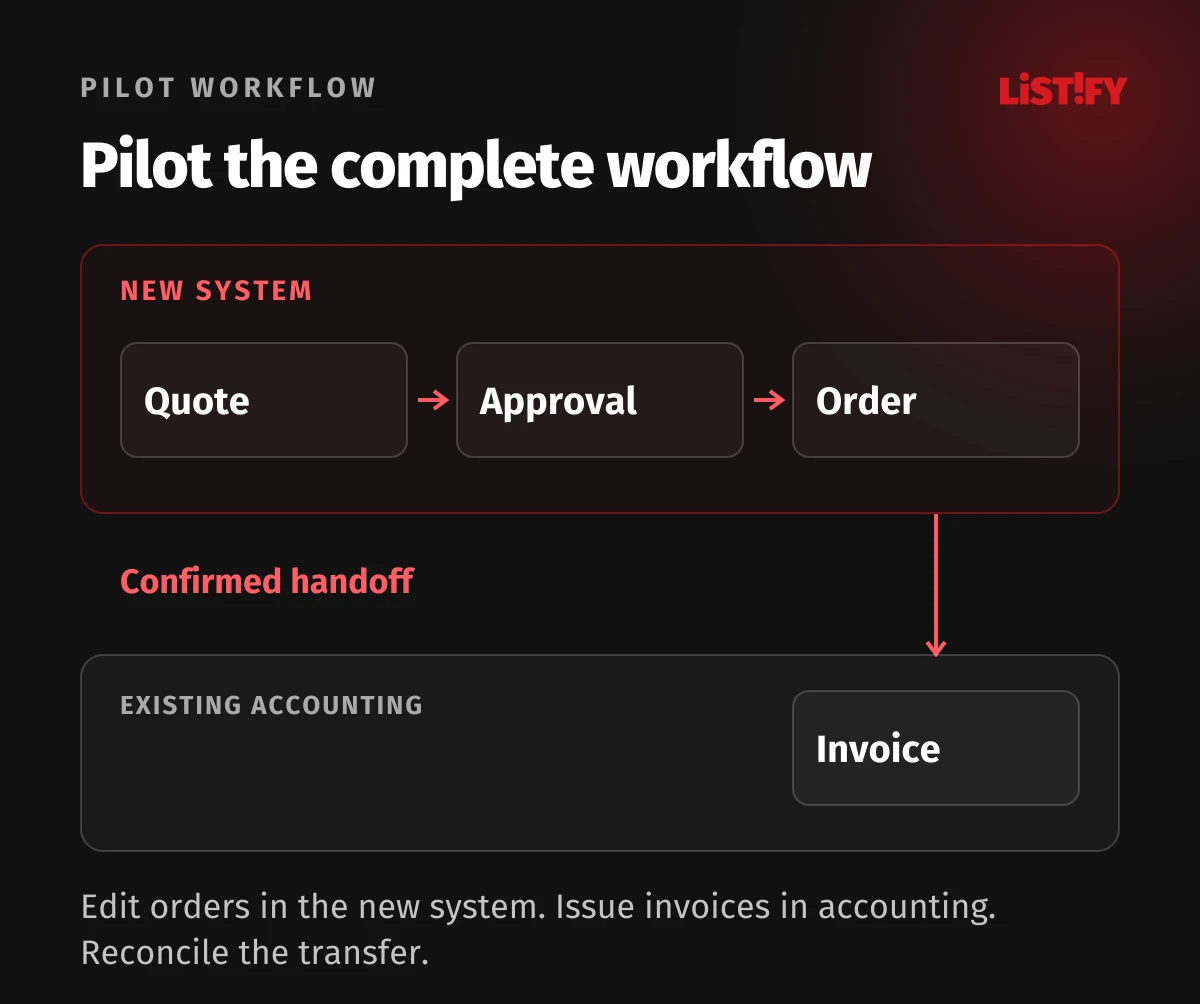
Consider a service business moving quotes and jobs into custom software while continuing to issue invoices in its existing accounting system. The pilot covers a selected group of new jobs. Older work in progress stays in the original workflow according to a boundary agreed in advance. This is a model, not a report of a client outcome.
A salesperson creates a quote, a manager approves a pricing exception and acceptance turns the quote into a job. Once the agreed condition is met, the system passes the billing information to accounting. Accounting confirms receipt and returns a reference to the document it creates. Without that confirmation, the job must not appear to have been successfully handed over.
| Data or action | Authoritative place to write during the pilot | What the other system may do |
|---|---|---|
| Quote and job status | New system | Read the required information without changing sales status outside an agreed rule |
| Issued invoice and its number | Existing accounting system | Display the reference and agreed status |
| Existing customer identity | Designated master register with a shared ID | Use the record rather than automatically creating a duplicate |
| Transfer confirmation | Recorded against the integration step | Allow investigation, correction and safe retry |
If accounting is unavailable, billing information should remain traceable and wait for a controlled retry. Repeating the handoff must not create a second invoice. Changes to an already transferred job need an agreed process, not independent edits to the same data in both systems. We design these dependencies through our integration and API service.
05Define which system owns each kind of data in every phase
For each record type, document the authoritative system, the data owner, permitted directions of change and a conflict rule. Two tools can display data, but unrestricted editing of the same field in both creates a dispute that technical synchronisation alone cannot settle. A two-way connection is not a substitute for ownership.
Agree acceptable delay as well. A revenue report may tolerate a different update interval from a reservation for the last available slot. Users should be able to see that information is awaiting synchronisation and know what they may do in the meantime. Check missing records and unexpected states as well as failed transfers.
Before launch, define the final write in the old system and how changes since the last import will be captured. We cover historical records, cleaning and reconciliation in our guide to data migration from Excel and legacy systems. The rollout plan must make clear which data and work in progress move in this particular phase.
06Base the go-live decision on acceptance criteria
The supplier should not declare the business ready simply because the features are finished. Verification must involve accountable people within the company. Microsoft’s go-live preparation guide stresses complete connected processes, testing, user readiness and support planning.
- The chosen workflow completes from input to final outcome, including integrations and important exceptions.
- Data and permissions meet the agreed checks, with the cause of critical discrepancies resolved.
- Users can handle normal work and cover for colleagues, and know where to report problems.
- There is a specific cutover plan with ordered steps, named owners and outcome checks.
- A plan exists for stopping the pilot and preserving a traceable record of new transactions.
- Business owners and the technical team understand the conditions to proceed, postpone or stop.
A successful login is not acceptance. In our model, the team must demonstrate, for example, that a rejected quote does not generate billing information and that retrying a transfer does not issue an invoice twice. Write the criteria before testing so they do not change after a failure to match whatever happens to work.
07Plan recovery around the records created after launch
Turning off a new module does not undo the work people have done in it. A fallback plan must say who stops new writes, how work in progress will be captured and what returns to the original process. Restoring a database cannot simply undo an issued invoice or an email already sent.
Before cutover, identify the point until which a return is practical and the procedure for later situations. Sometimes it will be safer to pause one action, fix the fault and move forward. That decision depends on impact and a verifiable data state, not a general promise of an Undo button.
The end of coexistence must be equally specific. Give every temporary connection an owner, budget and retirement condition. Before removing the old component, check unfinished work, required access to history and dependent reports. Otherwise an interim arrangement becomes another permanently maintained system.
If you are moving away from spreadsheets or an old application, we can help design custom software and its rollout phases. Together we will choose the first complete workflow, its integrations and acceptance criteria. A list of your current tools and one typical job are enough to start the conversation.
08Frequently asked questions about phased system rollouts
Is rolling out by module always cheaper?
No. A smaller first phase can reduce the initial scope, but parallel operations and temporary connections cost money. Compare the entire transition, including support, training and removing interim solutions.
Does a phased system need microservices?
No. Phases describe how business work moves to the new solution. We choose the technical architecture around requirements, dependencies and operations. A single modular application can also be introduced gradually.
Can staff enter information in both systems?
Only as a controlled, time-limited process with a clear purpose and reconciliation. Without a rule defining which data is authoritative, duplicate entry increases work and creates conflicting records.
When should the next module go live?
After the pilot meets its agreed criteria, dependencies are verified and the team has capacity for the next change. A calendar date does not establish that the process and people are ready.