How to plan SaaS development: from the first wireframe to launch
The most expensive mistakes in a SaaS project are made in the plan, not in the code. A subscription app that many companies use at once has to handle, from day one, things an ordinary website never has to deal with: teams and roles, payments, separated customer data and uptime. Here is the path from the first wireframe to launch, step by step, with a timeline, a budget and a checklist.
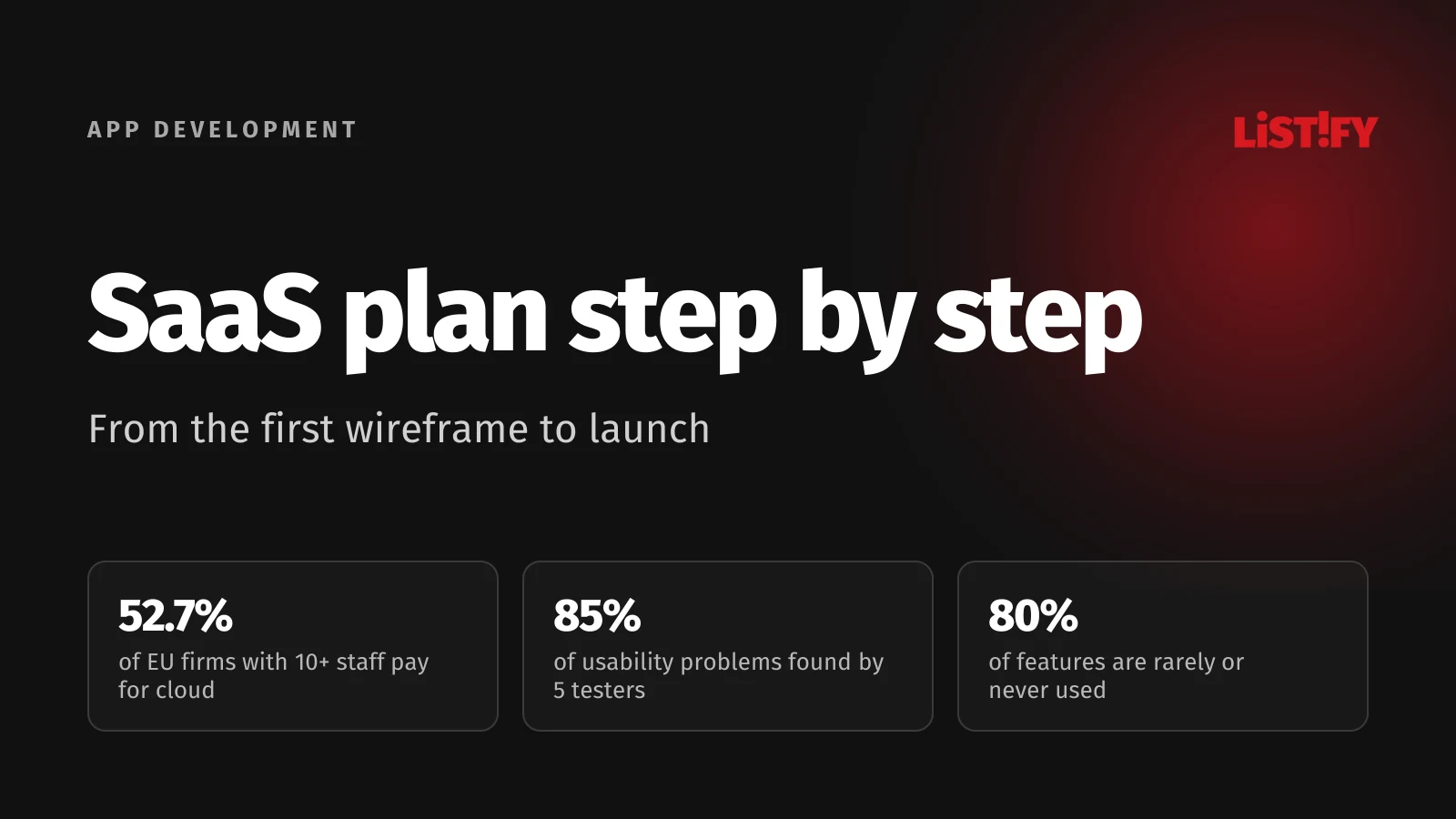
Short answer: you can plan how to build a SaaS product in seven steps: a one-page brief, user flows and wireframes, a clickable prototype tested with real users, the scope of the first version, architecture decisions, development in short cycles and a controlled launch. A typical first version takes about 12 to 20 weeks. You save the most money in the first four steps, while a change still only means redrawing a sketch.
This guide follows on from From idea to MVP, which covers how to check that people actually want your app. Here we assume you know who you’re building for and that there is demand. Prices and data are as of September 2026, with a source next to each figure and a full list at the end.
01What a SaaS product is and why you plan it differently from a website
SaaS (software as a service) is an application the customer doesn’t install. They use it in the browser and pay for it on an ongoing basis, usually monthly or yearly. Think invoicing tools, CRMs, booking systems or time tracking. For European businesses this is now a normal way to buy software. According to Eurostat, 52.7% of EU businesses with ten or more employees paid for cloud services in 2025, and in Finland it was almost four in five.
- Finland79.2%
- Czechia54.9%
- Poland54.7%
- Germany53.9%
- EU 2752.7%
- Austria52.1%
- Slovakia36.4%
Share of enterprises with 10 or more employees buying cloud computing services over the internet. Source: Eurostat, isoc_cicce_use, 2025 data.
SaaS differs from an ordinary website or internal tool in four ways that need planning up front:
- Many customers in one app. Each company’s data must be separated so that no customer ever sees another customer’s data.
- Teams and roles. Your customer is a company with several users. The owner, the accountant and a regular user are each allowed to do different things.
- Subscriptions. Plans, free trials, plan changes, invoices, failed payments and VAT in different countries.
- Operations that never stop. New versions go live while people are using the app, and customers expect uptime, backups, support and security for as long as they pay.
You can add any of these later, but it costs far more. That’s why a SaaS plan has more steps than a website plan.
02Step 1: a brief that fits on one page
Before anyone draws the first screen, write a one-page brief. It forces you to decide what matters, and afterwards everyone, from you to the designer to the developers, works from the same picture.
- Who it’s for: a specific type of customer and the user roles. Who pays and who uses the app every day.
- The problem and today’s workaround: how people handle it now: in Excel, by email, on paper or in another tool.
- The main user journey: one sentence from sign-up to the result the customer pays for.
- Pricing model: per company, per user or by volume. Monthly or yearly. It shapes both the database and billing.
- Success metric: how you’ll know after three months that the first version works. For example the number of paying companies or the share of users who come back.
- Budget and deadline: including a buffer and including running costs after launch.
- Constraints: languages, countries, integrations with accounting, banking or a CRM, legal requirements.
If the app is meant to replace the spreadsheets a company lives in today, write down what people do in them by hand. That is usually the core of the first version. We cover when a spreadsheet turns into a bottleneck in When a business outgrows Excel.
03Step 2: user flows and wireframes
A user flow is a simple diagram of a user’s path to a goal: where they come from, which screens they see and where they make decisions. Draw the main path first, then the ones people forget: sign-up and inviting a colleague to the team, a forgotten password, changing plans, a failed payment, cancelling a subscription and exporting data.
The flows turn into wireframes, black and white sketches of the screens. They show what’s on a screen and in what order; the visual design comes later. Colour and photos are left out on purpose, so the discussion stays on content and usability. Wireframe vs mockup vs prototype, three terms that often get mixed up:
| Aspect | Wireframe | Mockup | Clickable prototype |
|---|---|---|---|
| What it is | Black and white sketch of the screen layout | Static image in the final visual design | Linked screens you can click through |
| What it answers | What is on the screen and in what order | What the app will look like | Do people understand how to use it? |
| When to make it | Right after the user flows | Once the wireframes are approved | Before development, for user testing |
| Cost of a change | Minimal, you redraw it in minutes | Low, it’s only visuals | Low, still without a single line of code |
Keep the early versions simple. As Nielsen Norman Group puts it, a user interface prototype is a hypothesis, a candidate design solution you still have to test. A simpler prototype means less time spent preparing it and more time for the design itself. The tool doesn’t matter much. Paper, a whiteboard or Figma will do; a full seat for one designer costs $16 a month billed annually. Make wireframes for both desktop and mobile. SaaS is mostly used on a computer, but people handle approvals, notifications and a quick overview on their phones. If you’re unsure whether you also need a mobile app, Native vs cross-platform apps will help you decide.
04Step 3: a clickable prototype and a test with five people
Turn the approved wireframes into a clickable prototype and put it in the hands of people from your target group. Don’t explain anything. Give them a task, say “create an invoice and send it to a client”, and watch where they hesitate. Jakob Nielsen of Nielsen Norman Group found that five testers uncover about 85% of usability problems. Several small rounds pay off more than one big test.
So test in rounds: five people, fixes, another five. A fix in a prototype takes hours. The same problem found in a finished app has to be fixed in the design, the code and the tests. Where to find testers and what to ask them is covered in From idea to MVP.
A prototype is also the best basis for a quote. The supplier sees every screen, so the estimate rests on the actual work. If someone offers you a fixed price without a prototype, or at least wireframes, ask how they calculated it.
05Step 4: the scope of the first version
The biggest trap in planning is wanting everything at once. Pendo analysed anonymised usage data from its customers’ software and concluded in its 2019 report that 80% of features in the average software product are rarely or never used. Just 12% of features generate 80% of daily usage.
A simple MoSCoW sort helps. Put every feature into one of four groups:
- Must have: without it the customer can’t complete the main journey and won’t pay.
- Should have: important, but early customers can work around it for a while.
- Could have: nice extras, added based on usage data.
- Won’t have (for now): consciously postponed, so the debate doesn’t come back every week.
Only the “must have” group goes into the first version. The test is simple: if you cut the feature, can the customer still complete the main journey and pay? If yes, the feature waits.
This becomes your backlog, a list of tasks sorted by priority. Describe each item from the user’s point of view and add a condition for when it’s done. For example: “As a business owner I want to invite a colleague by email so they can issue invoices. Done when the invitation arrives, the link is valid for seven days and the invited person can’t see the payment settings.” A task written like this can be estimated, built and tested.
06Step 5: decisions that are hard to change later
Most things in an app can be changed at any time. A few decisions, though, run through the entire codebase and database, and changing them after launch means weeks of work and migrating customer data. Make these before the first line of code:
| Decision | What to think about | The risk if you postpone it |
|---|---|---|
| Separating customer data | The most common start is a shared database where every record is tagged with the company. A separate database per customer suits strict data isolation requirements. | Rebuilding the database and the risk of one company seeing another’s data |
| Accounts, teams and roles | One person in several companies, invitations, roles and permissions, sign-in with Google or Microsoft, two-factor authentication | Rewriting sign-in and permissions across the whole app |
| Subscriptions and payments | Plans, free trials, annual discount, plan changes, failed payments, VAT invoices | Manual invoicing and VAT mistakes |
| Languages and currencies | Text kept out of the code, date and number formats, prices in several currencies | Going through the entire app to pull out text |
| Personal data | Data processing agreement, where the data lives, how to delete and export it, a log of who changed what | Retrofitting the database and uncertainty during an audit |
| Deployment and operations | Staging and production, automatic deployment, backups, error monitoring | Manual deployments and outages with every update |
Payments and VAT
For card payments and subscriptions, Stripe is a frequently used option. On its Slovak price list, for example, a payment with a standard EEA card costs 1.5% + €0.25, and managing subscriptions through Stripe Billing adds 0.7% of the volume. On a €20 subscription you pay about €0.69 per payment.
If you sell to consumers in other EU countries, keep an eye on VAT. If your business is established in the EU, electronically supplied services to consumers are taxed in the customer’s country once your cross-border sales to consumers exceed €10,000 excluding VAT in the current or previous calendar year. The threshold covers all EU countries combined and is shared with distance sales of goods, as Your Europe explains. You don’t have to register in every country: the One Stop Shop (OSS) is a special scheme that lets you declare that VAT in one quarterly return. If you sell services to businesses based in another EU country, you usually don’t charge them VAT, because the reverse charge procedure applies. Outside the EU the rules are different, for example in the UK or with US sales tax. Talk the setup through with a tax adviser. Either way, the app has to store the customer’s country and VAT number from the start and calculate the correct rate.
Personal data and accessibility
As a SaaS provider for businesses, you process personal data about their customers and employees. Article 28 GDPR requires this processing to be governed by a contract, usually called a data processing agreement (DPA). If there is a data breach, Article 33 requires the controller, your customer, to notify its supervisory authority without undue delay and, where feasible, within 72 hours of becoming aware of it. The same article requires you, as the processor, to notify your customer without undue delay. The app should also be able to find, export and delete a person’s data, because your customer, as the controller, may ask you to do so. What leadership needs to sort out before launch is covered in app security for executives, NIS2 and the CRA.
The European Accessibility Act has applied since 28 June 2025, when the national laws implementing it took effect, such as the Czech Act No. 424/2023 Coll. and the Slovak Act No. 351/2022 Coll.. Among other things it covers e-commerce services for consumers. Both laws exempt services provided by micro-enterprises. A purely B2B SaaS usually falls outside it. Even so, it pays to build to the WCAG 2.2 standard, because retrofitting an interface costs more than designing it accessibly from the start.
07Step 6: development in short cycles
Split development into short cycles with a visible result. The Scrum Guide allows a sprint of one month at most, and in practice one or two weeks works well. Basecamp’s Shape Up method uses six-week cycles, each followed by two weeks of cool-down, a period with no scheduled work for deciding what to do next. Rhythm matters more than the method. At the end of every cycle there has to be something you can click through on staging.
- Plan: a few backlog items with a clear condition for when they’re done.
- Automatic staging: every change is deployed automatically to a staging URL where you can try it.
- Demo: a short meeting where the team shows finished work on real data.
- Decision: what’s next, what to cut, what to postpone.
Small, frequent releases are also about stability. According to the DORA 2024 report, the best teams deploy on demand, even several times a day, only 5% of their deployments fail and they recover from a failed deployment in less than an hour. The weakest teams deploy between once a month and once every six months, and 40% of their deployments fail.
Agree on a shared definition of done, too. Done doesn’t mean “works on the developer’s machine”. The code has been reviewed by a second developer, has automated tests, runs on staging, works on mobile and desktop, the text is in every language and you’ve signed it off. And plan a buffer in both time and budget. Changes always come, because only a working app reveals things the prototype couldn’t show.
08Step 7: beta and launch preparation
Before the public launch, let a few customers into a closed beta, ideally those who tested the prototype or pre-paid for the product. A few weeks of real use turns up bugs no test will, because they only appear with live data, different browsers and time pressure.
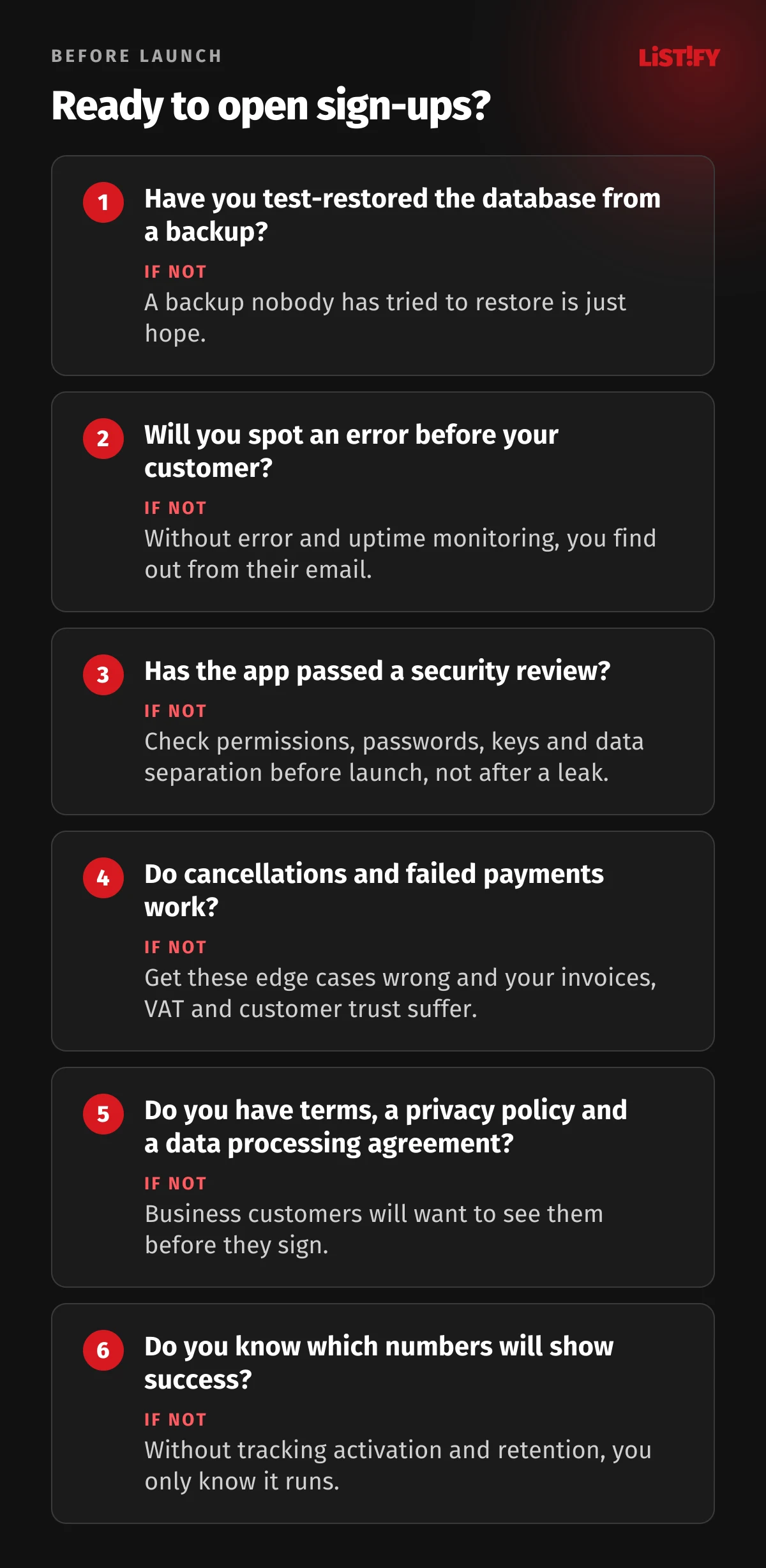
Before you open sign-ups to everyone, go through six questions. Every “no” is a task that’s better finished before launch than after the first incident.
If you promise customers an uptime figure, work out what it means. 99.9% uptime allows about 43 minutes of downtime a month, just under 8 hours 46 minutes a year. Google Workspace, for instance, promises the same monthly uptime. Early on, it’s more honest to promise less and keep your word.
Go through security point by point with our web app security checklist before launch. The most common mistakes that let data leak out of apps are covered in Code flaws that leak data. Staging, hosting and HTTPS are covered in how to lock down your server, HTTPS and cloud before launch.
09Launch and the first 30 days
Launch is where measuring starts. In the first weeks, watch five numbers above all:
- Activation: how many signed-up companies complete the main action, such as issuing their first invoice or inviting a colleague.
- Retention: how many companies still use the app after a week and after a month.
- Churn: how many paying customers cancel each month, and why.
- MRR: monthly recurring revenue from subscriptions.
- Errors and speed: how many errors monitoring catches and how fast the app loads.
Plan the first month’s capacity mainly for fixes and small improvements based on feedback. Big new features can wait until the data shows what customers really need. This is where the work from step 4 pays off: your “should have” and “could have” items are already written down, and now you know in which order to build them.
10How long it takes and what it costs
So how long does it take to build a SaaS product? A typical first version with subscriptions, teams and roles looks roughly like this:
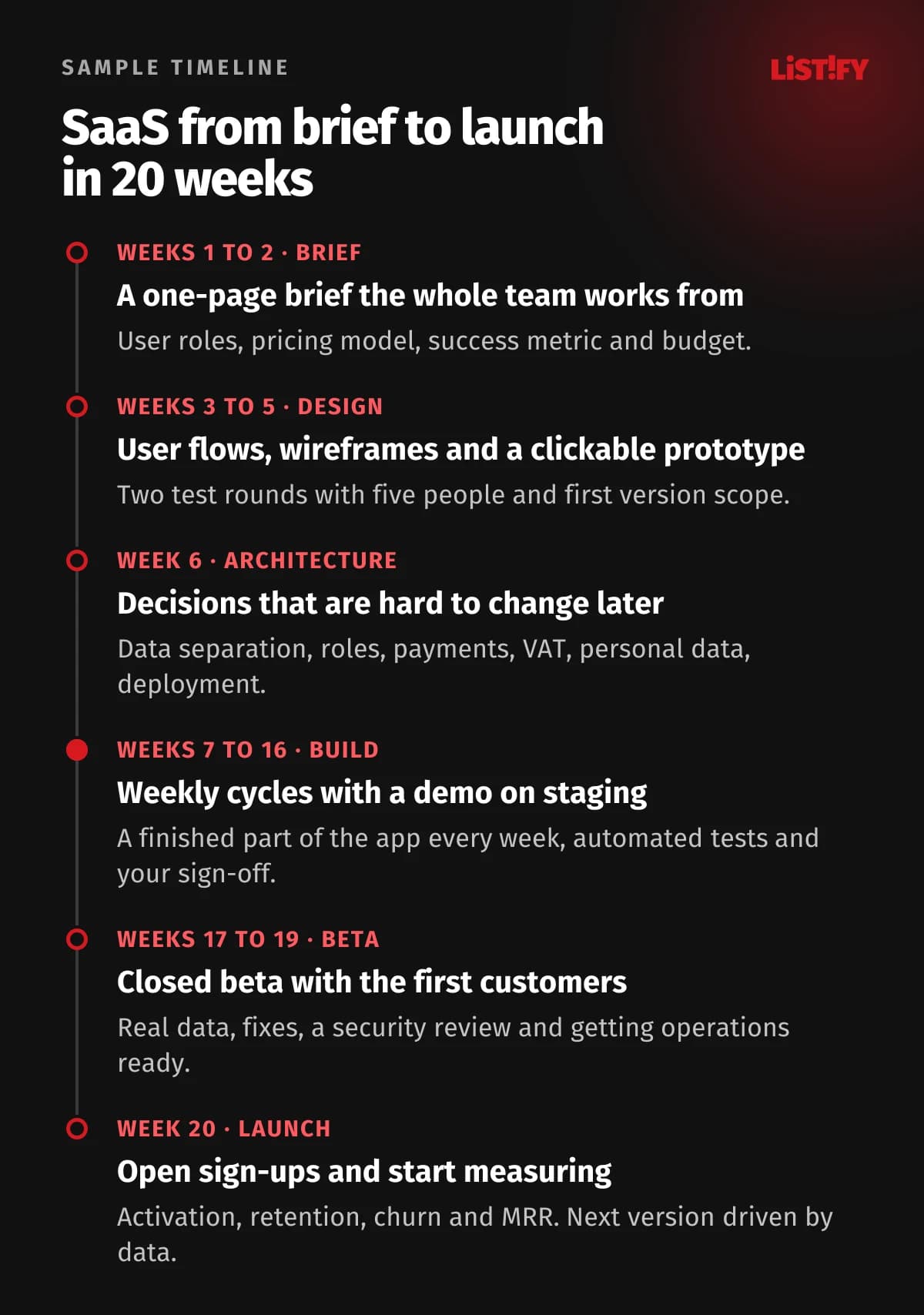
And the cost? In our calculator, a SaaS app comes out at roughly CZK 400,000 to 800,000 excluding VAT (about €16,000 to €32,000), with 12 to 20 weeks from brief to launch. That covers a typical first version. More demanding projects with many integrations, complex permissions, several languages, strict regulation or a mobile app can run into millions of CZK, depending on their complexity and all the circumstances of the project. You’ll find prices for all our services in our pricing.
- Mobile app180
- Admin and reports45
- Payments and subscriptions40
- User accounts30
- API integrations30
- Multilingual25
- Notifications15
Add-ons to the base price of an app, excluding VAT, as of September 2026. Source: Web apps calculator. Nearly every SaaS app needs the highlighted features.
On top of development, budget for running costs. For a small app, typical services start at tens of dollars a month. Prices from the providers’ price lists as of September 2026:
| Service | What for | Price |
|---|---|---|
| Vercel Pro | App hosting | $20 a month per developer seat; the plan includes $20 of usage credit |
| Neon Launch | PostgreSQL database | Usage-based; Neon quotes a typical spend of $15 a month (intermittent load, 1 GB) |
| Sentry Team | Error monitoring | $26 a month billed annually |
| Stripe | Payments and subscriptions | No monthly fee, 1.5% + €0.25 per standard EEA card payment and 0.7% for Billing |
How we work together, from the first meeting to handover, is described on our How it works page.
11The most common SaaS planning mistakes
- Coding before the flow is clear. Every change then costs code, tests and patience.
- A first version that’s too big. When 80% of features are rarely or never used, every extra feature delays launch and your first data.
- Forgotten edge cases. Cancelling a subscription, a failed payment, someone leaving the team or exporting data only show up with the first customer.
- Leaving roles and data separation for later. The most expensive rebuild a SaaS can have.
- No budget for operations. Hosting, monitoring, support and further development cost money after launch too.
- Launching without measuring. Without activation and retention figures, all you know is that it runs.
12FAQ
What is a SaaS product?
SaaS (software as a service) is software the customer uses in the browser and pays for by subscription, with nothing to install. Examples include invoicing tools, CRMs and booking systems. Many companies use the same app, and each company’s data is kept separate.
How long does it take to build a SaaS product?
A typical first version with subscriptions, teams and roles takes about 12 to 20 weeks from brief to launch. About five weeks of that go on the brief, wireframes and prototype. Bigger projects with many integrations take longer.
How much does it cost to build a SaaS product?
In our calculator a SaaS app comes out at roughly CZK 400,000 to 800,000 excluding VAT, about €16,000 to €32,000, with 12 to 20 weeks from brief to launch. More demanding projects with complex permissions, integrations, several languages or a mobile app can run into millions of CZK, depending on their complexity and all the circumstances. On top of that, plan for monthly running costs.
Wireframe vs mockup vs prototype: what’s the difference?
A wireframe is a black and white sketch of what’s on a screen and in what order. A mockup shows the final look but can’t be clicked through. A clickable prototype links the screens so users can try it before development starts.
How many people do I need to test a prototype?
According to Jakob Nielsen of Nielsen Norman Group, five testers uncover about 85% of usability problems. Several small rounds of five people with fixes in between are better than one big test.
Do I have to deal with VAT in other countries?
If your business is established in the EU and your cross-border sales to consumers exceed €10,000 excluding VAT a year across all EU countries combined, you charge VAT at the rate of the customer’s country. The OSS scheme lets you declare it in one quarterly return instead of registering in every country. For business customers from other EU countries, the reverse charge usually applies. Outside the EU different rules apply. Discuss the exact setup with a tax adviser.
Agile or fixed price: which is better?
You can combine them. Fix the price for a clearly defined scope, typically after the prototype, and development still runs in short cycles with a demo on staging, so changes are caught early.
13Conclusion: a good plan is cheaper than good code
A successful SaaS product solves one problem better than whatever people use today and is ready for subscriptions, teams and operations from the start. The cheapest place to get that right is on paper: the brief, the flows, the wireframes and the prototype.
If your idea is validated and you want to turn it into an app, see how we build web apps, or use the calculator to get an indicative price and timeline.
14Sources
- Eurostat: Cloud computing services by size class of enterprise (isoc_cicce_use), 2025 data, updated 27 February 2026
- Jakob Nielsen: Why You Only Need to Test with 5 Users, Nielsen Norman Group, 18 March 2000
- Kara Pernice: UX Prototypes, Low Fidelity vs. High Fidelity, Nielsen Norman Group, 18 December 2016
- Pendo: The 2019 Feature Adoption Report
- Stripe: payments pricing and Billing pricing, Slovak price list, as of 27 September 2026
- Your Europe: Cross-border VAT, including the reverse charge for B2B services and European Commission: VAT One Stop Shop
- GDPR Article 28 and Article 33
- European Commission: European Accessibility Act, Czech Act No. 424/2023 Coll., Slovak Act No. 351/2022 Coll. and WCAG 2.2
- Scrum Guide 2020 and Basecamp: Shape Up, chapter on cool-down
- DORA: Accelerate State of DevOps Report 2024
- Google Workspace: Service Level Agreement
- Price lists of Figma, Vercel, Neon and Sentry, as of 27 September 2026