Web app scalability: how to prepare your system for hundreds of thousands of users
A web app can handle hundreds of thousands of users if you first measure where the bottleneck is and only then add capacity. It is rarely a weak server. Far more often it is the database, a slow third-party service or thousands of people arriving in the same minute. We walk through real outages, a government load test that published every number, and how Notion, Figma and Shopify grew, then finish with a plan for 1,000, 10,000 and 100,000 users.
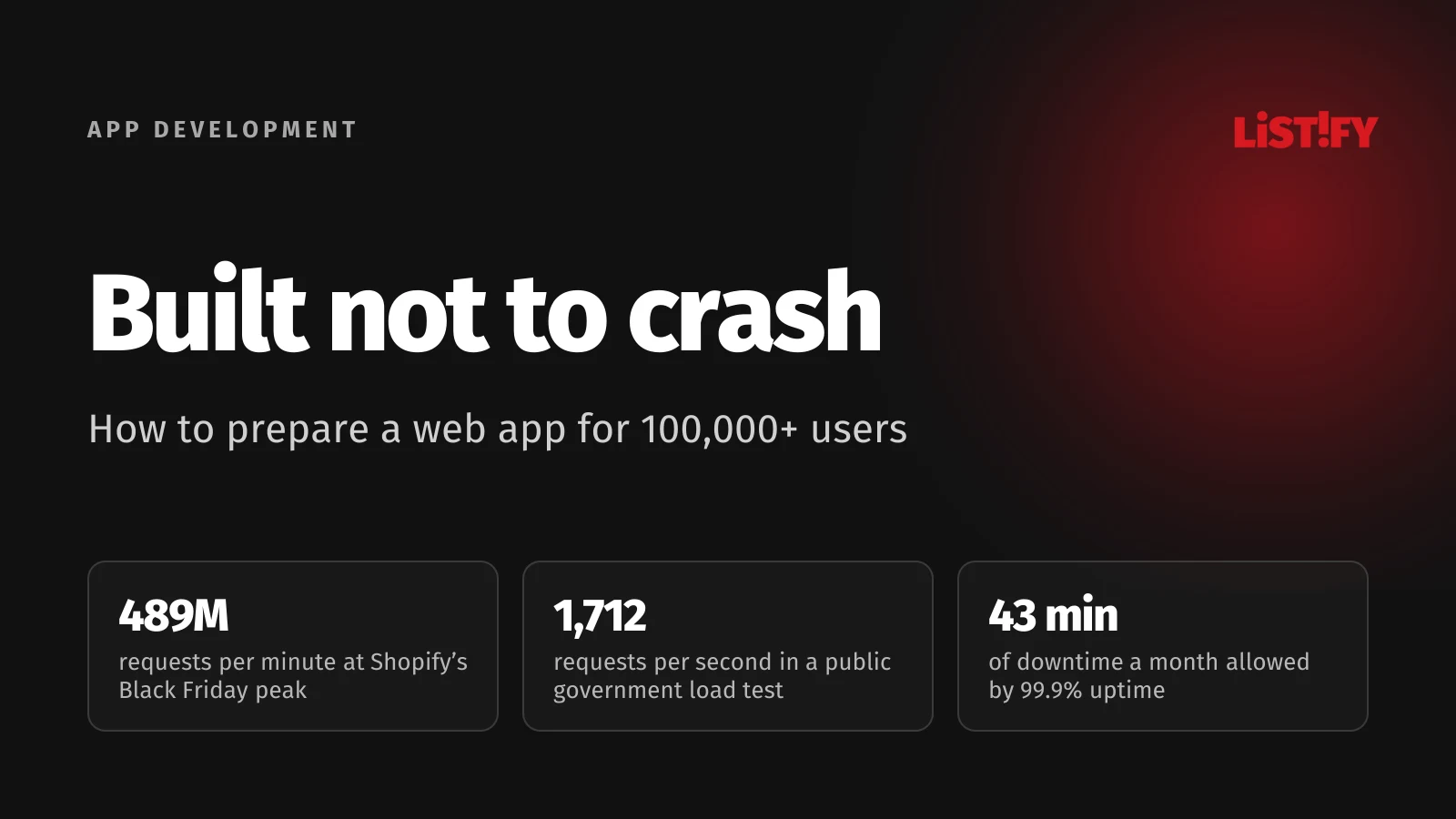
Over Black Friday weekend 2025, Shopify’s edge network peaked at 489 million requests per minute and merchants sold a record $14.6 billion. Two months earlier, on October 3, 2025, the Czech government’s digital ID app eDoklady buckled on the first day of a parliamentary election. More than 1.5 million logins arrived in four hours, the part of the app that refreshes digital IDs was overloaded, and some voters couldn’t use their digital ID to identify themselves at polling stations. The head of the agency behind it apologized and offered his resignation.
Most teams that have launched a successful campaign, ticket sale or product know a smaller version of that story. While a few hundred people use the app, everything works. Then a TV spot airs, a filing deadline approaches or a newsletter mentions you, and the site that worked on Tuesday can’t load a login page on Thursday.
Scalability is a system’s ability to serve more users and more data without slowing down or falling over. Hundreds of thousands of users don’t require the architecture of the world’s largest platforms. You need to know where your app will break before your customers find out.
01The short answer: what decides whether an app survives a surge
| Area | What typically breaks under load | What helps |
|---|---|---|
| Database | Slow queries without indexes, hundreds of connections at once, one query fired thousands of times | Indexes, connection pooling, caching, read replicas |
| Sudden spikes | Thousands of people in the same minute, autoscaling can’t add capacity fast enough | Capacity provisioned in advance, a waiting room, staggered slots |
| Third-party services | SMS gateways, payments and registries have their own limits | A queue, rate limits, an honest message to the user |
| State on the server | Sessions and uploads stored on one machine, so a second server can’t be added | A stateless app, sessions and files stored elsewhere |
| Slow tasks | Exports, PDFs and emails block the response | Background jobs through a queue |
| Monitoring | Nobody knows what is slow until customers complain | Latency and error monitoring, load tests before peaks |
There are two ways to scale. Vertical scaling means a bigger server: more CPU and memory. It is quick and simple, but it has a ceiling, and one machine stays a single point of failure. Horizontal scaling means adding more servers side by side and splitting the work between them. The ceiling is much higher, but the app has to be built for it.
Scalability is also not the same as speed. An app can answer one user in 50 milliseconds and grind to a halt with a thousand concurrent users. Another can be a little slower but just as slow for ten people as for ten thousand. The second one scales. The first doesn’t.
02Hundreds of thousands of users is not hundreds of thousands of requests per second
When a company says “we need an app for 300,000 users,” it usually means registered accounts. Your server doesn’t care how many people have an account. It cares how many requests arrive in the worst second. A rough estimate takes five minutes:
| Step | Assumption | Result |
|---|---|---|
| Registered users | the brief | 300,000 |
| Daily active users | 20% of registered | 60,000 people |
| Busiest hour | 15% of daily traffic | 9,000 people per hour |
| Requests to the server | 30 per visit | 270,000 per hour |
| Average in the busiest hour | 270,000 / 3,600 s | 75 requests per second |
| Short peak | 3× the hourly average | about 225 requests per second |
For comparison: in 2016, Stack Overflow served 209 million HTTP requests a day, according to its engineer Nick Craver. That is more than 2,400 per second on average, handled by 11 web servers (2 of them for dev and meta) and 4 SQL Server database servers. A typical business app with a few hundred thousand accounts is a load that a well-built system carries on a handful of servers.
The catch is the word “peak.” An average says nothing about the moment everyone shows up at once: 8 a.m. when registration opens, Sunday night before a deadline, or right after an ad airs. That is when even systems that normally run fine go down.
03Where apps break: lessons from public outages
Outages of government systems make good case studies, because they tend to be investigated and reported in detail, including the technical cause. The Czech Republic has had a string of them, and they share a pattern: the cause wasn’t the system as a whole but one specific component, and in most cases nobody had planned for it.
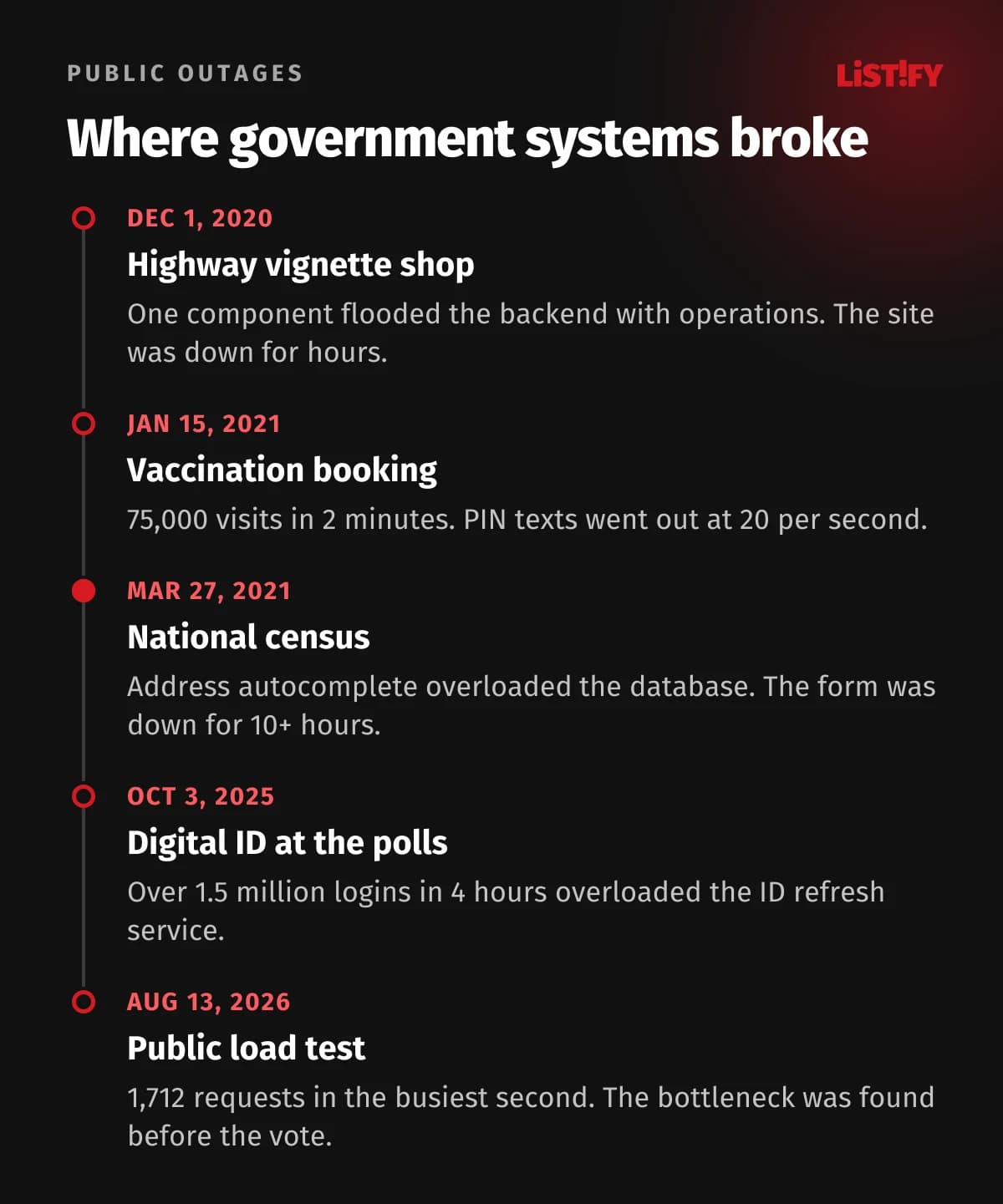
- Online shop for highway toll vignettes, December 1, 2020. The site was down for several hours on launch day. The first explanation was protection against attacks. The head of the contractor, CENDIS, later said that one component generated a huge number of operations between frontend and backend, which hadn’t shown up in testing.
- Vaccination booking, January 15, 2021. 75,000 visits in the first two minutes. The system struggled, but the main bottleneck wasn’t the app: the login PIN was sent by text message, and the operators delivered them at 20 per second. More than 40,000 were queued. It took another half hour to raise the gateway to 200 messages per second.
- National census, March 27, 2021. The online form was offline for just over ten hours, according to the tech news site Lupa. The contractor traced it to the address autocomplete module, which overloaded the database servers. The head of the statistics office said that extensive testing, including by an independent firm, hadn’t caught it.
- Digital ID app at the elections, October 3, 2025. Over 1.5 million logins in the first four hours and an overloaded ID refresh service. The Digital and Information Agency (DIA) admitted it had misjudged the load and its testing, and its director said capacity hadn’t covered the demand.
In the first three cases, the story wasn’t simply “not enough servers.” One time a component was needlessly chatty, another time an external SMS gateway hit its ceiling, and once a single autocomplete field flooded the database. More hardware would have helped little or not at all. The 2025 election did run short of capacity, but again in one specific part of the app.
04What a public load test revealed
On August 13, 2026, the same agency did something governments rarely do: it asked the public to log into eDoklady at the same moment. About 30,000 people took part, and the DIA published the results with the kind of numbers companies usually keep to themselves.
At 1:00 p.m., concurrent connections at the entry gateway rose almost twelvefold within two minutes. The busiest second brought 1,712 requests. The application servers coped: 95% of logins were handled within 20 milliseconds, and server errors stayed at 0.06%. People on their phones still waited.
- Normal traffic before the test (12:00 to 12:45 p.m.)3.6
- Sudden spike (1:00 to 1:10 p.m.)33.5
- Gradual ramp in the evening (from 7:15 p.m.)4.3
Values in seconds, response time as seen from the user’s phone (99th percentile). Source: DIA, analysis of the public eDoklady test published August 18, 2026 (in Czech).
Median response time jumped from 28 to 267 milliseconds. 95% of requests finished within 22.2 seconds and 99% within 33.5 seconds. According to the DIA’s analysis, the limit wasn’t the application servers or the volume of data. It was how quickly the Application Gateway could add capacity after the sudden jump in connections.
A spontaneous evening wave during the 7:15 p.m. news, with about half as many logins (over 14,000) and a similar volume of data spread over roughly half an hour, looked completely different: a 29 ms median, 99% of requests within 4.3 seconds and 0.05% errors. Before the next election, the DIA is raising the gateway’s baseline capacity so it doesn’t have to scale up from its minimum during a sudden surge.
Three lessons apply to any app. Autoscaling isn’t instant, so for a known peak it is better to have capacity ready beforehand. The median response time can look great while one request in twenty waits more than 20 seconds. And the shape of the ramp matters as much as the headcount: thousands of people in two minutes are a different problem from the same thousands over half an hour.
05What downtime and slowness cost
Every business has to work out its own cost of downtime: lost orders per hour, support time, goodwill discounts, contractual penalties. Large surveys give a sense of scale. In the Uptime Institute’s Annual Outage Analysis 2026, 57% of data center operators said their most recent major outage cost more than $100,000, and one in five put it above $1 million. ITIC’s 2024 survey found that an hour of downtime costs over 90% of mid-size and large enterprises more than $300,000.
Those figures don’t fit a small company, and ITIC offers a smaller example: a business that puts an hour of downtime at $10,000 still loses $167 every minute. The widely quoted “$5,600 per minute” from Gartner comes from a 2014 blog post by analyst Andrew Lerner, refers to network downtime, and in his own words is an average with a large degree of variance.
Slowness costs money even without an outage
Deloitte’s Milliseconds Make Millions report from 2020, commissioned by Google, looked at 37 brands and 30 million sessions. When mobile sites got 0.1 seconds faster, retail conversions rose 8.4% and travel conversions 10.1%. That is a correlation, not a controlled test. A clean experiment comes from Ronny Kohavi at Microsoft: when Live Search slowed its results by one second, queries per user fell 1% and ad clicks 1.5%.
The famous “Amazon loses 1% of sales for every 100 ms” has exactly one primary source: a line on a slide by former Amazon engineer Greg Linden from a 2006 lecture, with no methodology attached. The direction holds. The exact number for today’s web doesn’t.
The web as a whole is getting faster but still has work to do. According to the HTTP Archive’s Web Almanac 2025, only 48% of websites pass Core Web Vitals on mobile.
- 202132%
- 202231%
- 202336%
- 202444%
- 202548%
Share of websites with good LCP, INP and CLS on mobile, Chrome UX Report data. Source: HTTP Archive, Web Almanac 2025, Performance chapter.
How speed and clarity affect whether people come back to an app is covered in our article UX design for web apps.
06The database: usually the first bottleneck
You can copy an application server and run ten of them. You can’t do that as easily with a database whose data has to be the same everywhere. That is why many apps choke here first. The census outage above is a textbook example: one autocomplete field sent the database more work than it could handle.
1. Indexes and slow queries
A query that takes a millisecond on a test database with a thousand rows can take hundreds of milliseconds or more on a million rows, because the database scans the whole table. Before you buy a bigger server, look at how the database executes the query and add an index on the columns you filter and sort by. In PostgreSQL it looks like this:
EXPLAIN ANALYZE
SELECT id, total FROM orders
WHERE customer_id = 4821
ORDER BY created_at DESC
LIMIT 20;

CREATE INDEX CONCURRENTLY idx_orders_customer_created
  ON orders (customer_id, created_at DESC);
Another classic is the N+1 problem: the app loads a list of 50 orders and then runs a separate query for each order’s customer. Instead of one query it sends 51. With ten users nobody notices. With ten thousand, the database falls over.
2. Connection pooling
Every database connection costs memory. PostgreSQL’s default limit is typically 100 concurrent connections, and raising it means allocating more shared memory. If your app runs on ten servers and each opens 20 connections, you are already at twice the limit. The fix is a connection pooler such as PgBouncer, which in transaction mode hands out a connection only for the duration of one transaction. The PostgreSQL wiki says it plainly: you can often support more concurrent users by reducing the number of database connections and using some form of pooling.
3. Read replicas and splitting the database
Most apps read far more than they write. Read-only copies of the database (replicas) can take dashboards, search and reports, leaving the primary to handle writes. Replicas lag slightly behind, so reads right after a write (an order confirmation, say) should go to the primary. The next step is to split data by module into separate databases, for example billing in one and analytics in another.
Sharding, which splits one large table across several database servers, comes last. It works, but it is expensive. Notion says its single PostgreSQL database carried it through five years and four orders of magnitude of growth. In 2021 it moved to 480 logical shards on 32 databases, and in 2023 it tripled the fleet to 96 machines. In 2020, Figma ran on a single PostgreSQL database on AWS’s largest physical instance. Before sharding, it added caching, read replicas and a dozen vertically partitioned databases, and sharding its first table still took about nine months.
The advice for a company expecting hundreds of thousands of users is simple: pick a reliable relational database, design your tables and indexes well, and don’t plan for sharding up front. If you ever need it, it means the product is doing well.
07Caching and CDNs: the cheapest performance you can buy
The fastest request is the one that never reaches your app. Images, scripts, stylesheets and public pages can be served by a CDN, a network of servers close to your users. The results of frequent queries can live in a cache, typically Redis, so the app only goes to the database when the value is missing or has expired.
Shopify’s Black Friday Cyber Monday 2025 numbers give a sense of how much an edge layer can absorb. At peak, the edge received 489 million requests per minute, while the application servers peaked at just over 117 million, roughly a quarter. In 2016, Stack Overflow ran about 160 billion Redis operations a month without any instance going above 2% CPU.
Caching has two traps. The first is stale data: for prices, stock levels or order status you need to know exactly when the cache is cleared. The second is the moment a popular entry expires and a thousand requests hit the database for the same value at once. Discord handles this with request coalescing: if many users ask for the same row at the same time, the database is queried only once.
08A stateless app: the precondition for adding servers
Horizontal scaling only works if it doesn’t matter which server a request lands on. The application server must not keep any state of its own:
- Sessions belong in a signed token or a shared session store.
- Uploaded files belong in object storage (S3 or similar). Treat the server’s disk as temporary.
- Scheduled jobs must run once, not on every server, or a customer gets the same email ten times.
- Configuration comes from environment variables, so a new server starts without manual setup.
Once that holds, you put a load balancer in front of the app and add servers as load grows. AWS sums this up in two principles of its reliability guidance: replace one large resource with several smaller ones so that one failure doesn’t take everything down, and stop guessing capacity by adding and removing resources automatically based on real demand.
The eDoklady test showed, though, that autoscaling takes time. For peaks you know about (a sale, a campaign, a deadline), raise the minimum in advance and leave the automation to handle what you didn’t see coming.
09Queues and waiting rooms: what doesn’t have to happen right now
When a user clicks “Place order,” they need to know the order went through. They don’t need to wait while the PDF invoice is generated, the email is sent and the accounting system is updated. A job queue can take all of that and process it a few seconds later in the background.
A queue also protects you from other services’ limits. The vaccination booking system above ran straight into this: 44,000 people registered in the first hour, but PIN codes went out at 20 text messages per second and more than 40,000 piled up in the queue. There was a queue. What was missing was gateway capacity agreed in advance and a clear message to users. With both, waiting is an annoyance. Without them, people click again and again and multiply the load.
For events where everyone arrives at once (ticket sales, registrations, limited slots), a virtual waiting room helps. The app lets in as many people as it can serve and shows everyone else their place in line. The vaccination booking system did exactly that, with a message saying capacity was full and bookings would resume after users ahead had been served. Better still is not to create the rush at all: release slots gradually or in groups, not all at 8 a.m.
If your app talks to other systems, see also our guide to API integration best practices. It covers rate limits, retries and failures on the partner’s side in detail.
10Monolith or microservices?
Microservices split an app into dozens of independent parts that are deployed and scaled separately. That makes sense for large companies with hundreds of developers. For a small team it mostly means more operational work.
In 2018, Segment described how it merged more than 140 microservices, one for each data destination, back into one. Before that, three full-time engineers spent most of their time just keeping the system alive. In 2023, a team at Amazon Prime Video rebuilt one monitoring service from a distributed serverless design into a single process and cut its infrastructure costs by over 90%. Both cases involve one part of the company, not the whole product, but they show that splitting into more services doesn’t add performance by itself.
In 2016, Instagram described running the world’s largest deployment of the Django web framework, with more than 500 million users. The same year, Stack Overflow said it could run its entire Q&A network off a single web server if it had to. Neither needed to break the app into dozens of small services to grow that far.
For most business apps and SaaS products, we recommend a modular monolith: one application with clearly separated modules (users, orders, billing) that talk through defined interfaces. When one module needs its own scaling or its own team, you can carve it out. Going the other way is much harder.
Kubernetes is similar. The CNCF survey says 82% of container users run it in production, but its respondents come mostly from the cloud native community. Among all developers in the Stack Overflow 2025 survey, 28.5% had done extensive work with it. For an app with hundreds of thousands of users, a managed platform where you don’t look after servers is often enough.
11Monitoring: without it you are scaling blind
Before you optimize anything, you need to see what is happening in the app. The minimum for a production app:
- Latency in percentiles. Averages and medians hide problems. Track the median plus the 95th and 99th percentiles, meaning the time within which 95 and 99 out of 100 requests complete. During the eDoklady spike the median was 267 ms, but the 99th percentile was 33.5 seconds.
- Error rate. How many requests end in a server error, broken down by part of the app.
- Resource saturation. CPU, memory, database connections, job queue length.
- Slowest database queries. PostgreSQL can log them for you.
- Alerts. When something crosses a threshold, someone on your team should hear about it before a customer calls support.
The second step is agreeing how reliable the app should be. Google’s Site Reliability Engineering book recommends setting an availability target and deriving an error budget from it: how much failure you can afford before you pause new features and focus on fixes. A service handling 2.5 million requests a day with a 99.99% target can return at most 250 errors.
- 99%432.0
- 99.5%216.0
- 99.9%43.2
- 99.95%21.6
- 99.99%4.3
Minutes per 30-day month, based on the availability table in Google’s SRE book. Over a year, 99.9% means about 8.8 hours of downtime.
Every extra nine costs money: standby servers, a second data center, people on call. Google itself points out that a user on a 99% reliable smartphone can’t tell 99.99% from 99.999%. For a business app, 99.9% is a sensible start. Payments and healthcare need more.
12Load testing: how to make it count
A load test simulates visitors and measures when the system starts to slow down and when it breaks. Grafana k6 describes six test types: a smoke test checks that the script works, an average-load test covers normal traffic, a stress test pushes above average, a soak test runs for hours, a spike test simulates a sudden surge, and a breakpoint test finds the ceiling.
Here is a simple spike test: a two-minute ramp to 50 users, then 2,000 virtual users within 30 seconds and five minutes at full load. The test fails if 1% or more of requests fail, the 95th percentile exceeds 800 milliseconds or the 99th exceeds two seconds.
import http from 'k6/http';
import { sleep } from 'k6';

export const options = {
  stages: [
    { duration: '2m', target: 50 },
    { duration: '30s', target: 2000 },
    { duration: '5m', target: 2000 },
    { duration: '1m', target: 0 },
  ],
  thresholds: {
    http_req_failed: ['rate<0.01'],
    http_req_duration: ['p(95)<800', 'p(99)<2000'],
  },
};

export default function () {
  http.get('https://staging.your-app.com/api/slots');
  sleep(1);
}
For a test to find anything, it has to look like real life:
- Test the whole user journey, not a single page. The census went down on an address autocomplete, a part that a simple login test never touches.
- Use production-sized data. Queries on an empty database are always fast.
- Test sudden spikes, not just a slow ramp. The eDoklady test showed that a similar volume of traffic spread over half an hour is a completely different situation.
- Include third-party services or a faithful stand-in, and find out their limits. Payment gateways, SMS and registries all have a ceiling.
- Repeat the test after every major change and before every announced event. Before Black Friday 2025, Shopify ran five major scale tests between April and October and reached 146 million requests per minute in the fourth.
Never load test production without telling your hosting provider. A test from hundreds of machines looks like an attack and can get you blocked.
13Cloud or your own servers: what capacity costs
The server itself is a surprisingly small line item. A machine with 2 vCPUs and 8 GB of RAM costs €42.99 a month at Hetzner (dedicated vCPU, excluding VAT, after the price increase of June 15, 2026). A comparable AWS instance in Frankfurt costs $71.39 (m7g.large) or $88.15 (m7i.large) a month on demand, before storage and data transfer.
The real costs are the managed database, data transfer, backups, monitoring and, above all, the time of the people running it. In Flexera’s 2026 State of the Cloud report, organizations estimate that 29% of their cloud spend is wasted. At the other end, 37signals (Basecamp, HEY) moved from the cloud to its own hardware and cut its annual cloud bill from $3.2 million to $1.3 million by moving to its own hardware, which cost about $700,000 up front. Its co-founder David Heinemeier Hansson still says the cloud makes sense in the early days and for workloads with big swings in load.
A practical rule: while the product is still finding customers, pay for managed services and save your developers’ time. Once traffic is stable and predictable and the cloud bill becomes a real line item, run the numbers on rented or owned servers. Budgeting for development and running costs is covered in How to plan SaaS development.
14A phased plan: what to do at 1,000, 10,000 and 100,000 users
This is our rule of thumb. The thresholds are rough and count daily active users, not registered accounts. A booking app with a morning rush can reach the next phase much sooner than an internal tool with even traffic.
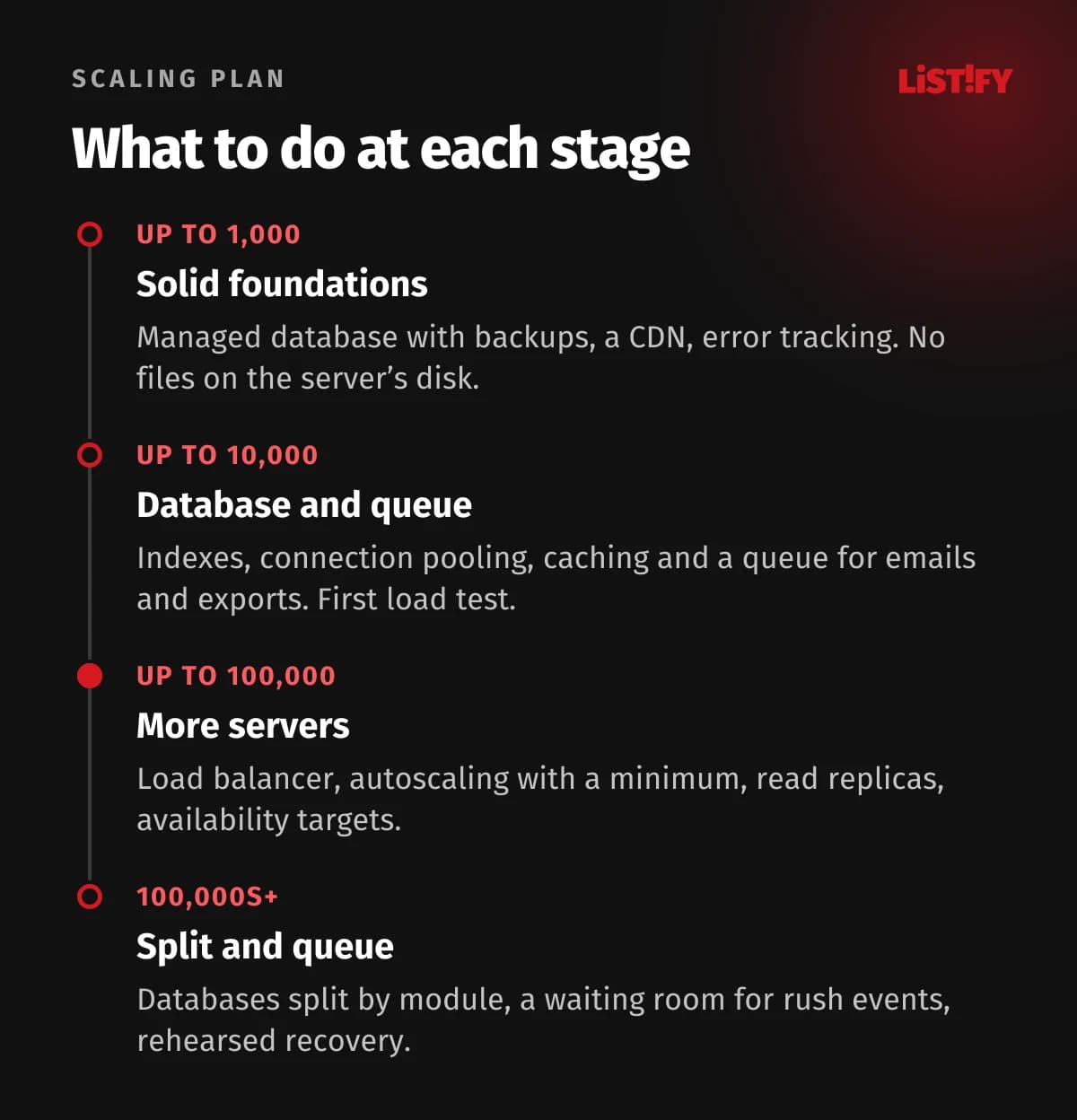
- Up to 1,000 daily active users. One app, a managed database with automated backups, a CDN for static files, error tracking and basic latency monitoring. Above all, don’t block your own path: no files or sessions on the server’s disk.
- Up to 10,000. Review the slowest queries and add indexes, turn on connection pooling, cache the most requested data and move emails, exports and PDFs to a queue. Run the first load test with realistic data.
- Up to 100,000. Several app instances behind a load balancer, autoscaling with a sensible minimum, read replicas, availability targets and an error budget. A load test before every major event, including a sudden spike.
- Hundreds of thousands and beyond. Split the database by module, add a waiting room for rush events, isolate critical paths (login, payments) from the rest and rehearse disaster recovery. Shard or split out services only where measurements prove you need to.
The most expensive mistake is getting the phase wrong in either direction: building a complex microservice system for your first hundred customers, or ignoring the first three steps and dealing with them in the middle of a campaign.
15How to tell whether your app is ready
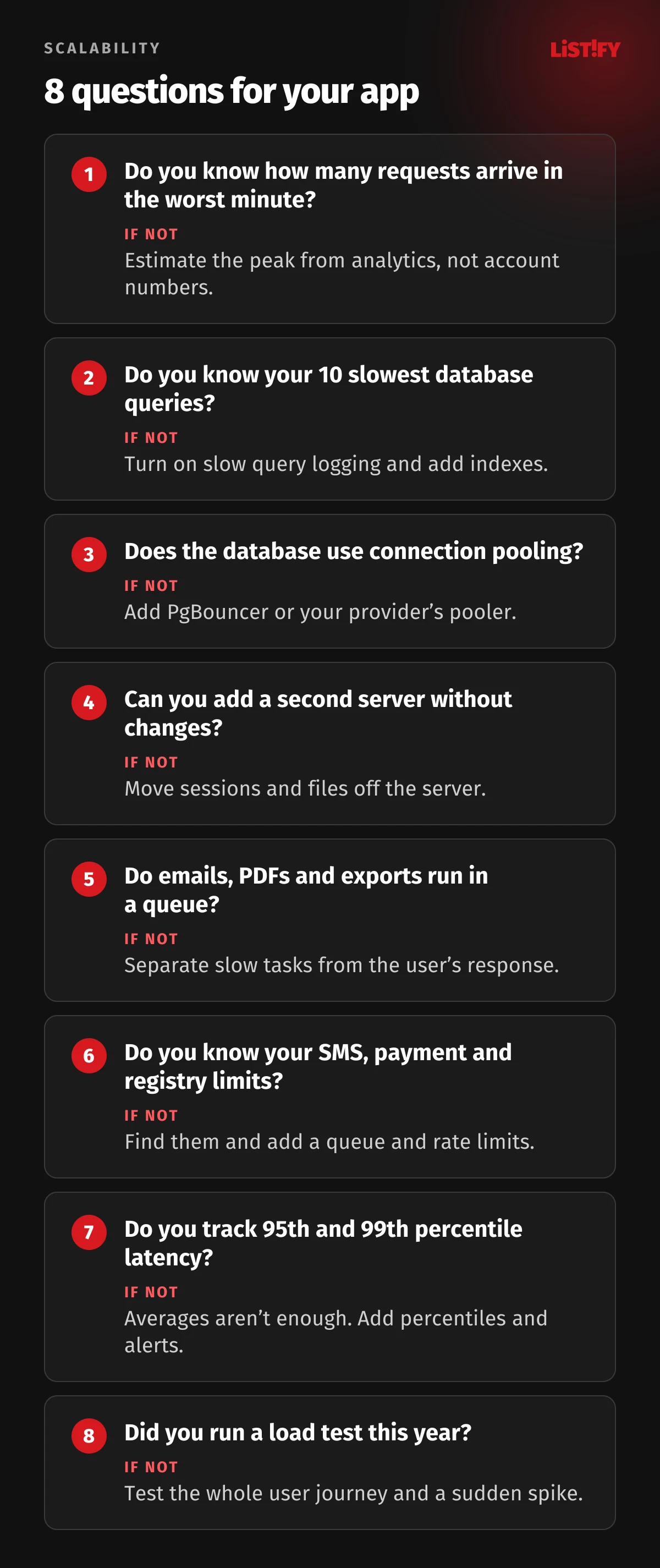
Before you spend money on bigger servers, go through eight questions. Every “I don’t know” is a task for your developers:
For new projects, the cheapest option is to think about these points from day one. Architecture design, load testing and monitoring are part of how we build web applications and aren’t billed extra. You can see how a project runs on How it works and indicative prices on our pricing page.
Scale affects security too: the more users you have, the more is at stake in your database. What to watch for is covered in Data security in custom software development.
16Common scaling mistakes
- Buying a bigger server before you know what is slow. It helps for a week, then the problem comes back bigger.
- Testing only the login and the home page. Apps fail on specific features: autocomplete, exports, search.
- Testing against an empty database. The results look great and mean nothing.
- Relying on autoscaling for an announced peak. New capacity takes minutes to come online. Users give up after a few seconds.
- Ignoring third-party limits. An SMS gateway, a payment provider or a registry can stop an app that would otherwise cope.
- Watching only average or median latency. The median looks fine while one request in twenty waits tens of seconds.
- Starting with microservices for future growth. A small team then spends more time on operations than on the product.
- Letting everyone in at the same moment. Slots, sales and registrations can often be staggered, and the problem goes away.
17FAQ
What is web application scalability?
The ability of an app to handle more users, requests and data without significant slowdowns or outages. You can scale vertically (a bigger server) or horizontally (more servers side by side). Horizontal scaling has a higher ceiling, but the app must be designed for it.
How many servers does an app with 100,000 users need?
It depends on how many are active at the same time and what they do. By our rough model, an app with 100,000 registered accounts sees tens to a few hundred requests per second at a normal peak, which a few application servers and one well-tuned database can usually handle. Estimate your peak with the formula in this article and confirm it with a load test.
Do I need microservices to scale?
Usually not. For small and mid-size teams, a modular monolith, one application with well-separated modules, is the more sensible choice. Segment and a team at Amazon Prime Video both described saving work or money by consolidating services. Separate services make sense when one part needs very different scaling or its own team.
What is a load test and how much does it cost?
A load test simulates thousands of visitors and measures when the app slows down or starts returning errors. Open-source tools such as k6 and JMeter are free to use. The main cost is the time to build a realistic scenario and test data. A good test covers the whole user journey, all the way to a submitted order or form.
How do I know my app is reaching its limits?
The 95th and 99th percentile response times rise, server errors increase, the database approaches its connection or CPU limit, and the job queue can’t keep up. If you don’t measure these, you’ll hear about it from customers first.
Is the cloud always more expensive than your own servers?
Not always, but for the same capacity it usually is. What you get in return is less operational work and capacity on demand. 37signals cut its annual cloud bill from $3.2 million to $1.3 million by moving to its own hardware, yet its co-founder still says the cloud makes sense early on and for highly variable workloads. Traffic stability and your team’s time decide it.
What uptime should a business app aim for?
For most business apps, 99.9% is a sensible target, about 43 minutes of downtime a month. Higher availability needs standby infrastructure and on-call staff, so it costs significantly more. Set the target based on what an hour of downtime actually costs you.
18Sources
- DIA: Analysis of the public eDoklady test (August 18, 2026, in Czech)
- DIA: eDoklady at the elections, lessons learned (October 7, 2025, in Czech)
- Lupa.cz: Census 2021 online form unavailable (in Czech)
- Lupa.cz: Vaccination booking, 75,000 people in the first minutes (in Czech)
- Aktuálně.cz: Highway vignette shop outage (in Czech)
- Uptime Institute: Annual Outage Analysis 2026
- ITIC: 2024 Hourly Cost of Downtime and part 2
- Deloitte and Google: Milliseconds Make Millions (PDF, 2020)
- Kohavi et al.: Controlled experiments on the web (PDF, 2009)
- HTTP Archive: Web Almanac 2025, Performance
- Nick Craver: Stack Overflow, The Architecture, 2016 Edition
- Notion: Herding elephants, sharding Postgres at Notion and The Great Re-shard
- Figma: How Figma’s databases team lived to tell the scale
- Discord: How Discord stores trillions of messages
- Shopify: Black Friday Cyber Monday 2025 results and BFCM readiness 2025
- Segment: Goodbye Microservices (2018)
- Amazon Prime Video: reducing costs by 90% (archived, 2023)
- Instagram Engineering: Web service efficiency at Instagram with Python (archived, 2016)
- PostgreSQL: Connections and Authentication, PostgreSQL wiki: Number of database connections and PgBouncer: Features
- AWS Well-Architected: Reliability pillar, design principles
- Google SRE: Availability table and Embracing risk
- Grafana k6: Load test types
- Flexera: State of the Cloud 2026 and CNCF Annual Cloud Native Survey 2025
- Stack Overflow Developer Survey 2025: Technology
- 37signals: Our cloud exit savings will now top ten million over five years
- Hetzner: 2026 price adjustment and AWS EC2 On-Demand pricing