Scaling a growing application: a practical capacity plan
When an application is growing, scale the constraint you have measured and keep enough capacity for the busiest credible scenario. A rising account total alone cannot tell you what to buy. You need a view of peak demand, a service target, a tested operating limit and a decision about what happens if part of the system fails. This guide turns those inputs into a practical plan for product owners and technical teams, from the next campaign to the next investment.
Your application has customers, usage is climbing and the support team is hearing that it feels slower at busy times. There is an immediate commercial question: can you accept the next large customer or launch the campaign already booked for next month? A list of possible infrastructure upgrades will not answer it.
The useful output is a short capacity plan with assumptions, evidence, a decision date and an owner. We checked the technical references on October 23, 2026. All figures in the worked scenario are illustrative, not measurements from a LISTIFY project. For the broader architecture background, see our web app scalability guide.
01Start with the business operation that must keep working
Choose the activity that makes the application valuable: completing a booking, submitting an order, opening a customer record or saving a report. Describe a successful outcome before choosing a server size. A page that returns a fast error is not a successful service, and an order accepted twice is not a performance win.
Agree a service objective for that activity. It might specify the proportion of successful operations completed within a chosen time, the observation window and the allowed error rate. The actual limits belong to your product and customers. A background export can tolerate a different wait from a checkout confirmation.
Write down the business consequence of missing the objective. Does a delay create a support call, hold up warehouse work or prevent a sale? This gives your team a reason to protect one operation before another. It also helps management distinguish a necessary capacity investment from an expensive attempt to make every dashboard number look better.
02Describe demand as work, not just users
Separate account growth from active sessions, requests and expensive jobs. Ten new customers uploading large catalogues may create more pressure than a thousand occasional readers. Record the busiest relevant intervals and the mix of actions inside them. Keep reads, writes, searches, imports and exports visible rather than combining everything into one total.
Ask sales and marketing what will change. A new contract may mean a scheduled morning import. A campaign may bring many people to the same uncached search. A feature launch may add an extra database query to every request. Those are different capacity problems even if the increase in monthly active users is identical.
Build a small demand register: driver, expected date, affected operation, plausible range and confidence. Mark a signed customer rollout differently from a speculative forecast. This makes the plan usable when dates change. You can revise one assumption without pretending that the whole forecast was a precise prediction.
03Establish a baseline that explains the busy period
Start with traffic, latency, errors and saturation, the four signals described in Google’s SRE guidance. Split results by critical operation and success or failure. Add the application version, database size and relevant deployment events so that a sudden change has context.
For an owner, the baseline should answer three questions: what customers experience, how much useful work finishes and which resource is running out of room. CPU can help, but connection waits, memory pressure, queue age or a partner quota may be the real limit. A quiet application server does not prove that the whole system has spare capacity.
Use the same definitions in the dashboard and the capacity test. If production measures completed bookings but the test counts only requests sent, the figures cannot support the same decision. Include a representative busy period and retain the underlying distribution. A monthly average can hide the short window that creates most complaints.
04Find the usable limit, not the crash point
Usable capacity is the load at which the agreed operation still meets its service objective under stated conditions. It is not the last request the server manages before failing. Increase load in controlled steps, observe whether the system stabilizes, and stop when the agreed latency, error or safety limit is crossed.
Reproduce important features of production: the amount and distribution of data, typical permissions, warm and cold caches, and realistic read and write proportions. Document differences you cannot reproduce. A test database with a few rows can establish whether the test script runs; it cannot establish the capacity of a large customer account.
Agree the test boundary with whoever operates the environment. Prevent test messages, payments and external calls from reaching real recipients. Record a stop condition and a recovery procedure. The deliverable is a repeatable result with its configuration and constraints, not a screenshot containing an impressive request count.
05Use a demand model to expose the decision
Consider a fictional application with a current peak of 120 requests per second. The team plans for 25% growth and assumes a campaign will multiply that future peak by 1.4. The resulting planning case is 120 × 1.25 × 1.4 = 210 requests per second. These are assumptions chosen to explain the method.
- Current peak120
- After 25% growth150
- Growth plus campaign210
- Capacity: four instances260
- Capacity: one instance down190
Illustrative planning scenario, not a benchmark or client result. Demand: 120 × 1.25 × 1.4 = 210 requests/s. Both capacity values are separate assumed test outcomes for the same workload and service targets. They are not a linear extrapolation.
Suppose separate tests for the same workload and service objective produced usable limits of 260 requests per second with four instances and 190 with one instance unavailable. Both limits are assumed here. The lower figure is not calculated by removing one quarter of the larger figure; shared dependencies make that shortcut unreliable.
The normal configuration appears adequate, but the campaign case exceeds the degraded limit by 20 requests per second. That is the decision the model exposes. You can add verified capacity, reduce simultaneous demand, defer lower priority work or accept a clearly described risk. Calling the normal configuration “50 requests per second spare” would conceal the failure scenario.
06Reserve capacity for maintenance and failure
A plan based on every component being available has no allowance for a deployment, an unhealthy instance or routine maintenance. Define which disruption the service should survive. Losing an application instance, a database failover and a regional outage are different requirements with very different costs.
Check the complete chain during the selected scenario. Adding application instances can increase database connections and exhaust a shared pool. Moving traffic after a failure can overload the destination. A larger queue can postpone visible errors while customers wait longer. The expected recovery time matters as much as whether the process eventually restarts.
Make the reserve an explicit business choice. It should match the consequence of interruption and the time needed to add capacity. There is no universal spare percentage that fits every application. Keep the assumptions visible so the team can revisit them after a new release, a customer rollout or a change in supplier limits.
07Choose the smallest change that addresses the constraint
Ask for a diagnosis before an upgrade proposal. If the limit is a slow query, extra application workers may make it worse. If the application is compute bound and the database has room, additional workers may be useful. If a partner limits requests, buying your own servers will not increase that quota.
| Evidence | Candidate action | What must be verified |
|---|---|---|
| One costly operation dominates load | Reduce its work or move suitable work to a queue | Correctness, completion time and remaining bottleneck |
| Application workers saturate; dependencies have room | Increase worker size or count | Sessions, connection budgets and failure behavior |
| Database waits dominate | Tune queries, indexes or database capacity | Write impact, locking and representative data |
| External quota limits throughput | Agree quota, pace requests or change the workflow | Partner terms, queue age and user feedback |
| A short predictable surge exceeds capacity | Pre-scale and spread arrivals | Warm-up time, cost ceiling and recovery |
Ask every proposal to name the expected benefit, the evidence that would disprove it, the operational cost and the rollback path. A smaller change with a clear measurement plan is easier to evaluate than a general rewrite justified by “future growth”. Larger architectural changes may be right, but they need a specific constraint and a credible delivery plan.
For a detailed method to distinguish database, API and browser delays, see our web app performance guide.
08Treat autoscaling as a control loop with a delay
Automatic scaling needs to detect a signal, request resources, start the application and make the new capacity ready. Kubernetes documents HPA as a periodic control loop, not an instantaneous response. Other platforms have their own behavior. Measure the delay in your actual environment.
For a scheduled campaign, prepare capacity before arrivals begin. Check warm-up, database connections and account quotas, then confirm that new instances are serving useful traffic. For unpredictable demand, choose a scaling signal linked to the constraint, a minimum, a maximum and an alert when the maximum is reached.
Include the cost and recovery side. A runaway job should not quietly expand spending until a provider limit stops it. Scaling down should not interrupt long-running work or discard local state. Have someone own the policy, including what happens when the metric is missing or the scaling request cannot be fulfilled.
09Decide how the service behaves when demand wins
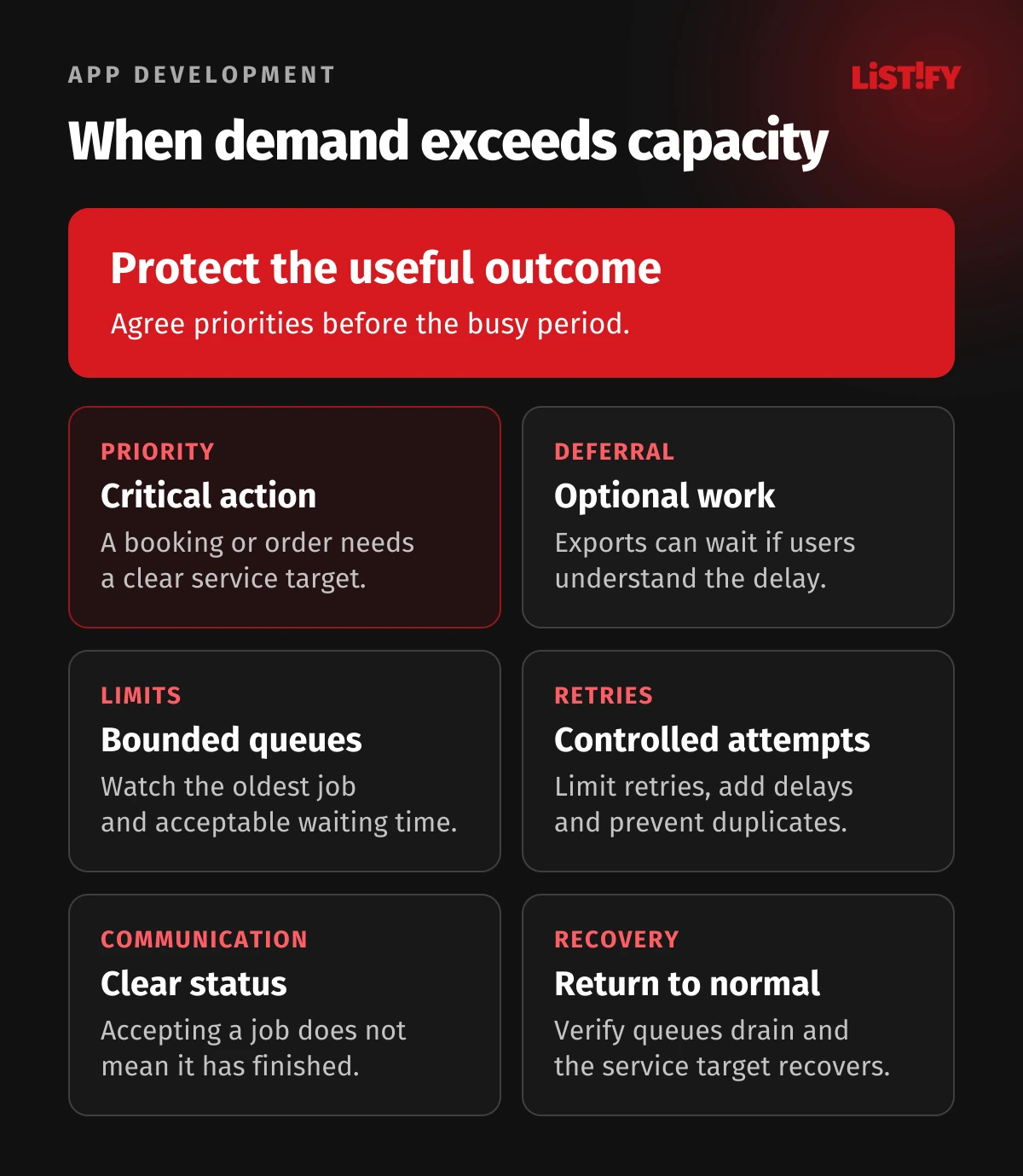
Even a careful forecast can be wrong. Agree what the product should do when it cannot accept more work. You might pause large exports, slow a bulk import or show a clear waiting state while preserving the primary transaction. The alternative should be designed and tested before the busy day.
Queues need a maximum acceptable age and a route for failed jobs. They are not unlimited spare capacity. Google’s cascading failure guidance explains how growing queues can compound overload. Track work completed and the oldest waiting job, not just how many jobs were accepted.
Retries also consume capacity. Set bounded retries and appropriate delays; use idempotency where repeating an operation could duplicate a side effect. AWS’s guidance explains why a timeout does not prove that the original action failed. A customer should not receive duplicate bookings because an overloaded client tried again.
10Test the next event and a failure scenario
Use the next business event as a test brief. Define arrival pattern, workload mix, dataset, target duration and pass criteria. Include a sustained peak, a plausible burst and recovery after load falls. Watch whether queues drain and resources return to normal, not only whether the initial minutes look healthy.
The load generator must model the question. In a closed test, simulated users wait for work to finish before starting again. An open arrival model can keep introducing work independently. Grafana k6 explains this distinction. If arrivals continue during a slowdown in real life, a test that automatically slows its arrivals can understate the pressure.
Repeat the relevant case with the agreed failure condition in a controlled environment. Record whether the service objective still holds, how traffic shifts and how recovery works. A passing result applies to the tested conditions. It is evidence for the next decision, not a permanent certificate that the application will scale to any audience.
11Make the rollout a controlled experiment
Release the chosen change to a limited audience or share of traffic where the architecture allows it. Compare equivalent operations under similar load. Keep an eye on correctness, error rates and costs as well as latency. A cache that returns the wrong account’s data is a failed change even if every chart looks faster.
Set a stop condition before release: which observation triggers a rollback, who decides and how quickly the team can act. Check compatibility with database migrations and queued jobs. Reverting application code is not automatically enough to undo a data or schema change.
Write down the new operating limit only after verification. Retain the old result, the new configuration and the reason for the decision. This small record prevents a later team from treating an estimate as a tested fact. It also gives management a clear account of what the investment bought and what limitation remains.
12Keep a short capacity review on the calendar
During active growth, a brief weekly review can connect product plans with operating evidence. The useful agenda is stable: actual peak versus forecast, service objective, remaining margin, next demand event and the action that needs a decision. Reduce the frequency when the product is stable, but keep an owner.
Give each action a date and a trigger. “Investigate the import before the new customer starts” is actionable; “improve scalability” is not. Bring finance the expected steady cost, the temporary peak cost and the staffing cost. Bring sales an honest statement of the capacity already verified and the work still required.
If your team needs a concrete technical plan, start with the critical operation, current measurements and the next business event. Our web application service is a place to discuss that scope. A useful brief asks for evidence, priorities and a verifiable outcome, rather than a predetermined infrastructure purchase.
13Frequently asked questions
How many users justify scaling an application?
There is no reliable account threshold. Look at concurrent work, the cost of each operation, data volume and the busiest interval. Scale when the expected demand approaches the usable limit for the service objective and the failure scenario you have agreed.
Should we upgrade the database or the application first?
Follow the measured constraint. Database waits, query cost and connection pressure point to a different intervention from application CPU saturation. Check the effect on the whole request path before choosing an upgrade.
How much spare capacity should we keep?
Enough for the demand uncertainty and disruption you choose to cover while maintaining the agreed service objective. Derive the reserve from realistic tests and provisioning time. A fixed percentage copied from another company is not a capacity plan.
Can autoscaling replace capacity planning?
No. It still needs suitable signals, limits, available resources and time to react. Plan known peaks in advance and verify the complete path, including the database and external services.
Do we need microservices for the next growth stage?
Not automatically. First show which part cannot meet the required load and why simpler changes are insufficient. Separating a component can help when its scaling needs justify the added deployment, monitoring and operational work.
How often should we repeat a load test?
Repeat relevant scenarios after material changes to demand, data, code, infrastructure or dependencies. Schedule a test before an important launch. The interval should follow risk and change frequency, not an arbitrary annual checkbox.
What should management receive from the technical team?
A demand range, the usable capacity under stated conditions, the main constraint, a proposed action with cost and ownership, and evidence from verification. Include uncertainties and the conditions under which the recommendation must be revisited.
14Sources and method
Technical references checked on October 23, 2026. Recommendations are an editorial planning framework. The capacity chart is an illustrative scenario with invented inputs, not a vendor benchmark or a LISTIFY customer result. Product-specific settings must be checked against the version and environment you operate.