VPN on PC and Mac: a step-by-step guide for Windows and macOS
The quickest way to get a VPN on your computer is the provider’s app: download it, sign in and click Connect. To add a VPN by hand, go to Settings › Network & internet › VPN on Windows 11, or System Settings › Network › Action menu › Add VPN Configuration on a Mac. Below are both methods step by step, a two-minute leak check and fixes for the most common errors. Current as of October 13, 2026.
Laptops go everywhere with us: cafes, hotels, trains, conferences. That’s exactly where we join Wi-Fi networks we know nothing about. Microsoft’s own advice is that if you have to use public Wi-Fi, you should consider a VPN, because an attacker on the network can see that a tunnel exists but not what flows through it (Microsoft). On a computer, though, a VPN is set up differently from a phone and has different weak spots.
For phones, see our guide to VPNs on iPhone and Android. If you’d like to know what a VPN does and doesn’t hide, start with What is a VPN and how does it work. Here we cover Windows and macOS, plus a short note on Linux.
01Quick answer: where the VPN lives on your computer
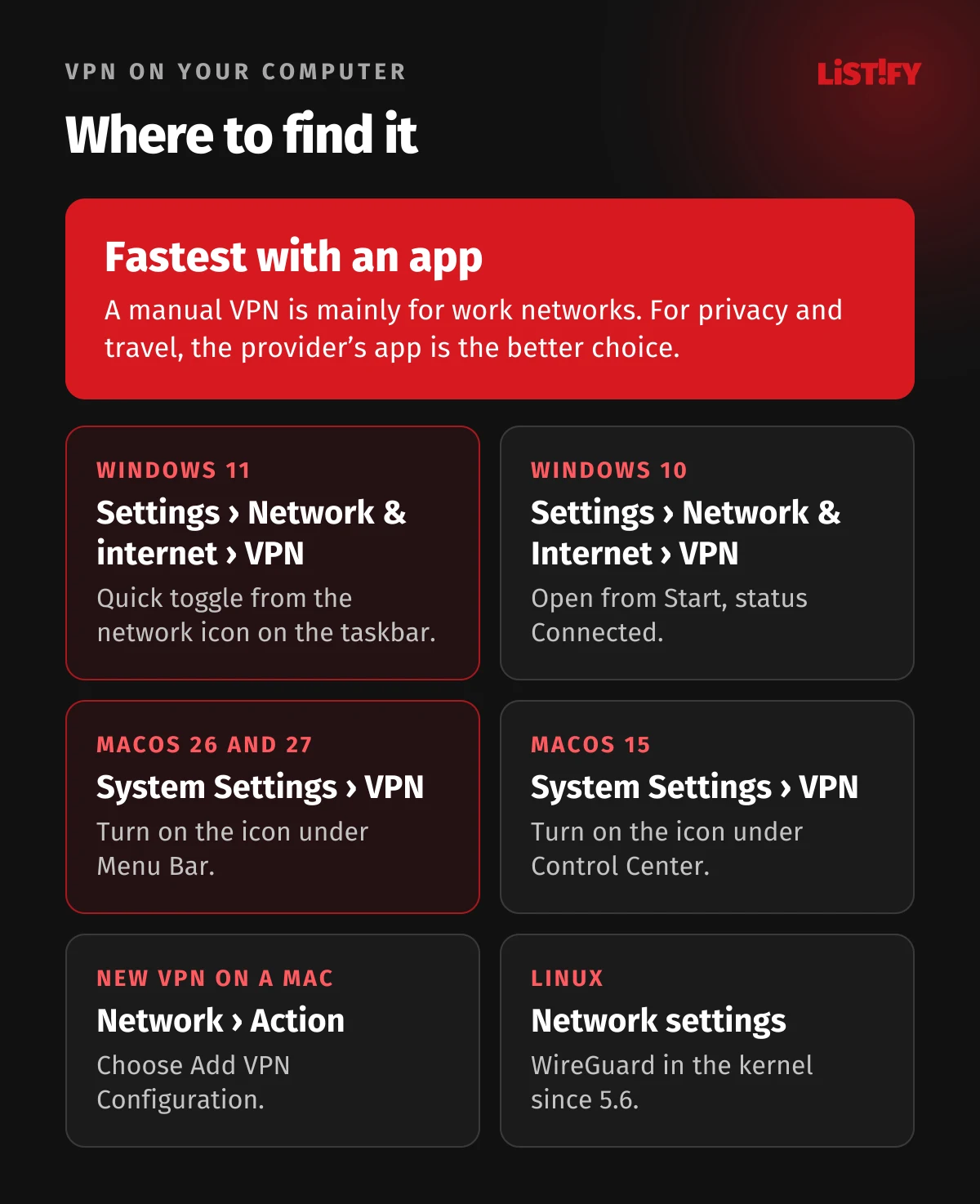
| System | Where to find the VPN | How to tell it’s on |
|---|---|---|
| Windows 11 | Settings › Network & internet › VPN | Connected appears under the VPN name, and a blue shield shows on the taskbar for a recognized VPN |
| Windows 10 | Start › Settings › Network & Internet › VPN | Connected appears under the VPN name |
| macOS 26 and 27 | System Settings › VPN (add one under Network › Action) | VPN icon in the menu bar, once you turn it on under System Settings › Menu Bar |
| macOS 15 Sequoia | System Settings › VPN (add one under Network › Action) | VPN icon in the menu bar, turned on in Control Center settings |
On Windows there’s also a shortcut: press Windows + R, type ms-settings:network-vpn and hit Enter. It’s the same link Microsoft’s help page uses for its Open VPN settings button (Microsoft).
02How to install a VPN app on your computer
For privacy and travel, the provider’s app is the simplest and safest option. It gives you modern protocols, a kill switch and a choice of countries, none of which the built-in VPN offers.
- Buy the subscription on the provider’s website, then download the Windows or Mac app from the same site, or from the Microsoft Store or Mac App Store.
- Run the installer. Windows asks for administrator permission, and a Mac asks for your password or Touch ID.
- Mac only: the first time the app runs, macOS may block its network extension. Open System Settings › General › Login Items & Extensions, click the Info button next to Network Extensions and turn the app’s extension on (Apple). Then allow the app to add VPN configurations (Proton VPN, Surfshark).
- Sign in and click Connect, or pick a country.
- In the app’s settings, turn on the kill switch, auto-connect and launch at startup.
When we checked the Microsoft Store in Czechia and Slovakia on October 13, 2026, it listed the Surfshark and ExpressVPN apps, both in versions for regular and ARM processors. We didn’t find NordVPN or Proton VPN there, so download those from the provider’s website (Proton VPN). On Windows on ARM (Snapdragon laptops, for example) a native app is worth having: Surfshark, ExpressVPN and Proton VPN all offer a separate ARM64 build (Surfshark, ExpressVPN, Proton VPN).
03How to manually set up a VPN on Windows 11 and 10
You’ll mostly need a manual VPN for a work network or your own server. The server address, VPN type and sign-in details come from your network admin or provider.
- Open Settings › Network & internet › VPN and select Add VPN (on Windows 10, Add a VPN connection).
- Under VPN provider, choose Windows (built-in).
- Fill in a Connection name you’ll recognize and the Server name or address.
- Pick the VPN type and the Type of sign-in info: username and password, one-time password, certificate or smart card.
- Select Save, then Connect next to the new VPN. Connected appears under its name.
The steps and field names follow Microsoft’s help page, which covers both Windows 10 and 11 (Microsoft).
Which protocols Windows supports without an app
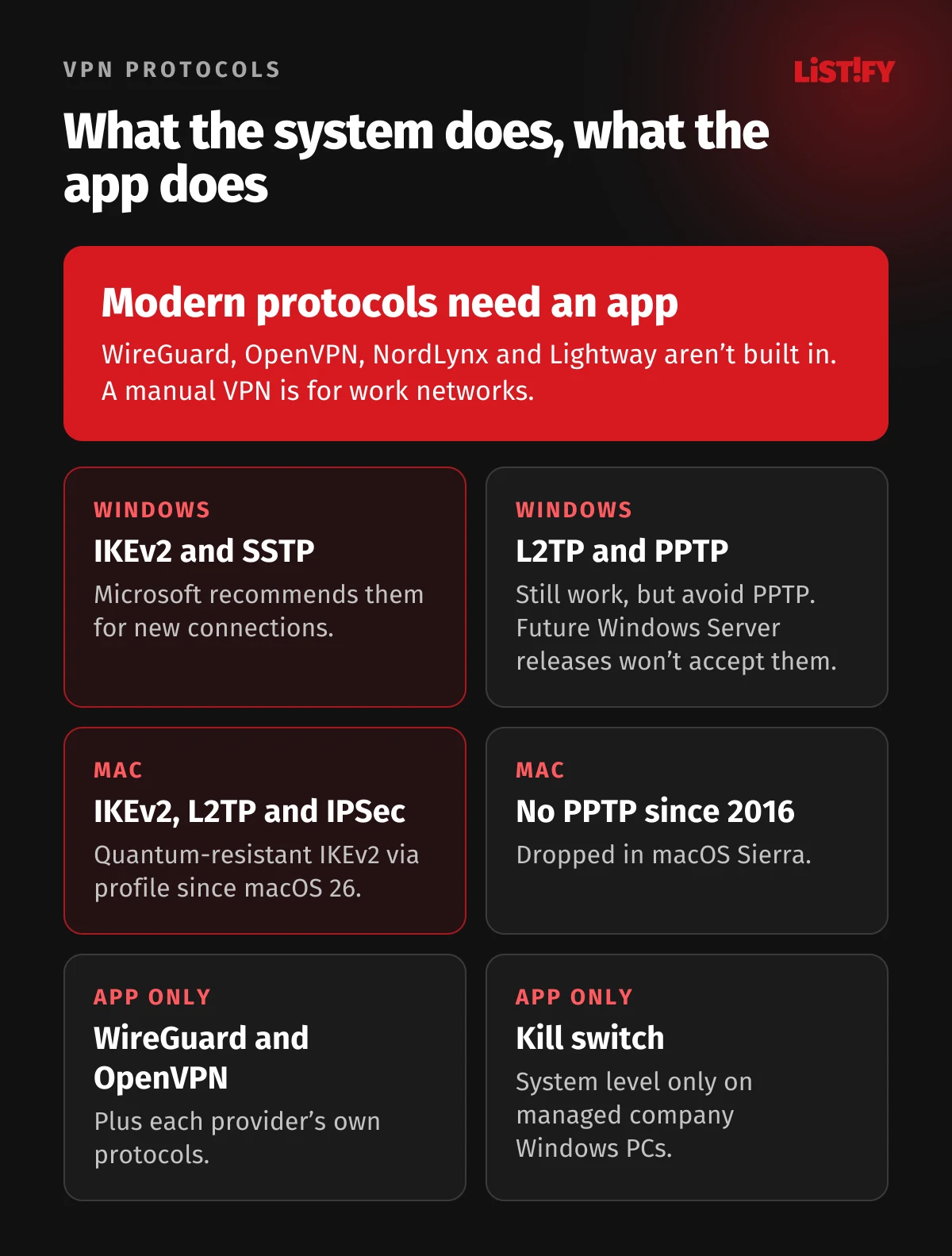
The built-in Windows client handles IKEv2, SSTP, L2TP with IPsec and PPTP. The Automatic option tries them from the most secure to the least secure (Microsoft Learn). WireGuard and OpenVPN aren’t built in, so you’ll need an app for those. In 2024 Microsoft announced that the VPN server in future versions of Windows Server will stop accepting PPTP and L2TP connections. Outgoing connections from your PC keep working. For new connections it recommends SSTP and IKEv2 (Microsoft). Avoid the outdated PPTP altogether. Apple doesn’t recommend it either (Apple).
Quick toggle and the blue shield
On Windows 11, select the Network, Volume, Battery icon on the taskbar, then VPN in Quick Settings. With one VPN set up, the left half of the tile turns it on and off. With several, choose Manage VPN connections (Microsoft). Since the June and July 2023 updates, a small blue shield appears on the network icon when you’re connected to a recognized VPN profile (Microsoft). Third-party apps may not trigger it, though. No shield doesn’t mean the VPN is off, and a shield tells you nothing about leaks.
Windows 10 after end of support
Windows 10 stopped getting regular security updates on October 14, 2025 (Microsoft). Home users can extend fixes through the ESU program until October 12, 2027. In the European Economic Area it’s free as long as you stay signed in with a Microsoft account. Elsewhere you can sync your PC settings, redeem 1,000 Microsoft Rewards points or make a one-time $30 payment plus tax (Microsoft). A VPN can’t make up for missing patches: it encrypts the connection, but it won’t protect a system with known holes.
- Windows 11Worldwide: 71.5%Czechia: 74.9%
- Windows 10Worldwide: 27.8%Czechia: 24.6%
- Older versionsWorldwide: 0.7%Czechia: 0.5%
Share among Windows PCs by page views, not by number of devices. Source: StatCounter (worldwide, Czechia).
So more than a quarter of Windows desktop page views worldwide still come from Windows 10. If you use a VPN on one, enroll in ESU and keep the VPN app current: Proton VPN needs 64-bit Windows 10 build 19045 (Proton VPN), and NordVPN 64-bit Windows 10 version 1607 or later (NordVPN).
04How to set up a VPN on a Mac
On a Mac you add a VPN in one place and switch it on in another. The steps are the same in macOS 15 Sequoia, 26 Tahoe and the current macOS 27 (Apple).
- Choose Apple menu › System Settings, then click Network in the sidebar.
- Click the Action pop-up menu (the three dots icon) and choose Add VPN Configuration.
- Pick the type: IKEv2, L2TP over IPSec or IPSec (Cisco).
- Enter a Display Name, the server address, the account name and the authentication method (password or certificate).
- Click Create. You then switch the VPN on under System Settings › VPN in the sidebar.
If your admin or provider sent you a settings file, just double-click it (Apple). Configuration profiles are installed and removed under System Settings › General › Device Management, not Privacy & Security as older guides say (Apple). To edit or delete a VPN, click the Info button next to it. The option is called Remove configuration (Apple).
Macs haven’t supported PPTP since macOS Sierra in 2016, and the upgrade removed PPTP connections from existing profiles (Apple). Since macOS 26, IKEv2 can also use an ML-KEM key exchange that resists future quantum computers, but it has to be configured, typically by an admin through a profile. There’s no switch for it in System Settings (Apple).
The VPN icon in the menu bar
On macOS 26 and 27, open System Settings › Menu Bar and select the VPN checkbox. On macOS 15 it’s under System Settings › Control Center › Menu Bar Only › VPN › Show in Menu Bar (Apple). From the icon you can then connect, and with Show Time Connected selected you’ll also see how long you’ve been connected.
App Store version or website version?
NordVPN and Surfshark both offer two Mac versions. NordVPN’s website version adds a per-app kill switch and custom DNS, while the App Store version has VPN bypass prevention, which keeps traffic in the tunnel even if the connection drops or the network changes (NordVPN). Surfshark’s Dausos protocol is only in the App Store version so far, and if you switch from the website version, Surfshark says to uninstall that one first (Surfshark). Don’t run both at once.
05Edge Secure Network and Private Relay: good enough instead of a VPN?
Microsoft Edge Secure Network is a VPN inside the Edge browser that Microsoft provides in partnership with Cloudflare. A personal Microsoft account gets 5 GB of free data a month, but it only covers Edge. In its recommended Optimized mode it sends streaming sites outside the tunnel and swaps your location for a “similar regional address,” so it won’t change your country (Microsoft). Microsoft also says it may not be available in every region.
iCloud Private Relay on a Mac is under System Settings › [your name] › iCloud › Private Relay (Apple). It protects Safari browsing, DNS queries and unencrypted app traffic, and your IP address stays in your own region (Apple Developer). It comes with iCloud+, which costs 25 Kč a month in Czechia and €0.99 in euro countries such as Slovakia (Apple). With a VPN app running, your Mac may warn that some of your system settings prevent Private Relay from working (Apple).
Both offer free or low-cost protection for browsing on public Wi-Fi. To protect every app on your computer or change your country, you need a real VPN.
06VPN on Linux in brief
WireGuard has been part of the Linux kernel since version 5.6, released on March 29, 2020 (Kernel Newbies), and NetworkManager has supported it since version 1.16 (NetworkManager). So you can add it by hand through NetworkManager, which most desktop distributions use. The official apps are easier: NordVPN for Ubuntu 22.04 and Debian 12 or newer, Surfshark for Ubuntu 20.04 or newer, ExpressVPN for Ubuntu 24.04 or newer, and Proton VPN with both a desktop app and a command-line tool (NordVPN, Surfshark, ExpressVPN, Proton VPN).
07How to check if your VPN is working
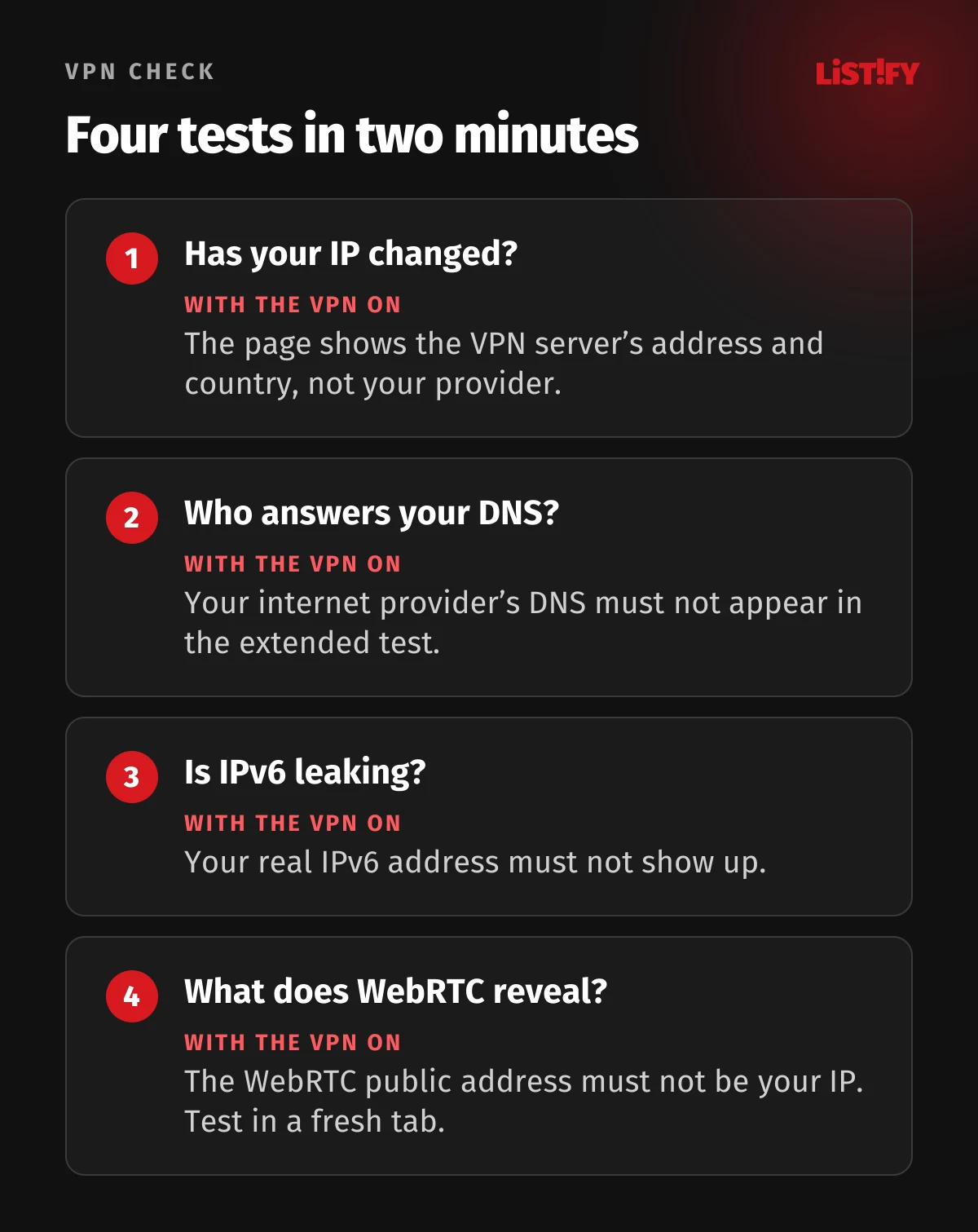
A green button in the app doesn’t prove nothing is leaking. Run four quick tests, first without the VPN and then with it, and compare.
- IP address: open, for example, Proton VPN or ipleak.net. With the VPN on, you should see a different address and the VPN server’s country, not your internet provider.
- DNS: run the extended test on dnsleaktest.com. If your internet provider shows up among the DNS servers, your lookups are bypassing the VPN.
- IPv6: ipleak.net shows both your IPv4 and IPv6 address. If your real IPv6 appears with the VPN on, it’s leaking (ipleak.net).
- WebRTC: on BrowserLeaks, your real IP must not show up in the Public IP Address row. Test in a fresh tab, as an old tab can hold on to the address from before you connected (ipleak.net).
Most of these test sites are run by VPN providers themselves: ipleak.net belongs to AirVPN and dnsleaktest.com to IVPN. In 2026 the testing lab Artifact Security, which funded its own study, put NordVPN, ExpressVPN, Surfshark, Proton VPN and Mullvad through tests on Windows 11 and found no IP, DNS or WebRTC leaks in any of them. The lab tested on an IPv4-only network, though, and left the TunnelVision attack for a later round (Artifact Security, PDF).
How to fix DNS, IPv6 and WebRTC leaks
- DNS: keep the app’s DNS leak protection on and don’t pair the VPN with your own Google or Cloudflare DNS. Proton VPN explicitly advises against it (Proton VPN). Secure DNS (DNS over HTTPS) in your browser can also send lookups outside the VPN (DNS leak test, ipleak.net).
- Windows and DNS: Windows sends DNS queries over all network connections in parallel (Microsoft Learn). Mullvad flagged this leak back in 2015 (Mullvad). VPN apps such as Proton VPN block it with firewall rules (Proton VPN), and on Pro editions and up you can also turn off the parallel lookups with the Turn off smart multi-homed name resolution policy.
- IPv6: Proton VPN keeps IPv6 support off by default on Windows (Proton VPN), and Surfshark recommends disabling IPv6 on Windows by hand (Surfshark).
- WebRTC in Firefox: type about:config in the address bar and set media.peerconnection.enabled to false (BrowserLeaks, Mozilla). Video calls in the browser will stop working, though.
- WebRTC in Chrome: there’s no built-in off switch (ipleak.net). What helps is not excluding the browser from the tunnel: according to RFC 8828, the risk is highest with split-tunnel VPNs (IETF).
08Kill switch and split tunneling on a computer
A kill switch cuts your internet if the VPN drops, so nothing leaves outside the tunnel. In Windows itself, that only exists as LockDown VPN, which an admin sets up through device management and, for the built-in client, only for IKEv2 (Microsoft Learn). Apple lists Always On VPN only for iPhone, iPad and Vision Pro (Apple), and the macOS firewall only blocks incoming connections (Apple). On a home computer, the app is the only thing that gives you a kill switch.
- ExpressVPN has its kill switch on by default, and the advanced option blocks the internet whenever the VPN isn’t running (ExpressVPN).
- NordVPN has an Internet Kill Switch for the whole computer and an App Kill Switch that closes chosen apps if the VPN drops. The latter is off by default (NordVPN).
- Surfshark lets you turn on its kill switch in the app settings (Surfshark).
Split tunneling sends chosen apps outside the VPN, such as online banking. NordVPN sets it per app on Windows (NordVPN), and Surfshark calls the feature Bypasser (Surfshark). With ExpressVPN, note that Lightway Turbo doesn’t work with split tunneling (ExpressVPN). Don’t exclude the browser you rely on for privacy from the tunnel.
An app’s kill switch also helps against TunnelVision, a 2024 attack in which a malicious Wi-Fi network can pull traffic out of the VPN on Windows, macOS and Linux. According to the researchers, some VPNs block traffic outside the tunnel with firewall rules (Leviathan Security). In 2024 Mullvad also described how, after macOS updates, traffic from Apple services could bypass the VPN until a restart (Mullvad). Apple fixed CVE-2024-44165, a bug that could let traffic leak outside the tunnel, in macOS 15, 14.7 and 13.7 (NVD). Keep your system up to date.
09Does a VPN slow down your internet?
- Surfshark142
- NordVPN109
- Proton VPN109
- Mullvad93
- ExpressVPN92
Test origin closest to Central Europe, test started in May 2026, report from June 2026. The lab funded the test itself, and it includes no measurement without a VPN. Sources: Artifact Security, PDF, AMTSO.
The farther the server, the longer the detour your data takes. Averaged across all five test origins, NordVPN came out fastest in the Artifact Security test (272 Mbps), followed by ExpressVPN (257 Mbps) and Surfshark (209 Mbps). NordVPN also connected fastest, in 1.8 seconds (Artifact Security, PDF). The test has no measurement without a VPN, so it can’t tell you how much slower your own connection will be. If speed matters, try a server in or near your own country.
10Work VPN on a company laptop
A work VPN gets you into the company network. It isn’t a privacy tool. On Windows you can get one through a work account (Microsoft), and larger companies roll it out centrally as Always On VPN through Intune or another device management tool (Microsoft Learn). On a Mac it arrives as a configuration profile under Device Management.
- Don’t delete profiles or VPNs your company installed, or you’ll lose access to company systems.
- Only install a personal VPN on a work laptop with IT’s approval. Two VPNs at once can fight over network traffic.
- A work VPN doesn’t hide your activity from your employer. Your traffic runs through their network.
11VPN won’t connect: common errors and fixes
| Error | What it means | What to try |
|---|---|---|
| Windows 809 | The server isn’t responding, often because a firewall or router blocks UDP port 500 or 4500 | Another network (a phone hotspot, say) or another protocol in the app |
| Windows 800 | The tunnel couldn’t be set up, often because the server is unreachable | For a manual VPN, choose a specific VPN type instead of Automatic |
| Windows 812 | The server’s authentication method doesn’t match your VPN settings | Check the sign-in type with your admin |
| Windows 720 | The WAN Miniport (IP) adapter isn’t bound correctly on your PC, or the server ran out of addresses | Check the adapter in PowerShell using Microsoft’s guide, otherwise ask your VPN admin |
| Mac has no internet | A conflict between a VPN, profile or filter | Search System Settings for VPN, profile, firewall and filter, or try a new network location |
With apps, the usual fixes are switching protocol or server, signing out and back in, and updating the app. For VPN trouble on a Mac, Apple suggests clearing the DNS cache with sudo dscacheutil -flushcache in Terminal and searching the Console app for entries containing VPN (Apple). If your Mac has no connection at all, even with the VPN turned off, search settings for VPN, profile, firewall and filter, and temporarily turn off anything suspicious (Apple).
12Which VPN to choose for your computer
- WindowsWorldwide: 76.4%Czechia: 86.4%
- macOSWorldwide: 16.7%Czechia: 9.6%
- LinuxWorldwide: 4.5%Czechia: 3.6%
macOS combines StatCounter’s OS X and macOS entries. Source: StatCounter (worldwide, Czechia).
Roughly three in four desktop page views worldwide come from Windows, and in Czechia it’s closer to six in seven. All four big services have apps for Windows, Mac and Linux, but they differ in the oldest system they support and in how many devices one subscription covers.
| Service | Windows | macOS | Windows on ARM | Devices at once |
|---|---|---|---|---|
| NordVPN | 10 (version 1607 or later) and 11 | 14 Sonoma or later | not stated | 10 |
| Surfshark | 7 or later (7 and 8 on a legacy build) | 12 Monterey or later | yes | unlimited |
| ExpressVPN | 10 or later | 11 Big Sur to 26 Tahoe | yes (Windows 11) | 10 to 14 by plan |
| Proton VPN | 10 (build 19045 or later) and 11 | 14 Sonoma or later | yes | 10, free plan 1 |
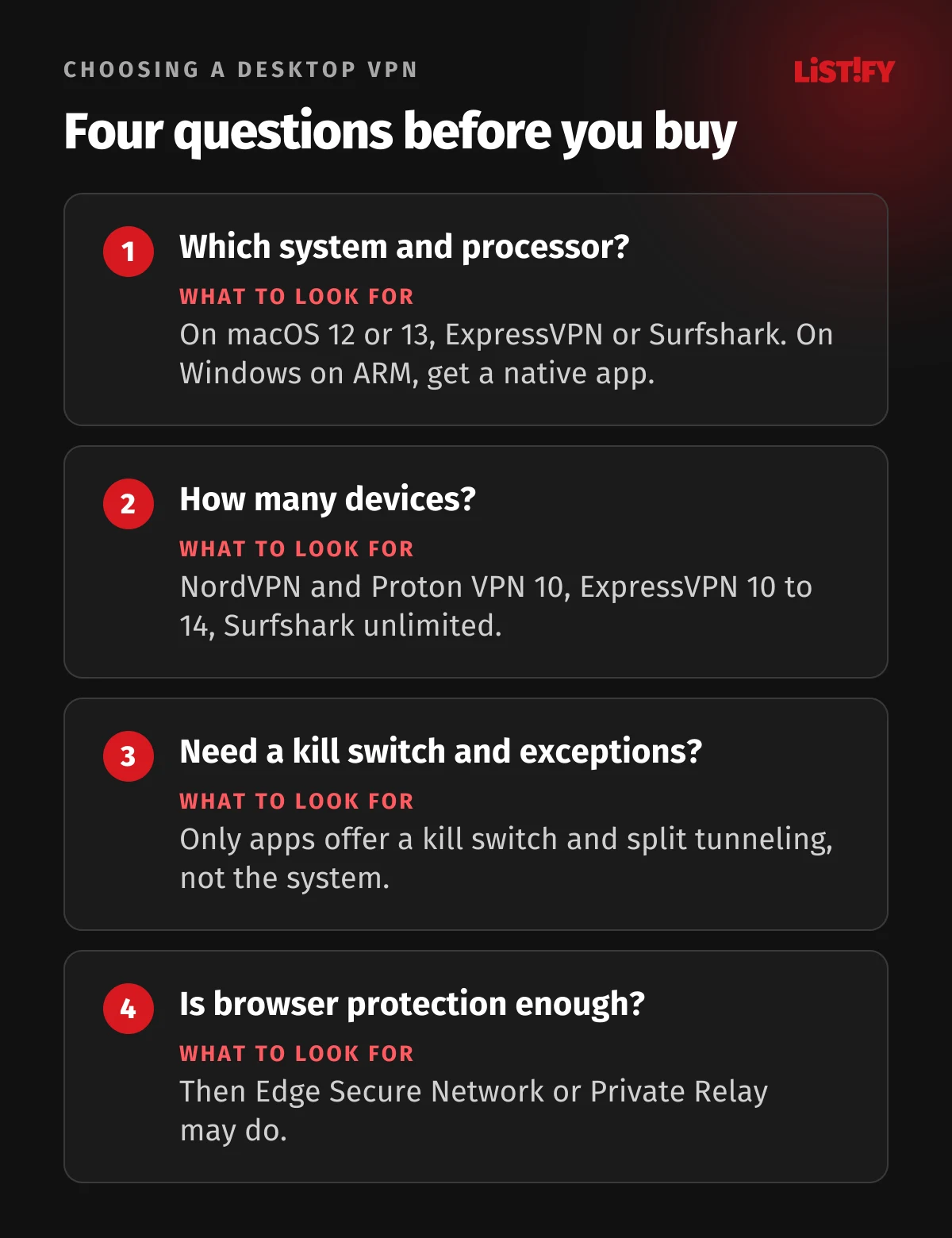
If you want to cover a whole household with lots of devices, Surfshark’s unlimited plan is the easy pick. On a Mac running macOS 14 to 26, any of the four apps will do, though ExpressVPN doesn’t list macOS 27 yet. On macOS 12 or 13 only Surfshark and ExpressVPN offer a current app, and on macOS 11 only ExpressVPN. For prices and features, see our best VPN 2026 comparison, for an in-depth look at one of them our NordVPN review, and for free options Best free VPN 2026.
13Frequently asked questions
Where is the VPN on Windows 11?
Under Settings › Network & internet › VPN, and you can toggle it quickly from the Network, Volume, Battery icon on the taskbar (Microsoft). Windows + R with ms-settings:network-vpn works too.
Where is the VPN on a Mac?
Under System Settings › VPN in the sidebar. To add a new one, go to System Settings › Network, then Action menu › Add VPN Configuration (Apple).
Do I need an app, or is the built-in VPN enough?
For privacy and travel, get an app. The built-in VPN on Windows and macOS can’t do WireGuard or pick a country, and it has no kill switch for regular users. Manual setup is mainly for work networks.
How can I tell my VPN isn’t leaking?
Compare your IP address, DNS servers, IPv6 and WebRTC with and without the VPN, for example on ipleak.net and BrowserLeaks. With the VPN on, neither your real address nor your internet provider’s DNS should appear.
Does a VPN work on Windows 10?
Yes, the NordVPN, Surfshark, ExpressVPN and Proton VPN apps all support Windows 10. But the system hasn’t had regular fixes since October 14, 2025, so sign up for ESU, which runs until October 12, 2027 (Microsoft).
How many devices does one subscription cover?
NordVPN and Proton VPN cover 10 devices, ExpressVPN 10 to 14 depending on the plan, and Surfshark an unlimited number. One subscription usually covers your computer and phone.
Why does my internet stop working with the VPN on?
Try another server or protocol and update the app. On Windows, error 809 usually means UDP port 500 or 4500 is blocked (Microsoft Learn). On a Mac, Apple suggests checking VPNs, profiles, firewalls and filters (Apple).
14The bottom line
The quickest way to a VPN on your computer is an app: install, sign in, connect. On Windows you’ll then find it under Settings › Network & internet › VPN, and on a Mac under System Settings › VPN. Manual setup is fine for a work network, but for privacy and travel it lacks a kill switch, WireGuard and a choice of country.
After installing, run the two-minute check of IP, DNS, IPv6 and WebRTC and turn on the kill switch. An up-to-date system helps too: at least free ESU on Windows 10, and the latest macOS on a Mac.
We take the same care with security in the websites and apps we build. If you’re planning a website, portal or app, see how we build custom websites and apps and how we work.
15Sources
- Microsoft: Connect to a VPN in Windows
- Microsoft: Be safer over wireless connections
- Microsoft Learn: VPN connection types
- Microsoft: PPTP and L2TP deprecation (2024)
- Microsoft: VPN status icon on the taskbar (KB5027303)
- Microsoft: Windows 10 end of support
- Microsoft: Extended Security Updates
- Microsoft: Edge Secure Network
- Microsoft Learn: LockDown VPN
- Microsoft Learn: Always On VPN
- Microsoft Learn: smart multi-homed name resolution
- Microsoft Learn: errors 800, 809 and 812
- Microsoft Learn: error 720
- Apple: Set up a VPN connection on Mac
- Apple: Connect a Mac to a VPN
- Apple: Change VPN settings
- Apple: VPN in the menu bar
- Apple: Configuration profiles
- Apple: Login items and extensions
- Apple: Firewall on Mac
- Apple: iCloud Private Relay on Mac
- Apple Developer: Private Relay and networks
- Apple: iCloud+ prices
- Apple: Private Relay and system settings
- Apple: End of PPTP support
- Apple: VPN overview for Apple devices
- Apple: Connection problems and VPNs
- Apple Platform Support: VPN on Mac
- NordVPN: Supported systems
- NordVPN: Mac App Store and website versions
- NordVPN: Kill switch
- NordVPN: Split tunneling
- NordVPN: Number of devices
- Surfshark: Windows app
- Surfshark: Disabling IPv6 on Windows
- Surfshark: Mac app
- Surfshark: Mac App Store and website versions
- Surfshark: Number of devices
- Surfshark: Linux app
- ExpressVPN: Windows app
- ExpressVPN: Windows on ARM
- ExpressVPN: Mac app
- ExpressVPN: Simultaneous connections
- ExpressVPN: Linux app
- Proton VPN: Windows app
- Proton VPN: Windows on ARM
- Proton VPN: Mac app
- Proton VPN: DNS leaks
- Proton VPN: IPv6 leaks
- Proton VPN: Plans
- Proton VPN: Linux
- Mullvad: DNS leaks on Windows (2015)
- Mullvad: Leaks after macOS updates (2024)
- Leviathan Security: TunnelVision (2024)
- NVD: CVE-2024-44165
- IETF: RFC 8828, WebRTC IP address handling
- Mozilla: WebRTC and privacy
- ipleak.net
- BrowserLeaks: WebRTC test
- DNS leak test
- Proton VPN: What is my IP address
- StatCounter: Desktop OS share worldwide
- StatCounter: Desktop OS share in Czechia
- StatCounter: Windows versions worldwide
- StatCounter: Windows versions in Czechia
- Artifact Security: VPN Performance World Tour 2026 (PDF)
- AMTSO: Artifact Security test 2026
- Kernel Newbies: Linux 5.6
- NetworkManager: Release notes
Steps, system versions and service terms are as of October 13, 2026. Menu names may vary slightly by system version and language.