Training employees on a new system: How to make adoption stick
The new system is live and training is complete, yet the team still emails spreadsheets. Attending a presentation does not mean someone can do their job in a new environment. Plan the transition around roles, real tasks and the obstacles that emerge during everyday work.
01Make independent task completion the goal
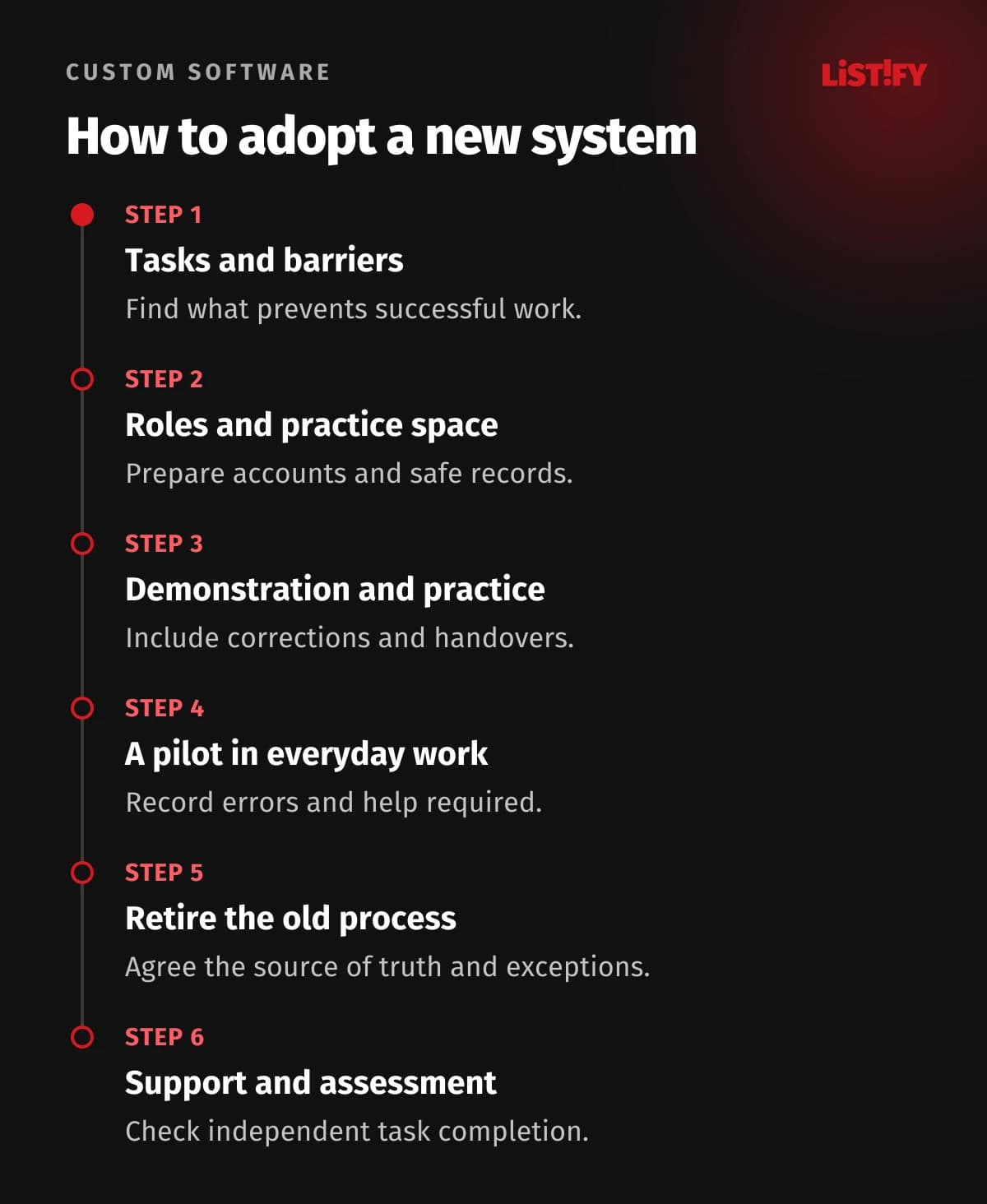
A salesperson needs to prepare a quotation, a manager needs to approve it and an administrator needs to find the correct version. Those are training outcomes. “Everyone watched the demonstration” is an attendance record. Before training starts, define the task each role must complete, the required quality and the help they may use. Build the content, exercises and acceptance checks around those outcomes.
This guide covers moving to a CRM, ERP or internal application, including retiring the old process and supporting the first weeks of operation. For a standalone AI course, see our guide to assessing AI training value after 30 days. A mandatory business system needs more than interest in a tool. Responsibilities and connected workflows must change too.
02Find out what is preventing people from working
Non-use can indicate missing skills, but it can also reflect incorrect permissions, a slow application, an unclear process or duplicate data entry. Each problem calls for a different response. Ask people from several roles to demonstrate an ordinary task. Watch where they stop and ask what is missing at that point.
CDC's needs analysis guidance distinguishes training needs from other causes of a performance gap. We use it as methodological guidance, not as certification for a business training programme. If someone lacks permission to approve an invoice, another approval video will not enable their work.
| Obstacle | How to recognise it | Response |
|---|---|---|
| Missing procedural knowledge | The person succeeds after explanation and practice. | A short guide, practice and feedback. |
| Missing access or equipment | The correct action is unavailable. | Fix the account, role or working equipment. |
| A poor process | The same data must be entered twice. | Change the workflow or system integration. |
| A confusing interface | Several experienced people make the same error. | Investigate and improve the application design. |
| No time or management support | A new requirement was added without removing old work. | Change capacity, priorities and expectations. |
03Organise training around roles and handovers
Create a matrix of roles, tasks, frequency and the consequences of mistakes. Reception staff do not need the entire accounting module, and administrators need different knowledge from everyday users. A shared introduction can cover signing in, searching, handling information safely and reporting a problem. Follow it with each group's actual work.
Include handovers between roles. A salesperson may save a quotation correctly, but the process still stops if the manager does not recognise the approval request. Add a scenario that runs from beginning to end. Invite someone from the receiving team and check their understanding of statuses, notifications and responsibility.
04Write outcomes you can observe
Replace “The user understands orders” with “Using the supplied brief, the user creates an order, verifies the customer, corrects an item and sends it for approval”. Define critical errors and situations that require assistance. For an infrequent action, safely finding the correct guidance may matter more than remembering every step.
If a quick reference is available during everyday work, allow it during the assessment. Independence means operating successfully with the resources people will actually have. Record trainer assistance separately. Completing a task with step-by-step coaching is different from completing it independently.
05Prepare a safe practice environment
Before the session, check accounts, permissions, sign-in, equipment and application availability. Use realistic but safe practice records. Clearly label the environment and separate it from real orders, payments and customer messages. Make sure you can restore the exercise to its starting state after each group.
Test with a participant's role rather than only an administrator account. Include an ordinary mistake: a duplicate customer, an invalid date or a request returned for correction. People need to recognise a successful result and recover safely when a task diverges from the demonstration. Explain any differences between training and production behaviour.
06Alternate short demonstrations with hands-on work
We recommend a simple cycle: demonstrate a task, let participants attempt a different example, give specific feedback and try a further variation. Adjust the length to the task, experience and needs of the group. There is little value in turning every menu item into several hours of slides.
CDC's quality training standards connect objectives, participant engagement, practice and follow-up support. Our practical recommendation is to organise each block around one complete working situation. Find the reason behind a mistake, and offer a more demanding variation to people who are already comfortable.
Make materials usable for people who cannot follow a fast presentation. Provide captions and concise text instructions alongside video, and explain diagrams in words. Consider keyboard operation, readable text and language needs. A recording can supplement the materials, but a short task-specific guide is easier to consult when someone needs one particular step.
07Create guidance that can be maintained
Name guides after tasks, such as “Return an order for correction”. Include the role, prerequisites, steps, expected result and route to help. Add an owner, a review date and the relevant system version. One findable source is more useful than several outdated PDFs scattered across folders.
When the application changes, update the associated guide and notify affected roles. Training material is part of ongoing operation, not a one-off attachment to an implementation invoice. Include a check in testing and project handover that a new user can actually complete a task using the documentation.
08Choose a pilot group that represents everyday work
Include experienced and less experienced staff, different shifts and different equipment. Enthusiasts alone will not reveal every barrier. At an agreed cadence, sort problems into application defects, unclear processes, missing access and practice needs. Give each category a person responsible for resolving it.
Trusted colleagues who can explain what they have learned can help. Microsoft's guidance on internal champions includes feedback and clear participation requirements. We recommend giving champions allocated time, support boundaries and access to a specialist. They should not quietly become a substitute for a missing help desk.
09Agree how the old process will end
Write down the transition date, the treatment of work in progress and the authoritative location for records. If parallel running is necessary, specify its purpose, duration and reconciliation process. Uncontrolled duplication adds work and creates disputes about which record is correct.
Do not disconnect the old system simply because a calendar date has arrived. First verify critical tasks, data availability, permissions and support. Equally, give temporary exceptions an owner and an end point. Define who can postpone launch and how records will be preserved if an emergency fallback is needed.
10Measure adoption in the context of work
Sign-in counts show access, not successful work. Track completion of key tasks, correctness, help required and use of the system when an opportunity actually arises. A monthly task has a different rhythm from daily administration. Do not silently count people on leave or roles without the relevant task as inactive users.
CDC separates learning from transfer into the workplace. We therefore recommend assessment after practice and again during real work. Track satisfaction with the session separately. A pleasant presentation does not establish that a team can complete a period-end process without assistance.
Illustrative calculation: Of 20 employees, 16 had an opportunity to process an order that week. Twelve completed it correctly in the new system without help and another two with support. Independent completion is 12/16 = 75%; completion including support is 14/16 = 87.5%. The four people without an opportunity are outside this denominator. This is a worked example, not an observed result or a universal target.
11Treat support as part of launch
Agree one place for questions, support availability and escalation for blocking problems. Record the task, role, exact step and effect. A recurring question can expose a faulty guide or interface. Avoid answering it individually forever: fix the cause and tell people what changed.
Agree time for learning and reasonable capacity for the first days with management. Use feedback to improve the process. Do not turn training results into an employee ranking without context. If operational data will serve another purpose, clarify that purpose and its rules separately.
12Check readiness before going live
- Each role understands its tasks and has a tested account.
- Practice covered the normal flow, correction and handover to another role.
- Critical tasks were checked independently and gaps have a resolution.
- Guides match the release being deployed and have an owner.
- The team knows when and where the old process ends.
- Support has capacity, escalation routes and a review date.
13Common questions about new-system training
Is one shared session enough?
A simple tool may need only a shared introduction, but still check independent task completion. More complex roles, shift patterns and exceptions call for further practice and support.
What if people refuse to use the system?
Observe their work first. Separate missing skills, technical barriers, poor processes and concerns about change. Then choose training, a product fix or an organisational response.
When should we repeat training?
Use changes in tasks and observed problems to decide. Provide follow-up for new starters, substantial application changes and recurring errors. Time the review around a real opportunity to use the new skill.
Introducing custom business software? Include roles, practice, documentation and transition support in the brief. A working application and a team that can work with it belong in the same outcome.